FRED v2026.1 Documentation
This documentation aids various user groups of the Free Registry for ENUM and Domains, the domain name registry software developed by CZ.NIC as an open-source solution.
- Edition:
- Source:
The source code of this documentation is open and can be found on GitLab.
Contributions may be submitted using the pull-request mechanism.
- General:
Record of Changes
Overview of changes in documentation from previous editions. For changes in software see Release Notes.
Version
Edition
Segment
Change description
v2026.1
1.2
Simplified source code overview into GitLab link
1.1
Added overview of FRED functions
Added quick start manual
1.0
Update DB node installation
Replaced Ubuntu with Debian
Update installation manual - upgrade to Debian 12
Update demo image for new release 2026.1
v2024.1
1.6
Update Contact verification
1.5
Remove
FRED-client, update examples toFRED-eppicWhole documentation
Remove all mentions of old Technical checks
1.4
Update installation manual ‒ add individual nodes
Update demo image from VirtualBox to
.qcow2formatAdd auctions to domain registration expiration schema
1.3
Add section Scan results
Replace original Technical checks with DNScheck
1.2
Separate installation manual to demo and production
1.1
Update demo installation manual to new process using virtual image
Add release notes for FRED Release v2024.1
1.0
Replace old
fred-clientwith neweppicUpdate all packages needed for deployment
Whole documentation
Other minor changes according to FRED
v2024.1Add concept level info about zone generation
2.50
1.3
Changes due to new AKM version
Update FRED component schema
1.2
Add Reports section
1.1
Separate
<domain:check>command to non-auction and auction chapters1.0
Extended command
<domain:check>supporting domain auctions2.49
1.0
Added installation manual for BSA – GlobalBlock feature
2.48
1.0
Whole documentation
Changes according to FRED 2.48.0
2.47
1.4
Updated demo installation script
1.3
Ferda Administration ManualWhole manual dissolved and incorporated into Administration Manual, Architecture and Features
Incorporated information from Ferda Administration Manual
Registry initialization
EPP client workflow
Info contact
Poll message typesChanged all
REG-FRED_XtoREG-FRED-X1.2
Discontinued support for Ubuntu 16.04, update to Ubuntu 20.04
1.1
/AdminManual/Installation/BinsUbuntu
Updated installation script link
Small changes in
server_exception1.0
Added release notes for FRED Release 2.47.0
Configuration
EPP client workflow
Object transfer
Info (domain, contact, nsset, keyset)
Create (domain, contact, nsset, keyset)
Common object attributesAdded AuthInfo TTL information
2.46
1.0
Added release notes for FRED 2.46.0
New features of FERDA webadmin
2.45
1.0
Added release notes for FRED 2.45.0
Send AuthInfo for contact
Send AuthInfo for domain
Send AuthInfo for nsset
Send AuthInfo for keysetAdded AuthInfo sending changes
Changes for AuthInfo generation
2.44
1.0
Added release notes for FRED 2.44.0
Added new contact attribute states
2.43
1.0
Added release notes for FRED 2.43.0
Updated GDPR-compliant configuration
Updated Namespace and Schema
New
info_contactattributeauthInfo2.42
1.0.2
Fix level of
expiryitem1.0.1
Whole documentation
Added new FRED logo
1.0
Added release notes for FRED 2.42.0
Domain life cycle paramaters moved to a new
domain_lifecycle_parameterstable
Added new variable and commandsSome minor rephrasing and minor links changes
2.41
1.6
Convert README.md to README.rst
Diagram of FRED components
Component deployment diagramUpdate components and deployment schemas
1.5
Added description of
fred-registry-servicesandfred-logger-servicesAdded description of Ferda service
Updated and extended the deployment schema with
Ferda,fred-logger-serviceandfred-registry-servicesAdded link to poll messages
Added link to Ferda’s manual
1.4
/FerdaManual/index
/FerdaManual/Intro
/FerdaManual/Installation
/FerdaManual/Configuration
/FerdaManual/Localization
/FerdaManual/Two-factor Authentication
FERDA webadmin featuresExtended Ferda Administration Manual and Ferda’s features section
Added Two-factor Authentication sectionUpdated repository paths and added new repositories
/AdminManual/Installation/BinsUbuntu
Added fingerprint check to the installation process Change in adding required repositories
webwhois/public_request_form_menu.htmlreplaced withwebwhois/include/public_request_form_fields.htmlAdded a new section HTTP Statuses
1.3
System requirements, /AdminManual/Installation/BinsFedora
Added support for RHEL/CentOS 8
1.2
Expanded release notes for FRED 2.41.0
Source code, /AdminManual/Installation/SourceTar
Reorganized source code structure and installation procedure
Fixed minimum occurences of
<keyset:dnskey>element in the EPP command1.1
/FerdaManual/index
Added Ferda Administration Manual
1.0
Added release notes for FRED 2.41.0
Replaced the diagram with clickable SVG
Added support for Fedora 31
Added listing of EPP specifications
Added status mapping reference
2.40
1.1
Corrected installation procedures
1.0
Added release notes for FRED 2.40.0
Added legal notice for the FRED and the documentation
Object modif. (Communication),
Object update (Poll message types)Added a new communication rule (notify a registrar of a domain about an update in a linked contact of another registrar)
2.39
1.4
Reworked this chapter a little, added more examples
1.3
Added release notes for FRED 2.39.1 and 2.39.2
Upgraded supported Fedora versions
1.2
/AdminManual/Installation/BinsUbuntu, /AdminManual/Installation/BinsFedora
Updated installation procedures - system registrar required for servers to launch
1.1
Added webwhois customization and template reference
1.0
Added libfred component and updated build groups
/AdminManual/Installation/SourceTar
Updated installation procedure with new tools
Contact unblocking together with domain now possible
Customization reworked for email templates and state-change notifications
2.38
1.4
Added release notes for FRED 2.38.{2,3,4,5} and FRED 2.39.0
1.3
Updated supported Fedora versions
/AdminManual/Installation/BinsUbuntu, /AdminManual/Installation/BinsFedora
Updated installation procedures
1.2
Added release notes for FRED 2.38.1
1.1
Corrected the note in 2.38.0 about the
sendauthinfobugfix1.0
Added release notes for FRED 2.38.0, 2.37.3 and 2.37.2
Added considerations before upgrade
Invoicing and banking CZ-specific,
Billing,
The Future of Payments & Invoices,
Blackbox model,
Top-level components,
Configuration,
Import & pairing of payments,
Assign a payment to a registrarAdded or changed according to PAIN Phase 1 (see the release notes)
Disclosure of information, Contact information disclosure, Policies & rules of disclosure
Changed disclosure policies to configurable
install-dist
Marked more packages as ported to setuptools
Changed syntax of the command
Changed the name of the status of new public requests
Revised configuration of basic db parameters
/AdminManual/Extensions, Clients
Removed CZ-specific front-end extensions, because they are not released to the public
/AdminManual/Installation/BinsUbuntu
Revised the installation process a tiny bit
2.37
1.6
Added the audit log
1.5
Added an introduction to FRED’s users and user interfaces
Added an overview of FRED’s communication (notifications, warnings, etc.)
Added a list of Public interface features
1.4
Added a description of a general EPP client workflow
Added an RDAP reference guide
Added an example of distributed deployment
1.3
Added a configurable database table
Added a very general description of handling money in the FRED
Reviewed mail template parameters
1.2
Discontinued support for Ubuntu 14
/AdminManual/Installation/BinsUbuntu
Updated the installation script and its description
1.1
Added release notes for the version 2.37.1
Added considerations before upgrading
Corrected the definition of identical contacts
Added a cronjob
1.0
Added release notes for FRED 2.37.0
Added GDPR compliance as a new FRED feature
Added a new chapter
Improved explanations about information disclosure
Added a poll-message type about contact update
Added a new public-request type
Added a cronjob to process public requests for personal information
Added a new email template for sending personal information
2.36
1.2
Added release notes for the version 2.36.1; upgraded to a newer Sphinx
1.1
/AdminManual/Installation/SourceTar
Upgraded installation procedure to use source from GitHub, new signing key for secure apt
1.0
Added release notes for FRED 2.36
Extracted to a separate publication
Added object life cycle
Added contacts
2.35
1.0
Added release notes for FRED 2.35
An ad-hoc guide to database upgrade specifics in this release
Increased minimum version of PostgreSQL
Changed email template database table name
Generation of historical record statements in Daphne
New administration feature to manage objects
Added list of GitHub repositories
Added minimum omniORB settings for FRED servers
2.34
1.1
Criteria of destination contact selection in an automatic merger, some minor rephrasing
Mention of nsset and keyset unlinking with empty elements
1.0
Added release notes
Removed dependency on
fred-logdfromfred-pifdProcedures accept object types by name, new argument, removed dependency on
fred-rifd2.33
1.2
Added divergence from the standards of object mapping in FRED EPP
Expanded on the concept of technical checks
1.1
Added record statements feature, component and email template
1.0
Added mailing address extension of contacts
New texts of EPP error reasons
2.32
Added configurable handle format validation
Added configurable domain name format validation
2.31
Added AKM concept, components, task and email templates
2.30
Added contact merger concept, tasks and email template
Added a new CS parameter
older
Added more email templates
Legal Notice
No liability for CZ.NIC
Except in cases of harm caused by wilful or gross negligence, or harm to a person’s natural rights, or to the maximum extent possible by the user’s legal order, the CZ.NIC shall not in any event be liable for any direct or indirect harm resulting from the use (including installation) of the FRED, including, but not limited to, harm of reputation or name, the damage caused as a result of the disruption of work, loss or damage to data or any loss of economic nature (eg. loss of profits, turnover, anticipated savings, etc.).
Please note that the information included in this documentation is not of a nature of a guarantee, expressed explicitly or resulting from circumstances (implicitly), in particular guarantees of suitability for a specific purpose or guarantees of applicability in jurisdiction other than that of the Czech Republic.
Data protection notice
The FRED has been developed in the Czech Republic and its personal data protection policies are in compliance with the personal data protection laws of the Czech Republic, including the opinions of The Office for Personal Data Protection. Before using the FRED outside the Czech Republic, make sure that its privacy policy meets the requirements of the country’s legislation.
Governing law and prorogation of jurisdiction
The FRED documentation (and related documents) shall be governed by and construed in all respects in accordance with Czech law and each of the users using or implementing FRED hereby prorogates the exclusive jurisdiction of the Arbitratiton Court attached to the Czech Chamber of Commerce and the Agricultural Chamber of the Czech Republic („Court“). Any dispute, controversy or claim arising out or relating to using FRED (or this documentation), incl. its interpretation, performance, invalidity, no event etc. shall be finally set by the above mentioned Court by a sole arbitrator appointed by the President of this Court in accordance with the Rules of that Court.
Terms of use of the FRED logo
The CZ.NIC is the executor of the property copyright of the FRED logo and its derived modalities. The CZ.NIC hereby authorizes the FRED logo and its derived modalities to be used in connection with the implementation, the use of the FRED and its promotion or promotion of the CZ.NIC and its products, in all the usual ways of using a logo. The right to use the FRED logo and its derived modality is free of charge, non-exclusive, unlimited in quantity, territorial unlimited and limited in time in relation to the use of the FRED. The user is not obliged to use the FRED logo and its derived modalities. Without the consent of the CZ.NIC, the right to use the FRED logo and its derived modalities may not be referred to a third party. The FRED logo and its derived modalities may not be misused to damage the reputation of the CZ.NIC or used contrary to the interests of the CZ.NIC. In no way may the FRED logo and its derived modalities be disparaged or used in an used in a undignified manner.
The FRED logo and its modalities must be depicted as indicated in the graphical manual [1] and only be used in this depiction.
Typographic Conventions
Font styles
italics
general light in-line emphasis
labels of elements in user interfaces (button names, form field labels, tab and window titles, menu selections)
bold
general strong in-line emphasis
names of executables (programs, scripts)
monospacefile names, directory names, paths
names of parameters, variables and arguments
commands and code snippets
names of modules, libraries and packages
constant values and other literals
Links
External and internal links are differentiated with the following styling:
Code snippets
Code snippets are set in a monospace font and they are highlighted according to the language of the snippet. Example:
#!/bin/bash
variable="Hello world!"
echo $variable
Special characters
Angle brackets < >
Angle brackets are sometimes used in code illustrations, like this:
# Running a program
program-name <arguments>
The
<arguments>part suggests that program arguments should follow. The text inside the brackets gives a hint on the type of arguments, however if you are uncertain, consult the program help.Concrete arguments are usually entered without the brackets!
Square brackets [ ]
Square brackets usually signify something optional, like command arguments that may be used (or not used), unless specified otherwise. Again, if you decide to use an optional argument, enter it without the brackets.
Admonitions
Admonitions are used to highlight a block of text that has special importance. Several types of admonitions are distinguished by their severity/importance:
Warning
advisory information that states that performing some action may lead to serious or dangerous consequences (what the user must not do)
Caution
advisory information that states that performing some action may lead to consequences that are unwanted or undefined, such as loss of data or an equipment problem (what the user should not do)
Important
advisory information that states that a certain action must be performed where inaction may lead to unwanted or undefined consequences (what the user must do)
Note
advisory information in addition to the surrounding text (what the user should know)
Tip
advisory information how to use a product more efficiently or in a way that is not apparent (what the user can do or know)
Semantic markup overview
This overview exists just for checking that semantic markup has correct styling.
In-line:
ABBR – abbreviation with an explanation (
abbr)file.txt– file name (file)Cancel – GUI label (
guilabel)– menu selection (
menuselection)script.sh – program name (
program)FQDN – link to a term definition in the glossary (
term)in-line codeorin-line code– in-line code (coderole or``literal``)
Glossary of Terms
- Acquirer
a person or an organization that acquires the system
- AKM
automated keyset management, see also the AKM concept
- CLI
command-line interface
- Customer
a registrar or registrant or end user
- CZ-specific
This feature, setting or component is specific to the CZ.NIC and may require customization before it can be used in another environment.
- db
database
- Designated registrar
The registrar who is in management of a registrable object, also called the sponsoring registrar.
- DNSSEC
DNS Security Extensions, a suite of specifications for securing certain kinds of information provided by the Domain Name System (DNS) as used on Internet Protocol (IP) networks. See also RFC 4033, RFC 4034, RFC 4035.
- Domain owner
See Registrant.
- Drop catching
The process of acquiring a domain name immediately after it has been deleted from the registry. This is often done by automated systems to target and register domains the moment they become available.
- ENUM
electronic mapping of telephone numbers, see also About ENUM (CZ.NIC) or ENUM (ICANNWiki)
- EPP
extensible provisioning protocol, see also the EPP Reference Manual or RFC 5730
- Feature
a user-visible aspect, quality or characteristic of software
- FQDN
Fully Qualified Domain Name (an absolute domain name) contains labels of all nodes up to a TLD and the root domain.
- GDPR
General Data Protection Regulation. Wikipedia, Regulation (EU) 2016/679 (official source)
- Gloss
Simple logging backend.
- Holder
See Registrant.
- KEYSET
Key set, a shared object that contains a list of DNSSEC keys and is referenced by domains.
- Label
A name of a node in the DNS.
- NSSET
Nameserver set, a shared object that contains a list of nameservers and is referenced by domains.
- Object owner
A contact which is authorized to request changes of a registrable object. These are the technical contacts in nssets and keysets, the contact itself, or the domain owner.
- PAIN
PAyments and INvoices. See The Future of Payments & Invoices.
- Public request
This is a request that is submitted directly to the Registry through its public website, see Public requests.
- RDE
Registry Data Escrow (RDE) is the process by which a registry periodically submits data deposits to a third party called an escrow agent. These deposits comprise the minimum data needed by a third party to resume operations if the registry cannot function and is unable or unwilling to facilitate an orderly transfer of service. See RFC 8909
- Registrable object
A data object stored in the Registry that can be registered and modified by registrars. There are four types: domains, contacts, nssets, and keysets.
They are also called managed objects in the EPP.
- Registrant
Registrant is the contact which is assigned as the domain owner; also called the holder.
- ROID
Repository object identifier, generated by the Registry during creation of a registrable object.
This identifier should uniquely identify the object world-wide. It is composed of two parts separated with a hyphen, e.g.
D0010123116-CZ. The first part is unique within the Registry and is defined by the Registry. The second part (Repository id suffix) must be unique world-wide and it is assigned to the Registry by IANA organization.- Sponsoring registrar
See designated registrar.
- VAT
value-added tax
Overview
This document provides overview of all major FRED features, which are further explained in the Features section.
Target audience
Acquirers, testers, system administrators, developers
Purpose
Determining if the system can satisfy your needs, comparing it with other products, finding advanced or not-so-obvious usage, having a checklist for verification.
FRED (Free Registry for ENUM and Domains) is open-source domain name registry software
developed by CZ.NIC, the operator of the .cz country-code TLD.
It provides the full stack a registry operator needs: an EPP server for registrars,
Web whois service, WHOIS & RDAP protocols for the public, a web and CLI administration interface
for operators, and a zone generation pipeline – all distributed as packaged software.
The sections below group features by area.
Deployment & Platform
Plug and play
FRED is distributed as pre-compiled binaries. Installation requires only three steps: installing the package, setting the target domain, and starting the system.
Registry operators who require custom builds or need to target platforms outside the pre-packaged distributions may also compile FRED directly from source.
Reliability
FRED has been in active development since 2006 and has proven itself as a production system behind the .cz TLD, operated by CZ.NIC. For demonstration, registry statistics are published here.
Core registry services are implemented in C, data is stored in PostgreSQL, utilities and external integrations use Python 3. Both are industry-standard choices with well-understood operational characteristics and long-term ecosystem stability.
High performance
FRED is optimised for high throughput at scale. On common server-grade hardware it can process roughly 200 registry-changing operations per second – covering registrations, updates, renewals, and deletions – with databases of up to 20 million domains tested (as per recent benchmarks).
Modularity
FRED consists of many different modules and components. One of the advantages of this design is that you can install only the modules you want to use. Different components of FRED can even be installed on different servers, which provides better scalability and the ability to apply different security policies to different parts of the system. FRED is also capable of running in a single-server configuration, which is useful for testing and experimenting.
Open source
FRED is published under the open-source GNU GPL licence, giving registry operators full access to the source code and the freedom to inspect, modify, and redistribute the software. Open access to the codebase also strengthens security and trust because anyone can read and audit the code, vulnerabilities and bugs are more likely to be spotted and reported by the broader community rather than discovered silently by malicious actors.
Online documentation
FRED is documented online at https://fred.nic.cz/documentation, covering installation, configuration, operation, and development.
Core Registry Operations
Relevant primarily to registry operators.
Zone support
FRED supports a variety of DNS zone types, including country-code top-level domains (ccTLDs), generic top-level domains (gTLDs), and second-level domains (SLDs).
Automated zone generation
FRED includes a registry backend, API, and client for generating zone files on either the registry core machine or a hidden master. Generation is configurable per zone and supports post-run script execution. This can be, for example, used to validate output or notify operators of failure. Zone files generated can also be customised with headers and footers.
Configurable domain lifecycle
The duration of specific periods in the domain lifecycle – such as registration, renewal, and expiry windows – can be customised per zone.
Domain auto-renewal
FRED supports setting up automatic renewal for domains that expire.
Anti-drop catching
To reduce the incentive for drop catching, FRED releases expired domains at randomised intervals rather than at a fixed, predictable time. This makes it significantly harder for automated systems to target and register domains the moment they become available.
Domain auctions
FRED supports an optional domain auction lifecycle for expired and deleted domains. Rather than releasing domains immediately to EPP registrars, eligible domains can be auctioned publicly, giving any interested party the opportunity to acquire them. This broadens access beyond professional domainers and reduces the volume of speculative EPP traffic from registrars monitoring for drops.
Object grouping and shared relation management
Nameservers and DNSSEC keys are represented as shared set objects at the registry level – NS sets (nssets) and key sets (keysets) – rather than being attached to individual domains. This allows multiple domains to reference the same set, reducing duplication and simplifying bulk updates. Registrars can also be assigned to groups for organisational purposes.
Registry object locking
FRED provides a range of object states that control permissions for operations such as updates, linking, deletion, and transfer. States can be set by the registry operator; a defined subset can also be requested directly by registrants, giving domain holders some degree of self-service control over their objects.
Registry object name validation
FRED can be configured to enforce naming rules for domain objects. The default enforces RFC 1035 preferred syntax, and additional custom rules may be added to meet local policy or regulatory requirements.
Domain blacklist
FRED supports a configurable blacklist that prevents registration of specific domain names. Both exact matches and regular expressions are supported.
DNSSEC
FRED supports DNS Security Extensions (DNSSEC) out of the box. The registry manages the creation, storage, and manipulation of DNSSEC keys internally, while the zone-signing process is delegated to external tools. This separation gives operators the flexibility to choose whichever DNSSEC tooling best meets their security and performance requirements.
DNSSEC automation
FRED supports Automated Key Management (AKM) as defined by RFC 7344 and RFC 8078, allowing domain holders to delegate DNS key administration to the registry by publishing CDNSKEY records.
Registry superadmin registrar
FRED supports the concept of system and internal registrars with elevated privileges. These accounts can view and edit objects belonging to standard registrars through EPP.
Registry data escrow
FRED supports Registry Data Escrow, an ICANN-required feature for compliant registries. It generates periodic exports of registry data in a defined format that can be used to reconstruct the registry on an alternative system in the event of provider failure.
Registrar Interface
Relevant primarily to registrars and registry operators managing registrar relationships.
EPP server
FRED includes an Apache module that acts as a translation and validation layer between the public EPP endpoint and the internal registry. It converts and validates EPP XML requests and responses, and provides an additional security boundary between the registry core and the publicly accessible interface. Granular access controls are supported, including deny lists, IP address ranges, and SSL certificate requirements.
Encryption of registrar communication
SSL encryption can be enforced for all requests to the EPP server.
Registrar session management
The registry can be configured to limit the number of parallel EPP sessions allowed per registrar, helping to prevent resource exhaustion and enforce fair use across registrar accounts.
Poll messages
FRED implements an extension to EPP called poll messaging, allowing registrars to receive notifications about registry events that were not triggered by their own actions. This includes time-based events such as domain expiry and deletion of idle objects, as well as events triggered by other registrars (such as transfers) or by the registry itself (such as the results of contact merges).
Registrar credit
FRED includes an optional credit system that assigns a configurable cost to EPP operations such as domain creation and renewal.
Pricing customisation
The amount of credit consumed by each EPP request type is configurable, giving registry operators fine-grained control over the cost model applied to registrar operations.
Registrar certification
FRED supports registrar certification management. This certification is an incentive programme designed to encourage best practices across the DNS ecosystem. Certification covers areas such as IPv6, DNSSEC, technical support, and security. It gives registrars a structured path to demonstrate competence, motivates full use of registry capabilities, and provides domain registrants with a basis for evaluating registrar quality. Certification can then be issued and displayed, for example, on the registry operator or registrar websites.
CLI EPP client (eppic)
FRED includes eppic, a command-line EPP client built on the epplib Python utility library. It is suitable for registrars that lack the resources to develop their own EPP client, and is also useful for registry administrators and internal registrars who need to perform manual or automated tasks against the EPP interface.
Administration & Monitoring
Relevant primarily to registry operators and system administrators.
GUI administration interface
FRED comes with a plugin-based, extensible web administration interface for registry operators called FERDA. It provides access to registry data and audit logs, control over registry processes such as registrant verification, and tools for administering automated reports.
CLI administration interface
FRED includes a command-line administration tool, fred-admin, intended for installation procedures and automation tasks. It provides scripting-friendly access to administrative functions.
Two-factor authentication for administration
FERDA supports two-factor authentication (2FA) and can be configured to require hardware security keys in addition to passwords.
Administrator access and permission control
FERDA supports role-based access control, allowing different administrator accounts to be granted different combinations of read, write, and execute permissions across FERDA modules.
Audit logging
All registry interactions are extensively logged. Logs are accessible through the FERDA graphical administration interface, giving operators a full audit trail of activity of each FRED service across the system.
Object history
In addition to audit logging, every change made to an object in the registry creates a snapshot, which can be reviewed in FERDA.
Registry reports
FERDA includes a reporting plugin that allows operators to generate on-demand reports from SQL queries against the registry database. Reports can filter data based on input from the user and can be exported as csv.
Registrant verification
A FERDA plugin and a companion web portal that allows the registry to request information verification from domain owners. For example via EU NIS2-mandated checks or eID authentication in order to detect and address false, incomplete, misleading, or fraudulent registrant data.
Notifications
FRED provides an interface for sending and monitoring outgoing messages to registrants and contacts, supporting email, SMS, and postal letters. Message content is fully customisable through Jinja2 templates, managed via the Messenger, Secretary, and File Manager components.
Message automation
Registry and registrar operations automatically trigger notifications to the relevant object registrants or technical contacts.
Public Interface
Relevant primarily to registry operators and developers building public-facing clients.
Web WHOIS
FRED provides a two-layer WHOIS interface consisting of a basic web frontend and an underlying API. This allows registry operators to integrate WHOIS and public request services into their own websites, or to expose them as standalone services.
Unix WHOIS
FRED supports the traditional WHOIS protocol, allowing public information about registry objects to be queried via standard WHOIS clients.
RDAP
FRED supports the Registration Data Access Protocol (RDAP), the modern successor to WHOIS. RDAP provides structured, standardised responses, making it better suited than WHOIS for programmatic access and privacy-aware disclosure policies.
Public interface for registrants
FRED provides a public-facing API that allows registrants to request changes to object states directly, without needing to route those requests through their registrar.
Domain browser
FRED includes a publicly accessible web service that allows authenticated domain registrants to view registry information about the objects they own or administer. The Domain Browser supports OIDC (OpenID Connect) authentication and provides an interface for registrants to request object locks directly, without registrar involvement.
Compliance & Data Protection
Relevant primarily to registry operators operating under GDPR or ICANN obligations.
GDPR compliance and registrant contact disclosure
FRED can be configured to restrict disclosure of registrant contact information, both to the general public and to other registrars. Registrars cannot access non-public information about objects they do not administer, supporting compliance with GDPR and similar data protection frameworks.
Registrant deduplication
FRED can automatically detect and merge registry contacts that share duplicate information. Manual merging is also supported for cases requiring operator review, accessible via the API or the Domain Browser interface.
Integration & Extensibility
Relevant primarily to developers and registry operators extending FRED.
Client libraries
CZ.NIC develops and maintains Python utility libraries that provide gRPC clients for FRED services, including the registry core, EPP, public requests, and Messenger components. These libraries are available at /fred/utils/ and are intended to support development, automation, diagnostics, and testing workflows of registry operator or developers building software which interacts with the registry in some way.
Domain delegation diagnostics
FRED can be integrated with Zonemaster via dnscheck to continuously monitor the quality of domain delegations based on nameserver data stored in the registry. This helps operators identify and address delegation problems proactively.
Globalblock compatibility
FRED can be integrated with the Brand Safety Alliance GlobalBlock service to automatically enforce copyright protections, preventing registration of domain names that infringe on protected marks.
KNOT/BIND compatibility
Zone files generated by FRED are fully compatible with both the KNOT and BIND DNS server platforms, ensuring operators are not locked into a specific DNS server implementation.
BIRD compatibility
FRED is fully compatible with the BIRD internet routing daemon, allowing registry operators to integrate FRED into routing infrastructure that uses BIRD.
Advanced DNS analytics and measurements
CZ.NIC offers contractual access to ADAM (Advanced DNS Analytics and Measurements), a service providing detailed DNS analytics and measurement data. FRED is compatible with ADAM for registry operators who require this level of visibility into DNS traffic patterns.
Commercial Services
Available from CZ.NIC for operators who require formal support or managed deployment.
Support services
In addition to informal community support, CZ.NIC offers formal software support contracts for FRED deployments. These contracts include defined service level agreements (SLAs) and cover implementation assistance and ongoing operation of domain registry systems.
FRED software as a service
CZ.NIC offers a managed service option in which FRED is installed and operated by CZ.NIC on behalf of the registry operator, under a defined SLA.
Anycast
Registry operators can contract CZ.NIC to utilise its anycast network infrastructure, improving DNS resolution resilience and latency for end users across multiple geographic locations.
On-site support
CZ.NIC offers contractual on-site training for technical staff, covering FRED’s capabilities and operation. Training is delivered at the client’s premises by CZ.NIC personnel.
Remote support
CZ.NIC offers contractual remote training sessions for technical staff as an alternative to on-site delivery, covering the same subject matter with the convenience of remote access.
Information service
CZ.NIC provides an information service for registry operators, administrators, and developers, covering FRED and its related software components.
Priority development
Clients with contractual agreements are involved in shaping the future development roadmap for FRED, including feature priorities. This gives operators a direct channel to ensure the software evolves in line with their operational needs.
Quick Start Guide
The main goal of FRED is to administer authoritative information on domains, domain ownership and owners which is then distributed via the DNS (zone file) as well as served in response to public queries (whois, rdap etc.). To accomplish this, the system allows to input the relevant information into its database through the registration process and comprises the means to administrate existing data.
This document is intended for broader audience intending to make first steps in learning about running a domain registry using FRED.
For full overview of FRED capabilities please refer to Features and Concepts
Target audience
System administrators, developers, testers
Purpose
General knowledge of base concepts required to operate the registry software.
Terms & definitions
Terms and definitions can be found in the glossary.
Core registry concepts
The relevant information obtained by the registration process is grouped into so-called registrable objects.
To ensure the authenticity of the data, only authorized entities (registrars) can perform registrations and modify existing data in the Registry. FRED is structured according to the Registry–Registrar–Registrant model. Registrars communicate with the Registry on behalf of registrants (domain owners).
See also
Concepts – full list of concepts with details
Registry objects
Data stored in the Registry that can be registered and modified by registrars are called objects.
There are four types of objects:
domains (regular or ENUM)
contacts – domain owners, administrative contacts or technical contacts. FRED can manage both natural and legal persons.
nssets – a group of name servers
keysets – a group of DNSSEC keys
Objects can be shared, i.e. one contact can be used multiple times with domains, nssets or keysets. Similarly, one nsset or keyset can be linked to several domains.
While it is common to store information about nameservers as separate entities, it is not the case that a nameserver exists as an individual entity in the domain name system. To reflect this, FRED stores nameservers as sets, in order to better reflect the actual use of nameservers. Same applies for DNSSEC keys.
Registry interfaces
FRED separates access to the registry into three distinct interfaces, each designed for a different group of users with different needs and levels of trust. This separation ensures that registrars, administrators and the general public can only perform the operations appropriate to their role.
- Administrator Interface
Registry staff use the FERDA web application and the
fred-adminCLI to search, inspect and manually edit registry objects; all activity is recorded in a searchable audit log. They can also annually approve/reject the submitted requests made via the public interface after an identity verification.- Registrar Interface
Registrars connect over EPP to create and manage domains, contacts, nssets and keysets; each registrar authenticates with a client certificate and password.
For more information see registrar features
- Public Interface
Anyone can query public registry information via Unix WHOIS, the WebWHOIS web application, or the RDAP. Registrants (and general public) can use the WebWhois applications to request an object’s authorization password, request a block or an unblock of their object. They can also download a signed PDF statement of any registry record.
For more information see public interface features
Basics of registry operations
Registry Operations
This chapter walks you through the day-to-day operation of a FRED-based registry – from exploring a pre-configured demo environment, through hands-on work with registry objects, to the administrative and periodic tasks that keep the registry running.
The demo environment
FRED ships with a demo installation that lets you explore a fully functional registry without having to configure anything from scratch. The demo is the recommended starting point for new administrators.
You can download the demo image and run it on a local virtual machine from https://fred-demo.nic.cz/.
For comprehensive setup instructions, SSH connection details, and service access information, see the FRED demo. Once your environment is running, continue below.
Hands-on with registry objects
Registry objects – domains, contacts, nssets and keysets – are the core data that FRED manages. This section shows how to create and inspect them using each of the available interfaces.
Creating and managing objects via EPP
Registrars interact with FRED exclusively through the EPP interface on TCP port 700 (TLS). The full command reference is in the EPP Reference Manual.
A minimal session follows the pattern:
Connect and authenticate – open a TLS connection, send a
logincommand with your handle and password.Operate – send
create,info,update,deleteorrenewcommands for the object types you are accredited for.Log out – send
logoutto close the session.
Tip
For interactive testing during the demo, use the eppic client that is
bundled with FRED:
fred@localhost:~$ eppic
The default configuration connects to the demo registry with the REG-DEMO credentials. This can be changed by editing the /etc/eppic/eppic.conf file or by passing command-line arguments.
More information about eppic, including installation and configuration, is available in EPPIC repository.
FRED-eppic examples
create-contact --id=CID-DEMO1 --postal-info.name='Jan Novak' --postal-info.addr.street-1='Milešovská 1136/5' --postal-info.addr.city='Praha' \
 --postal-info.addr.pc='130 00' --postal-info.addr.cc='CZ' --email='jan.novak@example.cz'
create-domain --name=example-domain.demo --registrant=CID-DEMO1
create-nsset --id=NSID-DEMO1 --nss-1.name=ns1.test.demo --tech-1=CID-DEMO1
create-keyset --id=KSID-DEMO1 --dnskeys-1.flags=257 --dnskeys-1.protocol=3 --dnskeys-1.alg=5 --dnskeys-1.pub-key=kfdajdfa --tech-1=CID-DEMO1
update-domain --name=example-domain.demo --nsset=NSID-DEMO1 --keyset=KSID-DEMO1
info-domain --name=example-domain.demo
Tip
To view all commands and their arguments, or details about a specific command, run:
REG-DEMO@localhost > help

REG-DEMO@localhost > help --command=create-domain
For a full description of a typical registrar session, see the EPP client workflow concept.
Viewing objects through WHOIS and RDAP
FRED exposes every non-restricted registry object through three read-only public interfaces.
Unix WHOIS
A plain-text query/response protocol, is useful for scripting and quick lookups.
whois -h localhost example-domain.demo
WebWHOIS
A browser-based interface that renders the same data in HTML. You can access it at the location provided in fred-demo services list or example below.
https://localhost:8444/domain/example-domain.demo/
RDAP (Registration Data Access Protocol)
A new protocol that supersedes WHOIS for machine-readable lookups; standard tools like curl or wget can be used to query it.
The output is in JSON format and includes metadata about the objects, such as their state, history, linked objects, etc.
FRED supports domain, nameserver, entity, nsset and keyset queries:
curl https://localhost:8446/domain/example-domain.demo --insecure
curl https://localhost:8446/entity/CID-DEMO1 --insecure
curl https://localhost:8446/fred_nsset/NSID-DEMO1 --insecure
curl https://localhost:8446/fred_keyset/KSID-DEMO1 --insecure
curl https://localhost:8446/entity/REG-DEMO --insecure
Note
In case of the demo environment, the --insecure flag is required to bypass TLS certificate verification, since the demo uses self-signed certificates.
Full endpoint documentation: RDAP API Reference.
Administering objects in FERDA
FERDA is the web-based administration interface used by registry staff running as a Docker container. It connects to FRED’s administration interface (ADIF) and provides the following modules:
- Registry – search and inspect all registry objects, their linked objects and history.
Registrars – view and edit registrar details, manage their EPP and zone access.
Notifications – view and manage additional notifications about expiration and deletion of domains.
Messages – view all messages generated by the registry.
Reports – generate custom reports on registry data and activity.
Logger – view the audit log of all operations performed from multiple services
Requests – approve or reject requests from the public interface, such as block/unblock requests or authinfo requests.
Note
All write operations performed in FERDA are recorded in the FRED audit log database and can be reviewed in the Logger module of FERDA.
For more reference see FERDA webadmin features.
Zone file generation
FRED periodically reads the registry data directly from the database and generates a zone file
that contains all domains that are not marked with the serverOutzoneManual, unguarded or nssetMissing flag.
Running the generator
sudo /usr/sbin/fred-zone-generator --config /etc/fred/fred-zone-generator.conf
The output path and file name are configured in the generator’s
configuration file (/etc/fred/fred-zone-generator.conf).
Displaying the zone file
fred@fred-demo:~$ less db.demo

$TTL 18000 ;default TTL for all records in zone

demo.   IN      SOA     some.ns.test.demo.      hostmaster.domain.demo. (1780910078 900 300 604800 900)
        IN      NS      other.ns.test.demo.

test-domain.demo.       IN      NS      ns1.test-domain.demo.
test-domain.demo.       IN      NS      ns2.test-domain.demo.
ns1.test-domain.demo.   IN      A       111.222.111.222
ns2.test-domain.demo.   IN      A       222.111.222.111
Loading the zone into a DNS server
Zone file generation is where FRED’s responsibility ends and you have to publish the generated file to the DNS server, such as BIND or KNOT DNS.
For more reference see Zone generation.
Registry management
The following section shows an examples of regular tasks during the registry initialization and administration.
Creating a new zone
In order to manage domains in certain zone you must first create it.
sudo fred-admin --zone_add \
    --zone_fqdn=example \
    --ex_period_min=12 \
    --ex_period_max=120 \
    --ttl=18000 \
    --hostmaster=hostmaster@mail.example \
    --ns_fqdn=ns.nic.example
sudo fred-admin --zone_ns_add \
    --zone_fqdn=example \
    --ns_fqdn=ns.nic.example
Note
Only one price can be active for a given operation and zone at one time.
Important
Choose --ex_period_min carefully: it defines the smallest unit
of registration/renewal periods (e.g. 12 means whole years only).
Zone parameters cannot be changed after creation except by direct database intervention.
Note
It is also possible to add a second level domain as a zone, for example second.example.
For more reference see Preparing a zone.
Creating a registrar
sudo fred-admin --registrar_add \
    --handle=REG-EXAMPLE --reg_name="Example Registrar Ltd." \
    --organization="Example Registrar Ltd." \
    --dic="12345678" \
    --street1="Milešovská 1136/5" \
    --city="Praha" \
    --country=CZ \
    --email=support@example-registrar.cz \
    --url=http://www.example-registrar.cz
Note
Registrar details (name, address, contact information) can be edited later through the FERDA web interface.
Important
Registrars created with the --system flag are designated as system registrars.
This applies to the demo’s REG-SYSTEM and REG-DEMO, any operations performed through system registrars are
never billed and bypass the billing subsystem entirely. This ensures that
internal registry operations, automated background processes, and administrative
actions remain unaffected by credit limits or pricing rules.
Managing registrar access
Each registrar must have a client certificate and a password assigned before they can connect via EPP.
Assigning credentials
openssl x509 -noout -fingerprint -md5 \
    -in /usr/share/fred-eppic/ssl/test-cert.pem | cut -d= -f2
Note
If you are using a different certificate than the default one for REG-DEMO registrar, make sure to adjust the path accordingly.
sudo fred-admin --registrar_acl_add \
    --handle=REG-EXAMPLE \
    --certificate="6A:AC:49:24:F8:32:1E:B7:A1:83:B5:D4:CB:74:29:98" \
    --password=password
Warning
Certificate fingerprint must be written in uppercase.
Granting zone access
A registrar must be explicitly permitted to manage objects in given zone:
sudo fred-admin --registrar_add_zone \
    --zone_fqdn=example \
    --handle=REG-EXAMPLE \
    --from_date="2026-01-01"
For more reference about creating registrar and adding their credentials, see Preparing registrars.
Blocking and unblocking a registrar
Registry administrators can suspend a registrar’s EPP access at any
time via the fred-admin CLI.
Preparing billing
The billing subsystem tracks credit, charges registrars for EPP operations and generates invoices. It is disabled by default.
To enable charging, set the following in configuration files /etc/fred/server.conf ([rifd] section) and /etc/fred/fred-rifd.conf:
epp_operations_charging = true
and restart the services:
sudo systemctl restart 'fred-*'
When billing is enabled, perform these initialization steps:
1. Create a price list
Prices are defined per operation, per zone, with optional validity periods:
sudo fred-admin --price_add --operation='CreateDomain' \
    --zone_fqdn=example \
    --valid_from='2026-01-01 00:00:00' \
    --operation_price=0 --period=1
sudo fred-admin --price_add --operation='RenewDomain' \
    --zone_fqdn=example \
    --valid_from='2026-01-01 00:00:00' \
    --operation_price=160 --period=1
Note
CreateDomain is intentionally set to zero, because the first domain renewal is made upon domain registration, that means that a registration of a new domain is in fact billed as 2 operations: CreateDomain + RenewDomain whereas a renewal of an existing domain is billed only as one operation RenewDomain.
2. Set up invoice numbering
sudo fred-admin --add_invoice_number_prefix \
    --prefix=26 --zone_fqdn=example \
    --invoice_type_name=advance
sudo fred-admin --add_invoice_number_prefix \
    --prefix=25 --zone_fqdn=example \
    --invoice_type_name=account
sudo fred-admin --create_invoice_prefixes --for_current_year
3. Assign initial credit to registrars
psql --expanded -U fred -c "SELECT id as registrar_id FROM registrar WHERE handle = 'REG-EXAMPLE';"
psql --expanded -U fred -c "SELECT id as zone_id FROM zone WHERE fqdn = 'example';"
sudo fred-admin --invoice_credit \
    --zone_id=<zone-id> --registrar_id=<registrar-id> \
    --price=15000
For the complete billing reference, including VAT configuration, see Preparing billing.
Object states
Every registrable object (domain, contact, nsset, keyset) carries a set of flags that together form its current state. States determine which operations are allowed for the object and whether it appears in the DNS zone.
Flags fall into two categories:
- Automatic flags
Set and cleared by FRED based on time and other conditions, for example:
expirationWarning/expired/unguarded– domain registration expiry flowdeleteCandidate– object scheduled for removaloutzone– domain excluded from the zone file
- Manual flags (prohibitions)
Set by the registrant (user locks) or by the registry administrator (administrative blocks), for example:
serverUpdateProhibited– prevents EPP updates by the registrarserverDeleteProhibited– prevents deletionserverTransferProhibited– prevents transfer to another registrarserverInzoneManual– explicitly allows generation to the zoneserverOutzoneManual– prevents domain to be generated to zoneserverBlocked– prevents public requests for object’s update and transfer
Object states can be inspected via WHOIS, RDAP, WebWHOIS and FERDA.
See also
Life cycle of registrable objects – full state diagrams, transition rules and prohibitions for each object type.
Periodic tasks
In the demo image, no automatic tasks are configured. You have to either configure them or run each task whenever you need to.
Several registry operations should be scheduled to run automatically. The table below lists the most important ones; all tasks are invoked automatically via cron.
Task |
Typical schedule |
Purpose |
|---|---|---|
|
every 30 min |
Generate a fresh zone file for each configured zone. |
|
00:00 and 12:00 |
Update object states, send expiry notifications and delete
objects that have reached |
|
immediately after above |
Dispatch notifications about state changes (required since FRED 2.48.0). |
|
daily (night) |
Generate EPP poll messages about request-quota usage. |
|
daily |
Send annual reminders to contacts to verify their data. |
|
every 5 min |
Process requests from the public interface, such as block/unblock requests or authinfo requests. |
Important
The object_regular_procedure job is critical for registry
correctness. If it does not run, object states will not advance
and expired domains will not be deleted on schedule.
For the complete cron configuration and all available options, see Periodic tasks.
Note
If you are running the demo environment, periodic tasks are not set up by default. You can run them manually as needed, for example:
sudo fred-admin --object_regular_procedure
Registry infrastructure basics
A domain name registry must conform to a wide range of requirements. While the decisions in terms of architecture and infrastructure must be subject to a thorough analysis with regards to specific use case, here is a general model of how FRED is intended to be deployed. For full reference visit Architecture description
Single instance on single machine
Intended for personal use, primarily for learning and demonstration purposes.
Single instance on multiple nodes
Deploying FRED on multiple servers brings at least two advantages:
increased performance
access control on the network level
Deploying on multiple physical servers is not the only distributed solution, deploying on virtual servers or separating tasks on the process level is also possible.
Single instance on multiple nodes setup is usually utilised for internal test, staging and pre-production environments.
Multiple instances of multi-node setup in master-slave configuration
Given that production environments have increased requirements for stability and accessibility, it is sensible to deploy multiple instances, so in case of failure, another instance can step in and keep providing the service without downtime.
See also
Next steps
At this point you should be familiar with the core functions of the registry:
The core model – the Registry–Registrar–Registrant structure and the four object types (domains, contacts, nssets, keysets)
The three interfaces – EPP for registrars, FERDA for admins, WHOIS/RDAP for the public – and which operations belong to each
Hands-on basics – how to create and inspect registry objects using each interface
Registry initialization – how to set up a zone, create a registrar, assign credentials and zone access, and optionally enable billing
Object states – the difference between automatic and manual flags and what they control
Operational rhythm – which periodic tasks need to run and what breaks if they don’t
Deployment models – a rough sense of single-node vs. multi-node vs. HA setups
Where you continue from here, depends on your role.
If you’re considering adopting and deploying FRED as software for your registry, consider reading the Features and Concepts chapters for in depth reference about the system functionality.
Once you are familiar with the registry inner workings, the Architecture Description provides top level overview of the architecture, which is necessary for planning the layout of your registry deployment. For deployment, you can move onto the Admin Manual for information about installing, configuring and running FRED services.
For developers that connect external systems that access the registrar and registrant interfaces, see RDAP reference and EPP reference documents. If you’re interested in either modifying or extending FRED, see the Source Code for the location of the project’s repositories.
Do you have any questions for us?
Don’t hesitate to e-mail us at fred@nic.cz or sign up to our mail list.
If you are interested in paid support, please contact us using this form.
Features
This document describes the features of the FRED (and explains the conception logic behind these features).
Target audience
Acquirers, testers, (system administrators, developers)
Purpose
Provide descriptions and explanations of FRED features.
Terms & definitions
Terms and definitions can be found in the glossary.
Chapters
1. General features
The main goal of the FRED is to administer authoritative information on domains, domain ownership and owners which is then distributed via the DNS (zone file) as well as served in response to public queries (whois). To accomplish this, the system allows to input the relevant information into its database through the registration process and comprises the means to administrate existing data.
The relevant information obtained by the registration process is grouped into so-called registrable objects.
To ensure the authenticity of the data, only authorized entities (registrars) can perform registrations and modify existing data in the Registry.
1.1. Registry–Registrar–Registrant model
The most important feature of the FRED is its database structured according to the Registry–Registrar–Registrant model. Registrars communicate with the Registry on behalf of registrants (domain owners).
Strong ownership model ensures that each registrable object in the database is owned by one registrar (called the “designated registrar”) and no other registrar [1] may modify it.
A registrant is allowed to change the designated registrar of an object by means of the transfer process.
The registrable objects are the following:
domain (regular or ENUM),
contact (in roles of domain owners, administrative contacts or technical contacts),
nsset (a group of name servers), and
keyset (a group of DNSSEC keys).
All registration requests are resolved immediately if the requested object is free.
The history of all changes regarding any object is accessible through an administration interface.
Objects can be shared, i.e. one contact can be used multiple times with domains, nssets or keysets. Similarly, one nsset or keyset can be linked to several domains.
1.2. Zone file generation
The FRED can be used to automate the zone-file generation process.
It is possible to manage multiple different zones of any level. For each zone, the generator will create zone files with SOA, NS, A, AAAA, and DS records as specified in the database.
1.3. EPP protocol
The registrars communicate with the Registry using the EPP protocol (RFC 5730) with extensions for individual objects. The extensions are slightly modified versions of the standard specifications for domains (RFC 5731) and contacts (RFC 5733).
The FRED contains unique extensions for nssets and keysets.
Beside the standard commands, there are further auxiliary functions, such as information about credit or bulk list operations.
EPP communication is secured by the standard login-and-password authentication together with the verification of a client SSL certificate.
To ease EPP communication, the FRED distribution contains a Python client library and a command-line client application.
1.4. Whois & RDAP
There are two versions of the WHOIS service.
The first version is a classical Unix WHOIS service as specified in RFC 1834. This service features recursive results for all associated objects and inverse queries.
The second version is a web WHOIS application. The web version supports hyperlinked and more detailed results. There is even a possibility to enable CAPTCHA protection against robots.
Both versions contain the security feature of hiding personal information of contacts.
Additionally, the FRED contains a prototype implementation of the RDAP protocol which allows client applications to obtain results in a more recent, machine-readable format (JSON).
1.5. GDPR compliance
GDPR is an EU regulation, which must be complied with, once the Registry operator deals with personal information of natural persons that are based in the EU.
The FRED has adapted its policies to hide most of the personal information and it does not share personal information with third-party entities (especially the public via FRED’s public interfaces) without explicit consent from end users (natural persons), with the exception of name, organization, and, if a contact is not verified, address.
The consent for disclosure of some contact information can be given as disclosure preference flags through the EPP. (See Policies & rules of disclosure for details.)
End users (natural persons) may place a public request any time to find out what personal information is stored in the Registry about them.
1.6. Notifications
The registrars and registrants are notified about important situations in the Registry.
The registrars are notified using the EPP mechanism of poll messages.
The registrants are notified using email or printed letters. All mail is constructed from predefined configurable templates. All outgoing mail is stored in a searchable archive. The email messages produced by the system comply with the RFC 2387 standard.
Notification conditions include domain expiration, domain disabling, domain unregistration or any object modification via EPP.
All time periods for domain disabling and unregistration are configurable.
1.7. Technical checks
Technical checks are informative tests performed on registered name servers to diagnose potential domain delegation problems.
The technical checks are invoked regularly in a configurable interval and their results are sent using email to contacts associated with name servers.
They can also be invoked on demand by a registrar using the EPP interface. In this case, results are sent back to the registrar via the EPP poll mechanism.
The tests include existence and reachability of name servers, presence of delegated domains on name servers or the authoritative flag of DNS answers for such domains.
1.8. Multi-language support & IDN
The FRED is UTF8-aware within all its subsystems. Supported languages are very easily extensible by means of a standard process of language-catalogues manipulation.
Internationalized Domain Names (IDN) are supported in the system core as a configuration option that can be turned on, so that domains in UTF-8 can be registered and displayed, however there are limitations:
there is no way of restricting the character set,
there are no bindings of IDN and non-IDN domains.
1.9. DNSSEC support
The DNS Security Extensions are supported by the FRED out-of-the-box.
The software supports creating, storing and manipulating DNSSEC keys in the Registry while leaving the zone-signing process to external tools. It gives the Registry operator the flexibility to choose any suitable DNSSEC tools to meet the desired security and performance.
1.10. Invoicing and banking CZ-specific
The FRED implements both the prepaid-invoicing and postpaid-invoicing model which can be selected for each billed operation.
Payments collected by an external system can be paired with FRED using the Accounting interface. When a payment is paired, an advance invoice is issued and credit is extended to the matching registrar by a corresponding amount. The credit is then decreased upon each domain registration or renewal. The price of registration and renewal is configurable per zone.
At some point in time, it’s possible to create an accounting invoice for a particular registrar containing a list of all its registrations and renewals and the total amount of money subtracted from the credit.
Note
Work with the billing subsystem may be tricky because it is tightly tied to the context of the financial and commercial laws of the Czech Republic (esp. the VAT handling and invoice essentials).
Therefore it may not be fully (or at all) suitable for your environment.
More about billing in FRED.
There is also a new concept of billing being developed, see The Future of Payments & Invoices.
1.11. ENUM
A standard protocol for electronic mapping of phone numbers to domains which allows to associate an IP phone with a classic phone number and store these phone number domains in DNS.
In comparison to regular domains, ENUM domains have an additional attribute, the validation expiration date, as a means of verification of number ownership.
ENUM is defined in RFC 3761.
1.12. Contact verification CZ-specific
A contact may be subject to verification if the domain holder’s contact details contain false, incomplete, or misleading information, or if fraudulent or deceptive content is hosted on the domain.
A request for a contact to be subject to verification can be submitted by anyone, for example, based on a report of deceptive content on the domain, discrepancies in the contact information identified by the helpdesk, or by any user.
Contacts within the EU/EEA can be verified either via a letter sent to their address or through the Czech e-identity system, MojeID.
Contacts outside the EU/EEA may either designate a representative within the EU/EEA or use MojeID for verification.
If the domains are transferred to a new contact, a new verification process will begin for that contact.
In case of no response, the contact’s domains are outzoned after a given period and it is not possible to register or transfer domains to the affected contact.
If there is still no response, the contact’s domains are deleted. This step is still manually reviewed by Registry staff.
1.13. Contact merger
There is a method to minimize duplicate contact records in the Registry automatically. However, only contacts which are identical and mergeable by strict rules, are merged.
1.14. Object locking
Object locking (also known as Registry lock) stands for enhanced security settings of registrable objects that a registrant can request from the Registry directly.
To submit a request to lock an object, a registrant uses the Public Request website form. However, an extra electronically signed email or an officially signed letter must follow to confirm that the registrant is authorized for such request.
The request is processed manually by Registry staff after verifying the authorization.
To unlock an object, the process is the same.
1.15. Domain name & handle format validation
The FRED implements several standard rules for domain name format validation:
forbid consecutive hyphens,
forbid empty domain name,
enforce RFC 1035 preferred syntax,
enforce single digit labels (for ENUM domains),
forbid IDN punycode encoding.
The rules can be configured per zone.
If the Registry operator requires additional restrictions, they can be implemented by providing forbidden keywords or patterns in the domain blacklist. The restrictions can be configured for any period of time given by a starting and ending date of validity.
The Registry operator can also configure the format of handles of contacts, nssets and keysets, and they can do it for each object type separately.
1.16. Automated keyset management
In order to simplify introduction and rotation of DNSSEC keys, the FRED implements two standards devised for key management automation: RFC 7344 and RFC 8078. By polling domains’ name servers for CDNSKEY records, the Registry can easily link DNSSEC-enabled domains into the global chain of trust and respond to key updates flexibly. This method does not require registrars to be involved in any way because the publishing of the CDNSKEY records relies on DNS operators.
1.17. Generation of verified record statements
A record statement is a generated confirmation of a state of a registrable object at a given moment. The statement can be used as legal evidence for the police or in court. It is a PDF document signed with an official digital signature.
If a statement is requested through the public interface (web whois), some contact information will be hidden according to disclosure settings of that contact. A statement can be also issued privately through the administration interface (Ferda) or Domain Browser and in those cases all contact information is disclosed in the statement.
1.18. Audit log
FRED creates an audit trail of activity of all user services (EPP, WHOIS, RDAP, WebAdmin). Log records include user names and IP addresses, from which service requests come.
An audit trail is required as the basis for information security audits and it can also serve as a supporting mechanism for access control, prevention of criminal activity, evidence in a trial, or just an auxiliary tool in problem solving.
The specialized schema of the log database allows the records to be maintained month by month.
2. Administration features
This chapter contains lists of FRED’s features related to administration.
2.1. FERDA webadmin features
See also Clients.
2.1.1. General
Two basic languages (CS, EN)
Two-factor user authentication via FIDO2 tokens (optional)
User permissions
Referenced objects are linked by hypertext (object handles, attached files)
Logging via gRPC
- Registry module
Viewing object details
Viewing registrar details
Basic or detailed view
Comparison of two points in history side by side
Search in recent data
Search in historic data
Messages module (all e-mails, sms and letters in one place)
Report module
Logger module for searching and viewing logs
List of domains linked to one contact
2.1.1.1. Configurables
Django and apps settings
State flags grouping
State flags descriptions
2.1.2. In development
Completely new contact verification process with representatives for non-EU countries
Attaching files to objects
Full history summary downloadable as a PDF file
2.1.3. Reports module
The reports module is a feature that provides a front-end for repeatable registry queries (referred to as reports for the rest of this section), which are defined via an administration interface. Selecting a report triggers the defined database query and the output is displayed in the browser.
2.1.3.1. Django administration interface
The Django interface allows you to manage user permissions to run or modify reports and sync them with the database.
The interface is accessible either from FERDA (select Admin in the user menu in the header), or at the path
of your FERDA installation configured during deployment (default is /admin, e.g. ferda.example.com/admin).
Only users with Staff or Superuser status can log into the administration interface.
2.1.3.1.1. Reports section
In this section, you can synchronize reports with the database, modify their permissions and labels, add new reports or modify existing ones using SQL.
The Manage reports button allows the user to input an SQL function that creates or modifies reports.
2.1.3.1.2. Synchronizing reports
To perform synchronization of reports from individual backends with the main FERDA database, use the Sync reports button in the Django administration interface to open the synchronization dialog.
2.1.3.1.3. Modifying reports
When you select a report, you may change or view the following:
Object permissions (which users and groups can run the report).
History (view history of report changes).
Label of the report, its long description, and labels of the input and output parameters.
2.1.3.1.4. Creating or modifying report SQL definitions
To create or modify a report:
Go to the Django administration interface.
Select Reports.
Select Manage reports.
Select the service your report will belong to.
Input the SQL function that adds or modifies your report.
When modifying a report this way, the function name and parameters must be identical to the already existing function.
Only users with Can add Report can create reports.
2.1.3.1.5. Example 1: SQL to add a report
The following SQL creates a report that returns a list of domains for a specified holder country code.
CREATE OR REPLACE FUNCTION domain_list_by_holder_country(country_code VARCHAR)
RETURNS TABLE (
                  domain VARCHAR,
                  sponsoring_registrar VARCHAR,
                  holder VARCHAR,
                  crdate TIMESTAMP,
                  exdate DATE,
                  zone_status VARCHAR,
                  state_flags TEXT
            )
AS
$$
SELECT d.domain,
      d.sponsoring_registrar,
      d.holder,
      d.crdate,
      d.exdate,
      CASE WHEN d.state_flags @> '{outzone}' THEN 'OUT' ELSE 'IN' END AS zone_status,
      ARRAY_TO_STRING(d.state_flags, ', ') AS state_flags
      FROM (
            SELECT doreg.name AS domain,
                  r.handle AS sponsoring_registrar,
                  coreg.name AS holder,
                  doreg.crdate,
                  d.exdate,
                  ARRAY_AGG(deos.name ORDER BY deos.importance) AS state_flags
            FROM public.enum_country ec
            JOIN public.contact c ON c.country = ec.id
            JOIN public.object_registry coreg ON coreg.id = c.id
            JOIN public.domain d ON d.registrant = c.id
            JOIN public.object dobj ON dobj.id = d.id
            JOIN public.registrar r ON r.id = dobj.clid
            JOIN public.object_registry doreg ON doreg.id = d.id
            LEFT JOIN public.object_state dos ON dos.object_id = d.id AND dos.valid_to IS NULL
            LEFT JOIN public.enum_object_states deos ON deos.id = dos.state_id
            WHERE ec.id = UPPER(country_code)
            GROUP BY 1, 2, 3, 4, 5
      ) AS d;
$$
LANGUAGE SQL
STABLE
SECURITY DEFINER;
2.1.3.2. Configuring reports in the registry
To start using reports in FERDA, take the following steps:
Configure the database to provide required data in a controlled manner.
Configure registry backend to provide a gRPC endpoint for queries from FERDA. This is done by the
fred-dbreport-servicesbinary provided by thefred-backend-dbreport\package.Configure FERDA to send report queries to the configured endpoint.
2.1.3.2.1. Configuring database for reports
Reports can be configured to run directly on registry database, however, as an additional step, we recommend to encapsulate reports within their own scheme and set up read-only user for access on target database.
2.1.3.2.2. Configuring registry backend for reports
The fred-backend-dbreport package is used to provide the gRPC endpoint for FERDA via /usr/sbin/fred-dbreport-services binary.
By default, the package installs a systemd unit configuration, which creates an instance of fred-dbreport-services for each
configuration file that matches the following pattern: /etc/fred/fred-dbreport-[INSTANCE_NAME].conf.
However you can configure your own customised systemd unit as well. An example configuration file can be found in
FRED GitLab repository, or you can pass config
as parameters directly to the binary (see --help).
We recommend to set a new service for each database.
Installing the fred-backend-dbreport should configure the basic services for you. (fredlog, messenger and registry).
2.1.3.2.3. Configuring reports in FERDA
To know which endpoint to call when running reports, FERDA uses FERDA_REPORTS system variable.
See the README file. If you run FERDA on docker,
to simplify the configuration, you can use the .env file
to directly set the configuration values for each service.
These will be applied during setup.
2.1.3.3. Controlling user access to reports
This section describes permissions that control what particular users can do with reports.
The relevant permissions in the Users section are marked with the ferda | Report | prefix and are as follows:
Can add Report
Can change Report
Can delete Report
Run report
Can view Report
Only users with the permission to change users can assign permissions.
2.2. Daphne webadmin features (OBSOLETE)
Warning
Daphne webadmin is obsolete. Please use FERDA webadmin
Webadmin features are divided into feature groups which also constitute the sections of this document.
2.2.1. General
User authentication on login
User must be permitted to perform an action (The granularity of permissions corresponds with the atomic operations over objects: read, change, block, unblock, delete, add.)
Show/hide the history of details (set globally per session)
Extra confirmation for critical actions (e.g. domain blocking)
Referenced objects are linked by hypertext (object handles, attached files)
2.2.1.1. Configurables
User authentication method
User authorization method and permissions
Table page size (number of rows per page)
Table timeout
Table maximum row limit (general and object-specific)
Calendar date format for viewing and editing
Utility for calculating termination dates of domain blocking and blacklisting
Lock duration to resolve a verification check
Limit of the wait for a response to a manual verification check request
2.2.2. Result table properties
- Result tables paginated
- With page navigation
Go to the first / previous / next / last page
Go to a page by number
Even and odd table rows distinguished (different background color)
Table row highlighted when hovered over
Sort table by any column (ascending or descending)
If the result contains only a single record, view its details directly
Export results to TXT or CSV
2.2.3. Compose a search filter
Add a field (logical AND)
Remove a field
Add an alternative statement (logical OR)
Remove an alternative statement
Negate a field (logical NOT)
Un-negate a field
Save the current filter using a custom name
Use a saved filter
Show a saved filter
2.2.4. Manage domains
Search/filter domains
Select domains
- Administer blocking of multiple (selected) domains
Block
Change blocking
Unblock
Blacklist and delete
- View domain details
List emails from the last month where this domain is mentioned
View dig details about this domain
Include domain in the zone manually
View related logs (List logged actions in the last month by various Service types)
Block this domain
Change blocking of this domain
Unblock this domain
Blacklist and delete this domain
Generate a record statement
Import emails for out-of-zone notification
2.2.5. Browse contacts
Search/filter contacts
- View contact details
List domains where this contact is an owner
List domains where this contact is an admin
List all domains where this contact appears in any role (owner/admin/temp)
List all NSSets where this contact is a technical contact
List all KeySets where this contact is a technical contact
List emails from the last month where this contact is mentioned
List public requests concerning this contact
List all messages for this contact
List all verification checks of this contact
Enqueue contact for automatic verification
Enqueue contact for manual verification
View related logs (List logged actions in the last month by various Service types)
Generate a record statement
2.2.6. Verify contacts
List contact checks by type (automatic/manual/all)
View contact check details – Automatic
- Resolve check
Resolve as failed
Invalidate
Resolve as OK
View contact check details – Manual
- Resolve check
Confirm enqueue
Invalidate
Resolve as OK
2.2.7. Browse NS sets
Search/filter NSSets
- View NSSet details
List domains with this NSSet
List emails in the last month where this NSSet is mentioned
View related logs (List logged actions in the last month by various Service types)
Generate a record statement
2.2.8. Browse key sets
Search/filter KeySets
- View KeySet details
List domains with this KeySet
List emails from the last month where this KeySet is mentioned
View related logs (List logged actions in the last month by various Service types)
Generate a record statement
2.2.9. Manage registrars
List all registrars
Search/filter registrars
View registrar details
Add a new registrar
- Edit registrar details
Registrar data (contact and billing info)
Authentication
Zones
Groups
Certifications
- Manage registrar groups
Add group
Rename group
Delete group (only empty)
2.2.10. Browse invoices
Search/filter invoices
View invoice details
2.2.11. Browse and assign payments
Changed in version 2.38: The feature has been discontinued. See The Future of Payments & Invoices.
2.2.12. Browse audit log
Search/filter logs (from logger)
View log details
2.2.13. Browse and resolve public requests
What is a public request?
Search/filter public requests
View request details
- Resolve the request
Accept and send
Invalidate and close
Resend a copy of PIN3 Letter (used in contact verification)
Resend a copy of PIN2 SMS (used in contact verification)
Important
Resending of PIN2 and PIN3 was removed in FRED 2.48.0. New request can be created.
2.2.14. Browse sent emails
Search/filter emails
View email details
2.2.15. Browse sent messages
Search/filter messages (emails, letters, sms texts, registered letters)
View message details
2.2.16. Browse files
Search/filter files
(List domain expiration warning letters) (predefined filter)
Download a file
2.3. CLI admin features
2.3.1. Manage zones
Create a zone
Assign name servers to a zone
Generate zone files (periodical)
2.3.2. Manage registrars
List all registrars
Add a registrar
Set registrar’s authentication data
Grant a registrar access to a zone
Include a registrar in a group of registrars
Record registrar’s certification
Create a group of registrars
Block a registrar
Unblock a registrar
Block registrars over request-usage limit (periodical)
2.3.3. Manage objects
Keep object states up-to-date and users notified about important events (periodical)
Remove expired and inactive objects (periodical)
Remind contacts to review their contact details (periodical)
Merge a pair of duplicate contacts (manual)
Merge a set of duplicate contacts (automatic)
Update DNSSEC keys from CDNSKEY records (AKM) (periodical)
Re-register a domain for another owner and force the domain expired
2.3.4. Manage finance
Set a price for an operation (with temporal validity)
Set invoice numbering
Import payments and attempt pairing (periodical)
Assign credit to a registrar and create an invoice
Generate poll messages about request usage (periodical)
3. Registrar features
These are the features that the FRED EPP server provides to registrars.
They are common to both the FRED-eppic command-line interface and the API library. The FRED-eppic has some extra features of its own in addition to the raw EPP service.
3.1. General requests
Discover the service
Login into a session
Logout from the session
Get info about credit
Read and discard poll notifications
List objects in management
3.2. Manage domains
Check availability of a domain
Create a domain
Get info about a domain
Delete a domain
Renew a domain
Transfer a domain
Update a domain
Send authorization information of a domain to emails of the contacts linked with the domain
3.3. Manage contacts
Check availability of a contact
Create a contact
Get info about a contact
Delete a contact
Transfer a contact
Update a contact
Send authorization information of a contact to emails of the contact
3.4. Manage nssets
Check availability of an nsset
Create an nsset
Get info about an nsset
Delete an nsset
Transfer an nsset
Update an nsset
Request a technical check of an nsset
Send authorization information of an nsset to emails of the contacts linked with the nsset
3.5. Manage keysets
Check availability of a keyset
Create a keyset
Get info about a keyset
Delete a keyset
Transfer a keyset
Update a keyset
Send authorization information of a keyset to emails of the contacts linked with the keyset
3.6. FRED-eppic extras
Command help
Interactive input of commands
Session settings (language, poll auto-acknowledgement)
Debugging tools (verbosity, XML validation)
Fetch from info
4. Public features
These are the features that the FRED public interface provides to the public.
4.1. Unix WHOIS
Domain lookup
Contact lookup
Nsset lookup
Keyset lookup
Registrar lookup
- Lookup by inverse keys (supports wildcard characters
*): domain:registrant
domain:admin-c
domain:temp-c
domain:nsset
domain:keyset
nsset:nserver
nsset:tech-c
keyset:tech-c
- Lookup by inverse keys (supports wildcard characters
Recursion on/off
Lookup restriction by object types
4.2. Web WHOIS
Domain lookup
Contact lookup
Nsset lookup
Keyset lookup
Registrar lookup
Associated objects are hyper-linked
4.3. RDAP
Domain lookup
Nameserver lookup
Entity (contact) lookup
Nsset lookup
Keyset lookup
4.4. Public requests
Request for sending authorization information
Request for blocking object transfer / all changes
Request for unblocking object transfer / all changes
Request for sending personal info
- Requests (all of the above types) fullfilled to:
an email in the Registry are approved immediatelly and automatically
- a custom email must be approved manually and accompanied by a confirmation:
Email signed with a digital certificate
Letter with a notarized signature
4.5. Registrar list
For each registrar:
name,
website,
technologies (by interpreting registrar groups), CZ-specific
certification, CZ-specific
evaluation protocol, CZ-specific
registration guide. CZ-specific
5. Extending features CZ-specific
The FRED functionality can be enriched by some extensions.
Note
The following extensions are specific to the Czech Registry and they are not released to the public.
5.1. MojeID
MojeID is an implementation of a family of authentication protocols and a register of user identities that together allow the authentication of users for third-party services. The identities are based on FRED contact objects.
5.2. Domain Browser
Domain Browser is a web application that allows authenticated users to display data from the domain register to which a user is related as a contact. It uses the MojeID service for user authentication.
6. GlobalBlock
GlobalBlock is a unified domain name blocking services created by the Brand Safety Alliance (BSA). It is used for blocking domain registration across many TLDs.
6.1. Prerequisites
Before activating GlobalBlock extension, you need to have a valid contract with the BSA.
GlobalBlock extension is available only to users with paid FRED support. If you are interested, please contact us at fred@nic.cz.
Before installing GlobalBlock, make sure you have the following packages in the correct (or newer) versions installed.
Package |
Version |
|---|---|
|
2.43.0 |
|
2.18.0 |
|
0.1.0 |
|
2.64.0 |
|
2.64.0 |
|
2.64.0 |
|
2.64.0 |
|
2.64.0 |
|
2.64.0 |
|
2.64.0 |
|
2.64.0 |
Package |
Version |
|---|---|
|
3.15.0 |
6.2. Installation steps
This section contains specific steps for installing GlobalBlock extension to the FRED system.
Important
To install GlobalBlock, you need the fred-bsapp package. This package is not publicly available,
we send it only upon request. Please, contact us at fred-support@nic.cz.
6.2.1. Databases
Create
bsappschema – userpostgres, databasefred-- Create roles CREATE ROLE bsapp_ro NOLOGIN; CREATE ROLE bsapp_rw NOLOGIN; CREATE USER bsapp WITH PASSWORD '...' IN ROLE bsapp_rw; CREATE USER bsapp_view WITH PASSWORD '...' IN ROLE bsapp_ro; -- Create schema CREATE SCHEMA bsapp AUTHORIZATION bsapp_rw; ALTER USER bsapp SET search_path = 'bsapp'; ALTER USER bsapp_view SET search_path = 'bsapp'; -- Create priviledges REVOKE ALL ON SCHEMA public FROM bsapp_ro; REVOKE ALL ON SCHEMA public FROM bsapp_rw; -- It's needed to provide privileges to schema *and* tables. GRANT ALL ON SCHEMA bsapp TO bsapp_rw; GRANT ALL ON ALL TABLES IN SCHEMA bsapp TO bsapp_rw; GRANT USAGE ON SCHEMA bsapp TO bsapp_ro; GRANT SELECT ON ALL TABLES IN SCHEMA bsapp TO bsapp_ro;
Setup
bsappschema priviledges – userbsapp, databasefred-- Create default priviledges -- Must be run as 'bsapp' user! ALTER DEFAULT PRIVILEGES IN SCHEMA bsapp GRANT ALL ON TABLES TO bsapp_rw; ALTER DEFAULT PRIVILEGES IN SCHEMA bsapp GRANT SELECT ON TABLES TO bsapp_ro;
Run
bsappmigrations from the python virtual environment provided by thefred-bsapppackage#> app source /opt/venvs/fred-bsapp/bin/activate export ALEMBIC_CONFIG=/opt/venvs/fred-bsapp/lib/python3.9/site-packages/bsapp/alembic.ini echo "Migrations started" echo "Alembic config: $ALEMBIC_CONFIG" alembic history -i echo "Running migrations..." alembic upgrade head alembic history -i deactivate echo "Migrations completed"
Verify, that your FRED data model is in version
2.58.0or newerSELECT val FROM enum_parameters WHERE name = 'model_version'; val -------- 2.58.0
6.2.2. Configuration
app@/etc/fred/bsapp.confapi_key: THE_API_KEY # TEST values: # api_key: API_KEY_VALUE # api_url: https://api-ote.bsagateway.co/ # See https://docs.sqlalchemy.org/en/20/core/engines.html#database-urls for details db_connection: postgresql+psycopg://USER:PASS@:6432/fred?host=/var/run/postgresql # Disable pooling in client, if using pgbouncer. db_poolclass: sqlalchemy.pool.NullPool db_schema: bsapp logging: version: 1 disable_existing_loggers: False formatters: verbose: format: '%(asctime)s %(levelname)-8s [%(process)d:%(thread)d] %(name)s:%(funcName)s:%(lineno)s %(message)s' handlers: syslog: class: logging.handlers.SysLogHandler formatter: verbose address: '/dev/log' loggers: '': handlers: [syslog] level: DEBUG registry_netloc: localhost:2240
Whois apache configuration:
Add the following line:
WhoisBlacklistMessage "BSAPP" "% This name has been blocked by a GlobalBlock service."
to virtualhost section of
/etc/apache2/sites-available/whois.nic.cz.confso it will look like this:<VirtualHost *:43> CorbaEnable On CorbaNameservice "{{ corba.host }}:{{ corba.port }}" CorbaObject "Whois" "Whois_alias" CorbaObject "LoggerNew" "Logger_alias" WhoisLogdObject "Logger_alias" WhoisProtocol On WhoisDisclaimer "/etc/fred/disclaimer.txt" WhoisObject "Whois_alias" WhoisBlacklistMessage "BSAPP" "% This name has been blocked by a GlobalBlock service." ...
6.2.3. Cron jobs
- Cron job description: Fetch new orders from BSA
Server:
appWhen / Recurrence: hourly
Command:
fred-bsapp-fetch-orders
- Cron job description: Process new orders from BSA
Server:
appWhen / Recurrence: hourly (offset from fetch by 20 mins)
Command:
fred-bsapp-process-orders
- Cron job description: Report unregistrable domains to BSA
Server:
appWhen / Recurrence: daily (try to avoid parallel runs with other crons)
Command:
fred-bsapp-report-domains [list of zones to report] [list of managed zones specified with --managed zone flag]
- Cron job description: Daily check of blocked domains
Server:
appWhen / Recurrence: daily (try to avoid parallel runs with other crons)
Command:
fred-bsapp-check-domains
Concepts
1. Users and user interfaces
This chapter is an introduction to FRED users and user interfaces.
The end-user groups of the Registry system are:
registrars,
administrators,
the public.
See also the context diagram, which illustrates basic data flows between the users and the Registry.
1.1. Registrar interface (RIF)
The registrar interface enables the registrars to access the registry and registrable object information, and provides them with tools to implement operations concerning objects within the Registry. The registrars use the RIF to send requests for the operations and receive replies from the Registry through it.
The RIF provides the following:
communication with registrars using the EPP protocol and secure connection,
support for all operations concerning domains (and related registrable objects) provided by the Registry,
support for automatic request processing,
connection of several registrars at the same time,
individual account with specific access rights for each registrar,
logging of all communication with registrars – each request is logged with a registrar identifier and a transaction identifier,
support for hiding contact information.
System registrar
This is a registrar account that belongs to the Registry itself and allows the Registry to edit registrable objects as necessary. Normal rules do not apply – it can edit any object in any state (and without being designated to manage the object), it does not need to have credit, and it does not generate EPP notifications.
Important
The system registrar account must always exist in the Registry database and there must be exactly one of this kind!
See Preparing registrars during registry initialization.
1.2. Administrator interface (ADIF)
The administrator interface provides administrators (such as customer support workers) with tools for displaying and handling of information in the Registry and tools for manual intervention.
The basic function of the ADIF is search in Registry records (registrars, registrable objects, logs, communications), display of their details and manual editing thereof. The interface allows composition of complex search queries by any record attribute and using logical operators, limiting and sorting results, and even their export. Users may examine historical values and their period of validity.
Editing abilities can be used for managing registrars, blocking domains (e.g. during legal disputes or in case of law or rule breakage), or forcing their inclusion in (or exclusion from) a zone.
Access rights are configured per user, who can be given read-only or read-write permissions for various record types, depending on requirements of their job.
All user activity is logged to ensure security of sensitive data.
The ADIF is mainly a Web service (WebAdmin/Daphne), which is friendly to non-tech users. But there are also CLI programs to support some other administrative operations, which are not available in the Web service itself, including automated self-administration tasks.
The Registry staff may also edit domains and the other registrable objects for various administrative reasons, but they must use the RIF with the system registrar account.
1.3. Public interface (PIF)
The public interface provides the public with public information about domains and other registrable objects recorded in the Registry.
The PIF has 3 services which provide the public information in various formats via various protocols: Unix WHOIS service, Web WHOIS service, and RDAP service. The Web WHOIS allows visitors to download the public information as a signed PDF statement, too.
In addition to these services, the Registry provides a website listing accredited registrars, which can be used by potential domain holders to pick a suitable registrar, and public request forms.
Public requests
Public requests are a set of public websites which allow authorized stakeholders to send requests to the Registry directly, whether it is for AuthInfo, object (un)locking, or an overview of recorded personal information.
If the stakeholder requires information for a registered contact, the request is authorized automatically and resolved immediately. If the stakeholder requires information for an unregistered contact, they must prove that they are authorized for this request by sending either an electronically-signed email or a letter containing a notarized signature. The authorization is checked by Registry staff and the request is resolved manually.
2. Life cycle of registrable objects
This chapter describes the life cycle of registrable objects that is based on object flags.
A set of flags assigned to an object at a given moment constitutes an object state.
Legend
0zero stateany object state that does not involve any other flags from the same basic flow
- arrow description
transition originator, e.g.:
time– transition is based on the flow of timeEPP– transition caused by an EPP operationadmin– transition by administrative intervention

- !
flag flag must not be set
2.1. Domains
The life cycle of a domain is influenced by registration expiration, validation expiration (in ENUM domains), and eventually by forced presence in a zone (in or out) and prohibitions.
2.1.1. Registration expiration
This section describes a flow of states related to domain registration expiration.
- Setting:
automatically
- Visible:
internally or externally
- Allowed for:
domains
- Affects:
zone presence, existence
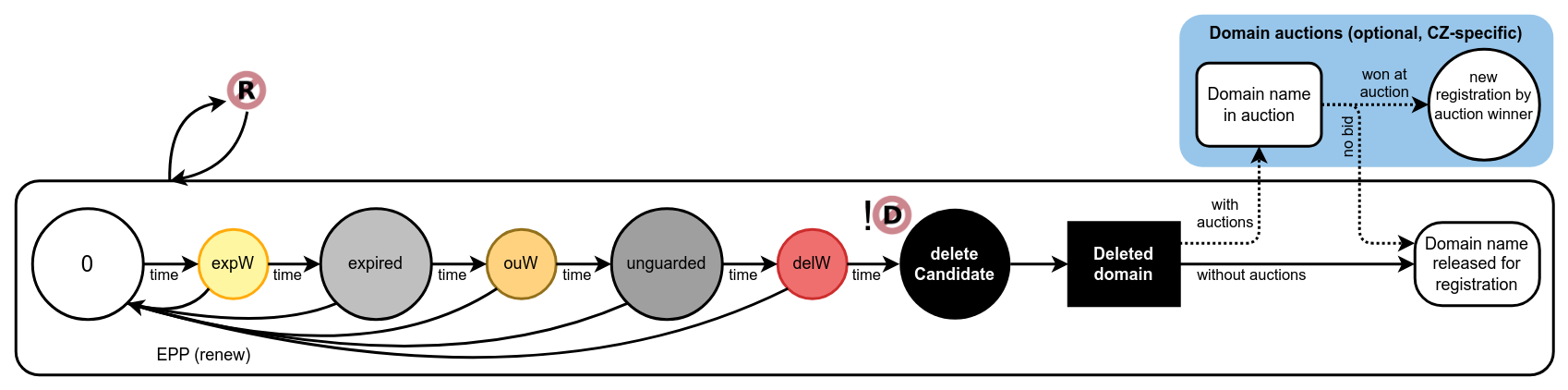
Domain registration expiration
Basic flow
0 (zero state)
When a domain is freshly registered or renewed, none of the flags is on.expW (internal)
When the expiration date is approaching, by default 30 days before expiration (configurable by the expiration_notify_period parameter), theexpirationWarningflag is set, which may trigger a notification.expired
When the actual expiration date arrives, theexpiredflag is set, which may trigger a notification.
However, the domain is still generated to the zone for some time.ouW (internal)
25 days after expiration (configurable by the outzone_unguarded_email_warning_period parameter), theoutzoneUnguardedWarningflag is set, which may trigger a notification.unguarded
30 days after expiration (configurable by the expiration_dns_protection_period), the domain becomesunguarded(and is flagged so), which results in exclusion from the zone (flagged alsooutzoneUnguarded).delW (internal)
34 days after expiration (configurable by the expiration_letter_warning_period parameter), thedeletionWarningflag is set, which may trigger a notification.deleteCandidate
61 days after expiration (configurable by the expiration_registration_protection_period parameter), thedeleteCandidateflag is set, unless there is delete prohibition on the domain. If set, the domain cannot be renewed anymore and the Registry is allowed to delete the domain.
The flags accumulate. (Each state includes flags of the preceding state,
e.g. when a domain has the expired flag, it also has the expirationWarning
flag.)
The flags are unset when the domain is renewed.
Prohibitions
Setting of the renew prohibition will cause the domain to be taken out of the basic flow (none of those flags will be set). The expiration flags are, however, returned to the domain (re-calculated according to the current date), once the renew prohibition has been revoked.
Delete prohibition prevents the Registry from setting
the deleteCandidate flag on the domain and consequently deleting the domain,
until the delete prohibition is revoked.
Zone-inclusion according to registration states
State |
0 |
expW |
expired |
ouW |
unguarded |
delW |
delCandidate |
|---|---|---|---|---|---|---|---|
Allows inclusion |
Yes |
Yes |
Yes |
Yes |
No |
No |
No |
Formal rules
2.1.2. Validation expiration
This section describes a flow of states related to ENUM domain validation expiration.
- Setting:
automatically
- Visible:
internally or externally
- Allowed for:
ENUM domains
- Affects:
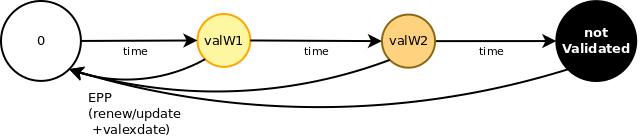
ENUM domain validation expiration
Basic flow
0 (zero state)
When a domain is freshly registered or its validation expiration date renewed/updated, none of the flags is on.valW1 (internal)
When the validation expiration date is approaching, 30 days (configurable) before validation expiration,validationWarning1flag is set, which may trigger the 1st warning notification.valW2 (internal)
When the validation expiration date is approaching, 15 days (configurable) before validation expiration,validationWarning2flag is set, which may trigger the 2nd warning notification.notValidated
When the actual validation expiration date comes,notValidatedflag is set, which results in the domain not being generated to the zone anymore.
The flags accumulate. (Each state includes flags of the preceding state,
e.g. when a domain has the notValidated flag, it also has the
validationWarning1 and validationWarning2 flags.)
The flags are unset when the validation is renewed/updated.
Prohibitions
Prohibitions do not affect this flow.
Zone-inclusion according to validation states
State |
0 |
valW1 |
valW2 |
notVal |
|---|---|---|---|---|
Allows inclusion |
Yes |
Yes |
Yes |
No |
Formal rules
2.1.3. Zone presence
There are two ways to determine whether a domain shall be generated to a zone.
The domain is naturally included in the zone if and only if it meets the following conditions:
the domain is not
unguarded, andthe domain is validated if it is an ENUM domain, and
the domain has an nsset assigned to it, and
the domain is not forced out of the zone manually, i.e. it does not have the
serverOutzoneManualflag.
This flag forces the domain not to be included despite having met the conditions above.
The domain can be forced to the zone by setting the manual flag serverInzoneManual.
This can override registration expiration flow up to deleteCandidate and expired validation.
However, if the domain does not have an nsset, this flag will not have the desired effect.
Neither of these manual flags affects the basic flow.
When the domain is not generated to the zone for any reason, it is indicated
with the outzone flag.
2.2. Non-domains obsoletion
Non-domains are contacts, nssets, or keysets.
The life cycle of these objects is influenced mainly by their usage in EPP operations, and prohibitions eventually.
- Setting:
automatically
- Visible:
externally
- Allowed for:
contacts, nssets, keysets
- Affects:
existence

Non-domains obsoletion
Basic flow
linked
As long as an object is assigned to another object (also is flaggedlinked), it cannot become obsolete.
When an unlinked object is linked again, the protection period is “reset”.0 (zero state)
Once the object is unlinked, it can become obsolete.
This is the moment when the protection period starts running.deleteCandidate
When the object has been left idle (unlinked and not modified) for the whole protection period of 2 months (configurable), then thedeleteCandidateflag is set, unless there is delete prohibition on the object.
If set, the Registry is allowed to delete the object.
Prohibitions
Delete prohibition prevents the Registry from setting
the deleteCandidate flag on the object and consequently deleting the object,
until the delete prohibition is revoked.
Formal rules
2.3. Prohibitions
Prohibitions are flags which affect the basic flow of objects’ life cycle or forbid some operations on objects.
Note
The prohibitions do NOT apply to the system registrar!
No matter which prohibition flags are set, the system registrar may always modify objects.
- Setting:
manually
- Visible:
externally
Prohibition flags
- Allowed for:
domains

serverRegistrantChangeProhibited
The registrar may not change the domain owner (update_domain ... <registrant> ...).

serverRenewProhibited
The registrar may not renew the domain.
- Allowed for:
all registrable objects

serverDeleteProhibited
The registrar may not delete the object.

serverTransferProhibited
Registrars may not transfer the object.

serverUpdateProhibited
The registrar may not update the object.
2.3.1. User blocking (locks)
Any registrable object may be blocked as an enhanced security setting by a contact linked to this object or the contact itself via the public requests.
- Affects:
EPP
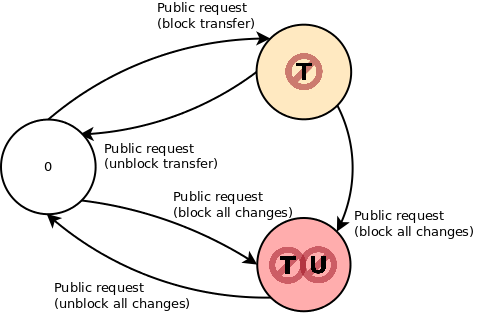
Locks
0 (zero state) – no blocking
If the object has no blocking, the registrant may request to block transfer or block all changes (transfer and update).blocked transfer (
serverTransferProhibitedflag)
If transfer is already blocked, the registrant may request either to unblock transfer or to block all changes.blocked all changes (
serverTransferProhibitedandserverUpdateProhibitedflags)
The registrant may request to unblock all changes.
These changes are allowed only assuming that the object does not have the flag serverBlocked.
2.3.2. Administrative blocking
- Affects:
EPP, expiration, obsoletion
Domains (together with the domain owners, eventually) can be blocked by the Registry operator via CLI client (fred-admin), e.g. when the registration rules or the law are being violated, or when there is a police investigation or litigation ongoing.
When an object is blocked by the Registry operator, it has the flag serverBlocked.

serverBlocked domains, contacts
Prohibitions are set by the Registry operator and they can be revoked only
by the Registry operator.
To define a blocking state, any combination of the prohibition flags above can be set,
and in domains, this can even be combined with the manual zone presence flags serverInzoneManual
or serverOutzoneManual.
There are no restrictions on transitions from one blocking state to another.
2.4. Rules for setting automatic flags
This section describes the formal rules for automatic flag setting.
Legend:
<name>the parameter which is queried from thedomain_lifecycle_parameterstable with thenamekey[...]unit of measure for the preceding parametercurrent_datethe current date (calculated from the timestamp within the time zone of the database server)current_timestampthe current date and time (within the time zone of the database server)current_timestamp at time zone <...>conversion of the current date and time into the time zone specified within<...>
2.4.1. Domain registration expiration rules
Legend:
regexdatethe date when a domain expires (domain.exdate)
regexdate + <expiration_notify_period> <= current_date
   && !serverRenewProhibited
regexdate <= current_date
   && !serverRenewProhibited
regexdate + <expiration_dns_protection_period> + <regular_day_outzone_procedure_period> [hour]
   <= current_timestamp at time zone <regular_day_procedure_zone>
   && !serverRenewProhibited
nsset is not assigned
nssetMissing
   || serverOutzoneManual
   || !serverInzoneManual && (unguarded || notValidated)
regexdate + <outzone_unguarded_email_warning_period>
   <= current_timestamp at time zone <regular_day_procedure_zone>
   && !serverRenewProhibited
   && !serverInzoneManual
unguarded && !serverInzoneManual
regexdate + <expiration_letter_warning_period> <= current_date
    && !serverRenewProhibited
regexdate + <expiration_registration_protection_period> + <regular_day_procedure_period> [hour]
   <= current_timestamp at time zone <regular_day_procedure_zone>
   && !serverRenewProhibited
   && !serverDeletePohibited
2.4.2. ENUM domain validation rules
Legend:
valexdatethe date till which an ENUM domain is validated (enumval.exdate)
valexdate + <validation_notify1_period> <= current_date
valexdate + <validation_notify2_period> <= current_date
valexdate + <regular_day_outzone_procedure_period> [hour]
   <= current_timestamp at time zone <regular_day_procedure_zone>
2.4.3. Non-domain obsoletion rules
Legend:
last_linked_timestampthe timestamp when this was linked to another object the last timeupdatethe date of the last updatecrdatethe date of creation
max(last_linked_timestamp, update, crdate)
   + <object_registration_protection_period> [months]
   + <regular_day_procedure_period> [hour]
   <= current_timestamp at time zone <regular_day_procedure_zone>
   && !serverDeleteProhibited
   && !linked
3. Contacts
Contacts are a type of registrable objects which represents a natural or legal person in the Registry.
The FRED understands a contact without a value in the organization attribute as a natural person for the purpose of disclosure.
See also attributes of contacts (EPP Reference) for a description of contact details.
3.1. Roles of linked contacts
Contacts can have the following roles depending on the type of the registrable object to which they are linked:
the domain holder,
an administrative contact of a domain,
a technical contact of an nsset or a keyset.
The domain holder may request any modification of their domain, including the change of the domain holder.
An administrative contact may request any modification of the domain except the change of the domain holder. See also attributes of domains (EPP Reference).
A technical contact may request any modification of the linked nsset or keyset. See also attributes of nssets (EPP Reference) or attributes of keysets (EPP Reference).
A single contact can appear in several roles.
3.2. Annual reminder
Contacts themselves are responsible for completeness, accuracy and recency of their contact details.
To keep contact information updated, contacts should be called on by email once a year to check their details and correct them if there was a change.
This can be set as a periodic task in the FRED.
3.3. Disclosure of information
The Registry defines policies for disclosure of contact information in the public interface (whois services):
the general approach (“Registry shows information” vs. “Registry hides information”),
disclosure of which attributes registrars will be allowed to manipulate (signal the contact’s preference opposite to the general approach), and
default disclosure settings if no preference is requested (show or hide per attribute).
All of this can be configured.
4. Object transfer
Object transfer is a mechanism that allows to change the designated registrar of an object.
Each object has authorization information (AuthInfo for short) that in this case represents a transfer password. The AuthInfo must be provided with the transfer request to authorize the transfer. More information about AuthInfo TTL can be found at AuthInfo TTL.
The transfer process in the FRED is different from the standard one (see RFC 5730#section-2.9.3.4) and it works as follows:
A contact linked to an object intended for transfer requests AuthInfo of the object. He can do so via the current registrar, via the new registrar or by submitting a public request to the Registry directly.
The AuthInfo is provided to the contact either through one of the involved registrars, or sent from the Registry.
The contact requests the transfer from the new registrar and provides the AuthInfo.
The new registrar requests the transfer from the Registry (via EPP) and provides the AuthInfo.
The Registry transfers the object immediately and generates new AuthInfo for the transferred object.
The Registry notifies the old registrar and the linked contacts about the transfer.
This model favours the holder because it does not allow the current designated registrar to reject nor inhibit the transfer.
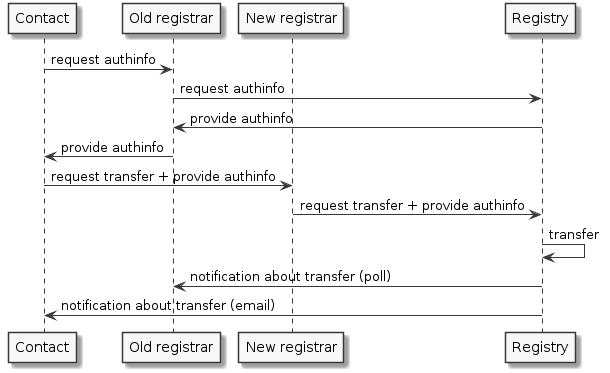
Sequence diagram – Object transfer process
5. DNScheck (Technical checks)
DNScheck is a system for checking nssets and DNS records. As a result, it monitors the quality of domain delegation. The system periodically scans all nssets in the registry and runs tests on them using Zonemaster.
DNScheck is a replacement for the old technical checks.
Prerequisites:
FRED system
Messenger
DNScheck is a dockerized Python service with its own database (PostgreSQL). The service selects which nssets will be checked and tells the Zonemaster service to run the DNS records and delegation test of associated domains. Then it collects the results, aggregates them and, if there are any problems found, sends notifications to nsset technical contacts.
5.1. Zonemaster
Zonemaster is a third-party open-source service that runs the DNS records and domain delegation tests. Each test ends with a severity level evaluation which is then processed by DNScheck.
Number of report for each severity is calculated for the domains delegation of each nsset.
Severity levels (as described in the Zonemaster documentation):
CRITICAL– The message means a very serious error.ERROR– The message means a problem that is very likely (or possibly certain) to negatively affect the function of the zone being tested, but not so severe that the entire zone becomes unresolvable.WARNING– The message means something that will under some circumstances be a problem, but that is unlikely to be noticed by a casual user.NOTICE– The message means something that should be known by the zone’s administrator but that need not necessarily be a problem at all.INFO– The message is something that may be of interest to the zone’s administrator but that definitely does not indicate a problem.
For details, please visit the Zonemaster documentation.
Note
The tests are only informative, they do not affect inclusion/exclusion of a domain in/from a zone.
5.2. Reporting
You can set a level of reporting (reportlevel) for each nsset.
The level defines at which severity are test result notifications sent.
|
Send notification according to severity |
|---|---|
0 |
never |
1 |
|
2 |
|
3 |
|
4 and more |
|
If during the evaluation at least one test on at least one associated domain ends with the given severity, a notification e-mail is sent. The email contains a count of all problems found with reported severity and a list of the most problematic domains (ordered from worst results). A notification e-mail is sent to all nsset technical contacts.
6. EPP client workflow
Registrars communicate with the registry through FRED’s registrar interface, which is based on the EPP and which the registrars use as clients.
There are 3 options for using the registrar interface:
command-line Python client fred/eppic,
client Python API library fred/utils/epplib,
registrar’s custom client built on the raw EPP.
Although these three options vary in syntax, they have the same workflow, since they all talk to the same EPP server. This chapter describes the general workflow, which is independent from the syntax, while giving you hints about the syntax.
Of course, correct syntax is a necessary condition for the commands to be carried out.
Each EPP command allows you to append your own client transaction identifier.
Note
This chapter assumes that the client is a regular registrar (not the system registrar).
Where to get detailed help with syntax
The CLI client has an embedded command help. It also allows you to enter the commands in an interactive mode by filling in command parameters one by one, or enter the parameters by their names. See Additional EPPIC abilities.
Python API methods have the same names as CLI client commands, they differ in parameter
syntax and order. You may view the API reference by starting the pydoc server pydoc -p 8080
from the command line and then opening http://localhost:8080 in a browser.
The EPP syntax itself is described in detail in the EPP Reference Manual. This chapter will provide you with links to specific EPP-commands as you read on.
6.1. Connecting to the server
The client must:
create a secure socket using a public certificate and private key,
connect via the socket to the EPP server using a hostname and port,
once connected, start reading data coming from the EPP server.
When you use the raw EPP, you need to find your own way of connecting to the EPP server, whereas the client programs will do it for you, all you need to do is supply connection settings in a configuration file.
Detailed requirements for transfer over TCP are in RFC 5734.
6.2. Getting service information
Once the client is connected to the server, the first data it receives contains the greeting.
What might interest you in the greeting (xpath:/epp/greeting/):
protocol version (
svcMenu/version),service languages provided (
svcMenu/lang),namespaces of managed objects (
svcMenu/objURI),namespaces of service extensions (
svcExtension/extURI),description of the data collection policy (
dcp).
You actually need the first four items to establish a session.
To get the greeting, you just need to connect to the EPP server or send a hello.
6.3. Establishing a session (login)
This is the first command you must issue.
To login, you send the login command (display help
/ see the reference)
with a username, password and, eventually, other session settings,
such as the interface language.
The CLI client can use configuration settings to login automatically when it is launched. It requests use of all namespaces automatically.
Once you are logged in, you may start issuing other commands.
6.4. Registering domains & other objects
In a nutshell, if you’re a newcomer without previous records, you must proceed with registrations in this order:
Login, before you begin.
Check that an object can be registered.
Optionally, create an nsset (using a contact).
Optionally, create a keyset (using a contact).
Create a domain (using a contact, and optionally an nsset and keyset).
6.4.1. Check domain names and handles
When registering a new object of any type, you need to name it
with a unique identifier – a domain name or a handle.
In case of domain names, the holders choose them for themselves of course.
But for the other objects, it is you who names them. To make sure that a domain
name or handle can be registered,
use a check command according to the object type:
check-domain(display help) /domain:check(see the reference),check-contact(display help) /contact:check(see the reference),check-nsset(display help) /nsset:check(see the reference),check-keyset(display help) /keyset:check(see the reference).
The command will tell you not only whether an object has not been registered yet, but also whether the name/handle has correct syntax and is acceptable by the Registry.
Formats for domain names and handles are properly described in chapter Common object attributes (EPP Reference).
You may also check several objects of the same type with one call, because the commands accept multiple parameters.
6.4.2. Create a contact
To register a domain name, you must first record personal information, to which the domain name will be linked. Personal information is recorded using contact objects, which hold information about people (or organizations) in various roles, such as the domain holder or a technician responsible for domain’s name servers. (More about the roles of contacts in the Registry.)
A contact is registered using the command create-contact (display help)
/ contact:create (see the reference)
and required parameters.
Note
Setting contact disclosure preference (disclose flags) requires special attention as described in Policies & rules of disclosure.
auth-infois generated on demand by thesend-authinfo-contactcommand. For more information, see AuthInfo TTL.
If you omit:
disclose, the server sets disclose flags to defaults according to the disclosure policy,other optional parameters, they are left unset.
6.4.3. Create a nsset OPTIONAL
To have the future domain included in the zone, you need to have some name servers recorded in the Registry as well. Name servers are recorded using nsset objects.
A nsset is registered using the command create-nsset (display help)
/ nsset:create (see the reference)
and required parameters.
auth-infois generated on demand by thesend-authinfo-nssetcommand. For more information, see AuthInfo TTL.
If you omit:
reportlevel, the server sets it to the default (see also DNScheck (Technical checks)),other optional parameters, they are left unset.
6.4.4. Create a keyset OPTIONAL
To have the future domain secured, you need to have some DNSSEC keys recorded in the Registry as well. The DNSSEC keys are recorded using keyset objects.
A keyset is registered using the command create-keyset (display help)
/ keyset:create (see the reference)
and required parameters.
auth-infois generated on demand by thesend-authinfo-keysetcommand. For more information, see AuthInfo TTL.
If you omit:
dnskey, it will be left empty and the linked domains still will not be secured.
6.4.5. Create a domain
Now, you’re ready to actually register a domain name. Domain names are recorded using domain objects.
A domain is registered using the command create-domain (display help)
/ domain:create (see the reference)
and required parameters.
auth-infois generated on demand by thesend-authinfo-contactcommand. For more information, see AuthInfo TTL.
If you omit:
period, the server makes registration for the smallest period allowed,other optional parameters, they are left unset.
Conditions for success
You must be granted access to the zone, in which you want to register the domain.
You must have credit, if the registry charges for domain creation.
6.4.6. Re-use
Of course, if you have previously recorded some contacts, nssets, or keysets, you may re-use them to register new domains, nssets, and keysets.
Beware, though, other registrars may link your objects to their objects, too. (This can happen when an object has been transferred.)
6.5. Listing objects
Recorded objects can be retrieved in the form of lists. This is done in two (or more) steps within separate requests.
The first request asks the server to prepare a list on its side.
Use one of the commands starting with prep-* (display help) /
a listing element (see the reference).
Note
The list preparation commands that do not accept parameters
(such as prep-domains / fred:listDomains),
will list only objects that you are designated
to manage.
The parametrized commands (such as prep-domains-by-contact /
fred:domainsByContact) ignore who the designated registrar is.
The server responds with a total of prepared items.
A subsequent request orders the server to send a bulk of list items and it is to be called repeatedly until the server returns an empty list.
To retrieve the next bulk, use the command get-results (display help)
/ fred:getResults (see the reference)
which does not require any parameters.
The server retains the remaining list items between these calls. Another prepare request resets the list.
Conditions for success
You must be logged in.
6.6. Getting object information
To view object details, use an info command according to the object type:
info-domain(display help) /domain:info(see the reference),info-contact(display help) /contact:info(see the reference),info-nsset(display help) /nsset:info(see the reference),info-keyset(display help) /keyset:info(see the reference).
Conditions for success
You must be logged in.
The object must exist.
6.7. Renewing domains
To renew a domain, use the command renew-domain (display help)
/ domain:renew (see the reference)
and required parameters.
If you don’t know its current expiration date, you can find out from the domain’s details – see Getting object information.
If you omit period, the server makes renewal for the smallest period allowed.
Conditions for success
You must be logged in.
The domain must exist.
The domain must not be marked for deletion (
deleteCandidatestatus flag).The domain must not be administratively blocked.
The domain must not be prohibited renewal.
You must have credit, if the registry charges for domain renewal.
6.8. Transferring objects
See the Object transfer concept for an explanation of how transfer works in general.
To proceed with a transfer request
(and thus become the designated registrar of the object),
use a transfer command according to the object type:
transfer-domain(display help) /domain:transfer(see the reference),transfer-contact(display help) /contact:transfer(see the reference),transfer-nsset(display help) /nsset:transfer(see the reference),transfer-keyset(display help) /keyset:transfer(see the reference).
Conditions for success
You must be logged in.
The object must exist.
The AuthInfo must match.
The object must not be administratively blocked.
The object must not be prohibited transfers.
6.9. Updating objects
Generally, there are 3 “methods” for editing object details:
add, rem (remove), and chg (change).
add and rem are used for editing attributes that can have multiple-child values,
such as admin/tech contacts, name servers, or DNS keys. There is no difference
between an omitted child (NULL) and a child that contains an empty string (''),
both are interpreted as no change.
chg is used to edit single-child values, such as a domain owner, linked nsset,
disclosure preference, or AuthInfo. If the child is omitted (NULL), it means
that a change is not being requested, whereas when a child contains an empty
string (''), it means that the old value shall be overwritten
and thus left empty after the update.
To edit object details, use an update command according to the object type:
update-domain(display help) /domain:update(see the reference),update-contact(display help) /contact:update(see the reference),update-nsset(display help) /nsset:update(see the reference),update-keyset(display help) /keyset:update(see the reference).
Note
Editing contact disclosure preference (disclose flags) requires special attention as described in Policies & rules of disclosure.
Conditions for success
You must be logged in.
The object must exist.
You must be designated to manage the object.
The object must not be administratively blocked.
The object must not be prohibited updates.
6.10. Deleting objects
To delete an object, use a delete command according to the object type:
delete-domain(display help) /domain:delete(see the reference),delete-contact(display help) /contact:delete(see the reference),delete-nsset(display help) /nsset:delete(see the reference),delete-keyset(display help) /keyset:delete(see the reference).
Conditions for success
You must be logged in.
The object must exist.
You must be designated to manage the object.
The object must not be linked to (referenced by) other objects.
The object must not be administratively blocked.
The object must not be prohibited deletion.
6.11. Reading messages
The server generates service messages. Reading of the messages is done in two (or more) steps within separate requests.
To ask the server if it has any messages,
use the command poll req (display help)
/ <poll op="req"/> (see the reference).
The server responds with the first message in the queue and the count of messages.
A subsequent request acknowledges that the message has been read and orders the server to remove it from the queue.
To acknowledge, use the command poll ack (display help)
/ <poll op="ack"/> (see the reference)
with the message identifier.
To read the next message(s), just repeat the process.
You must be logged in to read your messages.
6.12. Reading credit
Just use the command credit-info (display help)
/ fred:creditInfo (see the reference),
which does not require any parameters.
You must be logged in.
6.13. Ending a session (logout)
Just use the logout command (display help
/ see the reference),
which does not require any parameters.
Then your client may close the connection (it times out anyway).
If you want to logout, disconnect and quit, you may use exit.
6.14. Additional EPPIC abilities
This section describes additional abilities of the CLI client. All these abilities can be used from the running client.
Note
This guide doesn’t describe all features, only highlights. For all eppic features, see the documentation contained with the program fred/eppic.
6.14.1. Display command help
To show available FRED client commands, type help.
To show help for a specific command, type help <command>
(e.g. help update-contact) or ? <command>
(e.g. ? create-domain).
6.14.2. Parameter usage
FRED client accepts positional and named parameters. Use help commands to display parameter information.
6.14.3. View raw EPP messages
If you need to read the xml-formatted communication, in addition to the default output, the CLI client can display the raw xml data sent to and received from the server. Input can be read from a file.
7. Contact merger
The purpose of contact merger is to minimize duplicate contacts in the Registry.
The core of the merger is the merge operation which allows to merge a pair of identical and mergeable contacts, from a source contact to a destination contact. If the contacts are linked to other objects, then the source contact(s) is (are) replaced with the destination contact in every linked object. The source contact(s) is (are) then deleted from the Registry.
The Registry operator may choose a pair of duplicate contacts themself and merge just the two of them if the two contacts are mergeable. (See the task Merge a pair of duplicate contacts (manual).)
The other option is to use the automatic merge procedure which can select a whole set of duplicate contacts automatically and merge them into a single destination contact. The destination contact is determined by filtering the set with various criteria (see Selection of the destination contact in an automatic merger), which make the outcome the best possible choice. The other contacts in the set are treated as source contacts. (This task can be set as a periodic task.)
In both cases, the contacts must be managed by the same registrar, however, they are replaced in linked objects even if the linked objects have different registrars.
7.1. Identical contacts
For contacts to be considered identical by the merger, they must have the following attributes identical:
current designated registrar:
object.clidname:
contact.name[1]organization:
contact.organization[1]address (permanent):
contact.street1,contact.street2,contact.street3,contact.city,contact.stateorprovince,contact.postalcode,contact.country[1]email:
contact.email[1]notification email:
contact.notifyemail[1]fax:
contact.fax[1]telephone:
contact.telephone[1]identity document type:
contact.ssntypeidentity document number:
contact.ssn[1]VAT:
contact.vat[1]disclose flags:
contact.disclosename,contact.discloseorganization,contact.discloseaddress,contact.disclosetelephone,contact.disclosefax,contact.discloseemail,contact.disclosevat,contact.discloseident,contact.disclosenotifyemailuser’s preference of sending domain expiration letters:
contact.warning_letterand for each associated contact address of any type (
MAILING,BILLING,SHIPPING,SHIPPING_2,SHIPPING_3):
7.2. Mergeable contacts
Contacts must be identical and comply with the following conditions:
- the source contact(s):
must not be administratively blocked (
serverBlockedstatus active), andmust not have the
serverDeleteProhibitedstatus active, andmust not belong to a mojeID account (
mojeidContactstatus active), andmust not have the
contactInManualVerificationstatus active, andmust not have the
contactFailedManualVerificationstatus active,
- and the destination contact:
must not be administratively blocked (
serverBlockedstatus active), andmust not have the
contactInManualVerificationstatus active, andmust not have the
contactFailedManualVerificationstatus active,
- and registrable objects linked to the source contact:
must not have the
serverBlockedstatus active, andmust not have the
serverUpdateProhibitedstatus active.
Note
The rules for identity and merge-ability are hard-coded.
7.3. Merge operation
The procedure of merging a pair of duplicate contacts performs as follows:
Checks that the contacts are mergeable.
In objects linked to the source contact, replaces the source contact with the destination contact (using update operations).
If the source contact has had the
contactPassedManualVerificationstatus active, sets it on the destination contact.Deletes the source contact from the Registry.
Generates new AuthInfo for the destination contact.
Generates poll messages for changes made in the step 2.
7.4. Selection of the destination contact in an automatic merger
Because the detection of duplicates is automatic, the Registry must also select the destination contact, into which the merge will result and which will be used to replace the duplicate contacts in linked objects.
The contact of the best qualities is selected according to the following criteria evaluated in this order [2]:
contact is identified,
contact is conditionally identified,
contact handle complies with the syntax for mojeID handles,
contact has most domains linked (as a holder or administrative contact),
contact has most objects linked (domains, name-server sets or key sets),
contact has been updated most recently,
contact has been created most recently.
The contact that matches the most of the criteria, is the destination contact. If more than one contact meets all of these criteria, the destination contact is chosen from them randomly.
8. Automated keyset management
AKM is based on the two RFCs:
RFC 7344 Automating DNSSEC Delegation Trust Maintenance,
RFC 8078 Managing DS Records from the Parent via CDS/CDNSKEY.
Domains are included in the AKM strictly on demand when they publish valid CDNSKEY resource records [1] on domains’ name servers. Registrants are supposed to ask their DNS operators to do so or not to do so.
Tip
The KnotDNS can be easily configured to support automatic key management.
A CDNSKEY contains the KSK of a child zone (domain) solely for the purpose to request updates to DS records in the parent zone (Registry). DS records are calculated by the Registry; see also zone generation concept.
The CDNSKEY resource records are recognized by the FRED as valid when they comply with the same constraints as the rest of managed keysets – see keyset attributes in the EPP Reference Manual.
A special case is the “delete key” (CDNSKEY 0 3 0 AA==) which can be
published to request removal of a domain from AKM.
8.1. Security status cases
The Registry handles the request for update according to the security status of a domain:
an insecured domain (registered without a keyset) requests to be included in AKM,
a domain secured with a manually-managed keyset requests to be switched to AKM,
a domain secured with an auto-managed keyset requests to update the keys.
8.2. Acceptance of new keys
When introducing a new domain in AKM, the Registry handles differently domains which do not register yet as DNSSEC-enabled (without a keyset, insecured) and those that are secured with a keyset:
When a domain is already secured with a keyset, adoption of new keys happens immediately because the new keys can be authenticated using the old keys, and the domain is switched to AKM.
When a domain is not secured yet, the detected keys must undergo the acceptance period during which they must remain valid and unchanged on all name servers in the associated nsset. The acceptance period acts as a security measure instead of key authentication. After the keys pass the acceptance period successfully, then they are adopted and the domain is switched to AKM.
The acceptance period is initiated when valid CDNSKEY resource records are found for the first time during a scan. In subsequent scans, the records must be found again in exactly the same state and on all the name servers as before, otherwise the acceptance period is broken and the whole process must be restarted.
In special cases where there is a network unavailability of all domain nameservers, AKM-NG ignores the invalid scan results. However, valid scans of the original responses must occure so that there is less than 48 hours between two valid neighboring scans.
8.3. Management task
The task of keyset management is performed in several steps:
Loads selected domains and all name servers of insecured domains from their nssets, and sorts them in the scan queue.
Scans domains in the scan queue:
if a domain is insecured, name servers are asked by the scanner directly via TCP queries whether they have CDNSKEY records for domains,
if a domain is secured, the CDNSKEY records are requested via a local resolver and a response is validated with DNSSEC inside the scanner,
and saves the results.
Updates keys:
checks if the domain has a blocking status (e.g.
serverblockedanddeletecandidate), AKM ignores theserverUpdateProhibitedstatus,applies new keys if they have passed the acceptance period (EPP operations create_keyset & update_domain),
switches domains to AKM if they have been secured and they have requested AKM (EPP operations create_keyset & update_domain),
updates auto-managed keysets (AKM keyset update operation),
removes auto-managed keysets where removal from AKM has been requested (EPP operation update_domain).
See also the AKM periodic task.
8.4. Components
The AKM subsystem includes the following components:
- CDNSKEY scanner
- binary
cdnskey-scannerfrom the fred/cdnskey-scanner project scans for the existence of
CDNSKEYrecords for the specified set of domains
- binary
- Control part of AKM (CDNSKEY processor)
- binary
fred-akm-ngfrom the fred/akm-ng project via the gRPC API to/from the
cdnskey-processor-apiservice, it exports a list of domains to scan obtained from thefredregistry database or obtains a list of acceptedCDNSKEYentries and applies them back to the registry
- binary
- binary
cdnskey-processor-apifrom the fred/cdnskey-processor project via the gRPC API allows to specify a list of domains to scan and get a list of scanned
CDNSKEYrecordsstores and retrieves data from the PostgreSQL database
cdnskey_processor, runs every 10 minutes
- binary
- binary
cdnskey-processor-masterfrom the fred/cdnskey-processor project stores and retrieves data from the PostgreSQL database
cdnskey_processordivides the set of domains to be scanned into smaller parts and sends them to worker via
rabbitMQreads the scan results of worker from
rabbitMQ
- binary
- binary
cdnskey-processor-workerfrom the fred/cdnskey-processor project from
rabbitMQreads the domain sets to be scanned from masterruns
cdnskey-scannerwrites the scan results for master to
rabbitMQ
- binary
- testing tools
- binary
cdnskey-processor-db-loaderfrom the fred/cdnskey-processor project used to set up data in the
cdnskey_processordatabase for testing purposes
- binary
See also the overall architecture for component relations.
8.5. Notifications
The utilized EPP operations (create_keyset, update_domain) trigger the following notifications:
8.6. Scan results
Scan results are webwhois extension of the domain name details page.
Secured domain is a domain with DNSSEC. Unsecured domain is a domain without DNSSEC.
The following results are possible:
insecureNameserver on the IP address contains for the unsecured domain a
CDNSKEYrecord with values: flags, protocol, algorithm, public key.
insecure-emptyNameserver on the IP address for the unsecured domain doesn’t contain a
CDNSKEYrecord.
secureFor secured domain exists a
CDNSKEYrecord with trustworthy signature and values: flags, protocol, algorithm, public key.
secure-emptyFor secured domain there is no trustworthy
CDNSKEYrecord.
untrustworthy(Non)Existence of
CDNSKEYrecord for secured domain could not be reliably verified.
unknownNo information could be obtained from the DNS about a secured domain.
unresolvedNo information could be obtained from the nameserver on the IP address about the unsecured domain.
unresolved-ipUnable to obtain any IP address of the nameserver.
9. Communication
This chapter provides an overview of communication which is triggered by events in the Registry.
9.1. Channels
The FRED is capable of using the following channels of communication:
mandatory piece of information in contacts and registrars
used for most communication
- Notify email
optional, contacts only
used for notifications only
If a contact does not have a notify email, it is not notified.
- Generic and additional emails
extra addresses uncontained in Registry records
additional addresses must be supplied manually
used only for outzone unguarded warnings (a life-cycle event)
- Poll messages
an integral part of EPP
used for communication with registrars related to EPP activity
Letter or Registered letter CZ-specific
SMS CZ-specific
9.1.1. Generic email addresses CZ-specific
The generic email addresses are a qualified guess in an attempt to reach domain stakeholders. The Registry applies a set of patterns with local-part names which the stakeholders often use to name their domain-based mailboxes.
The generic email addresses are generated based on the following patterns:
info@<fqdn>, kontakt@<fqdn>, postmaster@<fqdn>,
<fqdn>@<fqdn>, where <fqdn> is the domain name in question.
The patterns for the generic email addresses are hard-coded and CZ-specific.
9.2. Object modifications
This section describes communication that arises from modifications of registrable objects by registrars, except the system registrar.
Modifications must finish successfully for notifications to occur.
Name |
Trigger |
Addressee |
Channel |
|---|---|---|---|
Create notification |
Notify email |
||
Registrar created a domain |
|||
Registrar created a contact |
The contact |
||
Registrar created an nsset |
|||
Registrar created a keyset |
|||
Delete notification |
Notify email |
||
Registrar deleted a domain |
|||
Registrar deleted a contact |
The contact |
||
Registrar deleted an nsset |
|||
Registrar deleted a keyset |
|||
Renew notification |
Registrar renewed a domain |
Notify email |
|
Transfer notification |
Notify email |
||
Registrar transferred a domain |
|||
Registrar transferred a contact |
The contact |
||
Registrar transferred an nsset |
|||
Registrar transferred a keyset |
|||
Registrar transferred an object |
Previous registrar |
Poll message (structure) |
|
Update notification |
Notify email |
||
Registrar updated a domain |
Holder and admin. contacts |
||
Registrar updated a contact |
The contact |
||
Registrar updated a contact linked to a domain of another registrar |
The registrar of the linked domain |
Poll message (structure) |
|
Registrar updated an nsset |
Tech. contacts |
||
Registrar updated a keyset |
Tech. contacts |
9.2.1. Settings
Configuration allows to disable all EPP notifications in the Registry altogether (allowed by default):
[registry]
disable_epp_notifier = true
It is also possible to allow registrars to disable EPP notifications per command by configuring a special prefix for client transaction identifiers:
[registry]
disable_epp_notifier_cltrid_prefix = no_notification_
When the registrar signs a command with a client transaction identifier
starting with the prefix no_notification_, the operation will not trigger
a notification.
9.3. Life-cycle events
This section describes communication that arises from the life cycle of registrable objects (state changes).
Name |
Trigger |
Addressee |
Channel |
|---|---|---|---|
Expiration warning |
Domain expiration is approaching – the expW state has been reached |
Registrar |
Poll message (structure) |
Expiration notice |
Domain has expired |
Email (CS params) |
|
Registrar |
Poll message (structure) |
||
Outzone warning (unguarded) |
Domain is becoming unguarded – the ouW state has been reached |
Email (CS params) |
|
Outzone notice (unguarded) |
Domain has become unguarded |
Email (CS params) |
|
Technical contacts of the domain’s nsset |
Email (CS params) |
||
Registrar |
Poll message (structure) |
||
Deletion warning |
Domain is going to be deleted – the delW state has been reached CZ.NIC: This letter was discontinued in January 2019. |
Letter |
|
Deletion notice |
Domain is being deleted – the deleteCandidate state has been reached |
Email (CS params) |
|
Technical contacts of the domain’s nsset |
Email (CS params) |
||
Registrar |
Poll message (structure) |
||
1st validation warning |
Validation of an ENUM domain is expiring – the valW1 state has been reached |
Registrar |
Poll message (structure) |
2nd validation warning |
Validation of an ENUM domain is expiring – the valW2 state has been reached |
Holder and admin. contacts of the domain |
Email (CS params) |
Outzone notice (not validated) |
Validation of an ENUM domain has expired – the domain is not validated anymore |
Email (CS params) |
|
Registrar |
Poll message (structure) |
||
Unused notification |
Object (nsset, keyset, or contact) has become obsolete and is being deleted |
Technical contacts or the contact |
Notify email (CS params) |
9.3.1. Outzone unguarded warnings
These warnings are sent to generic and additional custom email addresses which are not direcly related to records in the Registry database.
Additional email addresses can be manually loaded to the Registry in the WebAdmin (Daphne). You just import a CSV file with domain names and lists of email addresses to send the warning email to.
domain.tld,mail@example.tld,anothermail@example.tld,etc@example.tld
After the warnings are sent, the list of additional email addresses is cleared in the Registry database. A new list of addresses must be imported if there is need for another warning of this type.
9.3.2. Settings
To disable these messages, remove the corresponding row in the database table
notify_statechange_map for the state change that you do not wish to communicate.
See Customizing state-change notifications for details.
To modify when the messages are sent, reconfigure parameters of the object life cycle itself.
9.4. Administrative events
This section describes communication that arises from administrative tasks of the Registry.
Name |
Trigger |
Addressee |
Channel |
|---|---|---|---|
Contact merger |
Registry has merged a contact automatically because it was detected as a duplicate |
The contact |
Email (CS params) |
Object update (contact merger) |
Registry has updated an object as a result of contact merger (replaced duplicate contacts in linked objects) |
Registrar |
Poll message (structure) |
Contact update (address disclosure) |
Registry has changed disclosure of contact address (contact has started or stopped complying with the rules for hiding address) |
Registrar |
Poll message (structure) |
Contact reminder |
Contact registration anniversary is approaching in 2 months |
The contact |
Email (CS params) |
Domain update (Admin.blocking) |
Registry has updated a domain |
Registrar |
Poll message (structure) |
Domain delete (Admin.verification) |
Registry has deleted a domain |
Registrar |
Poll message |
Automated keyset management – Acceptance period iniated |
Registry has discovered valid CDNSKEY records on an insecured domain |
Technical contacts of the nsset |
|
Automated keyset management – Acceptance period broken |
Registry has detected that CDNSKEY records changed during the acceptance period |
Technical contacts of the nsset |
|
Automated keyset management – Acceptance period completed |
Registry has updated a domain with the newly accepted key set |
||
Registrar |
Poll message (structure) |
||
Automated keyset management – Keys update |
Registry has discovered new valid CDNSKEY records on a secured domain |
Technical contacts of the nsset |
Email (CS params) |
9.5. Public request events
This section describes communication that arises from requests of the public submitted through a web form.
Name |
Trigger |
Addressee |
Channel |
|---|---|---|---|
AuthInfo |
Request for AuthInfo, which has been placed as a public request |
Linked contacts or the contact |
Email (CS params) |
AuthInfo |
Request for AuthInfo, which has been placed through a registrar |
Linked contacts or the contact |
Email (CS params) |
Blocking confirmation |
Public request for object (un)blocking has been executed |
Linked contacts or the contact |
Email (CS params) |
Personal information |
Request for personal information, which has been placed as a public request |
The contact |
Email (CS params) |
9.6. Registrar events
This section describes communication that arises from registrar administration.
Name |
Trigger |
Addressee |
Channel |
|---|---|---|---|
Low credit |
Registrar’s credit has dropped below the limit, see Settings below |
Registrar |
Poll message (structure) |
Request usage |
Daily (depends on the task setup) |
Registrar |
Poll message (structure) |
Monthly bill – No audit invoice |
The end of the month in which paid services were not used |
Registrar |
|
Monthly bill – Audit invoice included |
The end of the month in which paid services were used |
Registrar |
|
Confirmation of a received payment for credit deposit – Advance invoice included |
An advance payment has been matched |
Registrar |
9.6.1. Settings
The credit limit for the low credit message can be configured per zone
in the database table poll_credit_zone_limit.
10. Zone generation
This chapter provides an overview of zone generation functionality in FRED.
FRED can generate zone files, which are compliant with RFC 1034, RFC 1035, RFC 2308, RFC 4027.
These zone files contain SOA, NS, A, AAAA and DS records, which are consistent with the data in the registry. The domain records are generated based on domain, nsset and keyset objects in the registry. FRED generates domains into the zone only if they are linked to a nsset. Domains can also be kept administratively out of the zone by statuses. DNSKEY records are immediately transformed into DS records and both A and AAAA records are only generated when GLUE records are required.
FRED itself only generates the text representation of zone file. The actual authoritative domain name service must be done through a DNS server such as KNOT or BIND. Although zone generator can execute additional scripts after zone file is generated in order to automate validation.
11. Billing
Billing in the FRED is targeted at registrars, who are charged for various operations, such as registrations, renewals, or the annual fee. The FRED supports both prepaid and postpaid model, which can be configured per operation.
A virtual account is managed for each registrar, which holds just the amount of credit without a specific currency. Incoming payments increase the credit on this account and charging for operations decreases it. The current state of credit is available over EPP. An account is kept for each zone separately.
Payment model
If a charged operation in in the prepaid model, it fails
when there is not enough credit (EPP response code: 2104 Billing failure).
Therefore registrars must pay in advance to use these operations.
If a charged operation is in the postpaid model, it succeeds even when there is not enough credit. Therefore registrars do not have to pay in advance. This situation can create debt and it is up to the Registry to force registrars to pay it off.
Each operation can have a different model. Generally, setting the model means to (dis)allow negative credit.
11.1. Scanning bank transactions
The idea is to run periodical scans for payments on bank accounts of the Registry operator.
The FRED contains CZ-specific scripts (connectors) to process transcripts of transactions collected from several banks that operate in the Czech Republic. (To study the scripts may help you in writing your custom connectors.)
Each bank has a B2B interface or API, but the individual banks use various channels (HTTP, IMAP) and various formats (CSV, XML). Therefore there is a specialized script for each bank, which transforms the payments into a common format and loads it into the FRED database.
A registrar can be identified in each payment with a payment symbol, which is given to them by the Registry operator, and which the registrar must enter with the bank transaction. If the symbol in a transaction matches a registrar, the payment is associated with this registrar. Unmatched transactions may be associated manually in the web administration (Daphne).
Changed in version 2.38: Bank transactions are collected, parsed and associated with registrars externally, and imported to FRED via a new Accounting interface for further processing. See also The Future of Payments & Invoices.
11.2. Processing payments
Once the payment is associated, the money can be processed further. If the registrar has debt, the money is used to cover the debt. The remaining amount, or all of it if there was no debt, is accepted as an advance payment.
For an advance payment, an invoice is issued to the registrar. (This is based on a legal requirement in CZ. It may not be necessary in another environment, but it is hard-coded.)
Then the VAT is subtracted from the amount. The VAT percentage is configurable.
Note
VAT subtraction applies to registrars who are marked as VAT-payers. The FRED marks registrars as VAT-payers by default. They can be unmarked (designated as not VAT-payers) individually:
either with the
--no_vatargument when adding a new registrar with fred-admin, orby unchecking the
DPHcheckbox in registrar details in Daphne.
Tip
To disable the VAT completely:
set all registrars as not VAT-payers, or
configure VAT percentage to 0 %.
After that, the (VAT-reduced) amount is added to credit.
Tip
Credit can be added for the registrar even without having to scan for bank transactions. Just use the CLI tool fred-admin to assign credit to a registrar.
11.3. Charging according to the price list
The FRED has a configurable price list for operations that involve charging:
establishment of a new domain record (
CreateDomain) via EPP,prolongation of an existing domain record (
RenewDomain) via EPP,EPP requests over a limit (
GeneralEppOperation).
This can be configured through the CLI tool fred-admin, see Creating price list. Prices are set for each zone separately. A price can be valid for a limited time (validity period).
Charging for specific EPP requests
Registrars are charged when EPP commands are carried out, for EPP commands:
renew_domain– charged for one operation: prolongation only, andcreate_domain– charged for 2 operations: establishment and immediate prolongation.
Establishment is charged one time, whereas prolongation is multiplied
by the length of the registration period. For example: If prices are
CreateDomain for USD 4 and RenewDomain for USD 6,
then creating a new domain registration for 2 years costs 4 + (2 * 6) = USD 16,
and renewing an existing domain for 3 years costs 3 * 6 = USD 18.
The amount is subtracted from credit. In the prepaid model, if there is not enough credit, the command fails.
Charging for all EPP requests over a limit OPTIONAL
Each registrar has an individual monthly limit of free EPP transactions based on the number of registered domains. (There is a minimum for new registrars.) At the end of a month, we count transactions and charge for the difference over the limit [1]. The amount is subtracted from credit. If there is not enough credit, we still charge in negative credit.
Tasks: Call fred-admin --charge_request_fee before monthly billing
fred-admin --invoice_billing ....
Other charges
Other charges can be implemented only as custom SQL scripts, but it is risky!
For example, the Czech Registry charges additionally:
an annual fee for zone access (
Fee):Once a year, we inform registrars to increase credit, first, and then we subtract the annual fee (USD 3,000) from the credit. If there is not enough credit, we still charge in negative credit.
a fine for too few registrations (
Fine):Each registrar must register for at least USD 7,000 per year (new domains or renewals). At the end of a year, we count the current state and if there is a difference, we charge for the difference under the minimum. This is not subtracted from credit, but it is covered by the next payment.
Both these charges, however, are made manually with ad-hoc scripts, which are not released with the FRED.
11.4. Invoicing
There are 2 types of invoices stored in the FRED database: advance (for advance payments) and account (monthly bills). Invoices are automatically numbered, but initial numbers (per year and invoice type) must be configured before invoices can be generated, see Invoice numbering.
Invoices are delivered to registrars’ email in both XML and PDF formats. The XML format is FRED’s format for invoices and it can be transformed with XSLT for import into accounting software. The PDF format is generated with a templating system.
11.5. Customization options
Configure prepaid/postpaid model per operation
Configure price list and VAT
Write custom connectors for bank systems or add credit manually
Invoices can be ignored or PDF templates must be adapted
Write XSL transformations to upload invoices to accounting software
12. The Future of Payments & Invoices
We are aware that the original billing subsystem in FRED may not be suitable for use in other countries as it is. Therefore we have decided to detach this subsystem from FRED and leave billing to other tools as much as possible.
This detachment will be done in several phases and the phase 1 is part of FRED 2.38 (see below).
The target state
The intention is to remove payments (bank transactions) collection, parsing, registrar association, VAT calculations and invoicing from FRED.
Payments will be processed by an external tool which will interface with both FRED and an accounting system that should handle invoices, VAT and currencies properly.
FRED will only keep the currency-neutral credit account for each registrar and provide an interface for increasing and decreasing credit amount.
It will be up to the Registry operator which accounting system they choose and how they interconnect it with FRED.
The state of affairs in version 2.38
Scanning for payments, parsing and association with registrars is done in an external tool that calls FRED’s Accounting interface (IDL) to import payment data for further processing: to handle credit and generate invoices, because they remain in FRED for now. FRED handles credit internally, there is no interface yet.
The external tool we use in the Czech Registry is Django PAIN, which we started to develop for our own accounting purposes. This tool is released to the public along with FRED, but it is CZ-specific and is intended only as an example implementation for inspiration or customization. When we reach the target state, we will provide some customization instructions.
See also Considerations for upgrade to FRED 2.38.
13. Audit log (logger)
Audit log is the ability of the Registry to record user interface transactions, who requested them, from where, and what the result was.
Among other purposes, audit log records are also suitable for generating Registry statistics.
Disabling the logger
If the Registry operator does not need audit log records, they just do not
launch the logger daemon (fred-logd). Most depending components will still operate without recording
the audit log data, only the EPP Apache module has to be re-configured
not to require it (set the option EPPlogdMandatory to Off).
13.1. Logged services
Logged services of user interfaces encompass (a selection of services that
are not CZ-specific from the db table service):
EPP (infix
epp_)RDAP (infix
rdap_)Unix whois (infix
whois_)Web whois (infix
webwhois_)Public request (infix
pubreq_)Admin (infix
admin_)WebAdmin (infix
webadmin_)
The infixes are used to name logger database tables, see Database & partitioning.
13.2. Contents of a log record
An audit log record is made per user request and it is composed of:
request initiation (time_begin),
request completion (time_end),
service (see Logged services),
request type (further classification under the individual services),
user name,
source IP address,
result (code and message),
properties (request and reply parameters as key-value pairs).
For some activities, even the whole request and reply are logged, e.g. for EPP.
13.3. Browsing the log
The audit log records can be viewed in the web administration
(Daphne) under a user with the permission read.logger.
The log records can be searched like any other records,
see Database search.
13.4. Database & partitioning
Audit log data can be stored in an independent database that can be completely separated from the rest of FRED data, even physically, which is recommended for better performance.
The database must be properly secured so that nobody can modify the records.
Partitioning logic
The audit log data is partitioned into tables according to:
purpose – records are used by system admins for monitoring (infix
mon_) or not (empty infix),service (see Logged services),
date – year as 2 digits
YYand month as 2 digitsMM.
Which means that the db tables are named using the pattern
request_<service-infix><monitoring-infix><YY>_<MM>
and they contain only the logs of the specified period and service.
Creating partitions
New partitions can be prepared using the Python script create_parts,
which is included with the package fred-logger-maintenance.
If the logger needs to write into a new partition, which does not exist yet,
it will create the new partition automatically on the fly but at a cost.
Therefore, we recommend to prepare partitions in advance (e.g. for a whole year).
Archiving partitions
Legislation may require to keep the records for a certain period of time (e.g. for 2 years). Older records should be regularly removed from the database to free system resources.
Partitions are to be archived by month using pg_dump and archived partitions
can be dropped using the Python script drop_parts afterwards. This script is
included with the package fred-logger-maintenance, too.
Architecture Description
This document describes the top-level architecture and internal bindings of the FRED system.
Target audience
Developers, system administrators, customer support
Purpose
Knowing the basic top-level composition and organization of the system (reflects general design, no implementation details).
Terms & definitions
Terms and definitions can be found in the glossary.
Chapters
1. Blackbox model
This model, which can be also considered a context diagram, illustrates basic data flows between Registry end users and the Registry.
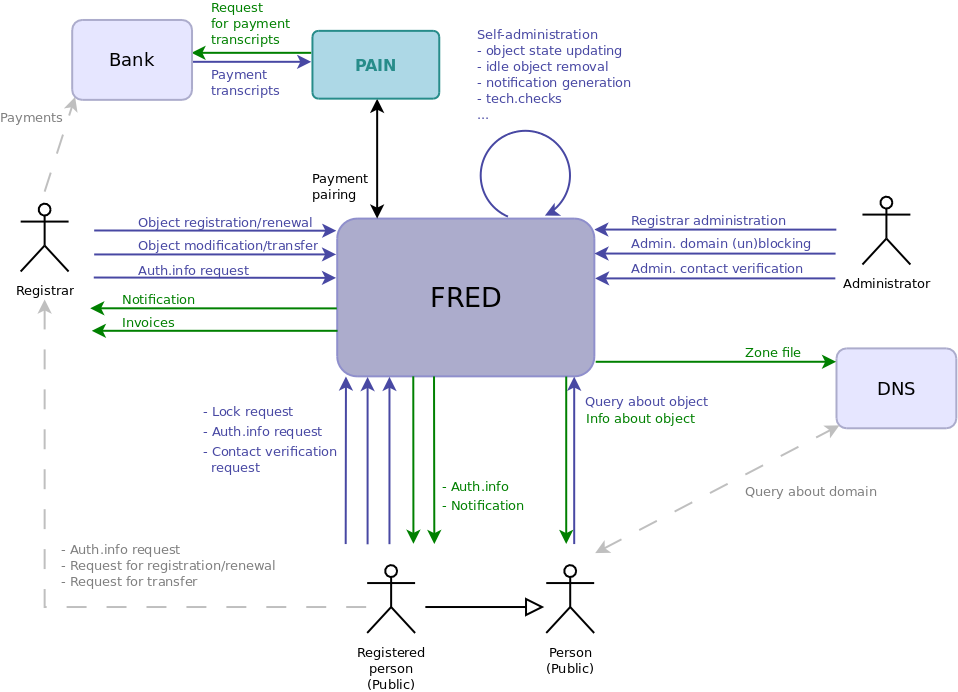
Context diagram – Overview of users and general data flows
2. Top-level components
This chapter contains diagrams and brief descriptions of FRED top-level components and their relationships.
Diagram of FRED components (For full resolution Click here)
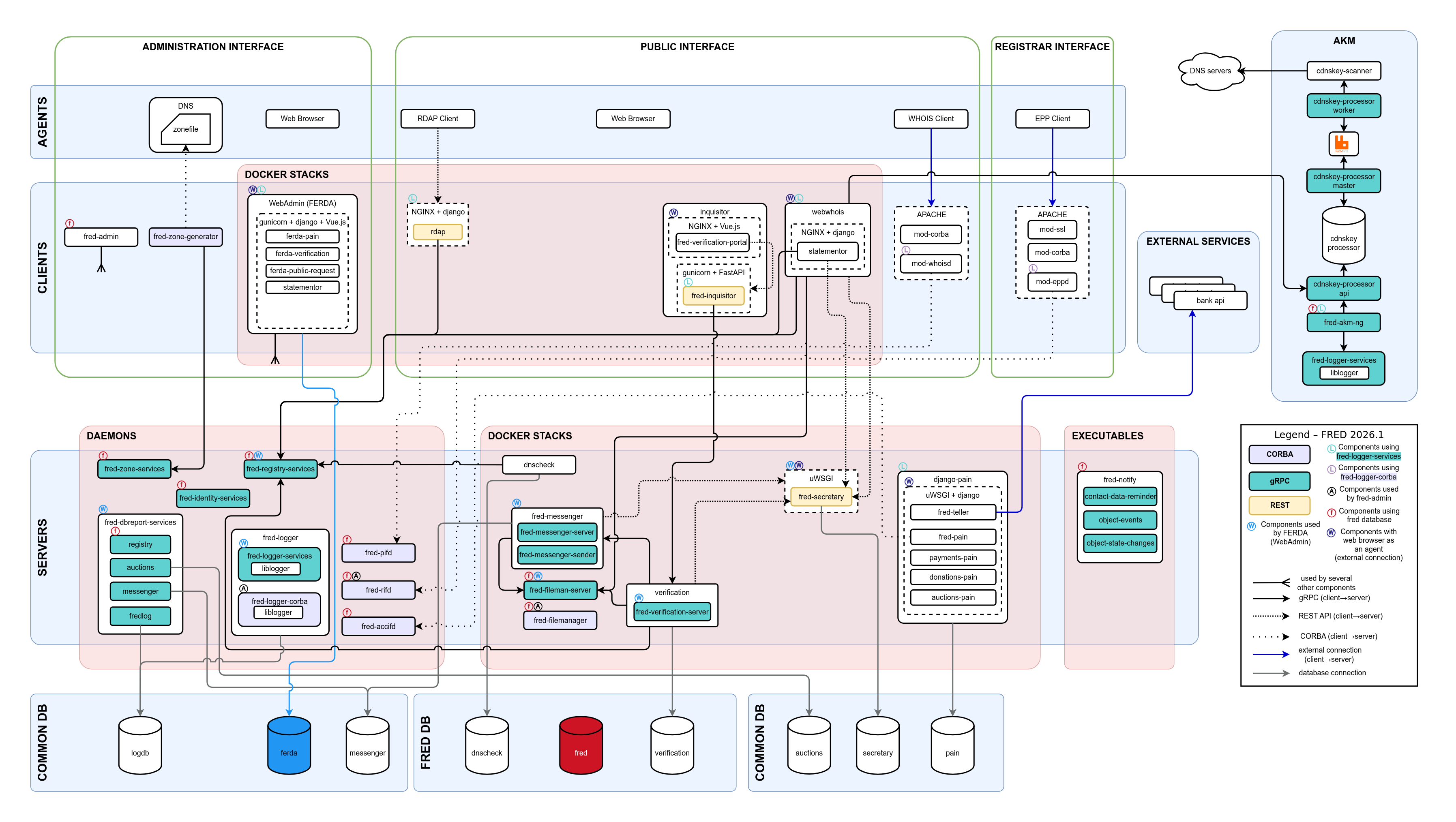
Legend
Arrows signify direct cooperation of components (the arrow points at the component which serves the other component); neither the colour nor the style of arrows carry any meaning.
For pin list of all necessary packages see the latest release notes.
2.1. User agents
In general, user agents are applications in the client-server model that act as clients and communicate with a server on behalf of a user. Most user agents in the FRED schema, such as a web browser, are not actual components of FRED. However, there is an exception of the EPP client which is a user agent that comes with the FRED.
2.1.1. EPP client
The EPP client is a tool that allows registrars to register, delete and modify objects in the Registry.
The EPP client API allows registrars to implement their own application to access the EPP service or integrate it with their systems. The API is coded in Python.
Also, the fred-client command-line application is available which is a reference implementation of the API and ready to use.
2.1.2. Whois client
This can be any application that can request domain information via the WHOIS protocol (typically the command-line whois).
2.1.3. RDAP client
This can be any application that can request domain information via the REST API and process a response in the JSON format.
2.1.4. Web browser
A web browser used to access FRED’s services should support graphics and JavaScript.
2.2. Clients
Clients constitute the frontend interfaces that serve actual users.
2.2.1. Registrar interface
This interface provides only a single service to the registrars.
2.2.1.1. EPP service
This service negotiates communication between registrars and the Registry by means of the EPP protocol which was designed for creation and administration of registrable objects.
The mod-eppd module translates the incoming requests in XML into remote CORBA calls (supported by the mod-corba module) and then translates their results back to the outgoing responses in XML. The structure of the XML documents is formally described in XML schemas and can be validated.
The communication is secured with the SSL using the mod-ssl Apache module. Transportation is provided by the TCP/IP protocols.
The service is built on a web server engine (Apache). It has its own configuration in the Apache config. syntax.
2.2.2. Administration interface
This interface provides the web service and command-line utilities for Registry administration.
2.2.2.1. WebAdmin service (Daphne)
This service provides web access to Registry administration. It can be used by the Registry customer service for manual administrative tasks.
This component is coded in Python using the CherryPy framework which provides a self-contained web server.
The service has its own configuration file.
2.2.2.2. WebAdmin service (Ferda)
Ferda is a new and enhanced web administration interface and tool for FRED and it is expected to replace the Daphne webadmin in the future.
Ferda is meant mainly for helpdesk workers who can use it to view and manage registrars and objects within the FRED system. You can see registrar and object details, the entire object history, e-mails, letters and SMS messages, passwords, etc.
The current set of features is listed in FERDA webadmin features.
It is coded in Python using the Django web framework and distributed via Docker images.
The service has its own database and configuration file (although the configuration is mostly done by setting .env
variables while running the docker container).
2.2.2.3. Fred-zone-generator
Important
Genzone client is deprecated and is no longer used.
The fred-zone-generator generates zone files and catalog zones based on data obtained from the fred-zone-services and fred-dnshosting-services servers.
The client has its own configuration file.
2.2.2.4. Transproc
This Python script is used to download and analyze transcripts of bank transactions or simple payments. It parses a downloaded transcript, whose format is specific to each bank, using a processor (configurable script), transforms it into an internal XML format and calls pain to save this data into the PAIN database.
The script has its own configuration file.
See also The Future of Payments & Invoices.
2.2.2.5. Fred-admin
This command-line application is used mainly (but not only) for automated
administration tasks, such as keeping object states up to date,
cancelling expired domains, deleting unused objects, generating notifications
and billing registrars.
Refer to fred-admin --help for all available commands.
This program shares configuration with C++ daemons.
2.2.2.6. Fred-akm
This command-line application implements the processing logic of Automated keyset management
and is used to perform the periodic task.
Refer to fred-akm --help for all available commands.
The program has its own configuration file.
The program uses a local SQLite database to store internal intermediary data (scan state) between runs.
2.2.2.7. CDNSKEY scanner
This command-line utility is used during automated management of keysets to scan specified name servers for requests to update DNSSEC keys of specified domains. The utility spreads queries over a specified run time to avoid overloading the DNS infrastructure and distributes queries per name server.
The utility is implemented with the getdns and libevent APIs.
Neither a configuration file nor database access are required. The scanner reads from STDIN and writes to STDOUT.
2.2.2.8. PAIN utility & admin service
This utility collects and parses payments, and saves them to an independent database. It is based on Django.
The utility allows to pair processed payments with a registrar credit account and invoices in FRED, either automatically or manually using the Django admin interface.
The fred-pain module connects this independent utility to FRED over CORBA.
See also The Future of Payments & Invoices.
2.2.3. Public interface
This interface provides information services to the public.
2.2.3.1. Unix whois service
This service implements the WHOIS protocol as described in RFC 3912. The protocol allows to query the Registry about registrable objects.
The mod-whoisd module translates incoming WHOIS requests into remote CORBA calls (supported by the mod-corba module) and then translates their results back to outgoing WHOIS responses.
Each response contains the link to the web whois service site which can be used to win full information about domain owners and administrative contacts.
The unix whois service allows to query even ENUM domains, although these responses do not contain the link to the web whois because the rules of information disclosure that apply to ENUM domains are different from those of common domains.
The service is built on a web server engine (Apache). It has its own configuration in the Apache config. syntax.
2.2.3.2. Web whois service
This service allows to browse the database of the Registry. It allows to search in domains, contacts, name server sets and DNS key sets. The web site is protected against data mining with CAPTCHA.
This service does not allow to browse information about ENUM domains.
It is based on Django.
2.2.3.3. RDAP service
This service processes queries sent via the HTTP protocol using the REST API. If the query is successful, the response contains JSON-formatted data.
It is based on Django.
2.3. Servers
This is a set of components which implement the backend of the Registry and which can run independently of each other. All of them use the same ORB implementation (omniORB) which takes care of the server side and process threading.
2.3.1. C++ daemons
These backend components are coded in C++.
Each of them is launched in a separate process and they may share a single configuration file.
2.3.1.1. fred-rifd
The registrar interface daemon.
This daemon implements operations over the database defined in the EPP protocol and it is used by the EPP service. Every EPP operation is mapped to a corresponding CORBA operation. Operations over objects are idempotent, i.e. if the same operation is invoked repeatedly, it does not change the state of object in the Registry.
The daemon is aware of all connected clients; if a client connects in a new session, a unique identifier is generated to identify the session in EPP communication and in the audit log.
All clients’ activity is recorded in the database including the original request and response XML files.
Object-altering operations make the system record the object in the history before the change is applied.
A database connection is opened during each EPP operation (and closed at the end). Therefore the pgpool tool is utilized to cache the connections, thus reducing the connection overhead.
2.3.1.2. fred-pifd
The public interface daemon.
This daemon implements operations over the database which make information about domains accessible to the public; it functions as the backend for the unix whois, web whois and RDAP.
2.3.1.3. fred-rsifd
Important
The fred-rsifd daemon has been removed in FRED 2.48.0
and replaced by the fred-statementor library.
The record statement interface daemon.
This daemon implements operations over the database which allow generation of signed PDF documents with information about registrable objects; it functions as another backend for Daphne, web whois and Domain Browser extension.
2.3.1.4. fred-adifd
The administration interface daemon.
This daemon implements administration operations over the database which allow to browse any information in the Registry (including the history and audit log) and to add and modify some of it.
It functions as the backend for Daphne, the web administration service.
2.3.1.5. fred-akmd
The automated keyset management daemon.
This daemon implements operations over the database that support automatic management of keysets (loading domains with name servers, updating DNSSEC, notifying contacts); it functions as the backend for the AKM client.
2.3.1.6. fred-accifd
The accounting daemon.
This daemon implements operations for pairing processed payments of registrars with credit and invoices.
2.3.1.7. fred-msgd
The messaging daemon.
This daemon implements operations for generating and sending text messages (SMS) and printed letters.
Important
The fred-msgd daemon has been replaced
by messenger and
its dependent services in FRED 2.48.0.
The fred-msgd daemon has been replaced by following services:
Sending the messages is replaced by
fred-messenger.File creation (PDF, XML, CSV) is replaced by
django-secretary. Thedoc2pdfpackage is not used anymore in any part of messaging process.Communication with fred-fileman (e.g. storing attachments) is now via library,
file-clientis not used anymore.
Generating specific messages is handled by these clients:
fred-notify-contact-data-reminder– runs daily, sends annual message to contacts.fred-notify-object-state-changes– runs after regular object procedure (twice a day), sends notification about changes in object states.fred-notify-object-events– runs every 5 minutes, sends notification about used commands (create, update, delete, renew, transfer), typically done via EPP.
2.3.1.8. fred-logd
The audit logging daemon or “logger”.
This daemon creates audit trail of all user activity that passes through FRED applications and modules (i.e. Clients, see the Diagram of FRED components (For full resolution Click here)).
Important
The fred-logd daemon has been replaced in FRED 2.48.0
by the binaries fred-logger-services
and fred-logger-corba. Both are independent services that only use the
same core library librogger. Fred-logger-services implements gRPC interface,
fred-logger-corba implements CORBA interface and is intended for old
CORBA-based clients.
2.3.1.9. fred-logger-services
This deamon replaces the fred-logd deamon, but the fred-logger-services's clients are gRPC apps, not CORBA apps
(a different communication protocol is used). We are developing a wrapper from Corba to gRPC for CORBA clients that will
simplify transition of clients to only one logger service implementation.
2.3.1.10. fred-mifd
The daemon of the MojeID extension.
This daemon implements operations for the MojeID extension.
2.3.1.11. fred-dbifd
The daemon of the Domain Browser extension.
This daemon implements operations for the Domain Browser extension.
2.3.1.12. fred-registry-services
This deamon provides features via gRPC interface for getting information about objects in registry, for searching among registry entries, and, in the future, also for managing (creating, deleting, updating) objects in registry. It works directly with the FRED database.
2.3.1.13. fred-zone-services
This is a gRPC backend for generating zone file.
In addition to the backend itself, the solution also includes the client fred-zone-generator, which is used for generating the zone file.
2.3.2. fred-messenger
FRED services for sending, generation and archivation of documents. You can see its dependencies on a simplified diagram:
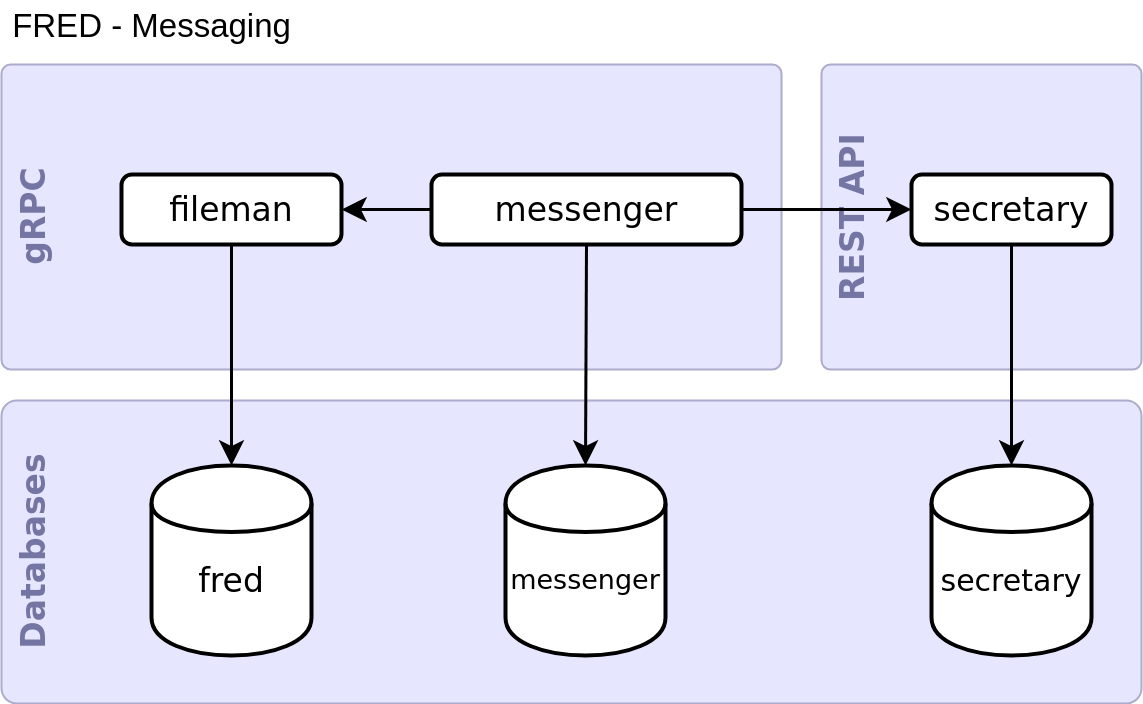
Diagram of FRED messaging components
2.3.3. django-secretary
Service for generating documents and template management.
2.3.4. fred-fileman
Service for file management.
2.3.5. PYFRED daemon(s)
These backend components are coded in Python.
The PYFRED is a framework which provides common functions to several modules that act as standalone CORBA servers and implement various operations over the database.
The common functions provided by the framework encompass:
process logging,
database connection management,
parsing of a configuration file,
ORB initialization and registration of objects with the CORBA naming service,
launching of periodic tasks registered by the modules.
The modules can run either in a single process or in several processes and they may share a single configuration file.
2.3.5.1. GenZone
Important
The genzone daemon is deprecated and is no longer used. It has been replaced by fred-servers-zone and its dependent services.
The zone generator daemon.
This daemon implements operations over the database used during zone file generation.
A generation is requested by the client application that can run on another machine. The client receives a portion of data of a fixed size, first, and then orders the remaining data in small chunks. (The total size of a zone file can reach hundreds of MB.)
2.3.5.2. Mailer
Important
Since FRED 2.48.0 the mailer daemon is deprecated and is no longer used. It has been replaced by messenger and its dependent services.
The mailer daemon.
This daemon implements the part of the notification system that delivers messages through email. It integrates a templating system for email assembly, operations for sending and archivation of outgoing email and search in archived messages.
Note
The mailer does not send email by itself, it just hands all email over to a mail transfer agent.
Attachments are either constructed from templates or retrieved from the file manager.
The mailer is used by the CORBA servers fred-rifd, fred-adifd, and also by the CORBA clients WebAdmin and MojeID extension.
2.3.5.3. FileManager
The file manager daemon.
This daemon implements operations for managing files, namely the upload, download and search of managed files. Each file is stored in the file system as such and only its metadata are recorded in the database.
The file manager is used by mailer, web whois service and file manager client.
2.3.5.4. TechCheck
Important
Since FRED 2.48.0 the TechCheck daemon is deprecated and is no longer used. It has been replaced by messenger and its dependent services.
The technical checks daemon.
This daemon implements operations for performing technical tests on name server sets.
The tests are either launched periodically and a report is sent to the corresponding technical contact of the nsset by email, or they are requested by registrars and the reports are included in EPP poll messages.
The technical tests are scaled by severity and the tests of higher severity can be performed only if the tests of lower severity were successful.
Both planned checks and results are stored in the database.
2.4. Databases
The selected database solution is PostgreSQL.
The C++ backend components use the libpq library for database connectivity.
The Python backend components use Python’s own database interface.
3. Distributed deployment example
Deploying FRED on multiple servers brings at least two advantages:
increased performance,
access control on the network level.
Deploying on multiple physical servers is not the only distributed solution, deploying on virtual servers or separating tasks on the process level is also possible.
Nodes overview
Nodes in this document represent execution environments.
We work with the following nodes:
EPP node – EPP service
ADMIN node – web admin service
WEB node – public web services: Unix WHOIS, Web WHOIS, RDAP
HM node – zone management
APP node – application servers, CLI admin tools, pgbouncer, CORBA naming service
DB node – the main FRED database
LOGDB node – the logger database
Tip
Redundancy
This text does not describe redundancy options in detail, but here is a quick tip:
database replication is a standard technique to protect data,
the whole system can be replicated in several instances on different localities, which can substitute one another when one instance fails or during a system upgrade.
3.1. Network
Network rules are described per node in the following sections, but here is an overview of logical connections in the network (a single instance of the system).
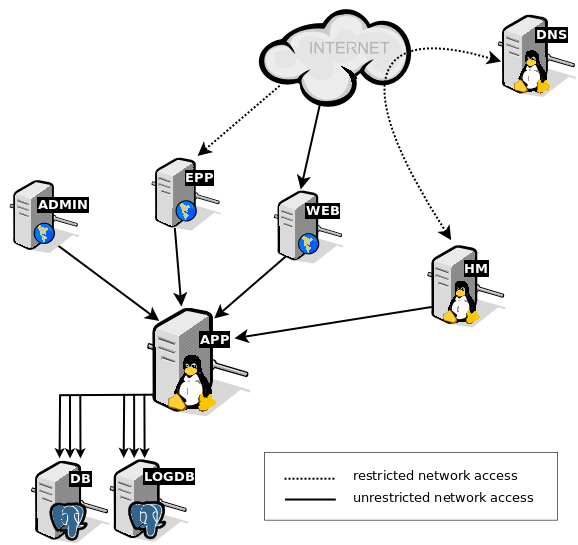
Network – Logical topology
Restricted network access means that servers should be accessed only from IP addresses and ports allowed on a firewall.
Unrestricted network access means that servers can be accessed from any IP address, but only necessary ports should be open for access as illustrated in the network rules for each node.
3.2. EPP node
Provides: EPP service
Packages:
libapache2-mod-corba
libapache2-mod-eppd;
Network:
access to EPP (tcp, port 700) permitted only from particular IP addresses (or ranges) declared by registrars
Package |
Provided services |
Description |
Default config location |
|---|---|---|---|
|
None (is only an Apache module) |
Apache module that provides common functionality of CORBA communication for EPP and WHOIS Apache modules |
|
|
None (is only an Apache module) |
Apache module for parsing EPP commands and transforming them into CORBA calls to server (and vice versa) |
|
3.3. ADMIN node
Provides: Web administration interface
Network:
access to HTTPS (tcp, port 443) permitted only from the private network of the Registry
Docker image |
Description |
Default config location |
|---|---|---|
|
http webserver |
none, configuration example in fred/ferda/-/tree/master/docs/demo-deploy |
|
webserver gateway interface |
none, configuration example in fred/ferda/-/tree/master/docs/demo-deploy |
3.4. WEB node
Provides: Unix WHOIS, Web WHOIS, RDAP
Network:
access to HTTPS (tcp, port 443) permitted from anyone
access to WHOIS (tcp, port 43) permitted from anyone
Package |
Provided services |
Description |
Default config location |
|---|---|---|---|
|
No provided services (is only an Apache module) |
Apache module that provides common functionality of CORBA communication for EPP and WHOIS Apache modules |
|
|
No provided services (is only an Apache module) |
Apache module for parsing EPP commands and transforming them into CORBA calls to server (and vice versa) |
|
Docker image |
Description |
Default config location |
|---|---|---|
|
http webserver |
none, configuration example in fred/ferda/-/tree/master/docs/demo-deploy |
|
webserver gateway interface |
none, configuration example in fred/ferda/-/tree/master/docs/demo-deploy |
|
http webserver |
none, configuration example in fred/ferda/-/tree/master/docs/demo-deploy |
|
webserver gateway interface |
none, configuration example in fred/ferda/-/tree/master/docs/demo-deploy |
3.5. HM node
Hidden master for the DNS infrastructure.
Provides: zone file generation, zone signing, DNS servers notification
Network:
access to IXFR (tcp, port 53) permitted only from DNS servers
Package |
Provided services |
Description |
Default config location |
|---|---|---|---|
|
None |
System binary for zonefile generation |
|
3.6. APP node
Provides:
CORBA naming service (omninames) as a virtual server “corba”,
backend application servers,
CLI administration tools,
Tip
In addition to FRED components we recommend adding pgbouncer for database connection distribution.
Network:
only internal access from the private network of the Registry
Package |
Provided services |
Description |
Default config location |
|---|---|---|---|
|
|
FRED backend for accounting |
|
|
|
Administration interface daemon |
|
|
None |
FRED automatic keyset management client |
|
|
|
FRED backend for automatic keyset management |
|
|
None |
FRED fileman services interface definition files |
None |
|
None |
FRED logger services interface definition files |
None |
|
|
FRED server for database reports (gRPC) |
None |
|
|
FRED service for file management |
|
|
|
FRED logger services (gRPC) |
None |
|
|
FRED logger services (CORBA) |
None |
|
None |
FRED notify implementation |
|
|
|
FRED backend for public requests management |
None |
|
|
FRED registry core services (gRPC) |
None |
|
|
FRED backend service for DNS zone generator |
|
|
None |
FRED server interface definition files |
None |
|
|
FRED public interface daemon |
|
|
|
FRED registrar interface daemon |
|
|
None |
CDNSKEY records scanner |
None |
|
None |
Data validation and settings management using python type hinting |
None |
3.7. Database nodes
Database is separated into several nodes:
DB – the main database
freddb– data of all domains, contacts, registrars, history etc.LOGDB – the audit log (logger) database
logdb– logging of all user transactionsmessenger
secretary
FERDA
We have the logger database separately due to high workload.
Network:
accessed only by the backend server(s) from the APP node
Package |
Provided services |
Description |
Default config location |
|---|---|---|---|
|
None |
Database schema and example data for FRED |
None |
|
None |
PostgreSQL database server |
None |
3.8. Secretary node
Package |
Provided services |
Description |
Default config location |
|---|---|---|---|
|
|
Django app for rendering e-mails and PDFs |
|
|
None |
http web server |
None |
|
None |
webserver gateway interface |
None |
3.9. Messenger node
Package |
Provided services |
Description |
Default config location |
|---|---|---|---|
|
None |
FRED fileman services interface definition files |
None |
|
None |
FRED messenger services interface definition files |
None |
|
|
FRED service for sending and archiving messages |
None |
4. Source code
FRED’s source code is split across multiple subprojects, each maintained as a separate repository in the fred GitLab group, where every repository’s description explains its role in the system.
Administration Manual
This document provides guidance on installation, operation and maintenance of the system.
Target audience
System administrators, customer support
Purpose
Making the system work and keeping it operational (installation, configuration, customization, maintanance), setting automated tasks, being aware of the tools for manual intervention.
Prerequisites
To understand this manual, you should already be familiar with the general features and the architecture of the system.
The procedures of this manual expect at least basic experience in the usual tasks of a Un*x/Linux-like environment.
Terms & definitions
Terms and definitions can be found in the glossary.
Chapters
1. Installation
This chapter describes how to install the FRED.
1.1. System requirements
This section describes the environment suitable for running the FRED.
1.1.1. Hardware
We recommend to run the FRED on 64-bit architectures.
Binaries are available only for 64-bit architectures.
Sources can be compiled for both 32-bit and 64-bit architectures but the 32-bit variant is no longer tested or supported.
1.1.2. Operating system
To deploy binaries, you must have installed this operating system:
Debian 12 (Bookworm)
To compile sources from tarballs, you may try to use any Linux distribution of your choice, but we tested the current compilation/installation procedure only on Debian.
1.1.3. Auxiliary software
To make use of all FRED features, the following auxiliary programs are required:
(essential) CORBA naming server (OmniNames),
(essential) PostgreSQL database server (PG17),
(essential) Apache web server (Apache>2.2),
mail server (Postfix, Sendmail, Exim or other),
DNS server (KnotDNS, Bind, NSD or other).
Note
All of these tools are installed automatically when installing from binaries but they must be installed manually when you decide to compile source code yourself. But don’t worry, the appropriate packages are included in the dependency lists for each supported operating system.
1.2. FRED demo
The demo environment differs from a production deployment in several important ways:
Sample data. The database is already filled in with a sample zone (
.demo), two registrars (an internalREG-SYSTEMand an externalREG-DEMO), a set of test contacts and domains. In regular deployment, you initialize the zone, registrar, and price list by yourself during registry initialization.Relaxed security. TLS certificates, EPP passwords and database credentials are set to well-known test values.
Single-node layout. All FRED services run on one machine. More details about the differences are explained in registry infrastructure basics section.
No mail or DNS integration. The demo does not send emails or publish zone files to a live DNS server. Emails are created and processed by
messenger, so it is possible to find them in messenger db (sudo -u postgres psql messenger) or Ferda.
For testing and demonstration purposes, we provide a virtual image of Debian server with uninitialized instance of FRED. Download the image here. For building the demo we use script in the repository fred/demo-install.
Import the
.qcow2image.After importing, you can launch the server and ssh into the machine with user:
fred, password:password.Note
One of the possible ways to import and run the image is using Virtual Machine Manager on Linux. The steps are as follows:
Install Virtual Machine Manager:
sudo apt-get update
sudo apt-get install virt-manager
Import the Image:
sudo virt-install --name fred-demo --import \
   --disk=/home/$USER/path-to-image/fred-v2026.1-debian12.qcow2 \
   --vcpus=6 \
   --memory=8192 \
   --os-variant=debian12 \
   --noautoconsole
Find the IP Address:
virsh domifaddr fred-demo
Note the
IP addressassigned to the interface.Connect to the Virtual Machine:
ssh -L 8445:localhost:8445 \
   -L 8443:localhost:8443 \
   -L 8444:localhost:8444 \
   -L 8446:localhost:8446 \
   fred@<IP_ADDRESS>
(Replace
<IP_ADDRESS>with the address obtained in the previous step.)Tip
The
-Lflags forward the specified local ports to the corresponding ports on the remote VM. Accessing the services vialocalhostonly works after establishing the SSH tunnel shown above or adding an alias in/etc/hosts– otherwise, use the VM’s IP address directly.After successfully logging in, you can see all registry services via command:
sudo systemctl status 'fred-*'and the containers status via:
sudo docker ps
Note
At this point, the registry is running, but the billing is not enabled and the price for domain registration is not set. This is done to allow you to explore the registry without worrying about the billing.
However, to make the registry fully functional, you should follow the next steps described in chapter registry initialization.
- The registry is ready to use. You can find the following services running on these locations:
- Browser:
FERDA – web based administration interface: https://localhost:8445 login
admin/passwordSecretary – django admin app for editing mail templates: https://localhost:8443 login
admin/password- WebWHOIS – simple website for searching domains using whois protocol: https://localhost:8444
block objects: https://localhost:8444/block_objects
unblock objects: https://localhost:8444/unblock_objects
send AuthInfo: https://localhost:8444/send-password
- Protocols:
EPP localhost:700
WHOIS https://localhost:8444
- CLI Tools:
fred-admin– Administrate the registry, registrars and customise pricing (some of these actions are also available in more user-friendly FERDA administration interface) - see repositoryeppic– A Python EPP client for registrars to allow administration of registry objects without having to write their own implementation of EPP - see repository.C++ and python daemons as described here
- Databases: Database cluster is accessible from the VM with
sudo -u postgres psql. Access from external client is also feasible with appropriate modifications. After logging in, you can see the list of all available databases with command:
\l.
- Databases: Database cluster is accessible from the VM with
Note
Please note that for full functionality you should configure periodic tasks, as described in chapter periodic tasks.
1.3. Installation of FRED
This section of documentation explains required steps that need to be done to install software required for the operation of FRED registry.
Please be advised that the current version of FRED(2026.1) is only supported by Debian 12. If you need to use a different system, you can build FRED daemons manually using the source code available here.
1.3.1. Multinode setup
This installation will guide you through installing FRED in a multinode setup (separate individual applications logically from each other). This method is recommended by us. It is possible to divide individual applications onto machines according to your preferences.
For a test installation and to try out FRED, you can install everything on a single virtual machine with Debian 12, or try the demo image we have published at https://fred-demo.nic.cz/.
1.3.2. VMs preparation
To install FRED, prepare the following machines, ideally KVMs:
Node |
Specs(minimum recommended for production use) |
OS |
Description |
|---|---|---|---|
|
4vCPU, 16GB RAM, 250GB SSD STORAGE |
Up to you |
Postgresql 17 database. |
|
8vCPU, 16GB RAM, 100GB SSD STORAGE |
Debian 12 |
Core FRED registry backend. |
|
4vCPU, 8GB RAM, 50GB SSD STORAGE |
Debian 12 |
Registrar interface. |
|
4vCPU, 8GB RAM, 50GB SSD STORAGE |
Up to you |
Docker server used for administration(FERDA). |
|
4vCPU, 8GB RAM, 50GB SSD STORAGE |
Debian 12 |
Docker server used for web apps(WebWHOIS, RDAP…), also used for UNIX whois. |
|
4vCPU, 8GB RAM, 50GB SSD STORAGE |
Debian 12 |
Hidden master server for generating and loading the zone file. |
|
4vCPU, 8GB RAM, 50GB SSD STORAGE |
Up to you |
Docker server used for dockerized backend services such as secretary, messenger and fileman. |
|
4vCPU, 8GB RAM, 50GB SSD STORAGE |
Debian 12 |
Server for automated keyset management utilities - cdnskey-processor and rabbitmq. |
For testing purposes, it is not necessary to have the same hardware resources as described above; for each domain registry, the hardware specifications should be modified according to the possibilities and expected traffic.
1.3.3. Nodes installation
1.3.3.1. DB node
# OS is up to you, postgresql 17 is required

apt update
apt install -y ca-certificates curl gnupg lsb-release git sudo

# Clone repo with configurations(.sql structures of databases)
cd /tmp/
git clone https://gitlab.nic.cz/fred/demo-install.git

# Move conf files to /tmp
mv demo-install/files /tmp/

# Install postgresql 17
wget --quiet -O - https://www.postgresql.org/media/keys/ACCC4CF8.asc | sudo apt-key add -
echo "deb http://apt.postgresql.org/pub/repos/apt/ `lsb_release -cs`-pgdg main" |sudo tee  /etc/apt/sources.list.d/pgdg.list
apt update
apt -y install postgresql-17 postgresql-client-17

# Set psql timezone to UTC, set correct listen addresses and setup pg_hba correctly
sed -i~ -e "s/^#\?\s*timezone\s*=.*/timezone = 'UTC'/" /etc/postgresql/17/main/postgresql.conf
sed -i "s/#listen_addresses = 'localhost'/listen_addresses = '*'/" /etc/postgresql/17/main/postgresql.conf
systemctl restart postgresql

# Initialize fred and fredlog database
mkdir -p /var/lib/postgresql/17/fred
cp -r files/db-config/* /var/lib/postgresql/17/fred/
sudo -u postgres psql -c "CREATE USER fred WITH ENCRYPTED PASSWORD '<strong-password>';"
sudo -u postgres psql -c "CREATE USER logd WITH ENCRYPTED PASSWORD '<strong-password>';"
sudo -u postgres psql -c 'CREATE DATABASE fred;'
sudo -u postgres psql -c 'CREATE DATABASE fredlog;'
sudo -u postgres psql -c 'ALTER DATABASE fred OWNER TO fred;'
sudo -u postgres psql -c 'ALTER DATABASE fredlog OWNER TO logd;'
sudo -u postgres psql -c 'GRANT ALL PRIVILEGES ON DATABASE fred TO fred;'
sudo -u postgres psql -c 'GRANT ALL PRIVILEGES ON DATABASE fredlog TO logd;'

su - postgres -c "PGPASSWORD='<strong-password>' psql -h 127.0.0.1 -U fred -d fred -f 17/fred/structure.sql"
su - postgres -c "PGPASSWORD='<strong-password>' psql -h 127.0.0.1 -U fred -d fred -f 17/fred/fred_db.sql"
su - postgres -c "PGPASSWORD='<strong-password>' psql -h 127.0.0.1 -U logd -d fredlog -f 17/fred/structure.sql"
su - postgres -c "PGPASSWORD='<strong-password>' psql -h 127.0.0.1 -U logd -d fredlog -f 17/fred/logdb_db.sql"
su - postgres -c "PGPASSWORD='<strong-password>' psql -h 127.0.0.1 -U logd -d fredlog -f 17/fred/fix-seq.sql"

# Initialize cdnskey_processor database
sudo -u postgres psql -c "CREATE USER cdnskey_processor WITH ENCRYPTED PASSWORD '<strong-password>';"
sudo -u postgres psql -c "CREATE USER cdnskey_processor_ro WITH ENCRYPTED PASSWORD '<strong-password>';"
sudo -u postgres psql -c 'CREATE DATABASE cdnskey_processor;'
sudo -u postgres psql -c 'ALTER DATABASE cdnskey_processor OWNER TO cdnskey_processor;'
sudo -u postgres psql -c 'GRANT ALL PRIVILEGES ON DATABASE cdnskey_processor TO cdnskey_processor;'

su - postgres -c "PGPASSWORD='<strong-password>' psql -h 127.0.0.1 -U cdnskey_processor -d cdnskey_processor -f 17/fred/cdnskey/0001_schema.sql"

# Add akm-worker into the cdnskey_processor database
su - postgres -c "PGPASSWORD='<strong-password>' psql -h 127.0.0.1 -U cdnskey_processor -d cdnskey_processor -c \"INSERT INTO worker (name) VALUES ('worker-1');\""

# Dont forget to configure /etc/postgresql/17/main/pg_hba.conf with correct ip addresses
1.3.3.2. APP node
# OS: Debian 12

apt update
apt install -y ca-certificates curl gnupg lsb-release git sudo

# Clone repo with configurations(.sql structures of databases)
cd /tmp/
git clone https://gitlab.nic.cz/fred/demo-install.git

# Move conf files to /tmp
mv demo-install/files /tmp/

# Add cznic keyring for fred packages
mkdir -p /usr/share/keyrings/
curl https://archive.nic.cz/dists/cznic-archive-keyring.gpg >/usr/share/keyrings/cznic-archive-keyring.gpg

# Add source list for FRED
if [ ! -f /etc/apt/sources.list.d/fred.list ]; then
cat << EOT >> /etc/apt/sources.list.d/fred.list
deb [signed-by=/usr/share/keyrings/cznic-archive-keyring.gpg] http://archive.nic.cz/public $(lsb_release -sc) main
EOT
fi

# Copy FRED pin list to /etc/apt/preferences.d/fred
cp files/fred /etc/apt/preferences.d/fred

apt update

# Installation of FRED
apt -y install fred-backend-logger fred-backend-logger-corba fred-backend-registry fred-backend-notify fred-backend-public-request fred-backend-zone fred-zone-generator fred-backend-dbreport fred-rifd fred-pifd fred-adifd fred-akm-ng fred-accifd libapache2-mod-eppd python3-fred-epplib fred-eppic

# Remove installation files created by packages, and use example confs from demo repository - it is expected that you will change these configurations according to your needs
rm -rf /etc/fred/*
cp -r files/configs/* /etc/fred/
cp files/configs/eppic.conf /etc/eppic/eppic.conf
rm /etc/fred/eppic.conf

# Initial FRED registry setup - create system registrar, your initial registrar, add EPP access, create zone etc..
# More usage can be found in manual page of fred-admin

# You can name the system registrar as you want - but then dont forget to change it in FRED configurations in /etc/fred/
# REG-SYSTEM is the default one
/usr/sbin/fred-admin --registrar_add --handle=REG-SYSTEM --reg_name=REG-SYSTEM --organization=SYSTEM --street1=SYSTEM --city=SYSTEM --email=SYSTEM --url=SYSTEM --country=CZ --dic=12345 --no_vat --system

# Create your registrar that will be used to register domains, contacts, nssets etc..
fred-admin --registrar_add --handle "REG-YOUR_HANDLE" --country "EXAMPLE COUNTRY CODE(2)" --ico "123456789" --reg_name "REG-NAME" --organization "Your org" --street1 "Your street" --city "Your city" --postalcode "00000" --telephone "+000.123456789" --email "someemail@something.com" --url "https://webpage.com" --dic "DEMO12345678" --system

# Add EPP access to your registrar
# Please change the certificate used to your own generated certificate(authority used to generate the certificate needs to be configured on EPP node - as shown below)
# Also the password should be something strong - max. 16 chars
# Fingerprint of certificate can be obtained via `openssl x509 -noout -fingerprint -md5 -in /path/to/cert.crt`
fred-admin --registrar_acl_add --handle REG-YOUR_HANDLE --certificate "Certificate MD5 fingerprint" --password <strong-password>

# Create zone you want to manage using FRED
fred-admin --zone_add --zone_fqdn=<zone> --hostmaster hostmaster@domain.something \
        --ns_fqdn some.ns.test.something
fred-admin --zone_ns_add --zone_fqdn=<zone> --ns_fqdn=other.ns.test.something

# Ensure the log files are created
touch /var/log/fred-zone-services.log
chown fred /var/log/fred-zone-services.log

# Restart all of the Fred daemons
systemctl restart 'fred-*'

# Mask services not included in public release(they are not usable)
systemctl mask fred-auction-warehouse
systemctl mask fred-dbreport-services
rm /lib/systemd/system/fred-auction-warehouse.service
systemctl reset-failed

# If any of the services are failing to start, you can debug them using manual run, for example if you want to debug why `fred-backend-logger.service` is not starting use: `sudo -u fred fred-logger-services --config /etc/fred/fred-logger-services.conf` - it will show you what's wrong
1.3.3.3. EPP node
# OS: Debian 12

apt update
apt install -y ca-certificates curl gnupg lsb-release git sudo

# Clone repo with configurations(.sql structures of databases)
cd /tmp/
git clone https://gitlab.nic.cz/fred/demo-install.git

# Move conf files to /tmp
mv demo-install/files /tmp/

# Add cznic keyring for fred packages
mkdir -p /usr/share/keyrings/
curl https://archive.nic.cz/dists/cznic-archive-keyring.gpg >/usr/share/keyrings/cznic-archive-keyring.gpg

# Add source list for FRED
if [ ! -f /etc/apt/sources.list.d/fred.list ]; then
cat << EOT >> /etc/apt/sources.list.d/fred.list
deb [signed-by=/usr/share/keyrings/cznic-archive-keyring.gpg] http://archive.nic.cz/public $(lsb_release -sc) main
EOT
fi

# Copy FRED pin list to /etc/apt/preferences.d/fred
cp files/fred /etc/apt/preferences.d/fred

apt update

# Installation of FRED packages
apt -y install apache2 libapache2-mod-corba libapache2-mod-eppd python3-fred-epplib

# Enable apache2 modules required by EPP
a2enmod corba eppd ssl

# Enable eppd site in apache
a2ensite 02-fred-mod-eppd-apache

# Change logger configuration to point to correct name
sed -i 's/\(CorbaObject[[:space:]]*\)"Logger"\([[:space:]]*"Logger_alias"\)/\1"LoggerNew"\2/' /etc/apache2/sites-enabled/02-fred-mod-eppd-apache.conf

# Do not forget to edit configuration to suit your needs (/etc/apache2/sites-enabled/), then you can restart
# In this configuration you can specify certification authority that is used to authenticate registrars via EPP
systemctl restart apache2

# After installation you should be able to see apache2 listening on port 700, and you should be able to connect via fred-eppic to this node
1.3.3.4. ADMIN node
# OS: Up to you - this is a docker server

apt update
apt install -y ca-certificates curl gnupg lsb-release git sudo nginx-full

# Clone repo with configurations(.sql structures of databases)
cd /tmp/
git clone https://gitlab.nic.cz/fred/demo-install.git

# Move conf files to /tmp
mv demo-install/files /tmp/

# Docker installation
sudo mkdir -m 0755 -p /etc/apt/keyrings

# Add docker gpg key
sudo curl -fsSL https://download.docker.com/linux/debian/gpg -o /etc/apt/keyrings/docker.asc
sudo chmod a+r /etc/apt/keyrings/docker.asc

# Add docker repository
echo \
"deb [arch=$(dpkg --print-architecture) signed-by=/etc/apt/keyrings/docker.asc] https://download.docker.com/linux/debian \
$(lsb_release -cs) stable" | sudo tee /etc/apt/sources.list.d/docker.list > /dev/null

# Install required docker packages
apt update
apt install -y docker-ce docker-ce-cli containerd.io docker-buildx-plugin docker-compose-plugin

# Install and configure nginx
# Also consider using LE certificate or your own self-signed TLS cert to secure the webpage
apt install -y nginx-full
rm /etc/nginx/sites-enabled/default
# In this file `ferda` change the server name and certificates used
cp -r /tmp/files/docker-apps/nginx-demo/ferda /etc/nginx/sites-available/
ln -sf /etc/nginx/sites-available/ferda /etc/nginx/sites-enabled/ferda

systemctl restart nginx

# Create directory, where docker apps will store its configurations
mkdir -p /var/docker-apps

# Prepare Ferda app directory
cp -r /tmp/files/docker-apps/ferda /var/docker-apps/

# Move into Ferda directory
cd /var/docker-apps/ferda/

# There you should edit .env file without your configuration - that means correct addresses of registry services, address of database node for ferda etc...
# After you configure these options you can run ferda containers
docker compose up -d

# You should be able to see ferda containers in the output of `docker ps`, if so run migrations, and create superuser

docker compose run --rm ferda_uwsgi django-admin migrate

docker compose run -e DJANGO_SUPERUSER_USERNAME=<admin_username> -e DJANGO_SUPERUSER_EMAIL=<your-email-address> -e DJANGO_SUPERUSER_PASSWORD=<strong-password> --rm ferda_uwsgi django-admin createsuperuser --noinput

# After that you can login at your Ferda domain as a created superuser
1.3.3.5. WEB node
# OS: Debian 12 - altough it is a docker server, Debian 12 is needed for UNIX whois

apt update
apt install -y ca-certificates curl gnupg lsb-release git sudo whois

# Clone repo with configurations(.sql structures of databases)
cd /tmp/
git clone https://gitlab.nic.cz/fred/demo-install.git

# Move conf files to /tmp
mv demo-install/files /tmp/

# Install UNIX WHOIS
## Add cznic keyring for fred packages
mkdir -p /usr/share/keyrings/
curl https://archive.nic.cz/dists/cznic-archive-keyring.gpg >/usr/share/keyrings/cznic-archive-keyring.gpg

## Add source list for FRED
if [ ! -f /etc/apt/sources.list.d/fred.list ]; then
cat << EOT >> /etc/apt/sources.list.d/fred.list
deb [signed-by=/usr/share/keyrings/cznic-archive-keyring.gpg] http://archive.nic.cz/public $(lsb_release -sc) main
EOT
fi

## Copy FRED pin list to /etc/apt/preferences.d/fred
cp files/fred /etc/apt/preferences.d/fred

apt update

## Installation of FRED packages
apt -y install apache2 libapache2-mod-corba libapache2-mod-whoisd

## Enable apache2 modules required by EPP
a2enmod corba whoisd ssl

## Enable eppd site in apache
a2ensite 02-fred-mod-whoisd-apache

# Change logger configuration to point to correct name
sed -i 's/\(CorbaObject[[:space:]]*\)"Logger"\([[:space:]]*"Logger_alias"\)/\1"LoggerNew"\2/' /etc/apache2/sites-enabled/02-fred-mod-whoisd-apache.conf

## Do not forget to edit configuration to suit your needs (/etc/apache2/sites-enabled/), then you can restart
## In this configuration you can specify certification authority that is used to authenticate registrars via EPP
systemctl restart apache2

## After the installation you should be able to see apache2 listening on port 53, and you should be able to ask for domain using `whois` command

# Install other "public" docker apps - RDAP, WebWHOIS
## Docker installation
sudo mkdir -m 0755 -p /etc/apt/keyrings

## Add docker gpg key
sudo curl -fsSL https://download.docker.com/linux/debian/gpg -o /etc/apt/keyrings/docker.asc
sudo chmod a+r /etc/apt/keyrings/docker.asc

## Add docker repository
echo \
"deb [arch=$(dpkg --print-architecture) signed-by=/etc/apt/keyrings/docker.asc] https://download.docker.com/linux/debian \
$(lsb_release -cs) stable" | sudo tee /etc/apt/sources.list.d/docker.list > /dev/null

## Install required docker packages
apt update
apt install -y docker-ce docker-ce-cli containerd.io docker-buildx-plugin docker-compose-plugin

## Install and configure nginx
## Also consider using LE certificate or your own self-signed TLS cert to secure the webpage
apt install -y nginx-full
rm /etc/nginx/sites-enabled/default
## In these files `webwhois` and `rdap` change the server name and certificates used
cp -r /tmp/files/docker-apps/nginx-demo/webwhois /etc/nginx/sites-available/
cp -r /tmp/files/docker-apps/nginx-demo/rdap /etc/nginx/sites-available/
ln -sf /etc/nginx/sites-available/webwhois /etc/nginx/sites-enabled/webwhois
ln -sf /etc/nginx/sites-available/rdap /etc/nginx/sites-enabled/rdap

systemctl restart nginx

## Create directory, where docker apps will store its configurations
mkdir -p /var/docker-apps

## Prepare apps config directories
cp -r /tmp/files/docker-apps/ferda /var/docker-apps/

## Configure and start the apps
## Edit network locations to match your FRED configuration
vim /var/docker-apps/webwhois/.env
vim /var/docker-apps/rdap/.env

## After you configure these options you can run both apps
cd /var/docker-apps/webwhois/ && docker compose up -d
cd /var/docker-apps/rdap/ && docker compose up -d

## You should be able to see rdap and webwhois containers in the output of `docker ps`

## After that you can check both websites using your browser
1.3.3.6. HM node
# OS: Debian 12

apt update
apt install -y ca-certificates curl gnupg lsb-release git sudo

# Clone repo with configurations(.sql structures of databases)
cd /tmp/
git clone https://gitlab.nic.cz/fred/demo-install.git

# Move conf files to /tmp
mv demo-install/files /tmp/

# Add cznic keyring for fred packages
mkdir -p /usr/share/keyrings/
curl https://archive.nic.cz/dists/cznic-archive-keyring.gpg >/usr/share/keyrings/cznic-archive-keyring.gpg

# Add source list for FRED
if [ ! -f /etc/apt/sources.list.d/fred.list ]; then
cat << EOT >> /etc/apt/sources.list.d/fred.list
deb [signed-by=/usr/share/keyrings/cznic-archive-keyring.gpg] http://archive.nic.cz/public $(lsb_release -sc) main
EOT
fi

# Copy FRED pin list to /etc/apt/preferences.d/fred
cp files/fred /etc/apt/preferences.d/fred

apt update

# Installation of FRED packages
apt -y install fred-zone-generator

# Remove installation files created by packages, and use example confs from demo repository - it is expected that you will change these configurations according to your needs
rm -rf /etc/fred/*
cp -r files/configs/fred-zone-generator.conf /etc/fred/

# Configure zone-generator to match your FRED configuration
vim /etc/fred/fred-zone-generator.conf

# After the installation and configuration you should be able to generate zone via fred-zone-generator command
1.3.3.7. BACKEND node
# OS: Up to you - this is a docker server

apt update
apt install -y ca-certificates curl gnupg lsb-release git sudo nginx-full

# Clone repo with configurations(.sql structures of databases)
cd /tmp/
git clone https://gitlab.nic.cz/fred/demo-install.git

# Move conf files to /tmp
mv demo-install/files /tmp/

# Docker installation
sudo mkdir -m 0755 -p /etc/apt/keyrings

# Add docker gpg key
sudo curl -fsSL https://download.docker.com/linux/debian/gpg -o /etc/apt/keyrings/docker.asc
sudo chmod a+r /etc/apt/keyrings/docker.asc

# Add docker repository
echo \
"deb [arch=$(dpkg --print-architecture) signed-by=/etc/apt/keyrings/docker.asc] https://download.docker.com/linux/debian \
$(lsb_release -cs) stable" | sudo tee /etc/apt/sources.list.d/docker.list > /dev/null

# Install required docker packages
apt update
apt install -y docker-ce docker-ce-cli containerd.io docker-buildx-plugin docker-compose-plugin

# Install and configure nginx
# Also consider using LE certificate or your own self-signed TLS cert to secure the webpage
apt install -y nginx-full
rm /etc/nginx/sites-enabled/default
# In this file `secretary` change the server name and certificates used
cp -r /tmp/files/docker-apps/nginx-demo/secretary /etc/nginx/sites-available/
ln -sf /etc/nginx/sites-available/secretary /etc/nginx/sites-enabled/secretary

systemctl restart nginx

# Create directory, where docker apps will store its configurations
mkdir -p /var/docker-apps

# Prepare docker app directories
cp -r /tmp/files/docker-apps/secretary /var/docker-apps/
cp -r /tmp/files/docker-apps/messenger /var/docker-apps/
cp -r /tmp/files/docker-apps/fileman /var/docker-apps/

# Move into secretary directory
# There you should edit .env file with your configuration - DB connection, secret token..
# And the same goes for the other docker apps - configure them to match your FRED installation
vim /var/docker-apps/secretary/.env
vim /var/docker-apps/messenger/.env
vim /var/docker-apps/fileman/.env

# Create volume for secretary files
docker volume create secretary_media

# Create also volume for fileman
mkdir -p /var/lib/fileman
docker volume create --driver local --opt type=none --opt device=/var/lib/fileman --opt o=bind fileman_files

# Create fileman user - needed to correctly mount fileman_files volume - GID and UID can be changed - but dont forget to change it in fileman docker compose too
sudo groupadd -g 30002 fileman
sudo useradd  -u 30002 -g 30002 -M -s /usr/sbin/nologin fileman
chown -R 30002:30002 /var/lib/fileman

# Create secretary user - needed to correctly mount secretary_media volume - GID and UID can be changed - but dont forget to change it in secretary docker compose too
sudo groupadd -g 30001 secretary
sudo useradd  -u 30001 -g 30001 -M -s /usr/sbin/nologin secretary
chown -R 30001:30001 /var/lib/docker/volumes/secretary_media/

# After you configure these options you can run all of the docker apps
cd /var/docker-apps/secretary/ && docker compose up -d
cd /var/docker-apps/messenger/ && docker compose up -d
cd /var/docker-apps/fileman/ && docker compose up -d

# You should be able to see secretary, messenger and fileman containers in the output of `docker ps`

# If you see secretary running - create superuser and load templates
mv /tmp/files/secretary-templates /tmp/

cd /var/docker-apps/secretary

docker compose run --rm -v /tmp/secretary-templates:/app/secretary-templates:ro -w /app/secretary-templates secretary_uwsgi python3 load_templates.py fred-migration.yml
docker compose run --rm -v /tmp/secretary-templates:/app/secretary-templates:ro -w /app/secretary-templates secretary_uwsgi python3 load_templates.py fred-templates.yml
docker compose run --rm -v /tmp/secretary-templates:/app/secretary-templates:ro -w /app/secretary-templates secretary_uwsgi python3 load_templates.py pdf-templates.yml

docker compose run -e DJANGO_SUPERUSER_USERNAME=<admin-user> -e DJANGO_SUPERUSER_EMAIL=<your-email> -e DJANGO_SUPERUSER_PASSWORD=<strong-password> --rm secretary_uwsgi django-admin createsuperuser --noinput

# For messenger - create master trigger file
mkdir -p /etc/master
touch /etc/master/messenger-sender

# After that you can browse secretary in your browser - templates or /admin for admin interface
# Also messenger and fileman container should be visible as up and running in the output of `docker ps`
1.3.3.8. AKM node
# OS: Debian 12

apt update
apt install -y ca-certificates curl gnupg lsb-release git sudo

# Clone repo with configurations(.sql structures of databases)
cd /tmp/
git clone https://gitlab.nic.cz/fred/demo-install.git

# Move conf files to /tmp
mv demo-install/files /tmp/

# Add cznic keyring for fred packages
mkdir -p /usr/share/keyrings/
curl https://archive.nic.cz/dists/cznic-archive-keyring.gpg >/usr/share/keyrings/cznic-archive-keyring.gpg

# Add keyring for rabbitmq
curl -1sLf "https://keys.openpgp.org/vks/v1/by-fingerprint/0A9AF2115F4687BD29803A206B73A36E6026DFCA" | sudo gpg --dearmor | sudo tee /usr/share/keyrings/com.rabbitmq.team.gpg > /dev/null

# Add source list for rabbitmq
if [ ! -f /etc/apt/sources.list.d/rabbitmq.list ]; then
sudo tee /etc/apt/sources.list.d/rabbitmq.list <<EOF
deb [arch=amd64 signed-by=/usr/share/keyrings/com.rabbitmq.team.gpg] https://deb1.rabbitmq.com/rabbitmq-erlang/debian/bookworm bookworm main
deb [arch=amd64 signed-by=/usr/share/keyrings/com.rabbitmq.team.gpg] https://deb2.rabbitmq.com/rabbitmq-erlang/debian/bookworm bookworm main
deb [arch=amd64 signed-by=/usr/share/keyrings/com.rabbitmq.team.gpg] https://deb1.rabbitmq.com/rabbitmq-server/debian/bookworm bookworm main
deb [arch=amd64 signed-by=/usr/share/keyrings/com.rabbitmq.team.gpg] https://deb2.rabbitmq.com/rabbitmq-server/debian/bookworm bookworm main
EOF
fi

# Add source list for FRED
if [ ! -f /etc/apt/sources.list.d/fred.list ]; then
cat << EOT >> /etc/apt/sources.list.d/fred.list
deb [signed-by=/usr/share/keyrings/cznic-archive-keyring.gpg] http://archive.nic.cz/public $(lsb_release -sc) main
EOT
fi

# Copy FRED pin list to /etc/apt/preferences.d/fred
cp files/fred /etc/apt/preferences.d/fred

apt update

# Installation of FRED
apt -y install cdnskey-scanner cdnskey-processor-common cdnskey-processor-master cdnskey-processor-api cdnskey-processor-worker

## Install Erlang packages
sudo apt-get install -y erlang-base \
                        erlang-asn1 erlang-crypto erlang-eldap erlang-ftp erlang-inets \
                        erlang-mnesia erlang-os-mon erlang-parsetools erlang-public-key \
                        erlang-runtime-tools erlang-snmp erlang-ssl \
                        erlang-syntax-tools erlang-tftp erlang-tools erlang-xmerl

## Install rabbitmq-server and its dependencies
sudo apt-get install rabbitmq-server -y --fix-missing

# Create vhost in rabbitmq for cdnskey-processor
# vhost
rabbitmqctl add_vhost cdnskey-processor

# api
rabbitmqctl add_user api 'password'
rabbitmqctl set_permissions -p cdnskey-processor api "^queue_results$" "^(exchange_response|queue_results)$" "^queue_results$"

# worker
rabbitmqctl add_user worker 'password'
rabbitmqctl set_permissions -p cdnskey-processor worker "^(queue_(insecure|diag)_[-\\w]+)$" "^(queue_diag|queue_secure|queue_insecure_[-\\w]+|exchange_insecure_fanout)$" "^(exchange_diag|exchange_response|exchange_insecure_fanout|queue_secure|queue_(insecure|diag)_[-\\w]+)$"

# admin
rabbitmqctl add_user admin 'password'
rabbitmqctl set_permissions -p / admin ".*" ".*" ".*"
rabbitmqctl set_user_tags admin administrator

# Copy rabbitmq configs
cp -r files/rabbitmq-config/* /etc/rabbitmq/

# Restart rabbitmq
systemctl restart rabbitmq-server

# Configure these services to match your FRED configuration, then restart them
# Restart cdnskey_processor services
systemctl restart cdnskey-processor-api.service
systemctl restart cdnskey-processor-worker.service
systemctl restart cdnskey-processor-producer.service
systemctl restart cdnskey-processor-consumer.service
After completing all of the above steps, you should have FRED running. If you encounter any problems, please do not hesitate to contact us.
1.4. Setting timezone in PostgreSQL
The FRED assumes database connections using UTC timezone, so configure PostgreSQL to handle connections using this timezone.
Open /etc/postgresql/17/main/postgresql.conf with a text editor
and change the timezone parameter to UTC, or use a script like this:
sudo sed -i~ -e "s/^#\?\s*timezone\s*=.*/timezone = 'UTC'/" \
   /etc/postgresql/17/main/postgresql.conf
Then restart PostgreSQL:
sudo service postgresql restart
1.5. System initialization
The system is installed and running, however it still is not fully functional – domains cannot be registered yet because the database does not contain any information about zones or registrars. This initial data must be put in, first.
There are two ways to initialize the system:
you can run the provided config-zone script for a quick setup of a single TLD zone – see below, or
you can use administration tools directly to input custom data – this is described in detail in the Registry initialization chapter.
1.5.1. Config-zone script
For a simple setup of your particular TLD, you can download and use this Python script as follows.
It takes a TLD as an argument and generates a set of shell commands on std.output, which can be directly executed. Of course, you can have a look at those commands first to see what they do.
They will configure a zone, setup zero price for registrations and
create one system registrar with the handle REG-TLD and
EPP password passwd.
Zone SOA parameters are extracted from the real DNS.
Here is an example of usage with the .cz TLD:
# Download the script
wget -O fred-config-zone.py https://fred.nic.cz/public/media/1689167142/149/
# Generate a configuration script for a particular zone
python3 fred-config-zone.py cz > fred-config-cz.sh
# Run the script
. fred-config-cz.sh
1.6. Testing the installation
Once the installation is finished, you may want to check that it was successful.
There are several levels of testing the installation:
a smoke test that will check that all FRED’s interfaces are correctly configured and responding,
a zone test that will check that a registrar can access the zone, make registrations and that the registered domain is generated into the zone file and available via the public interface.
1.6.1. Check of running processes
The following daemons should start automatically after the FRED was installed:
fred-accifd.servicefred-adifd.servicefred-backend-logger.servicefred-backend-public-request.servicefred-backend-registry.servicefred-logger-corba.servicefred-pifd.servicefred-rifd.servicefred-zone-services.service
These daemons should be running on APP node only!
You can check the running FRED processes with the command ps -ef | grep "fred-".
The list of running containers is available via command sudo docker ps.
1.6.2. Smoke test of an uninitialized system
To test the plain installation, you can try these command:
eppicshould be able to connect to your registry and sendhellocommand:
REG-DEMO@localhost > hello
access: all
expiry: null
ext_uris:
- http://www.nic.cz/xml/epp/enumval-1.2
- http://www.nic.cz/xml/epp/extra-addr-1.0
- http://www.nic.cz/xml/epp/auction-1.0
langs:
- en
- cs
obj_uris:
- http://www.nic.cz/xml/epp/contact-1.6
- http://www.nic.cz/xml/epp/domain-1.4
- http://www.nic.cz/xml/epp/nsset-1.2
- http://www.nic.cz/xml/epp/keyset-1.3
statements:
- purpose:
   - admin
   - prov
   recipient:
   - public
   retention: stated
sv_date: '2026-02-17T13:05:48Z'
sv_id: EPP server (DSDng)
versions:
- '1.0'
command
whois -h localhost whatevershould return:
%ERROR:101: no entries found
%
% No entries found.
1.6.3. Test of registrations in a zone
You can use the following set of commands to test registrations on your system after the initialization with the config-zone script.
After you initialize the system with your registrars and zones, you can test object creation, whois, rdap, zone-generator etc..
Adjust the parameters in the tests according to how you have configured the zone. In this example, we are using the zone “.demo”.
# Connect to the server via EPP and login with the specified username and password
eppic --username=REG-DEMO --password=password --hostname=localhost --port=700 --cert-file=/usr/share/fred-eppic/ssl/test-cert.pem --key-file=/usr/share/fred-eppic/ssl/test-key.pem --verify=false

# Connect + run command that will create a contact with given credentials
eppic --session=REG-DEMO -- create-contact --id=TEST-CONTACT --postal-info.name=Name --postal-info.addr.street-1=Street --postal-info.addr.city=City --postal-info.addr.pc=12345 --postal-info.addr.cc=CZ --email=example@example.com

# Connect + run command that will create a set of nameservers with the contact assigned as a technical contact
eppic --session=REG-DEMO -- create-nsset --id=TEST-NSSET --nss-1.name=ns1.test-domain.demo --nss-1.addrs-1=111.222.111.222 --nss-2.name=ns2.test-domain.demo --nss-2.addrs-2=222.111.222.111 --tech-1=TEST-CONTACT

# Create a domain with the contact as the domain owner and with the NS set
eppic --session=REG-DEMO -- create-domain --name=test-domain.demo --registrant=TEST-CONTACT --nsset=TEST-NSSET
After creating objects, you should be able to test following commands:
# whois
whois -h localhost test-domain.demo

# rdap - replace URL with your RDAP domain
curl -k -L https://localhost:8446/domain/test-domain.demo | json_pp

# zone generator
sudo fred-zone-generator --config /etc/fred/fred-zone-generator.conf && cat db.demo
2. Configuration
Caution
This section is currently under construction. If you run into any issues, please contact us at fred@nic.cz
This chapter contains an overview of executable files that are a part of the FRED and the location and names of their default configuration files.
There are also some configurable database values, which you should consider revising.
Note
The descriptions of configurable values are contained in the default configuration files.
2.1. Security notice
Important
Always adapt access control information (especially user names and passwords) for the use on production!
2.2. Executables
The overview of executable files should give you an idea about the names of the FRED components that actually can be launched, and about the settings that must be configured on the system level. The mentions of the default configuration files are there to guide you to locations where these settings are made.
The default configuration files are located in @PREFIX@/etc/fred.
2.2.1. Servers
The CORBA servers are located in a system-binaries directory (@PREFIX@/sbin).
Systemd startup scripts are included with FRED packages
(e.g. /lib/systemd/system/fred-rifd.service). A startup
command is introduced with ExecStart= in the scripts.
2.2.1.1. C++ daemons
These daemons provide operations via the IDL interface implemented in C++.
In the default deployment scheme, all daemons run
on a single machine and they share an all-in-one configuration file
named server.conf.
In the deployment scheme adopted in the CZ.NIC, separate configuration files are used for each daemon, therefore they are listed with the daemons below and marked [CZ.NIC].
Note
If you decide to deploy servers on several machines,
you must specify the common configuration settings on each machine, namely
the sections: [database], [nameservice], [log] and [registry],
plus the daemon-specific settings for each daemon that runs on that machine.
fred-adifd– administration interface daemon – operations for administration (WebAdmin)standalone configuration file [CZ.NIC]:
/etc/fred/fred-adifd.conf
fred-rifd– registrar interface daemon – operations for the EPP-protocol Apache module (mod-eppd)standalone configuration file [CZ.NIC]:
/etc/fred/fred-rifd.conf
fred-pifd– public interface daemon – operations for Unix whois, web whois, RDAP and contact verificationstandalone configuration file [CZ.NIC]:
/etc/fred/fred-pifd.conf
fred-rsifd– record statement interface daemon – operations for the provision of registry record statementsstandalone configuration file [CZ.NIC]:
/etc/fred/fred-rsifd.conf
fred-akmd– automated keyset management daemon – operations for managing keysets automaticallystandalone configuration file [CZ.NIC]:
/etc/fred/fred-akmd.conf
fred-accifd– accounting daemon – operations for payment pairingstandalone configuration file [CZ.NIC]:
/etc/fred/fred-accifd.conf
fred-msgd– messaging daemon – operations for sending SMS text messages and paper lettersstandalone configuration file [CZ.NIC]:
/etc/fred/fred-msgd.conf
fred-logd– logging daemon (logger) – operations for the logging of user activitystandalone configuration file [CZ.NIC]:
/etc/fred/fred-logd.conf
fred-mifd– mojeID daemon (extension) – operations for the mojeID servicestandalone configuration file [CZ.NIC]:
/etc/fred/fred-mifd.conf
fred-dbifd– domain browser daemon (extension) – operations for the Domain Browser web applicationstandalone configuration file [CZ.NIC]:
/etc/fred/fred-dbifd.conf
fred-zone-generator– operations for generating zone files,standalone configuration file [CZ.NIC]:
/etc/fred/fred-zone-generator.conf
Configuration parameters can also be passed as command-line arguments to the daemons,
see <daemon> --help.
ORB parameters
Additionally, each daemon accepts ORB parameters which it hands over to its ORB.
Important
OmniORB minimum
You need to override the following omniORB settings when running FRED servers:
native character encoding – to encode/decode text data for transmission with UTF-8; this can be set on the command-line as
<daemon> -ORBnativeCharCodeSet UTF-8or in the ORB configuration file (possibly/etc/omniORB.cfg) as thenativeCharCodeSetvariable,endpoint address – to specify a port on which a server listens for CORBA calls; a unique port must be specified for each server; this must be set on the command-line, such as
<daemon> -ORBendPoint giop:tcp::<port>.
To list all possible ORB parameters, run omniNames -help;
see also omniORB configuration
for a more detailed explanation of the ORB parameters.
2.2.1.2. Python daemon(s)
This daemon provides operations via the IDL interface implemented in Python.
In the default deployment scheme, the daemon loads all modules and runs
in a single process (on a single machine) and all modules share an all-in-one
configuration file named pyfred.conf.
In the deployment scheme adopted in the CZ.NIC, separate configuration files are used for each daemon, therefore they are listed with the daemons below and marked [CZ.NIC].
fred-pyfred– a framework that integrates several Python CORBA servers as modules:mailer– operations for email assembly and dispatch,standalone configuration file [CZ.NIC]:
/etc/fred/pyfred-mailer.conf
filemanager– operations for managing files (mostly email attachments),standalone configuration file [CZ.NIC]:
/etc/fred/pyfred-filemanager.conf
2.2.2. Web administration servers
fred-webadmin– server for the web administration of the FRED
Default config.file: @PREFIX@/etc/fred/webadmin_cfg.py
2.2.2.1. Ferda webadmin
Backends required by Ferda are configured in .conf files.
There will be example configuration files included
(fred-registry-services.conf.example and
fred-logger-services.conf.example).
Environment
Ferda’s behaviour can be modified by configuring the following variables in the .env file in the directory from
which docker-compose is run:
Name |
Default value |
Description |
|---|---|---|
|
|
List of names and e-mails with names separated from e-mails by colons and individual admins separated by commas
(e.g. |
|
|
Comma-separated list of hosts; this variable needs to be set, unless you are in DEBUG mode. Otherwise, you will not be able to access Ferda on any hostname. |
|
|
Very important variable defining the connection with database; it is highly recommended to change the default
value, otherwise the database gets lost when the container is deleted; format for PostgreSQL is
|
|
|
Enabling/disabling debug mode; true/false |
|
|
Various e-mail settings (more details at https://docs.djangoproject.com/en/dev/ref/settings/) |
|
|
Logging server address |
|
required |
Configuration, address and port of the server running |
|
|
Enabling/disabling two-factor authentication via FIDO2 tokens; true/false |
|
|
system language |
|
|
List of available languages, format is similar as |
|
|
LDAP configuration variables (see https://github.com/etianen/django-python3-ldap); authentication via LDAP is
enabled only when the |
|
required |
Long random string; sensitive data |
|
|
Age of session cookie; the user will be automatically logged out after this period of inactivity (in seconds). |
|
|
Enabling/disabling session saving after every request; true/false |
|
|
Time zone |
2.2.3. CLI utilities
Located in @PREFIX@/bin
cdnskey-scanner– CDNSKEY resource record mining utility (no config. file)filemanager_client– Inserting a new file into the system (usespyfred.conf)fred-akm– Automated keyset management client (/etc/fred/fred-akm.conf)fred-admin– Automated administration tasks (server.conf), especially those performed periodically, see also Periodic tasksfred-eppic– Tool for registrars (/etc/eppic/eppic.conf)fred-doc2pdf– Rendering the standard input (RML) into the PDF (/etc/fred/fred-doc2pdf.conf)fred-zone-generator– Generating zones (/etc/fred/fred-zone-generator.conf)mailer_client– Sending email (pyfred.conf)simple_stats.py– Statistics (???)transproc– Processing the transcripts of bank transactions (/etc/fred/transproc.conf)
2.2.3.1. Database management
fred-dbmanager(in@PREFIX@/sbin) – Basic database management script (no config. file)create_partsanddrop_parts(in@PREFIX@/bin) – Logger partitions maintenance scripts (example config in@PREFIX@/share/doc/fred-logger-maintenance/examples/logger.conf.example)
2.2.3.2. Database search
Located in @PREFIX@/bin
filemanager_admin_client– search in managed filesmailer_admin_client– search in sent email
2.2.4. Apache modules
Configuration of FRED Apache modules and FRED sites can be found in Apache
configuration subdirectories, usually under /etc/apache2/.
2.2.5. Django PAIN
Configuration of this Django utility is in the settings.py
and described within project source.
2.3. Database tables
Some parts of the Registry behaviour can be configured by modifying or adding values in certain database tables.
Important
If you reconfigure the system using database tables, remember to examine changes in the database component before upgrading the FRED!
Sometimes we need to edit the database configuration for ourselves and these changes are added to a database upgrade script, which would overwrite your settings. Therefore you should either backup your current database tables to recover your settings after the upgrade, or adapt the upgrade script directly, so that you don’t lose your settings.
2.3.1. Life cycle parameters
A part of database configuration relates to the life cycle of registrable objects. It states e.g. when to send a notification to a contact before their domain expires or for how long a domain is protected before it can be re-registered.
There are two tables dedicated to this kind of configuration: enum_parameters and domain_lifecycle_parameters.
Parameters that affect all types of registrable objects (stored in the enum_parameters table):
regular_day_procedure_period– an hour in the day when the regular procedure is run (24-hour system, 0 means 00:00, 14 means 14:00 etc.), default:0regular_day_procedure_zone– time zone for periodic tasks, default:Europe/Prague. The format of the value is the standardized PostgreSQL name of a time zone which can be found either in the Postgres tablepg_timezone_names(the name column) or in this Wikipedia list (the TZ column).Important
It is necessary to adapt the time zone to your area!
Note
regular_day_outzone_procedure_period(an hour in the day when the outzone procedure is run) andregular_day_procedure_period- the value must agree with a CRON job settingroid_suffix– suffix used in repository object identifiers (see also ROID), which are assigned to registrable objects by the Registry, default:EPP
Parameters that affect only non-domain objects (stored in the enum_parameters table):
handle_registration_protection_period– for how many months is a handle (of a contact, nsset or keyset) protected before it can be re-registered, default:2object_registration_protection_period– how many months an object (nsset, keyset) must be unedited and unassigned to be considered idle and marked for deletion, default:6
Parameters that affect only domains (stored in the domain_lifecycle_parameters table):
valid_for_exdate_after– all the other parameters of the given record are valid only for domains with expiration date after this dateexpiration_dns_protection_period– for how many days after expiration is a domain still generated in a zone, integer, default:30expiration_letter_warning_period– how many days after expiration is the owner warned about domain deletion, integer, default:34expiration_notify_period– how many days before a domain expiration is the owner notified about the expiration, negative integer, default:-30expiration_registration_protection_period– for how many days after expiration is a domain protected before it is deleted and can be re-registered, integer, default:61outzone_unguarded_email_warning_period– for how many days after expiration may customer support enter additional email addresses in Daphne before the system starts sending warnings about domain exclusion from the zone to them, integer, default:25validation_notify1_periodENUM domains – how many days before validation expiry the owner should be notified for the first time, negative integer, default:-30validation_notify2_periodENUM domains – how many days before validation expiry the owner should be notified for the second time, negative integer, default:-15Important
The system does not verify that the time intervals follow one another correctly. It only verifies that the parameters in the
domain_lifecycle_parameterstable are in chronological order. Double check with the life cycle!Note
The parameters’ values have the integer format only within the fred-admin command, but in the
domain_lifecycle_parameterstable, they are stored as time intervals.
The parameters in this table can be changed using the following commands:
List all the records in the table in chronological order:
fred-admin --domain_lifecycle_parameters --list
Delete the record with the valid_for_exdate_after date furthest in the future (only records with the
valid_for_exdate_after date in the future can be deleted):
fred-admin --domain_lifecycle_parameters --delete
Append another record with a set of parameters (all parameters must be defined), with the valid_for_exdate_after
parameter in the future, while there cannot be any record with the valid_for_exdate_after parameter further in the
future:
fred-admin --domain_lifecycle_parameters --append \
              --valid_for_exdate_after="2021-08-03" \
              --expiration_notify_period=-30 \
              --outzone_unguarded_email_warning_period=25 \
              --expiration_dns_protection_period=30 \
              --expiration_letter_warning_period=34 \
              --expiration_registration_protection_period=61 \
              --validation_notify1_period=-30 \
              --validation_notify2_period=-15
2.3.2. Domain name format validation
The implemented rules for domain-name formatting are enumerated in the table
enum_domain_name_validation_checker. The Registry operator can turn them on or off
by adding or removing an association in the table zone_domain_name_validation_checker_map,
such as:
INSERT INTO zone_domain_name_validation_checker_map (checker_id, zone_id)
   values (2, 1);
where checker_id is an id of a formatting rule and zone_id is an id of a zone.
For a domain name to be valid, it must comply with all rules assigned to its zone.
Further restrictions on domain names may be required by the domain blacklist.
2.3.3. Handle format validation
The format of handles can be prescribed for non-domain object types—contacts, nssets and keysets—with settings in two database tables:
regex_handle_validation_checker– contains all patterns but does not specify which of them have to be matched,regex_object_type_handle_validation_checker_map– determines which patterns will have to be matched for which object types.
To configure a new allowed pattern, connect to the database and insert a new
regular expression into the regex_handle_validation_checker table, such as:
INSERT INTO regex_handle_validation_checker (regex, description)
   values ('^[Cc]', 'must start with the letter c or C');
Now, associate the new pattern to object types using the map table, such as:
INSERT INTO regex_object_type_handle_validation_checker_map (type_id, checker_id)
   values (1, 3);
where checker_id is the id of our new pattern and type_id is the id
of the desired object type from the enum_object_type table,
in our case contact. A regex pattern can be associated with several object types.
In our example, the pattern will make sure that contact handles start with the letter c or C.
In case an invalid regular expression was set up in the database,
then the corresponding check_object, create_object and info_object
operations will respond with the 2400 Command failed result code.
For a handle to be valid, it must match all patterns assigned to its object type.
If a handle is not valid according to db settings, the EPP client receives
a response with the 2005 Parameter value syntax error result code.
Important
It may be necessary to adapt the XML schemas of EPP as well.
Handle formats are defined in the fredcom-1.2.1.xsd file with the
following simple types:
objIDCreateType– handles of objects being created – must correspond with the current db setting,
objIDType– handles of objects occurring elsewhere – must correspond with the current setting and allow all historical db settings so that handles conforming previous formatting rules can still be used,
objIDChgType– same asobjIDTypebut allowing an empty string.
If a handle is not valid according to XML schemas, the EPP client receives
a response with the 2001 Command syntax error result code due to failed
XML validation.
2.3.4. Restricting domain names
A forbidden pattern for domain names can be configured by inserting a new pattern
with a validity period (i.e. when the pattern is applicable)
into the domain_blacklist table, such as:
INSERT INTO domain_blacklist (regexp, valid_from, reason)
   VALUES ('^..\.cz$', '2017-07-01 07:00:00', 'forbid 2-char length in cz zone');
The syntax for these patterns is POSIX regular expressions
and pattern matching is case insensitive (the ~* operator).
Temporal validity (valid_from–valid_to) must be specified for each pattern,
however the valid_to datetime can be left empty and then the validity is unbounded
(the pattern is applicable forever).
The patterns can be used in various ways:
to list forbidden words, for example: pattern
good|bad|uglywill refuse registrations of any domain names that contain one of the words “good”, “bad” or “ugly”,to force length of domain names, for example: pattern
^..\.cz$will refuse registrations of 2-character domain names in the cz TLD,or any other that regular expressions can express.
For a domain name to be valid, it must not match any pattern that is currently applicable.
2.3.5. Adding a registrar memo to annual reminders
The email template for annual reminders of contacts allows to include a memo from the designated registrar in the email and a custom email address to which the contact can reply.
The Registry operator may insert this information
into the reminder_registrar_parameter table:
registrar_id– identify the registrar,template_memo– enter the memo in plain text; use the~@~sequence to separate language variants (local language first, English second); whitespace is preserved,reply_to– enter an email address for the Reply-To header.
This must be done manually with an SQL insert.
2.4. Contact information disclosure
Disclosure of contact details must be configured in both the back end (fred-rifd) and the front end (Apache module mod-eppd).
mod-eppd
EPPdataCollectionPolicyAccess – sets the general approach and implies
the logic for contact preference requests (create/update) and display
(info):
all– the general approach is “Registry shows information”, registrars shall useflag='0'to signal contact preference to hide listed attributes,none– the general approach is “Registry hides information”, registrars shall useflag='1'to signal contact preference to show listed attributes.
EPPcontactOperationDiscloseflags lists names of the elements that
can be used in the disclose element of the corresponding operation.
Important
The *Discloseflags lists must allow the same elements
that are allowed in the XSD schemas!
fred-rifd
contact_data_filter – a method of enforcing server’s disclosure policy:
set_unused_discloseflags– sets disclosure of attributes, for which there was no preference, to the configured defaults unconditionallycznic_specific– controls conditional disclosure of address (see Hiding address), sets other disclosure settings, for which there was no preference, to the configured defaults unconditionally
The Registry operator may develop and assign custom methods.
Default disclosure settings default_disclose* are listed for create and
update operations separately. If the attribute’s disclosure cannot be set
in an operation, it must have a default setting listed here.
Specify the share policy by using preset or by selecting specific groups of relationship.
data_share_policy– set up preset policy with regard to the contact data shared between registrarsshow_all– allow access to all registrars (default settings)cznic_specific– hide attributes independently on the disclosure to the “other” registrar relationship
show_private_data_to– specify one or multiple groups of registrar’s relationshipadmin_contact– a sponsoring registrar of domain with the contact in the “administrative contact of a domain” roleauthorized_registrar– a registrar informed about AuthInfo passworddomain_holder– a sponsoring registrar of domain with the contact in the “holder” rolesponsoring_registrar– a sponsoring registrar of contactsystem_registrar– a registrar marked as the “system registrar”
other– all other relationships
2.4.1. Example configurations
Pre-GDPR configuration with the CZ-specific filter (as in version 2.36)
EPPdataCollectionPolicyAccess all
EPPcontactCreateDiscloseflags telephone fax email vat ident notifyemail
EPPcontactUpdateDiscloseflags address telephone fax email vat ident notifyemail
EPPcontactInfoDiscloseflags address telephone fax email vat ident notifyemail
[rifd]
contact_data_filter = cznic_specific
[rifd::cznic_specific::create_contact]
default_disclosename = show
default_discloseorganization = show
default_discloseaddress = show
[rifd::cznic_specific::update_contact]
default_disclosename = show
default_discloseorganization = show
GDPR-compliant configuration with the CZ-specific filter (as in version 2.37 and newer)
EPPdataCollectionPolicyAccess none
EPPcontactCreateDiscloseflags telephone fax email vat ident notifyemail
EPPcontactUpdateDiscloseflags address telephone fax email vat ident notifyemail
EPPcontactInfoDiscloseflags address telephone fax email vat ident notifyemail
[rifd]
contact_data_filter = cznic_specific
[rifd::cznic_specific::create_contact]
default_disclosename = show
default_discloseorganization = show
default_discloseaddress = show
[rifd::cznic_specific::update_contact]
default_disclosename = show
default_discloseorganization = show
GDPR-compliant configuration with the CZ-specific filter (as in version 2.43 and newer)
 [rifd::info_contact]
 data_share_policy = show_all
GDPR-compliant configuration without the CZ-specific filter
EPPdataCollectionPolicyAccess none
EPPcontactCreateDiscloseflags telephone fax email vat ident notifyemail
EPPcontactUpdateDiscloseflags address telephone fax email vat ident notifyemail
EPPcontactInfoDiscloseflags address telephone fax email vat ident notifyemail
[rifd]
contact_data_filter = set_unused_discloseflags
[rifd::set_unused_discloseflags::create_contact]
default_disclosename = show
default_discloseorganization = show
default_discloseaddress = show
[rifd::set_unused_discloseflags::update_contact]
default_disclosename = show
default_discloseorganization = show

# This configuration is by default. In case this setting section is missing, set up the following settings below.
[rifd::info_contact]
data_share_policy = show_all
2.5. Restricting contact attributes
2.5.1. Mandatory telephone
Since fred-rifd@2.70.0, it is server-configurable to restrict presence and format of the telephone number (EPP element voice).
There are two options in the fred-rifd config file to enable restrictions for operations create and update regarding the object’s contact:
# If true, valid telephone is required when contact is created
epp_create_contact_requires_telephone = false
# If true, valid telephone is required as the result of update operation
epp_update_contact_requires_telephone = false
Additionally, since fred-rifd@2.71.0, another two options for operations create domain and update domain are available:
# If true, valid telephone is required when domain is created
epp_create_domain_requires_telephone = false
# If true, valid telephone is required as the result of update operation
epp_update_domain_contact_requires_telephone = false
2.6. AuthInfo TTL
TTL value must be configured for the following applications: fred-dbifd, fred-rifd, fred-admin (server.conf).
authinfo_ttl– TTL of object authinfos; in seconds.
The value is defined in the document Rules of Technical Communication, which can be found here. CZ-specific
3. Registry initialization
This chapter will help you initialize the Registry, i.e. introduce the crucial data that must be present in the system prior to registrations or any work with registrable objects.
It is assumed that you have installed the FRED’s database schema already and that the database is blank (you have not input any data yet).
To initialize the Registry, you need to perform these tasks:
prepare a zone:
create a zone,
assign name servers to the zone,
prepare registrars:
add registrar(s),
set authentication data for registrar(s),
grant registrars access to the zone(s),
prepare billing:
create a price list for operations,
define the parameters for invoice numbering,
set the VAT tax and coefficient,
assign credit to registrars,
adapt parameters in the database.
Important
Perform the tasks in the same order as presented!
For most tasks, the fred-admin command-line utility is used. The commands of this utility have both mandatory and optional parameters. The mandatory parameters are marked with an asterisk (*) and default values are stated for the optional parameters. If you omit an optional parameter, the default value is assigned.
Note
The presented listings of parameters are only illustrative
and often incomplete. To see all available commands and parameters,
refer to fred-admin --help.
3.1. Preparing a zone
Preparing a zone is the most crucial task. The information you enter about a zone will appear in the header of a generated zone file. When you create a zone, you enter the fields of the SOA record, and in the next step, you add the zone name servers. An example of the resulting zone file header is given below.
3.1.1. Creating a zone
fred-admin --zone_add \
   --zone_fqdn=cz \
   --ex_period_min=12 \
   --ex_period_max=120 \
   --ttl=18000 \
   --hostmaster=hostmaster@nic.cz \
   --refresh=900 \
   --update_retr=300 \
   --expiry=604800 \
   --minimum=900 \
   --ns_fqdn=a.ns.nic.cz
This command creates a new zone in the Registry. It does not have to be only a TLD zone of course, you might provide access for example to go.to, com.tw or ENUM zones (like 0.2.4.e164.arpa).
Important
Consider thoroughly which parameters you set, there is no command for editing zones.
--zone_fqdn(*) – FQDN of the zone to be added – it also serves as a key in subsequent commands--ex_period_min,--ex_period_max– minimum and maximum number of months for which a domain in the zone can be registeredNote
The
ex_period_minnumber is also used as a unit for registration periods which are then defined as multiples of this number, i.e. with--ex_period_min=12domains can be registered (and renewed) for whole years, not e.g. year and half.Defaults:
--ex_period_min=12[months]--ex_period_max=120[months]
--ttl,--hostmaster,--refresh,--update_retr,--expiry,--minimum,--ns_fqdn– zone’s SOA fieldsDefaults:
--ttl=18000[s]--hostmaster=hostmaster@localhost--refresh=900[s]--update_retr=300[s]--expiry=604800[s]--minimum=900--ns_fqdn=localhost
3.1.2. Adding zone name servers
fred-admin --zone_ns_add --zone_fqdn=cz --ns_fqdn=a.ns.nic.cz
fred-admin --zone_ns_add --zone_fqdn=cz --ns_fqdn=b.ns.nic.cz --addr=1.2.3.4
fred-admin --zone_ns_add --zone_fqdn=cz --ns_fqdn=c.ns.nic.cz --addr=5.6.7.8 9.0.1.2
# or
fred-admin --zone_ns_add --zone_fqdn cz --ns_fqdn c.ns.nic.cz --addr 5.6.7.8 --addr 9.0.1.2
This command assigns a name server to a zone.
--zone_fqdn(*) – the zone a name server is added to--ns_fqdn(*) – name server’s FQDN--addr– name server’s IP address (glue) – it is required when the nameserver’s FQDN is from the same zone to which it is being added; you can list several IP addresses separated with a space
3.1.3. Zone file example
The data given in the examples above result in the following zone file header:
$TTL 18000 ;default TTL for all records in zone
cz.             IN      SOA     a.ns.nic.cz.    hostmaster.nic.cz. (1445442458 900 300 604800 900)
                IN      NS      a.ns.nic.cz.
                IN      NS      b.ns.nic.cz.
                IN      NS      c.ns.nic.cz.
b.ns.nic.cz.    IN      A       1.2.3.4
c.ns.nic.cz.    IN      A       5.6.7.8
c.ns.nic.cz.    IN      A       9.0.1.2
;
;--- domain records ---
;
3.2. Preparing registrars
There are two types of registrars:
a common registrar is an organization which provides domain administration to end users and pays for access to the Registry, and
the system registrar which is used by the Registry to manage domains manually and to perform automated administration procedures. This registrar has full permissions (he can change any object regardless of object’s designated registrar or its blocking of changes).
Both types of registrars are prepared in the same way:
create a registrar,
assign them authentication data,
permit them to operate in a zone (or zones).
Important
For the system to work properly, exactly one system registrar must be present.
Tip
If you want to work only with the EPP communication, the system registrar will do. However, if it is the billing and invoicing subsystem you want to work with, we recommend adding a (testing) common registrar, too.
3.2.1. Creating a registrar
# adding a common registrar:
fred-admin --registrar_add \
   --handle=REG-FRED-A --reg_name="Testing registrar A" \
   --organization="Company l.t.d." --country=CZ

# adding a system registrar:
fred-admin --registrar_add \
   --handle=REG-SYSTEM --reg_name="System registrar" \
   --country=CZ --system
This command creates a new registrar with some data.
--handle(*) – handle of the registrar to be added--reg_name– registrar’s name – you may set it the same as--organization--organization– registrar’s organization or company--country(*) – registrar’s country by 2-letter country code (tableenum_country)--no_vat– flag this registrar as NOT a VAT-payer--system– designates this registrar to be the “system registrar”many other parameters are available, see the program help
fred-admin --registrar_add --help.
Note
Registrar information can be edited later via the WebAdmin.
3.2.2. Setting authentication data
Authentication data allows registrars to connect to the Registry securely.
fred-admin --registrar_acl_add \
   --handle=REG-FRED-A \
   --certificate="39:D1:0C:CA:05:3A:CC:C0:0B:EC:6F:3F:81:0D:C7:9E" \
   --password=passwd
This command assigns the given access control data to a registrar.
--handle(*) – registrar’s handle--password(*) – registrar’s password – both the password and certificate are needed to access the Registry--certificate(*) – fingerprint of the registrar’s certificateIt can be created from an existing certificate with the following command:
openssl x509 -noout -fingerprint -md5 -in /path/to/cert.pem | cut -d= -f2
Note
For testing purposes, you can use the test certificate that comes
with the fred-mod-eppd package and was installed
in $PREFIX/share/fred-mod-eppd/ssl/.
Tip
If that is the case, you can copy & paste the fingerprint from this example.
3.2.3. Granting access to a zone
fred-admin --registrar_add_zone \
   --zone_fqdn=cz --handle=REG-FRED-A \
   --from_date="2007-01-01"
This command grants a registrar permissions to manage objects in a specified zone.
--handle(*) – registrar’s handle--zone_fqdn(*) – name of a zone the registrar gains access to--from_date– date since when the access is allowed – default: today
3.3. Preparing billing
The billing subsystem allows you to set prices for operations, charge registrars for these operations, keep track of their credit and create bills (invoices) for them.
All these functions are built-in and on by default.
You can turn charging off: find the [rifd] section in the server
configuration and set epp_operations_charging = false. Then you don’t
need to do anything else from this section and you can skip the rest of it.
Otherwise you need to prepare the subsystem for use by doing these tasks:
create a price list for operations,
define initial numbers for invoice numbering,
set a custom VAT tax rate,
assign initial credit to common registrars.
3.3.1. Creating price list
A price list is created by listing prices for operations individually. The price lists are defined for each zone separately.
Chargeable operations include:
CreateDomain– domain creation (one-time payment when a new domain is introduced to the Registry, corresponding EPP command: create_domain), pricing period: one-timeRenewDomain– domain renewal (renewal per unit, corresponding EPP commands: create_domain, renew_domain), pricing period: per unit (ex_period_min)GeneralEppOperation– operation over request-usage limit (charged only after all uncharged requests were exhausted), pricing period: per operation
fred-admin --price_add --operation='CreateDomain' --zone_fqdn=cz \
   --valid_from='2014-12-31 23:00:00' \
   --operation_price 0 --period 1

fred-admin --price_add --operation='RenewDomain' --zone_fqdn=cz \
   --valid_from='2014-12-31 23:00:00' --valid_to='2015-01-31 22:59:59' \
   --operation_price 155 --period 1

fred-admin --price_add --operation='RenewDomain' \
   --valid_from='2015-01-31 23:00:00' --zone_fqdn=cz \
   --operation_price 140 --period 1

fred-admin --price_add --operation='RenewDomain' --zone_fqdn=cz \
   --valid_from='2015-09-01 19:15:56.159594' --valid_to='2015-12-31 23:00:00' \
   --operation_price 190 --period 1

fred-admin --price_add --operation='GeneralEppOperation' \
   --valid_from='2015-05-31 22:00:00' --zone_fqdn=cz \
   --operation_price 0.10 --period 1 --enable_postpaid_operation
This command adds a price of an operation in a zone valid in a given time span. The amount is currency-independent, decimals are allowed. If you don’t want to charge for an operation, just set the price to zero.
--valid_from,--valid_to– range of UTC datetimes when the pricing scheme will be used, e.g. ‘2006-09-09 19:15:56’, valid_from < valid_to--operation_price(*) – amount, e.g. 140.00--period– pricing period/quantity (default = 1)--zone_fqdn(*) – zone FQDN--operation(*) – charged operation--enable_postpaid_operation– operation charge doesn’t require prepaid credit (allows negative credit)
Note
The first domain renewal is made upon domain registration that means
that a registration of a new domain is in fact billed as 2 operations:
CreateDomain + RenewDomain whereas a renewal of an existing domain
is billed only as one operation RenewDomain.
3.3.2. Invoice numbering
To allow the invoices to be numbered automatically, initial numbers must be defined for each invoice type, zone and year. An initial number is then incremented on invoice creation and the updated value is kept in the database for future reference.
You have two ways of defining initial invoice numbers:
you can set invoice prefixes and let the system create the initial numbers following the fixed pattern PPYY00001:
PP – 2-digit invoice number prefix
YY – 2 last digits of a year
00001 – the 5-digit order number
Tip
This way is recommended if you have many zones to administer.
you can set custom initial numbers manually.
3.3.2.1. Creating default initial numbers
fred-admin --add_invoice_number_prefix \
   --prefix=24 --zone_fqdn=cz --invoice_type_name=advance
fred-admin --add_invoice_number_prefix \
   --prefix=23 --zone_fqdn=cz --invoice_type_name=account
This command adds a number prefix for invoices of a given type in a zone.
--prefix– the prefix value for the given combination of a zone and invoice type--zone_fqdn– the zone FQDN for which the prefix is designated--invoice_type_name– the invoice type by name:account– billing (balance between the deposit and the total for provided services), usually monthlyadvance– depositing credit, when a payment was received
fred-admin --create_invoice_prefixes --for_current_year
This command creates initial invoice numbers for all available combinations
for the current year. If the --for_current_year argument is omitted,
initial numbers are created for the next year.
3.3.2.2. Defining custom initial numbers
fred-admin --invoice_add_prefix --zone_fqdn=cz --type 0 --year 2017 --prefix 401700001
This command adds a custom initial number (prefix) for the given combination of a year, zone and invoice type (0 – advance, 1 – account).
3.3.3. Value-added tax
To add your own VAT tax rate, you must know three things:
the rate percentage,
the rate coefficient and
when the validity of the previous rate ends.
The percentage (PERC) is usually given by the law, e.g. 21 %. So is the period
of validity. The coefficient (COEF) is the officially correct way
(in the Czech Republic) to figure out the tax basis and therefore it is used
in calculations. You can calculate the coefficient with the following formula:
PERC / (PERC + 100) = COEF and the result is then rounded to four decimal
places, e.g. for 21 % VAT: 21 / (21 + 100) = 0.1736.
Since there is no command to change the VAT rate, you must run an SQL script directly:
psql -U fred
fred=> begin;
update price_vat set valid_to = '2014-12-31 23:00:00' where valid_to is null;
insert into price_vat (koef, vat) values (0.1736, 21) ;
commit ;
This SQL script will:
end the validity of the last rate to the specified date time in UTC,
add the new coefficient and the new percentage.
3.3.4. Assigning credit to a registrar
fred-admin --invoice_credit \
   --zone_id=1 --registrar_id=1 --price=15000
This command adds some credit to a registrar in a zone and creates an advance invoice in the system. If the registrar is a VAT-payer, then an appropriate amount is subtracted automatically.
--zone_id– zone id,--registrar_id– registrar id,--price– the credit to add,--taxdate– tax date, default is today, for arg format seefred-admin --help_dates
Tip
To find an id of a zone or a registrar, you must run an SQL query against the database, for example:
psql -U fred -c "SELECT id FROM registrar where handle = 'REG-FRED-A';"
This command will find a registrar by its handle and return its identifier.
psql -U fred -c "SELECT id FROM zone where fqdn = 'cz';"
This command will find a zone by its FQDN and return its identifier.
3.4. Setting parameters in the database
There are some tables of configurable parameters in the main database. Most of these parameters can be used with the default values, however, it is important to adapt at least the values mentioned in this chapter.
For more information about configuration of the Registry via database values see Database tables.
3.4.1. Timezone for automated administration MANDATORY
Important
The following parameter must be adapted to your environment!
Set the appropriate time zone for automated administration with the regular_day_procedure_zone parameter:
fred-admin --enum_parameter_change \
   --parameter_name=regular_day_procedure_zone \
   --parameter_value=TZNAME
where TZNAME is the standardized name of your time zone, which can be found
in the Postgres table pg_timezone_names (the name column) or
in this Wikipedia list
(the TZ column), for example Europe/Prague (this is the default value).
3.4.2. Registry contact information RECOMMENDED
For the purpose of email communication from the Registry, adapt Registry contact information, which is used in email templating.
See Customizing email templates – Registry contact information for details.
4. Periodic tasks
This chapter should help you with the setting of automated tasks in CRON.
4.1. Zone file generation
Task command:
/usr/sbin/fred-zone-generator
Typically launched: every 30 minutes
Real run time [CZ.NIC]: ~ 5 min (.cz zone)
Required FRED components: fred-zone-services : zone generator backend
Other required components: none
Task activities:
generates a zone file for each configured zone
4.2. Administration of registrable objects
4.2.1. Regular procedure
Important
This task is critical for Registry operation, it must be set up!
Task command:
/usr/sbin/fred-admin --object_regular_procedure [--object_delete_types="contact,domain,keyset,nsset"]
Warning
To keep the notifications about state changes functional in FRED 2.48.0, run:
fred-admin --object_regular_procedure --object_delete_types="contact,keyset,nsset" \
   && fred-notify-object-state-changes
Typically launched: at midnight (00:00) and noon (12:00)
Real run time [CZ.NIC]: ~ 20 min
Required FRED components:
pyfred: Mailer module – email generation, FileManager module + filemanager_client – saving expiration letters (pdf)fred-doc2pdf: letter templates + PDF generation
Other required components:
xsltproc
Task activities:
updates the states of the registrable objects of all types; the states depend on time and other states that are set manually
- notifies registrars and end users (contacts) about state changes:
generates poll messages to notify registrars
generates emails to notify contacts
generates letters for domain deletion warning
generates poll messages to notify registrars about low credit
deletes objects of selected types that have been marked for deletion – this activity can be disabled by omitting the
--object_delete_typesargument and can be run in a separate task (see the next task)
4.2.2. Separate object deletion
Important
This task is critical for Registry operation!
Set this cronjob if you want to perform object deletion (or part of it) separately from the Regular procedure.
Task command:
/usr/sbin/fred-admin --object_delete_candidates <options>
Typically launched: at least once a day (if you delete all at once, you can include it with the regular procedure or launch it after the regular procedure is finished)
Required FRED components: none
Other required components: none
Task activities:
deletes objects of selected types that have been marked for deletion
Task variants:
deleting all at once (suitable for non-domains), for example:
/usr/sbin/fred-admin --object_delete_candidates --object_delete_types="contact,keyset,nsset"
deleting by parts (suitable for domains) with the
--object_delete_partsoption – this variant allows you to randomize deletion of objects by spreading it over several calls; this variant of the task means these activities:creates a randomly-ordered list of objects (delete candidates)
deletes a fraction of the list, repeatedly in iterations, the size of the fraction is given in the
--object_delete_partsoption, e.g. if--object_delete_parts=2, a half of the list is deleted in a single iteration, ifobject_delete_parts=10, a tenth of the list is deleted in a single iteration and so onsingle iteration can be spread over a period of time specified in the
--object_delete_spread_during_timeargument in secondsthe value of
object_delete_partsis calculated depending on CRON configuration (how often the task is run)finally, deletes the rest (
--object_delete_parts=1– this is the default value if the parameter is omitted)Example: spread the deletion of domains over a whole day:
# Iteration
*/10 1-22 * * *  /usr/sbin/fred-admin --object_delete_candidates --object_delete_types="domain" --object_delete_parts=$((((24 * 60 - (10#$(date \+"\%H") * 60 + 10#$(date \+"\%M")))/10) - 6)) --object_delete_spread_during_time=600

# Finalization
45 23 * * *  /usr/sbin/fred-admin --object_delete_candidates --object_delete_types="domain" --object_delete_parts=1
Real run time [CZ.NIC]: ~ 5 s (one iteration)
4.2.3. Automatic contact merger
See also introduction to the contact merger.
Task command:
/usr/sbin/fred-admin --contact_merge_duplicate_auto \
   [--except_registrar <registrar-handle> ... OR --registrar <registrar-handle> ...] \
   [--selection_filter_order <filter1,filter2,filter3>] \
   [--dry_run]
Typically launched: once a week
Required FRED components:
pyfred: Mailer modulefred-logd: Logger
Other required components: none
Task activities:
- looks for duplicate contacts per registrar that can be specified as:
all registrars in the database except registrars given in
--except_registrararguments (e.g. when you don’t want to merge contacts managed by the system registrar), oronly registrars given in
--registrararguments,
merges all source contacts into the destination contact.
Useful filters for selection of the destination contact:
mcs_filter_max_domains_bound
mcs_filter_max_objects_bound
mcs_filter_recently_updated
mcs_filter_recently_created
The procedure will apply the filters in the order specified on the command line; if not specified, the default filters in the default order will be applied, see the concept.
The --dry_run option is available to preview what the command will do.
Also see the program --help for more options.
4.2.4. Automatic contact verification CZ-specific
4.2.5. Automated keyset management
See also the AKM concept.
Task command: /usr/sbin/fred-akm-ng -c /etc/fred/fred-akm-ng.conf import
Typically launched: once a day
Required FRED components:
fred-akm-ngTask activities: obtains a list of domains to be scanned from the
fredregistry database and exports it to the scanner via thegRPC APIConfiguration: in a configuration file
Task command: /usr/sbin/fred-akm-ng -c /etc/fred/fred-akm-ng.conf update
Typically launched: once a day
Required FRED components:
fred-akm-ngTask activities: via the
gRPC APIimports the list of accepted CDNSKEY records and applies them back to the registry, i.e. creates / modifies / deletes the keyset for a domain where the record was foundConfiguration: in a configuration file
4.3. Communication
Letters Postservis CZ-specific
Letters Optys CZ-specific
SMS Texts CZ-specific
Registered Letters CZ-specific
4.3.1. Processing public requests
Note
This procedure processes only public requests for personal information.
Task command:
/usr/sbin/fred-admin --process_public_requests [--types <list of public request types>]
Typically launched: every 5 minutes
Required FRED components:
pyfred: Mailer module – email generationfred-logd: Logger interface
Other required components: none
Task activities:
generates emails in response to resolved public requests of types:
personalinfo_auto_pif– requests to send personal info to an email in the registry (authorized and resolved automatically),personalinfo_email_pif– requests to send personal info to another email, authorized with an email signed with a digital signature (resolved manually),personalinfo_post_pif– requests to send personal info to another email, authorized with a letter containing a notarized signature (resolved manually).
If the
--typesargument is omitted, all of the aforementioned types are processed.
4.4. Registrars
4.4.1. Generating poll messages about request usage
Task command:
/usr/sbin/fred-admin --poll_create_request_fee_messages
Typically launched: once a day (night time recommended, e.g. 1 AM)
Real run time [CZ.NIC]: ~ 10 min
Required FRED components:
fred-logd: Logger interface
Other required components: none
Task activities:
generates poll messages about the usage of free EPP requests and if the registrar exceeded the limit, calculates the price of the requests over limit
Configuration
in the database, table:
request_fee_parameter
4.4.2. Blocking registrars over limit CZ-specific
Task command:
/usr/sbin/fred-admin --block_registrars_over_limit [--email support@nic.tld]
Typically launched: once a day
Real run time [CZ.NIC]: ~ 10 min
Required FRED components:
fred-logd: Logger interfacefred-rifd: EPP interface
Other required components: none
Task activities:
calculates the current usage of free EPP requests and if exceeded, blocks the registrar’s access to the Registry
blocks until the end of the current month
only if the registrar is not blocked yet and
only if the registrar was not unblocked in the current month yet
disconnects all EPP sessions of the blocked registrars
if the
--emailaddress is given and registrars were blocked, sends a notification with a list of registrars blocked on this day
Note
In the CZ.NIC, the customer support calls the blocked registrars and unblocks their access on demand.
Configuration
in the database, table:
request_fee_registrar_parameter
4.4.3. Import & pairing of payments
Important
Changed in version 2.38: This feature has partially been moved from FRED to an external system. See The Future of Payments & Invoices.
4.5. Invoicing
Numbering
“Archiving” (gen. XML & PDF)
- Monthly
charge fee (subtract from credit)
bill (create invoice record)
4.6. Annual contact reminder
The goal is to remind users to review their contact details and to inform them about objects linked to their contact.
Task command:
/usr/sbin/fred-admin --contact_reminder [--date <date>]
Important
In FRED 2.48.0 the call fred-admin --contact-reminder
was replaced by fred-notify-contact-data-reminder
The default <date> is today.
Refer to fred-admin --help_dates for acceptable date formatting.
Typically launched: once a day
Real run time [CZ.NIC]: ~ 2 min
Required FRED components:
fred-pyfred: Mailer interface
Other required components: none
Task activities:
- selects contacts which
are linked to objects,
were created on the day and month 300 days ago (before the specified date)
were not changed in the last 300 days (relatively to the specified date)
sends them an email of the
annual_contact_remindertype (see template params)
4.7. Collect statistics CZ-specific
The statistics collector program is used in CZ.NIC to collect and export data for the statistics server which is not a part of the FRED.
Task command:
/usr/bin/collect_stats.py -s fred_daily[,mojeid_daily]
Typically launched: once a day (night time)
Required FRED components: none (database access)
Other required components: none
Task activities:
creates CSV files that can be imported into the statistics server
5. Administrative tasks
This chapter will give you hints on how the typical administrative tasks are done.
While some can be performed using the web administration application (WebAdmin), and we will guide you to the respective screen for each task, others must be executed with other administration utilities.
To use the WebAdmin, you have to log in.
If the WebAdmin is not providing some functionality described here, check the permissions of the user under which you login.
5.1. Manage users and permissions
This section describes how to manage permissions, create users and add security features in Ferda webadmin tool.
5.1.1. Permissions
Permissions are managed through the Django admin site, which is
separate from the main Ferda user interface, and can be accessed on the
/admin path.
A user with access to the admin site must be given the Staff status and can be designated to have all permissions implicitly with the Superuser status.
User management permissions:
Can view userCan add userCan change userCan delete user
Registry management permissions:
Can view basic registry content– required to display any information from the RegistryCan view AuthInfo– required to display the authorization information (AuthInfo)Can view registrar credit
You may create groups of these permissions and assign them to users.
5.1.1.1. Users and groups example
This example describes a model situation where we have two groups of permissions: one for customer support team workers and another for customer support team managers.
Groups
a Customer Support Lead group might have all Registry management permissions
a Customer Support Worker group might have only the permission
Can view basic registry content
Users
users of customer support who require only basic permissions would be assigned the Customer Support Worker group
a user of a customer support manager who requires extended permissions, would be assigned the Customer Support Lead group
5.1.2. Security features
You can add several security features to assure safety of the system, e.g. two-factor authentication for login or automatic log out from Ferda.
5.1.2.1. Two-factor Authentication
Ferda offers a possibility to use a two-factor authentication via FIDO tokens. This highly increases security of the administration system.
Before you enforce the second step of the authentication, you first need to set up the FIDO token at least for one admin. Otherwise, you could get stuck in a situation where no one can log in. Because of that, the setup of the two-factor authentication is divided into the following two steps.
First, you need to assign tokens to users (or at least one admin) in administration.
Then you can enforce the second step of authentication by setting up the FIDO_ENABLED=true in .env file when
running the container.
5.1.2.2. Automatic log out
You can set an automatic log out from Ferda after a specified amount of time of inactivity.
In .env file change the variable SESSION_COOKIE_AGE to a desired value (in seconds).
5.2. Registrar administration
All registrar information can be managed via the WebAdmin after login.
5.2.1. List all registrars
Select in the WebAdmin menu:
Or run on the command line sudo fred-admin --registrar_list (XML output
containing all registrars’ details).
5.2.2. View registrar’s details
List all registrars or search for a registrar in the WebAdmin and then click on its handle to display the details.
5.2.3. Add a registrar
To add a new registrar in the WebAdmin, follow this procedure:
Select from the menu to display the edit form and fill it in:
Registrar data – contact and billing information (handle and country are mandatory)
Authentication – password and MD5 sum of the certificate for EPP connection
Zones – grant access to zones
Groups – assign membership in groups (you may need to create a group first)
Certifications – evaluation of registrar’s retail services (it can be used in the public overview of registrars (default location: http://localhost/whois/registrars.py, see also the Certification programme in the CZ.NIC)
Click the Save button to save the new registrar.
Or provide the details on the command line. (See the program help for command parameters.)
Registrar data:
sudo fred-admin --registrar_add <parameters>Authentication:
sudo fred-admin --registrar_acl_add <parameters>Zones:
sudo fred-admin --registrar_add_zone <parameters>Groups:
sudo fred-admin --registrar_into_group <parameters>Certifications:
sudo fred-admin --registrar_create_certification <parameters>
5.2.4. Edit registrar’s details
To modify registrar’s information, use the WebAdmin:
View registrar’s details, then scroll to the bottom and click Edit to display the edit form.
Edit the details (see Add a registrar for a description of the details).
Click the Save button, when you finish, to save the changes.
5.2.5. Registrar blocking
Blocking a registrar means that their EPP access is suspended until the end of the current month. The usual reason is that a registrar wants to cease activity when their monthly budget for EPP requests is exhausted.
5.2.5.1. Block a registrar
Registrars are blocked by the system automatically if they exceed their preset price limit for EPP requests and the periodic task to block registrars over limit is set up.
Registrars cannot be blocked via the WebAdmin.
In case of emergency, a registrar can be blocked on the command line:
sudo fred-admin --block_registrar_id <registrar_id>
Note
If a registrar was unblocked this month, they cannot be blocked again till the next month.
5.2.5.2. Unblock a registrar
A registrar can be unblocked via the WebAdmin:
View registrar’s details, scroll down and click the Unblock button.
You will be prompted for an extra confirmation by retyping a number. Type it and hit OK.
The registrar is unblocked.
Or on the command line:
sudo fred-admin --unblock_registrar_id <registrar_id>
5.2.6. Registrar groups
Registrar groups are handy when you want to categorize the registrars, e.g. to mark which of them support DNSSEC or IPv6.
To view the list of groups, select in the WebAdmin menu:
You can change membership in a group when you edit registrar’s details.
5.2.6.1. Create a group
In the list of groups, find the last (empty) form field, enter the name of a new group and click Save.
Or provide the details on the command line:
sudo fred-admin --registrar_create_group <parameters>
(see the program help for parameters).
5.2.6.2. Rename a group
In the list of groups, find the group you want to rename, rewrite the name in the form field and click Save.
5.2.6.3. Remove a group
In the list of groups, find the group you want to delete, check the Delete checkbox and click Save.
Note
The WebAdmin lets you remove only empty groups.
5.2.7. Assign a payment to a registrar
Important
Changed in version 2.38: This feature is no longer supported in Daphne (WebAdmin). You may assign payments using Django PAIN or through the Accounting interface directly.
5.3. Objects administration
All information about objects (registrable and other) can be browsed and viewed via the WebAdmin after login.
To modify registrable objects, you have to use an EPP client (e.g. fred-eppic).
5.3.1. Operations to modify registrable objects
The operations for registrable object modification encompass:
check – see if an object can be registered,
create – register a new object,
delete – unregister an object,
info – view object’s details,
renew – prolong a domain registration,
sendauthinfo – request an AuthInfo,
transfer – perform a transfer,
update – change object’s details.
These operations are typically performed by registrars and they can be achieved only through the Registrar interface. If you need to do any of these as the Registry, it is what the system registrar is for.
Refer to the EPP client workflow concept for details.
5.3.2. View object’s details
Search for an object in the WebAdmin and then click on its id or handle or fqdn to display the details.
If the search result contains only one record, you are redirected to its details.
5.3.3. Administrative blocking of domains
Blocking a domain means to withdraw it from the typical workflow by forcing or prohibiting some operations over this domain.
5.3.3.1. State flags for blocking
The blocking is achieved by setting various blocking state flags (prohibitions, see also Life cycle of registrable objects). Which flags are suitable, depends on each case and the purpose of blocking.
Sometimes you may need to block even the domain holder together with the domain name, in which case the same blocking state flags are applied to both the owner contact and the domain.
The domain is administratively kept out of zone – forces the exclusion of a domain from the zone (overrides all rules for domain inclusion),
The domain is administratively kept in zone – forces the inclusion of a domain in the zone (overrides all rules for domain exclusion),
Deletion forbidden – prohibits the deletion of the domain/contact,
Registration renewal forbidden – prohibits the prolongation of a domain registration,
Sponsoring registrar change forbidden – prohibits the transfer of the domain/contact,
Update forbidden – prohibits changes of domain/contact details,
Registrant change forbidden – prohibits to reassign the domain owner.
5.3.3.2. Block a domain
To set a blocking of a single domain, follow this procedure:
In the WebAdmin, view domain’s details and click the Block button at the bottom.
The form with blocking options appears. Fill in:
Reason – the reason why the domain(s) has(have) to be withdrawn from the usual flow (e.g. indication of a violated law or rule),
- Holder blocking – decide what to do with the domain’s owner:
Do not block the holderwill not do anything with the registrant, they will be able to change any contact information or the designated registrar or to be deleted,Block the holderwill apply the same blocking flags to the registrant as the blocked domain(s) (this option can be selected only if you’re blocking all domains of this registrant at once),Create copy of the holderwill duplicate the contact and apply the same blocking flags to the duplicate as to the domain being blocked while the other domains and the original contact remain intact.
Block to date – on this date, the blocking will be cancelled automatically,
Blocking statuses – select which blocking flags to turn on.
Apply the blocking by clicking the Block button and confirm with OK.
Note
A blocked holder will be restored during domain unblocking automatically under certain conditions. See Unblock a domain.
5.3.3.3. Change blocking of a domain
If a domain already has been set some blocking flags, you can modify them following this procedure:
In the WebAdmin, view domain’s details and click the Change blocking button at the bottom.
The form with blocking options appears. Fill in:
Reason – the reason why the blocking is being changed,
Block to date – change the end of blocking or leave empty to keep the old value,
Blocking statuses – check or uncheck flags to change the blocking.
Apply the blocking by clicking the Block button and confirm with OK.
5.3.3.4. Unblock a domain
To remove blocking flags from a domain, follow this procedure:
In the WebAdmin, view domain’s details and click the Unblock button at the bottom.
The form with unblocking options appears. Fill in:
Reason – the reason why the domain is being unblocked,
New holder – assign a new owner by their handle,
Remove admin. contacts – unassign all administrative contacts,
Restore prev. state – restore the object state that was before blocking.
Proceed with the unblocking by clicking the Unblock button and confirm with OK.
The system removes all blocking flags, eventually restores the former set of flags which used to be assigned before the blocking, if requested.
The system attempts to unblock the original owner contact, if it had been blocked together with the domain, and if it is not linked to any other blocked domains. If it is linked to other blocked domains, the system creates a copy of the owner contact, replaces the original contact with the copy in the blocked domains, and unblocks the original owner.
5.3.3.5. Blacklist and delete a domain
A domain can be added to the Registry’s blacklist, so that it may not be re-registered for some time or at all.
In the WebAdmin, view domain’s details and click the Blacklist and delete button at the bottom.
The form with blacklist options appears. Fill in:
Reason – the reason why the domain has to be blacklisted and deleted (e.g. indication of a violated law or rule),
To (date) – on this date, the domain will be made available for registrations again. Leave it empty to blacklist the domain indefinitely.
Confirm by clicking the Blacklist and delete button and then OK.
5.3.3.6. Blocking, unblocking, or blacklisting in bulk
To block, unblock, change blocking of or blacklist a set of domains, follow this procedure:
Search domains to get those you need to block or blacklist.
Click the Administrative blocking link under the result table. It will allow you to select domains for blocking by using checkboxes. Check the box in the table header to select all displayed domains.
Above the result table, select which blocking operation you need to perform (block, change blocking, unblock, blacklist) and click Start….
The blocking form appears that lets you set the blocking parameters for all selected domains at once. Options are the same as for the single-domain variant of these operations (see block a domain, change blocking of a domain, unblock a domain or blacklist and delete a domain).
Proceed by clicking the button and confirm by OK.
5.3.4. Contact verification CZ-specific
TBD
5.3.4.1. Enqueue contact for verification
5.3.4.2. View results of automatic verification
5.3.4.3. Resolve manual verification
Important
Manual and thank-you verifications were removed in
FRED 2.48.0. Only automatic verification remains.
5.3.5. Merge contacts
The contact merger allows to fuse together two or more contacts that appear to represent the same identity and that are in a merge-able state.
The contact merger can be used from the command line only.
The definition of merge-able contacts and the description of the merge operation can be found in the Contact merger concept.
5.3.5.1. Merge a pair of duplicate contacts (manual)
The Registry operator can use a manual merge and select a pair of duplicate contacts by themself. The operator must also decide which contact will be the destination contact, which will remain.
A pair of merge-able contacts can be then merged by running a command like this:
fred-admin --contact_merge --src <src-contact-handle> --dst <dst-contact-handle> [--dry_run]
This command will merge the source contact given by its handle into the destination contact given by its handle.
The --dry_run option is available to preview what the command will do.
Also see the program --help for more options.
5.3.5.2. Merge a set of duplicate contacts (automatic)
The automatic merge procedure should be set up as a periodic task.
5.3.6. Resolve a public request
The public has the option to request an AuthInfo, personal information, or turn on/off enhanced security of their objects in the Registry database.
The form for request input and more details about the public requests can be found on the default location: http://localhost/whois/publicrequest.py
The types of public requests:
Sending AuthInfo
Blocking of transfer
Unblocking of transfer
Blocking of all changes
Unblocking of all changes
Sending personal information
Procedure to resolve a public request:
In the WebAdmin, select .
Search for unresolved requests (use the field Status with the value
PRS_OPENED).View request’s details.
If the request has been authorized, click the Accept and send button to answer it, otherwise click Invalidate and close. In both cases, you will be prompted for an extra confirmation by retyping a number. Type it and hit OK.
The request has been resolved.
5.3.7. Generate a record statement
View object’s details and scroll down.
Under the Generate record statement heading, select the date and time to which the record shall be retrieved from the history of registrations.
Click the Download PDF button.
The generated PDF file will start downloading shortly.
5.4. Database search
The WebAdmin allows you to search any objects in the database, typically registrars or registrable objects but also archived mail and messages, public requests or the audit log.
This is the general search procedure:
First, you select from the WebAdmin menu what kind of objects you want to search (e.g. ).
You continue with composing a search filter in which you specify search criteria. It can be a simple query, such as a search for a domain by its handle, or a complex statement combining many attributes and logical operations (
and,or,not).Start the search by clicking the OK button. You can also save the search filter for a later use under a name of your choice by clicking the Save button.
A saved search filter will appear above the search form as a text link.
If results are found, they are displayed in the result table below the search form. Results can be sorted by any column by clicking the column header.
To view the details of a record, click the icon in the id column. If the search result contains only one record, the details are displayed directly.
Note
The column collection of the result table is hard-coded and it cannot be adjusted.
5.5. Viewing history
The WebAdmin allows you to view the history of registrable objects. The history of object’s values is displayed together with object’s details. The display of history is turned on by checking the History checkbox in the top right area of the screen. You can turn it off by unchecking the checkbox. The setting is applied to the whole session, so you do not have to check it for every object you visit.
6. Maintenance
This chapter should help you with the maintenance of the system, especially the dynamic data that is generated during the system operation.
Unfortunately, specific maintenance practices depend greatly on the way you deploy the system. However, there are some general guidelines in this chapter that you may find useful.
6.1. Maintained dynamic data
There are several types of data that are generated during the operation of the system:
the main database,
the logger database,
managed files,
syslog data.
Some of these data should be duplicated as a safety precaution or archived if a release of system resources is required.
Most of them can be packed by a compressing archiver and moved to a backup location (i.e. a backup server).
6.2. Databases
- We recommend these standard PostgreSQL’s tools for database maintenance:
Backup and Restore for database backups and
Automatic Vacuuming for database cleanup.
6.2.1. Simple backup: pg_dump
Textual backup of the whole database which you may want to perform daily using CRON. It also may come in handy in the case you need to migrate the data to a higher version of PostgreSQL.
Recommended for both FRED databases—main and logger—as a minimum crash-safety precaution.
See PostgreSQL’s documentation: SQL Dump.
6.2.1.1. Logger database content archivation
The logger database is divided into partitions by months which is embedded in its schema. This allows you to dump only the data from a specified month (usually the previous one).
6.2.2. Advanced backup: continuous archiving
Incremental binary backup that allows to recover the database to the most recent state at a minimum cost, since it backs up at a rate of minutes but it only records the difference from the previous backup.
Recommended for the main database as an advanced crash-safety precaution.
6.3. Managed files
You may archive and/or remove the older content of /var/lib/pyfred/*
where the files managed by the FRED are located.
The system can handle missing files. When some part of the system requests a file, that has been removed, from the file manager, it reports an exception.
6.4. Syslog data
Local syslog files can be maintained by the logrotate utility
which is a part of the operating system.
Syslog data on a remote log server can be maintained for example
by the syslog-ng application, see the syslog-ng documentation
6.5. Upgrading
Important
Before you upgrade to a newer version, read the Release Notes and associated upgrade considerations carefully!
Considerations overview
7. Customization
The customization of the FRED mainly concerns the public web interface, generated announcements or notifications, and exported PDFs.
7.1. Customizing public web interface
The public web interface (see also Public interface (PIF)) is sourced as the component fred-webwhois. It is a standard Django application.
Note
We give quickstart tips in this customization tutorial, however, we recommend you to familiarize yourself with the Django framework.
Also notice that there is a difference between a Django app and a Django project.
The fred-webwhois app has some templates and views.
It does not have any models, since it handles data through CORBA calls.
The public web interface can be divided into 3 feature groups:
whois lookup – a form for web WHOIS search, results and details about registered objects,
registrar listing – a list of accredited registrars and their details,
public requests – forms and responses for submission of requests from the public.
These feature groups are not stricly separated in the code, they are only used in this documentation for better clarity.
7.1.1. Redesigning stylesheets
If you need to adapt the visual style only, changing CSS should suffice.
Create a folder for stylesheets under the static/webwhois directory
of the fred-webwhois app, such as css,
and put your stylesheet(s) in there.
Then you have to add a reference to your stylesheet file(s) in the template that contains the HTML head (by default in the base template) as follows:
<link rel="stylesheet" type="text/css" href="{% static "webwhois/css/mystyle.css" %}"/>
You should use the static tag and a path relative to the static directory.
Django will render this expression to the full file path accordingly.
Before deployment, you must collect static files (e.g. images, JavaScript, CSS) to a single location, see Django 1.11: Managing static files.
7.1.2. Reconfiguring URLs
The URL patterns of the public web interface are composed as
http(s)://hostname/base-path/app-paths.
The scheme, hostname, and eventually the base path are defined in web-server configuration.
The webwhois app-paths suffixes look like this by default (strings following the base path):
(empty suffix) – the whois lookup form,
registrars/– the list of registrars,send-password/– the public request to send AuthInfo password,and so on (the list is not complete).
You can find the app-paths configuration in webwhois/urls.py
of the fred-webwhois app and redefine them to your liking.
7.1.3. Redesigning templates
Django uses its own template system (the DjangoTemplates backend),
which is recommended.
The default webwhois templates are written in the Django template language, which allows separation of templates into several files, their inclusion, and inheritance, among other features.
If you want to reorganize how information is presented or to add custom site components, you can override only the components necessary.
For example:
Let us say that you want a different representation of the list of registrars:
a simple list instead of a table. You only need to override the template component
that defines the table (block webwhois_content), which originates in the template
webwhois/registrar_list.html.
Create a file such as
/path/to/my-templates/webwhois/my_registrar_list.htmlwith the following content:Django: Overriding a template block¶{# Name the template to be extended. #} {% extends "webwhois/registrar_list.html" %} {# Load library with webwhois filters (allows the use of "add_scheme" filter below). #} {% load webwhois_filters %} {# Name the block to override. #} {% block webwhois_content %} {# Your own definition of the block follows. #} <ul> {% for item in registrars|dictsort:"registrar.name" %} <li><a href="{{ item.registrar.url|add_scheme }}">{{ item.registrar.name }}</a></li> {% endfor %} </ul> {% endblock webwhois_content %} {# The rest of the template is inherited from the template being extended. #}
Define the
template_namevariable for the corresponding view in your URLs module:Django: Reconfiguring a template for a view¶urlpatterns = [ # From the template reference, we know that the list is rendered by this view # so we tell it that we want to use another template than the default url(r'^registrars/$', RegistrarListView.as_view(template_name="webwhois/my_registrar_list.html"), name='registrars'), # ... # Include the original webwhois URLs url(r'^', include('webwhois.urls') ]
Then add the directory path of the custom template to the
DIRSlist in templates configuration as follows:Django: Setting a custom template path in project settings¶TEMPLATES = [ { 'BACKEND': 'django.template.backends.django.DjangoTemplates', # ... 'DIRS': [ '/path/to/my-templates', ], }, ]
For more about Django templates in fred-webwhois see Webwhois Django Templates.
See also Django 1.11: Templates (a brief introduction).
7.1.4. Creating a new localization
Django uses gettext for internationalization and localization.
To make your own localization, create language files, into which you will place your translations.
Before deployment, remember to compile the language files.
See also Django 1.11: Iternationalization and localization.
7.1.4.1. Webwhois Django Templates
This section explains the basics of Django templates and gives a reference of the contexts that are passed to the webwhois templates by default.
You can find the templates in webwhois/templates
of the fred-webwhois app.
Templating basics
A resulting site is rendered from a template and a context. A context is a dictionary of keys and values that are passed to a template from a view. Context values can be accessed in templates by using context keys as variable names.
The basic components of the Django template system allow you to:
Output a value of a variable
Django templating example: Variable¶My first name is {{ first_name }}.
Control the flow
Django templating example: Conditional expression¶{% if user.is_authenticated %}Hello, {{ user.username }}.{% endif %}
Define (or override) a block
Django templating example: Block definition¶{% block main_content %} <p>Some main content here.</p> {% endblock %}
Include a partial template
Django templating example: Inclusion¶{% include "webwhois/include/public_request_form_fields.html" with pubreq_selected_menu="personal_info" %}
Extend a template
Django templating example: Extension¶{% extends template_name %} {# Here you can override some blocks. And this is a line comment. #}
And more.
See Django 1.11: Template language reference.
Basic context
The reference below mentions only template context that is added by specific webwhois class-based views.
The template context contains also items that are generated by the super classes, from which the webwhois views inherit, such as generic views and context mixins.
The template context of all class-based generic views include a view variable
that points to the View instance. This allows you to access attributes
of the view in the template, such as view.attribute_name.
For information on context inherited from Django class-based views, see Django 1.11: Built-in class-based views API reference.
7.1.4.1.1. Base template
The default base-template name is base_site_example.html,
but changing it is complicated, therefore we recommend to use the default name.
7.1.4.1.2. Server exceptions template
The template used to render errors.
Template name: webwhois/server_exception.html
Default additional context (see also basic context):
handle– The handle, which a user has entered in the search form.managed_zone_list– A list of zones managed by the Registry. (Available only with theserver_exception.unmanaged_zoneerror.)Changed in version NEXT: This variable is deprecated, use
managed_zonescontext processor instead.server_exception– An error object. It has the following attributes:code– A code of the error, e.g.OBJECT_NOT_FOUND,UNMANAGED_ZONE,INVALID_HANDLEetc.title– A title of the error.message– An error message. .. versionchanged:: NEXTThe message may be
None.
And may have following keys:
Changed in version NEXT: Following keys are deprecated. Use
codeand/orview.object_type_nameinstead.handle_is_in_zone–Trueif the user-provided handle is recognized as a valid domain name but does not match any record.too_many_parts_in_domain_name–Trueif the user-provided handle is recognized as a domain name but has more parts than are managed by the Registry.unmanaged_zone–Trueif the user-provided handle is recognized as a domain name but is not in any zone managed by the Registry (wrong TLD).object_not_found–Trueif the user-provided handle was not found in the Registry.
This template is rendered by RegistryObjectMixin.
7.1.4.1.3. Templates for whois lookup
This section covers a set of templates for whois lookup and results.
7.1.4.1.3.1. Search form template
Template name: webwhois/form_whois.html
Default additional context (see also basic context): None additional.
This template is rendered by WhoisFormView.
7.1.4.1.3.2. Multiple-entries result template
Template name: webwhois/multiple_entries.html
Default additional context (see also basic context):
handle– The handle, which a user has entered in the search form.registry_objects.contact.*– Same structure as in Contact details template.registry_objects.domain.*– Same structure as in Domain details template.registry_objects.nsset.*– Same structure as in Nsset details template.registry_objects.keyset.*– Same structure as in Keyset details template.registry_objects.registrar.*– Same structure as in Registrar details template.
This template is rendered by ResolveHandleTypeView.
7.1.4.1.3.3. Contact details template
Template name: webwhois/contact.html
Default additional context (see also basic context):
handle– A contact handle.registry_objects.contact.detail– A CORBA object with contact data, seeContactstructure in Whois2.idl.registry_objects.contact.birth_date– A contact birth date.registry_objects.contact.status_descriptions– List of contact status labels. Verification statuses are excluded.registry_objects.contact.verification_status– List of verification statuses. Each member has the following keys:code– Status codelabel– Status labelicon– Path to a status icon
registry_objects.contact.is_linked– Whether a contact is linked to another object in the Registry.registry_objects.contact.creating_registrar– The creating registrar – a CORBA object with registrar data, seeRegistrarstructure in Whois2.idl.registry_objects.contact.sponsoring_registrar– The current sponsoring registrar – a CORBA object with registrar data, seeRegistrarstructure in Whois2.idl.object_delete_candidate– Whether the contact is in delete candidate status.
This template is rendered by ContactDetailView.
7.1.4.1.3.4. Domain details template
Template name: webwhois/domain.html
Default additional context (see also basic context):
handle– A domain handle.registry_objects.domain.detail– A CORBA object with domain data, seeDomainstructure in Whois2.idl. If the domain has delete candidate status, it isNone.registry_objects.domain.status_descriptions– List of domain status labels.registry_objects.domain.registrant– The domain holder – CORBA object with contact data, seeContactstructure in Whois2.idl.registry_objects.domain.registrar– The current sponsoring registrar – a CORBA object with registrar data, seeRegistrarstructure in Whois2.idl.registry_objects.domain.admins– List of domain’s administrative contacts. Each member is a CORBA object with contact data, seeContactstructure in Whois2.idl.registry_objects.domain.nsset– Domain’s nsset – a CORBA object with nsset data, seeNSSetstructure in Whois2.idl.registry_objects.domain.keyset– Domain’s keyset – a CORBA object with keyset data, seeKeySetstructure in Whois2.idl.object_delete_candidate– Whether the domain is in delete candidate status.DNSSEC_URL– Value ofWEBWHOIS_DNSSEC_URLsetting.
This template is rendered by DomainDetailView.
7.1.4.1.3.5. Nsset details template
Template name: webwhois/nsset.html + includes webwhois/nsset_detail.html
Default additional context (see also basic context):
handle– A nsset handle.registry_objects.nsset.detail– A CORBA object with nsset data, seeNSSetstructure in Whois2.idl.registry_objects.nsset.status_descriptions– List of nsset status labels.registry_objects.nsset.registrar– The sponsoring registrar – a CORBA object with registrar data, seeRegistrarstructure in Whois2.idl.registry_objects.nsset.admins– List of technical contacts. Each member is a CORBA object with contact data, seeContactstructure in Whois2.idl.object_delete_candidate– Whether the nsset is in delete candidate status.
This template is rendered by NssetDetailView.
7.1.4.1.3.6. Keyset details template
Template name: webwhois/keyset.html + includes webwhois/keyset_detail.html
Default additional context (see also basic context):
handle– A keyset handle.registry_objects.keyset.detail– A CORBA object with keyset data, seeKeySetstructure in Whois2.idl.registry_objects.keyset.status_descriptions– List of keyset status labels.registry_objects.keyset.registrar– The sponsoring registrar – a CORBA object with registrar data, seeRegistrarstructure in Whois2.idl.registry_objects.keyset.admins– List of technical contacts. Each member is a CORBA object with contact data, seeContactstructure in Whois2.idl.object_delete_candidate– Whether the keyset is in delete candidate status.
This template is rendered by KeysetDetailView.
7.1.4.1.4. Templates for registrar listing
This section covers a set of templates for registrar listing.
7.1.4.1.4.1. A list of registrars template
Template name: webwhois/registrar_list.html
Default additional context (see also basic context):
groups– Mapping of all registrar groups.registrars– List of registrar context objects. Each object has following keys:registrar– A CORBA object with registrar data, seeRegistrarstructure in Whois2.idl.cert– Certification object.score– Certification score.stars– Range of certification score.
is_retail– Denotes whether a list of registrars was filtered to retail or wholesale registrars:Noneif not using the retail/wholesale filtering,Trueif only retail registrars are displayed,Falseif only wholesale registrars are displayed.
Deprecated since version 1.15: Will be removed in 1.16. Use
group_nameinstead.
This template is rendered by RegistrarListView.
7.1.4.1.4.2. Registrar details template
Template name: webwhois/registrar.html
Default additional context (see also basic context):
registry_objects.registrar.detail– A CORBA object with registrar data, seeRegistrarstructure in Whois2.idl.
This template is rendered by RegistrarDetailView.
7.1.4.1.5. Templates for public requests
This section covers a set of templates for submission of public requests and according responses.
7.1.4.1.5.2. Request forms – Send personal information template
Template name: webwhois/form_personal_info.html + includes webwhois/include/public_request_form_fields.html
Default additional context (see also basic context): None additional.
This template is rendered by PersonalInfoFormView.
7.1.4.1.5.3. Request forms – Lock an object template
Template name: webwhois/form_block_object.html + includes webwhois/include/public_request_form_fields.html
Default additional context (see also basic context): None additional.
This template is rendered by BlockObjectFormView.
7.1.4.1.5.4. Request forms – Unlock an object template
Template name: webwhois/form_unblock_object.html + includes webwhois/include/public_request_form_fields.html
Default additional context (see also basic context): None additional.
This template is rendered by UnblockObjectFormView.
7.1.4.1.5.5. Responses – Unknown public response template
Returned when a link to a public request is no longer valid (e.g. an outdated request).
Template name: webwhois/public_request_response_not_found.html
Default additional context (see also basic context): None additional.
This template is rendered by PublicResponseNotFoundView.
7.1.4.1.5.6. Public response data
Default additional context common to the following templates:
public_response– A public response object.object_type– A type of the registrable object in question.public_request_id– An identifier of the public request.handle– The handle of the registrable object.request_type- A type of the public request.confirmation_method- Confirmation method used.create_date- Public request create date.
This template is rendered by BaseResponseTemplateView.
7.1.4.1.5.7. Responses – Public response with an answer sent to an email in the Registry template
Template name: webwhois/public_request_email_in_registry.html
Default additional context (see also basic context):
public_response– A public response object.text_title– A page title.text_header– A page header.text_content– A page content.
This template is rendered by EmailInRegistryView.
7.1.4.1.5.8. Responses – Public response with an answer sent to a custom email template
Template name: webwhois/public_request_custom_email.html
Default additional context (see also basic context):
public_response– A public response object.text_title– A page title.text_header– A page header.text_subject– The email subject.text_content– The email body content.
This template is rendered by CustomEmailView.
7.1.4.1.5.9. Responses – Public response confirmed with a notarized letter template
Template name: webwhois/public_request_notarized_letter.html
Default additional context (see also basic context):
public_response– A public response object.text_title– A page title.notarized_letter_pdf_url– The URL of the PDF file with the notarized letter.pdf_name– The name of the PDF file.
This template is rendered by NotarizedLetterView.
7.1.4.1.6. Templates inheritance diagram
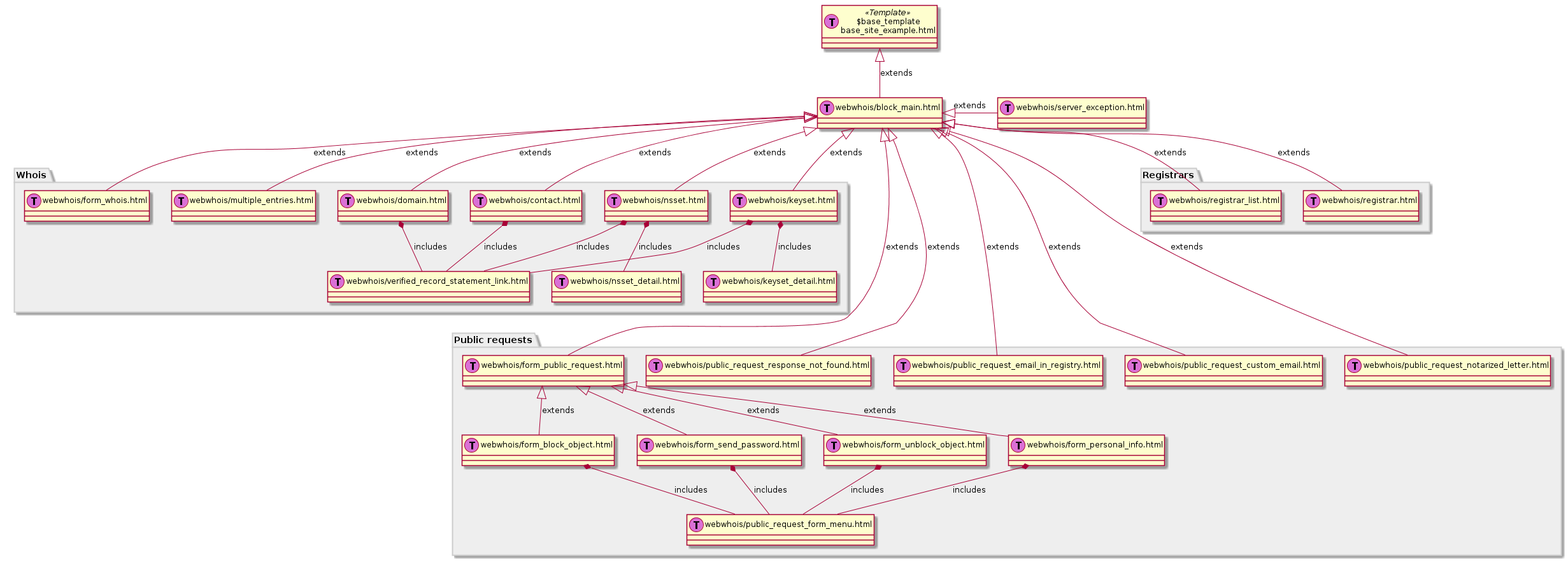
Templates inheritance diagram
7.2. Customizing email templates
Email templates are used to generate automatic Registry email communication, such as notifications and warnings.
The templates can be modified through the web interface at <https://secretary.nic.cz/admin/>
Caution
Due to the dockerization of the messenger and secretary projects, the following section is depracated. If you run into any issues, please contact us at fred@nic.cz
The templates can me modified through SQL queries. Emails are decomposed into several database tables as follows.
Important
If you customize database tables, remember to examine changes in the database component before upgrading the FRED!
Sometimes we need to edit the templates for ourselves and these changes are added to a database upgrade script, which would overwrite your settings. Therefore you should either backup your current database tables to recover your settings after the upgrade, or adapt the upgrade script directly, so that you don’t lose your settings.
7.2.1. Registry contact information (defaults)
Table: mail_template_default
This table contains Registry contact information (called defaults)
grouped in the JSON form.
defaults.* are a data subset that is passed to all email templates.
The parameters are described in the parameter reference.
{
   "defaults.company": "CZ.NIC, z. s. p. o.",
   "defaults.company_cs": "CZ.NIC, správce domény CZ",
   "defaults.company_en": "CZ.NIC, the CZ domain registry",
   "defaults.emailsupport": "podpora@nic.cz",
   "defaults.tel": "+420 222 745 111",
   "defaults.street": "Milešovská 1136/5",
   "defaults.city": "Praha 3",
   "defaults.postalcode": "130 00",
   "defaults.whoispage": "https://www.nic.cz/whois",
   "defaults.authinfopage": "http://www.nic.cz/whois/publicrequest/",
   "defaults.registrarlistpage": "https://www.nic.cz/whois/registrars"
}
You may have several defaults and associate each with an email template
by referencing it in the mail_template.mail_template_default_id attribute.
7.2.2. Email types
Table: mail_type
This table maps an email type name, which is referred to in the
Email Parameters Reference, to an id referenced by the mail_template
table.
Each email type serves a specific purpose that is built in into the overall functionality of the Registry. For this reason, there is no easy way of adding custom email types at the moment, although you may easily customize the existing types.
It is also possible to disable sending of some email types, see Customizing state-change notifications.
Email types are briefly described in the Email Parameters Reference.
7.2.3. Email composition
An email message is composed of:
header fields,
a subject,
a body,
a footer at the end of the body,
vCard attachment.
7.2.3.1. Email headers
Table: mail_header_default
This table allows you to preset email header fields, namely:
h_from– sender address,Fromheader, e.g.support@registry.comor"Registry Support" <support@registry.com>,h_replyto– address that should be used to reply,Reply-Toheader,h_errorsto– address(es) for additional notification of delivery errors,Errors-Toheader,h_organization– sender organization,Organizationheader,h_contentencoding– content encoding for theContent-Typeheader, e.g.charset=UTF-8,h_messageidserver– hostname that will be used to generate theMessage-IDheader, e.g.registry.com, which will result in Message IDs like<39370682.1555751410@registry.com>.
You may have several sets of headers. To associate one with an email template,
reference it in the mail_template.mail_header_default_id attribute.
Message-ID generation
A complete Message-ID is composed in the following manner:
<mail_archive.id>.<int(epoch_time)>@<mail_header_default.h_messageidserver>
7.2.3.3. Email vCards
Table: mail_vcard
This table contains a unique Registry vCard that is inserted by Mailer to all emails as an attachment.
You may redefine it by updating the row. VCard version is not restricted by the FRED, it is up to you to decide which to use, just consider compatibility with email clients.
BEGIN:VCARD
VERSION:2.1
N:podpora CZ.NIC, z. s. p. o.
FN:podpora CZ.NIC, z. s. p. o.
ORG:CZ.NIC, z. s. p. o.
TITLE:zákaznická podpora
TEL;WORK;VOICE:+420 222 745 111
ADR;WORK:;;Milešovská 1136/5;Praha 3;;130 00;Česká republika
URL;WORK:http://www.nic.cz
EMAIL;PREF;INTERNET:podpora@nic.cz
REV:20161108T120000Z
END:VCARD
7.2.3.4. Email template bodies
Table: mail_template
This table contains the core of the email templates, and it has the following attributes:
mail_type_id– reference to a mail typeidfrommail_type,version– version number of the template (see below),subject– a short description of message content for theSubjectheader,body_template– the main part of a template, see Body templating,body_template_content_type– content subtype of the message (onlyplainis tested),mail_template_footer_id– reference to a footeridfrommail_template_footer,mail_template_default_id– reference to a defaultsidfrommail_template_default,mail_header_default_id– reference to a headersidfrommail_header_default,created_at– template creation timestamp.
Subject
We use the convention Local-language subject text / English subject text.
Feel free to adapt the local-language text. If you decide to change the optical
separator (/), you should use it consistently across the email types.
Content type
The general content type of an email body is always text.
The body_template_content_type attribute is a subtype, usually plain,
therefore the full content type results in text/plain. Other text subtypes
are theoretically possible (such as html, css, xml, csv), although only plain
has been tested!
Versioning
The last version is used in generation of new emails.
Older versions are kept to regenerate archived messages for viewing in the WebAdmin.
When you’re changing any attribute of a mail template, insert a new row with the change and with the version number incremented by 1.
Tip
To write upgrades, you may use our database functions
get_current_mail_template_version(mail_type_id)
and/or get_next_mail_template_version(mail_type_id).
7.2.4. Body templating
In the email body template, we use the convention: local-language (Czech) text first, English text second, and the language variants are optically separated with a couple of newlines.
Note
We recommend to replace the Czech variant of texts with the variant in your local language and keep the English variant for common understanding.
Email bodies are processed with the ClearSilver template system, which takes a template in plain text and passes it a data set to create a resulting email. Each email template is passed a different data set, which depends on the email type. Data (parameters) are passed to a template in a hierarchical form. To traverse the hierarchy, a dot convention is used.
ClearSilver lets you do some basic templating:
Output the value of a variable:
ClearSilver example: Variable¶Handle: <?cs var:handle ?>Control the flow:
ClearSilver example: Conditional expression¶<?cs if:ident_type != "" ?> <?cs if:ident_type == "OP"?>Personal ID: <?cs elif:ident_type == "PASS"?>Passport number: <?cs elif:ident_type == "BIRTHDAY"?>Date of birth: <?cs /if ?> <?cs var:ident_value ?> <?cs /if ?>
Iterate over a list:
ClearSilver example: List iteration¶<?cs each:item = administrators ?>Administrative contact: <?cs var:item ?> <?cs /each ?>
And more.
See templates in ClearSilver for complete syntax reference.
For a detailed reference of the passed parameters according to the email type see Email Parameters Reference.
7.3. Customizing state-change notifications
State-change notifications are the part of Registry email communication that is based on the life cycle of registrable objects, in other words, on state changes of registrable objects.
See also Life-cycle events for the table of lifecycle-based notifications.
These notifications can be disabled by removal of rows from the database
table notify_statechange_map:
fred=> select * from notify_statechange_map;
 id | state_id | obj_type | mail_type_id | emails
----+----------+----------+--------------+--------
  1 |        9 |        3 |            3 |      1
  2 |       20 |        3 |            4 |      1
  3 |       17 |        3 |            5 |      1
  4 |       17 |        2 |           14 |      1
  5 |       17 |        1 |           14 |      1
  6 |       20 |        3 |            6 |      2
  7 |       17 |        3 |            7 |      2
  8 |       12 |        3 |            8 |      1
  9 |       13 |        3 |            9 |      1
 10 |       13 |        3 |            6 |      2
 11 |       17 |        4 |           14 |      1
 12 |       28 |        3 |           31 |      3
 13 |       28 |        3 |           31 |      4
(13 rows)
This table says: when an object of the type obj_type is set the status flag
state_id, an email message of the type mail_type_id is sent to recipients
according to emails.
Object states
See the table enum_object_states and compare with Life cycle of registrable objects.
Object types
obj_type is the type of an object to be notified (1..contact, 2..nsset,
3..domain, 4..keyset), see the table enum_object_type.
Mail types
mail_type_id is the type of mail to be sent from the table mail_type,
see also Email Parameters Reference.
Email recipients
emails are only distinguished in case of domains:
1 – all administrative contacts of the domain
2 – all technical contacts of the domain’s nsset
3 – generic emails, see communication channels
4 – additional domain notification emails, see communication channels
In case of nssets or keysets, recipients are all technical contacts.
In case of contacts, recipient is the contact itself.
7.4. Customizing PDF templates
The rendering of PDF files is done by Django application secretary.
The templates can be modified through the web interface at <https://secretary.nic.cz/admin/>
Link to the secretary project repository <https://gitlab.nic.cz/fred/django-secretary>.
Caution
Due to the dockerization of the messenger and secretary projects, the following section is depracated. If you run into any issues, please contact us at fred@nic.cz
The Portable Document Format (PDF) is used for many documents exported by the system such as letters (expiration warning), invoices or the portion of public requests delivered by post.
These documents are rendered with the fred-doc2pdf script from RML (Report Markup Language), which is an XML-based intermediary format for PDF rendering.
Intermediary RML files are constructed from dynamic XML data (generated from the database) and static strings stored in XML files in the same folder as templates. Standard XSLT templates and an XSLT processor are employed to construct these intermediary files.
The templates (.xsl) can be found in the directory
@PREFIX@/share/fred-doc2pdf/templates/.
The static strings (.xml) are available in Czech and English localizations and
the localization is selected in each template with the lang parameter.
The easiest way to customize PDFs is to adapt the headers and footers
to match your corporate identity (logo and graphic design). The default design
(used in CZ.NIC) is in the cznic_design.xsl template, which is imported
by all other templates.
7.5. Localization
Setting up localization for Ferda webadmin tool.
Basic languages for Ferda are English and Czech.
If you want to add another language, you have to add locales both in Python and JavaScript.
7.5.1. Localizing Python
Python uses the gettext system where locales are stored in message files (.po).
Generate a message file for the new language using the command
django-admin makemessages -l <language>` command from the root of the
Ferda app.
Translate the strings into the target language.
You need to compile them with the command django-admin compilemessages
before deployment.
7.5.2. Localizing JavaScript
JavaScript stores translations in the yaml
<https://learnxinyminutes.com/docs/yaml/> format.
Ferda has locales in the directory ferda/static/ferda/locales/,
which contains a subdirectory for each language.
Copy the contents of one of them (e.g. from en) to a new directory
named after the target language (e.g. es).
Translate the strings into the target language.
7.5.3. Setting up a new language
After creating localizations, you need to enable them for use in Ferda.
To set up your new language (e.g. Spanish), modify the following variables in the .env file:
LANGUAGE_CODE=es
LANGUAGES=en:English,cs:Česky,es:Español
If a translation string is missing, the localization falls back to the English string.
8. Appendixes
8.1. Dependencies Ubuntu 20.04 LTS
Changed in version 2.37: Support for Ubuntu 16.04 LTS has been discontinued.
8.1.1. Package list
apache2
apache2-dev
automake
build-essential
chrpath
doxygen
gettext
ldnsutils
libapache2-mod-python
libapache2-mod-wsgi
libboost-all-dev
libcurl4-openssl-dev
libidn11-dev
libminizip-dev
libmpdec-dev
libomniorb4-dev
liborbit2-dev
libpq-dev
libssh-dev
libssl-dev
libtool
libxml2-dev
libxml2-utils
omniidl
omniidl-python
omniorb-nameserver
patchutils
postfix
postgresql
postgresql-client
python
python-beaker
python-cherrypy3
python-clearsilver
python-dev
python-django
python-djangorestframework
python-dnspython
python-idna
python-omniorb
python-psycopg2
python-pygresql
python-reportlab
python-simplejson
python-simpletal
python-trml2pdf
ttf-dejavu
ttf-freefont
ttf-mscorefonts-installer
whois
xsltproc
zlib1g-dev
8.2. Email Parameters Reference
This is a reference of available parameters (data sets) which are passed to email templates when generating email based on events in the FRED.
The parameter names are listed for each email type together with the corresponding trigger event, and there is an index with short descriptions of common parameters at the end of this appendix.
See also Customizing email templates for detailed information on template customization.
8.2.1. Email type: sendauthinfo_pif
8.2.2. Email type: sendauthinfo_epp
sent in response to a request for an authorizationinformation (AuthInfo) which was placed through a registrar
passed parameters: defaults.*, AuthInfo, handle, registrar, type
8.2.3. Email type: expiration_notify
sent to the domain owner in response to the domain expiration
passed parameters: defaults.*, administrators, checkdate, dnsdate, domain, exdate, exregdate, owner, registrar,
8.2.4. Email type: expiration_dns_warning_owner
sent to the domain owner in response to the upcoming exclusion of a domain from the zone
passed parameters: defaults.*, administrators, day_before_exregdate, dnsdate, domain, exregdate, owner, registrar, zone
8.2.5. Email type: expiration_dns_owner
sent to the domain owner in response to the exclusion of a domain from the zone
passed parameters: defaults.*, administrators, day_before_exregdate, domain, exregdate, owner, registrar, zone
8.2.6. Email type: expiration_register_owner
sent to the domain owner in response to the upcoming domain cancellation
passed parameters: defaults.*, domain,
8.2.7. Email type: expiration_dns_tech
sent to the technical contacts of the nsset whose domain was just excluded from zone
passed parameters: defaults.*, domain, nsset, statechangedate
8.2.8. Email type: expiration_register_tech
sent to the technical contacts of the nsset whose domain was just cancelled
passed parameters: defaults.*, domain, exregdate, nsset,
8.2.9. Email type: expiration_validation_before
sent to the owner of an ENUM domain in response to the upcoming expiry of domain’s validation
passed parameters: defaults.*, administrators, checkdate, domain, owner, registrar, valdate
8.2.10. Email type: expiration_validation
sent to the owner of the ENUM domain in response to the expiry of domain’s validation
passed parameters: defaults.*, administrators, checkdate, domain, owner, registrar,
8.2.11. Email type: notification_create
sent when a new object (domain, contact, nsset, keyset) is created, to the email contact of the created object
common passed parameters: defaults.*, handle, registrar, ticket, type
- additional parameters concerning a new contact:
fresh.object.authinfo– the authorization information (AuthInfo)fresh.contact.name– name of contact personfresh.contact.org– organization namefresh.contact.address.permanent– permanent personal address / organization headquarters addressfresh.contact.address.mailing– mailing addressfresh.contact.address.billing– billing addressfresh.contact.address.shipping– 1st shipping addressfresh.contact.address.shipping_2– 2nd shipping addressfresh.contact.address.shipping_3– 3rd shipping addressfresh.contact.telephone– phone/mobile numberfresh.contact.fax– fax numberfresh.contact.email– email addressfresh.contact.notify_email– notification email addressfresh.contact.ident_type– type of personal identificationfresh.contact.ident– personal identifierfresh.contact.vat– VAT-payer registration number (DIČ)fresh.contact.disclose.name– name disclosure setting (show/hide)fresh.contact.disclose.org– organization disclosure setting (show/hide)fresh.contact.disclose.email– email disclosure setting (show/hide)fresh.contact.disclose.address– address disclosure setting (show/hide)fresh.contact.disclose.notify_email– notification email disclosure setting (show/hide)fresh.contact.disclose.ident– personal identifier disclosure setting (show/hide)fresh.contact.disclose.vat– VAT-payer identification number disclosure setting (show/hide)fresh.contact.disclose.telephone– phone number disclosure setting (show/hide)fresh.contact.disclose.fax– fax number disclosure setting (show/hide)
There are no additional parameters concerning new objects of other types (domain, nsset, keyset).
8.2.12. Email type: notification_update
sent after an object (domain, contact, nsset, keyset) is updated, to the email contact of the updated object
common passed parameters: defaults.*, handle, registrar, ticket, type
additional parameters concerning changes in an object:
changes– general indication of changes:0– there are no changes,1– there are some changesWhether a change has occured or not, is indicated for each attribute of an object and parameters containing both the old and the new value of the attribute are passed in the following manner:
changes.<object>.<attribute>indicates a change in an attribute – if the attribute has changed, it contains the value1; otherwise the parameter is not passed,changes.<object>.<attribute>.oldcontains the value of the attribute before the change (passed only if the attribute has changed),changes.<object>.<attribute>.newcontains the value of the attribute after the change (passed only if the attribute has changed).
changes.object.authinfo– indicates that the object’s AuthInfo has changed,Indication of changes of other attributes is specific for each object type as follows.
- additional parameters concerning changes in a contact:
changes.contact.name– contact name has changedchanges.contact.org– organization name has changedchanges.contact.telephone– phone number has changedchanges.contact.fax– fax number has changedchanges.contact.email– email address has changedchanges.contact.notify_email– notification email address has changedchanges.contact.ident_type– type of personal identification has changedchanges.contact.ident– personal identifier has changedchanges.contact.vat– VAT-payer registration number (DIČ) has changedchanges.contact.address.permanent– permanent (headquarters) address has changedchanges.contact.address.mailing– mailing address has changedchanges.contact.address.billing– billing address has changedchanges.contact.address.shipping– 1st shipping address has changedchanges.contact.address.shipping_2– 2nd shipping address has changedchanges.contact.address.shipping_3– 3rd shipping address has changedchanges.contact.disclose.name– name disclosure setting has changedchanges.contact.disclose.org– organization disclosure setting has changedchanges.contact.disclose.email– email disclosure setting has changedchanges.contact.disclose.address– address disclosure setting has changedchanges.contact.disclose.notify_email– notification email disclosure setting has changedchanges.contact.disclose.ident– personal identifier disclosure setting has changedchanges.contact.disclose.vat– VAT-payer number disclosure setting has changedchanges.contact.disclose.telephone– phone number disclosure setting has changedchanges.contact.disclose.fax– fax number disclosure setting has changed
- additional parameters concerning changes in a nsset:
changes.nsset.check_level– level of technical checks has changedchanges.nsset.tech_c– list of technical contacts has changedchanges.nsset.dns– list of name servers has changedthe old and new value of each name server can be accessed using an index number (counting from zero) at the end of the parameter name, for example:
changes.nsset.dns.old.1– the value of the second name server before the change,changes.nsset.dns.new.1– the value of the second name server after the change.
- additional parameters concerning changes in a domain:
changes.domain.registrant– domain owner has changedchanges.domain.nsset– nsset assignment has changedchanges.domain.keyset– keyset assignment has changedchanges.domain.admin_c– list of administrative contacts has changedchanges.domain.temp_cDEPRECATED – list of temporary contacts has changedchanges.domain.val_ex_dateENUM – date of validation expiry has changedchanges.domain.publishENUM – publication in telephone directory has changed
- additional parameters concerning changes in a keyset:
changes.keyset.tech_c– list of technical contacts has changedchanges.keyset.dnskey– list of DNS keys has changed
8.2.13. Email type: notification_transfer
sent after an object (domain, contact, nsset, keyset) is transferred to a new registrar, to the email contact of the transferred object
passed parameters: defaults.*, handle, registrar, ticket, type
8.2.14. Email type: notification_renew
sent after a domain is renewed, to its owner’s email
passed parameters: defaults.*, handle, registrar, ticket, type
8.2.15. Email type: notification_unused
sent after an unused object (contact, keyset, nsset) is removed from the database, to the email contact of the removed object
passed parameters: defaults.*, deldate, handle, type
8.2.16. Email type: notification_delete
sent after an object (domain, contact, nsset, keyset) is deleted, to the email contact of the deleted object
passed parameters: defaults.*, handle, registrar, ticket, type
8.2.17. Email type: request_block
sent to the domain owner / the contact / technical contacts of an object after a public request for object (un)blocking has been carried out
common passed parameters: defaults.*, handle, reqdate, reqid, type
- additional parameters:
otype– operation type:1– blocking,2– unblocking,rtype– request type:1– all object changes,2– object transfer.
8.2.18. Email type: annual_contact_reminder
sent to a contact in response to the upcoming contact registration anniversary as a reminder to check accuracy of contact information in the registry
common passed parameters: defaults.*, handle
- additional parameters:
organization– name of contact’s organization,name– personal or company name,address– address (in a single line),ident_type– identity-document identification type:RC– birth number,OP– personal ID card number,PASS– passport number,ICO– organization ID number,MPSV– MPSV ID (number from the Ministry of Labour and Social Affairs),BIRTHDAY– the date of birth,
ident_value– identity-document identification number,dic– VAT-payer identifier,telephone– phone number,fax– fax number,email– email address,notify_email– notification email address,registrar_name– name of the designated registrar,registrar_url– website address of the designated registrar,registrar_memo_cz– a memo provided by the registrar (Czech/local variant),registrar_memo_en– a memo provided by the registrar (English variant),Note
The registrar memo is configurable.
domains– list of domains where the contact is the owner,nssets– list of nssets where the contact is a technical contact,keysets– list of keysets where the contact is a technical contact.
8.2.19. Email type: merge_contacts_auto
sent to the contact after an automatic merger of its duplicates
common passed parameters: defaults.*
- additional parameters:
dst_contact_handle– handle of the destination contact into which the duplicates have been merged,domain_registrant_list– list of handles of domains in which the registrant contact had to be replaced with the destination contact,domain_admin_list– list of handles of domains in which some administrative contacts had to be replaced with the destination contact,nsset_tech_list– list of handles of nssets in which some technical contacts had to be replaced with the destination contact,keyset_tech_list– list of handles of keysets in which some technical contacts had to be replaced with the destination contact,removed_list– list of contacts which have been deleted as a result of the merger.
Values of the lists can be accessed by adding an index number at the end of the parameter name, counting from zero, for example:
domain_registrant_list.0for the first item.
8.2.20. Email type: akm_candidate_state_ok
sent after valid CDNSKEY records are discovered on a insecured domain and the acceptance period is initiated, to technical contacts of the domain’s nsset
common passed parameters: defaults.*, domain, zone
additional parameters:
keys– list of discovered CDNSKEY records (the first item of the list askeys.0etc.), a single key item looks like this:[flags: 257, protocol: 3, algorithm: 13, key: "mdsswUyr3DPW132mOi8V9xESWE8jTo0dxCjjnopKl+GqJxpVXckHAeF+KkxLbxILfDLUT0rAK9iUzy1L53eKGQ=="]
datetime– date and time of the discovery,days_to_left– how many days the acceptance period is going to last.
8.2.21. Email type: akm_candidate_state_ko
sent when the acceptance period is broken by absence of the CDNSKEY records or by discovery of changed records, to technical contacts of the domain’s nsset
common passed parameters: defaults.* domain
- additional parameters:
datetime– date and time of the discovery.
8.2.22. Email type: akm_keyset_update
sent when an auto-managed keyset is updated from new CDNSKEY records, to technical contacts of the domain’s nsset
common passed parameters: defaults.*, domain, zone
- additional parameters:
keys– list of discovered CDNSKEY records (the first item of the list askeys.0etc.),datetime– date and time of the discovery.
8.2.23. Email type: record_statement
sent in response to a request for a registry record statement about an object, to the email of the domain owner / the contact / technical contacts
common passed parameters: defaults.*,
- additional parameters:
request_day– the day of the request date,request_month– the month of the request date,request_year– the year of the request date.
8.2.24. Email type: sendpersonalinfo_pif
sent in response to a resolved public request for personal information of a contact, to the email selected within the request
common passed parameters: defaults.*, handle
- additional parameters:
name– name (personal),organization– name of an organization,address– main (permanent) address,mailing_address– mailing address,billing_address– billing address,shipping_address_1– 1st shipping address,shipping_address_2– 2nd shipping address,shipping_address_3– 3rd shipping address,ident_type– identity document type,ident_value– identity document number,dic– VAT-payer number,telephone– phone number,fax– fax number,email– main email address,notify_email– notification email address,registrar_name– name of the designated registrar,registrar_url– website of the designated registrar.
8.2.25. Description of parameters
This section contains description of parameters which are common to several email types.
8.2.25.1. Registry information (defaults)
These parameters are passed to all email types. See also Registry contact information (defaults).
defaults.company– name of the Registrydefaults.street– street in the headquarters address of the Registrydefaults.postalcode– postal code in the headquarters address of the Registrydefaults.city– city in the headquarters address of the Registrydefaults.tel– phone contact of the Registrydefaults.fax– fax contact of the Registrydefaults.emailsupport– email contact of the technical supportdefaults.authinfopage– URL of the site from which registrants can request the authorization information (AuthInfo)defaults.whoispage– URL of the site from which the public can search in the Registrydefaults.company_cs– Czech variant of the company name of the Registrydefaults.company_en– English variant of the company name of the Registry
8.2.25.2. Common parameters
administratorslist of administrative contacts (items are accessed by adding index number at the end of the parameter name, counting from zero, for example:
administrators.0for the first item)
AuthInfoauthorization information
checkdatethe date when the object-state check was performed and this email created (according to the server’s local time, date format: YYYY-MM-DD)
deldatedate of deletion of an idle (obsolete) object
dnsdatedate from which the domain will not be included in the zone anymore
domaindomain name in question
exdatedate of domain expiration (till when the registration has been prepaid)
exregdatedate from which the domain can be registered by another subject (domain is unguarded)
day_before_exregdatedate of the last day the domain is guarded (one day before registration cancellation)
handlestring identifier of the object in question
owneridentifier of the owner of the domain in question (contact handle)
nssetidentifier of the name server set assigned to the domain in question (nsset handle)
registrarname and website of the current designated registrar (in case of transfer, the new designated registrar)
reqdatethe date when the public request was placed (date format dd.mm.YYYY)
reqidthe identification number of the public request by which it can be traced in the Registry
statechangedatedate when the respective object state was set
ticketemail identifier
typeobject type by number:
1– contact,2– nsset,3– domain,4– keyset
valdatedate till when the ENUM domain has been validated
zonezone in question (FQDN with the leading dot)
EPP Reference Manual
This document provides a reference of XML-formatted requests and replies in the EPP protocol which has been implemented in the FRED with extensions to suit FRED particularities.
Target audience
Developers, testers
Purpose
Have reference information for implementing and debugging a custom EPP client.
Prerequisites
You should have a basic understanding of XML terminology and principles.
Terms & definitions
Terms and definitions can be found in the glossary.
Chapters
1. Introduction
This is a reference manual for the EPP protocol as implemented in the FRED.
The manual describes protocol basics and the generic structure of messages in a nutshell (based on the main RFC standard), introduces registrable objects managed in the FRED, contains basic guidelines on the use of the namespaces and schemas and finally embraces an overview and a detailed reference of specific commands and responses, all interleaved with examples. Appendices contain overviews of result codes, error reasons and simple data types from schemas.
Conformance of this reference
The global XSD schema all-2.4.8 has been taken as the baseline.
Specifications
RFC 5730 Extensible Provisioning Protocol (EPP) – the main standard
RFC 5731 EPP Domain Name Mapping
RFC 5732 EPP Host Mapping
RFC 5733 EPP Contact Mapping
RFC 5734 EPP Transport over TCP
1.1. General workflow
This reference manual focuses on the syntax and allowed values but it does not describe how to use the registrar interface in general. The description of the command workflow can be found in this concept article: EPP client workflow. We recommend reading it to understand the broader context.
1.2. Conventions for describing XML structures
To describe XML structures, the following notation is used.
Element names are represented enclosed between the lower-than
and the greater-than sign in a similar way as in actual XML documents,
e.g. <nameSpace:elementName>. If a namespace prefix is collapsed
into an asterisk, e.g. <*:elementName>, it means that the element is used
(similarly) in several namespaces and these should be listed somewhere nearby.
After the element name, the number of allowed occurrences of the element is stated within parentheses and in bold, e.g. (1..3) means between one and three occurrences of an element, (0..1) means an optional element, (1) means an element must occur exactly once, (1..n) means that an element must occur at least once but the maximum number of occurrences is unbound, and so on.
Children of an element are formatted as a sub-list, hence indentation models the tree structure of XML. Although the lists are not numbered, elements must appear in the order they are listed. If a sub-list is introduced with the phrase one of, then the sub-list represents possible choices (only one of the listed elements may appear) instead of a sequence.
Attribute names are prefixed with an @, e.g. @attributeName.
After the attribute name, the use of the attribute is specified
if it is different from the default (attributes are optional), that is
(R) if the attribute is required or (P) if the attribute is prohibited.
Element and attribute names are also generated to the index under the Symbols section. They are prefixed either with an Ⓔ for elements or with an ⓐ for attributes, so that they are distinguished from general index keys.
2. Protocol basics
Extensible Provisioning Protocol (EPP) is an application-layer client-server protocol which was designed for the provisioning and management of objects stored in a shared central repository. It is a standard (RFC 5730) that is usually chosen for communication between registrars (clients) and a domain registry (server). The standard allows the protocol to be extended by providing an extension framework which is used extensively in the FRED EPP implementation.
Communication between a client and the EPP server is performed as an exchange of XML documents (further referred to as messages) whose structure and content are defined by a series of schemas. EPP takes advantage of XML namespaces which make extensions easy.
A message sent from a client to the server is called a request message which the server answers with what is called a reply message.
XML messages are transported over the Transmission Control Protocol (TCP) with Transport Layer Security (TLS) using a client’s certificate. (See also RFC 5734.)
Chapter TOC
2.1. Introduction to the EPP
This section introduces basic aspects of the EPP, describes the activities of normal communication between a client and the EPP server and explains in general how FRED extends the standard protocol.
2.1.1. Service aspects
EPP has the following basic service aspects:
service discovery,
commands & responses, and
an extension framework.
Service discovery allows a client to be aware of managed objects, supported services, extensions and policy of the EPP server.
Commands are used by a client either to establish and to end a session or to request standard operations over objects managed in the Registry. The server replies to the commands with coordinated responses, each containing the result of the requested operation.
The extension framework allows the protocol to be extended on several levels:
command/response-level extensions – extensions of standard commands & responses,
object-level extensions – object extensions with definitions of managed objects and relationship of protocol requests and replies to those objects,
protocol-level extensions – protocol extensions with non-standard requests (such as new commands).
The FRED extends the EPP on all three levels as described below.
2.1.2. Protocol characteristics
EPP is a stateful protocol. (The server retains session information about each client.)
All comunication is initiated by a client. (The server does not send anything to a client unless it was requested by the client.)
The server responds to a communication-initiating request made by a client (which can be either a TCP connection request or an EPP service discovery request (
hello)) by returning agreetingto the client.The server responds to each EPP command with a coordinated response that describes the results of processing the command. (See also EPP Server State Machine for a more detailed description of server’s behaviour.)
Commands are processed by the server in the order they are received from clients.
Commands are atomic. (There is no partial success or partial failure.)
The FRED EPP server does not allow delayed execution of commands (pending), commands are performed immediately.
2.1.3. Normal communication
Normal communication between a client and the EPP server is:
The client connects to the server over TCP+TLS.
The server identifies itself and the commands and extensions that it supports. (Sends the
greeting.)The client logs in by supplying login name, password and session options.
The server establishes a session and confirms the login.
The client issues commands to the server, which replies immediately with a result.
The client then idles until it has more commands to send, querying periodically for poll notifications.
The client logs out (or times out).
The server terminates the session and confirms the logout.
If a session has not been established for a client, the server rejects all commands from the client (except for the login).
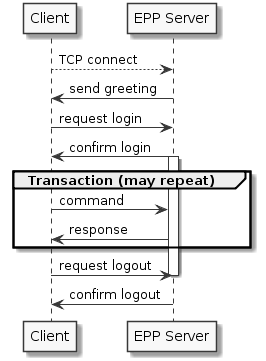
Sequence diagram – Normal EPP communication
2.1.4. Use of the extension framework in FRED EPP
- protocol-level extensions
define some custom commands (listing commands, creditInfo, sendAuthInfo, test)
XPath location:
/epp/extension/*:*
- object-level extensions
define custom managed objects (attributes, command-response mapping)
- XPath locations:
/epp/command/std-cmd/object:std-cmdwherestd-cmdcan be any standard command, and/epp/extension/fred:extcommand/fred:ext-cmd/object:ext-cmdwhereext-cmdcan be any protocol-extension command
- command/response-level extensions
define command-response mapping for additional attributes that extend some managed objects
command extensions – XPath location:
/epp/command[std-cmd]/extension/*:*wherestd-cmdcan be any standard commandresponse extensions – XPath location:
/epp/response[result]/extension/*:*
2.2. Generic message structure
This section describes the top-level syntax of the XML messages and explains how it relates to various message types.
All messages must begin with an XML prolog to:
identify the version of XML that is being used (1.0 or 1.1),
identify the character encoding of the message (optional), and
provide a hint to an XML parser that an external schema file is needed to validate the XML instance (optional).
<?xml version="1.0" encoding="UTF-8" standalone="no"?>
Note
UTF-8 is the recommended and default character encoding for use with EPP.
If the document requires an external definition (such as a schema) to be complete (for example to determine default values for absent optional attributes), then it is not standalone.
After the prolog, the root element follows and identifies the protocol and
its version. This is always <epp> in the standard base EPP namespace
(urn:ietf:params:xml:ns:epp-1.0) which must be declared at the <epp>
element. See also Namespaces & schemas on how to enable
client-side XML validation.
<?xml version="1.0" encoding="utf-8" standalone="no"?>
<epp
   xmlns="urn:ietf:params:xml:ns:epp-1.0"
   xmlns:xsi="http://www.w3.org/2001/XMLSchema-instance"
   xsi:schemaLocation="urn:ietf:params:xml:ns:epp-1.0 epp-1.0.xsd">

   <!-- message content -->

</epp>
Note
It is customary in the FRED and in the examples of this publication to declare this namespace as the default namespace (the one which does not have a prefix).
A namespace can be used for the element, at which it was declared, and all its descendants and their attributes. More on the scoping of namespaces.
The singular child of the <epp> element determines the type of a message
and it must be one of the following:
<hello>– service discovery request (contents and use described in Service discovery),<greeting>– service discovery reply (contents and use described in Service discovery),<command>– container for a standard EPP command (contents and use described in Commands & responses),<response>– reply to a command (contents and use described in Commands & responses),<extension>– protocol extension (non-standard request). The protocol extensions are described in FRED protocol extension.
Request-reply mapping of message types
The following table contains an illustration of relationships between the message types to clarify which types are requests sent by a client and which are replies sent by the server.
Service aspect |
Request |
Reply |
|---|---|---|
Service discovery |
|
|
Commands |
|
|
Protocol extensions |
|
|
2.3. Service discovery
To request service information, the client sends a hello message and the server replies with a greeting message which contains the service information.
The server also replies with a greeting when a TCP connection is initiated.
2.3.1. Hello element structure
The <hello/> element is a child of <epp> and is defined in the standard
EPP namespace.
The element must not contain any child elements nor attributes.
<?xml version="1.0" encoding="utf-8" standalone="no"?>
<epp xmlns="urn:ietf:params:xml:ns:epp-1.0"
 xmlns:xsi="http://www.w3.org/2001/XMLSchema-instance"
 xsi:schemaLocation="urn:ietf:params:xml:ns:epp-1.0 epp-1.0.xsd">

 <hello/>

</epp>
> hello
2.3.2. Greeting element structure
The <greeting> element is a child of <epp> and is defined in the standard
EPP namespace.
It contains the following child elements:
<svID>– the name of the EPP server as a xs:normalizedString of the length between 3 and 64 characters,<svDate>– the server’s timestamp as xs:dateTime,<svcMenu>– services supported by the EPP server:<version>(1..n) – listing of protocol versions supported by the server; the FRED EPP server supports only one version and that is1.0,<lang>(1..n) – listing of the available localizations of response texts; the FRED EPP server provides two localizations by default:enandcs,<objURI>(1..n) – listing of a managed object identified by its namespace as xs:anyURI,<svcExtension>(0..1) – a list of command/response-level extensions of objects supported by the server:<extURI>(1..n) – an extension namespace as xs:anyURI,
<dcp>– data collection policy that describes the server’s privacy policy for data collection and management:<access>(1) – describes the access provided by the server to the client on behalf of the originating data source; must contain one of the following child elements:<all/>– Access is given to all identified data.<none/>– No access is provided to identified data.<null/>– Data is not persistent, so no access is possible.<personal/>– Access is given to identified data relating to individuals and organizational entities.<personalAndOther/>– Access is given to identified data relating to individuals, organizational entities, and other data of a non-personal nature.<other/>– Access is given to other identified data of a non-personal nature.
<statement>(1..n) – describe data collection purposes, data recipients, and data retention:<purpose>(1) – describes the purposes for which data is collected; must contain one or more of the following child elements:<admin/>– Administrative purposes. Information can be used for administrative and technical support of the provisioning system.<contact/>– Contact for marketing purposes. Information can be used to contact individuals, through a communications channel other than the protocol, for the promotion of a product or service.<prov/>– Object-provisioning purposes. Information can be used to identify objects and inter-object relationships.<other/>– Other purposes. Information may be used in other ways not captured by the above definitions.
<recipient>(1) – describes the recipients of collected data; must contain one or more of the following child elements:<other/>– Other entities following unknown practices.<ours>– Server operator and/or entities acting as agents or entities for whom the server operator is acting as an agent. An agent in this instance is defined as a third party that processes data only on behalf of the service provider for the completion of the stated purposes. The<ours>element may contain a<recDesc>element (0..1) that can be used to describe the recipient.<public/>– Public forums.<same/>– Other entities following server practices.<unrelated/>– Unrelated third parties.
<retention>(1) – describes data retention practices; must contain one of the following child elements:<business/>– Data persists per business practices.<indefinite/>– Data persists indefinitely.<legal/>– Data persists per legal requirements.<none/>– Data is not persistent and is not retained for more than a brief period of time necessary to make use of it during the course of a single online interaction.<stated/>– Data persists to meet the stated purpose.
<expiry>(0..1) – describes the lifetime of the policy; mustcontain one of the following child elements:
<absolute/>– The policy is valid from the current date and time until it expires on the specified date and time. The format isdateTime(e.g.,2021-05-04T03:14:15+02:00).<relative/>– The policy is valid from the current date and time until the end of the specified duration. The format isduration(e.g.,P0Y0M1DT10H15M20S).
More about DCP in RFC 5730#page-9.
See also Policies & rules of disclosure.
<?xml version="1.0" encoding="UTF-8"?>
<epp xmlns="urn:ietf:params:xml:ns:epp-1.0"
 xmlns:xsi="http://www.w3.org/2001/XMLSchema-instance"
 xsi:schemaLocation="urn:ietf:params:xml:ns:epp-1.0 epp-1.0.xsd">

    <greeting>
        <svID>EPP server (DSDng)</svID>
        <svDate>2018-05-15T21:05:42+02:00</svDate>
        <svcMenu>
            <version>1.0</version>
            <lang>en</lang>
            <lang>cs</lang>
            <objURI>http://www.nic.cz/xml/epp/contact-1.4</objURI>
            <objURI>http://www.nic.cz/xml/epp/domain-1.4</objURI>
            <objURI>http://www.nic.cz/xml/epp/nsset-1.2</objURI>
            <objURI>http://www.nic.cz/xml/epp/keyset-1.3</objURI>
            <svcExtension>
                <extURI>http://www.nic.cz/xml/epp/enumval-1.2</extURI>
            </svcExtension>
        </svcMenu>
        <dcp>
            <access>
                <none/>
            </access>
            <statement>
                <purpose>
                    <admin/>
                    <prov/>
                </purpose>
                <recipient>
                    <public/>
                </recipient>
                <retention>
                    <stated/>
                </retention>
            </statement>
        </dcp>
    </greeting>

</epp>
2.4. Commands & responses
A command is an EPP request.
EPP commands fall into three categories: session management commands, query commands, and object transform commands.
Session management commands are used to establish and end persistent sessions with the EPP server.
Query commands are used to perform read-only object information retrieval operations.
Transform commands are used to perform read-write object management operations.
A response is an EPP reply coordinated with the command.
The command-response pair is also called a transaction. Transactions are always described together as a whole in this manual.
2.4.1. Implemented standard commands
Session management commands: login, logout
Query commands: check, info, poll (
requestandacknowledgeoperations)Transform commands: create, update, transfer (
requestoperation only), renew, delete
See also command overview for implemented non-standard (custom) commands, or FRED protocol extension for the generic syntax of custom commands.
Note
The standard suggests a more complex handling of object transfer which is not applicable in the FRED. Therefore the other transfer operations (query, cancel, approve, reject) are not implemented in the FRED EPP.
2.4.2. Transaction identification
To make sure that both the client and the EPP server have consistent temporal and state-management records, both commands and responses should be marked with unique identifiers.
A command should be assigned a clTRID (client transaction identifier)
by the client which uniquely identifies the command to the client.
The client is supposed to maintain its own transaction identifier
space to ensure uniqueness. Also the format of the identifier is arbitrary
as long as it complies with the restrictions of the XML schema
(epp:trIDStringType).
A response will be assigned by the server:
the
clTRIDof the command for which the response is being returned if provided by the client,an additional
svTRID(server transaction identifier) that marks this transaction from the server’s perspective.
Transaction identifiers should be logged, retained and protected.
2.4.3. Command element structure
The <command> element is a child of <epp> and is defined in the standard
EPP namespace. It contains a command type of object-related commands or
an actual object-independent command, also in the standard namespace,
which must be a singular occurrence of one of the following:
<login>– client login (establish a session), an object-independent command, see Login,<logout>– client logout (end the session), an object-independent command, see Logout,<check>– object availability checks, an object-related command type,<create>– object registrations, an object-related command type,<delete>– object unregistrations, an object-related command type,<info>– requests for object details, an object-related command type,<renew>– object registration renewals (to be used only with domains), an object-related command type,<transfer>– object transfer requests, an object-related command type:@op(R) – transfer operation – Because of the concept of transfer in the FRED, only one value is permitted and that isrequestwhich is used to request a transfer.
<update>– updates of object details, an object-related command type,<poll>– polling for notifications from the Registry, an object-independent command, see Polling.@op(R) – poll operation as one of values:req– requests poll messages,ack– acknowledges reading of a message,
@msgID– identifier of the message to be acknowledged as a xs:token. Use only with@op = 'ack'.
Each object-related command type may contain elements from any namespace. This is where the namespaces and appropriate top-level elements of managed objects come in. The object’s top-level element must correspond with the command type.
The command type may be followed by:
<extension>(0..1) – command extension container (see Command extensions),<clTRID>(0..1) – client transaction identifier as epp:trIDStringType.
<?xml version="1.0" encoding="utf-8" standalone="no"?>
<epp xmlns="urn:ietf:params:xml:ns:epp-1.0"
 xmlns:xsi="http://www.w3.org/2001/XMLSchema-instance"
 xsi:schemaLocation="urn:ietf:params:xml:ns:epp-1.0 epp-1.0.xsd">
   <!-- Command container -->
   <command>
      <!-- Command type: info, check, create, delete... -->
      <info>
         <!-- Command arguments container -->
         <object:info>
            <!-- Object-defined content -->
         </object:info>
      </info>
      <!-- Client transaction identifier -->
      <clTRID>fyyp004#17-05-30at13:02:36</clTRID>
   </command>
</epp>
Command contents are described separately for each justified combination of a command type and a managed object.
2.4.4. Response element structure
The <response> element is a child of <epp> and is defined in the standard
EPP namespace. It contains the following child elements:
<result>(1..n) – report of the success or failure of command execution:@code(R) – result code (4-digit number), for a list of possible values see result codes,<msg>(1) – human-readable description of the result,@lang– language of the result description as xs:language; default isen(English),
<value>(0..n) – identification of a client-provided element or other information that caused a server error condition,<extValue>(0..n) – additional error diagnostic information:<value>(1) – identification of a client-provided element or other information that caused a server error condition,<reason>(1) – human readable message that describes the reason for the error (see Error reasons for a complete list),@lang– language of the reason description as xs:language; default isen(English),
<msgQ>(0..1) – description of queued poll messages; in the FRED EPP, this element is present only in a response to apollcommand, for detailed syntax and usage see Polling,<resData>(0..1) – response data element that contains child elements specific to the command and/or associated object,<extension>(0..1) – response extension container, see Response extensions,<trID>(1) – transaction identifier composed of:<clTRID>(0..1) – client transaction identifier,<svTRID>(1) – server transaction identifier.
<?xml version="1.0" encoding="UTF-8"?>
<epp xmlns="urn:ietf:params:xml:ns:epp-1.0"
 xmlns:xsi="http://www.w3.org/2001/XMLSchema-instance"
 xsi:schemaLocation="urn:ietf:params:xml:ns:epp-1.0 epp-1.0.xsd">
   <!-- Response container -->
   <response>
      <!-- Result code and message -->
      <result code="1000">
         <msg>Command completed successfully</msg>
      </result>
      <!-- Response data -->
      <resData>
         <!-- Data container -->
         <object:someData xmlns:object="object:namespace:id"
          xsi:schemaLocation="object:namespace:id path/to/schema.xsd">
            <!-- Object-defined content -->
         </object:someData>
      </resData>
      <!-- Transaction identification -->
      <trID>
         <clTRID>fyyp004#17-05-30at13:02:36</clTRID>
         <svTRID>ReqID-0000135148</svTRID>
      </trID>
   </response>
</epp>
Note
Plain result message
A response is called a “plain result message” when it contains only
the result (<result>) and transaction identification (<trID>)
and nothing else. The result can be either a success or failure.
Example
<?xml version="1.0" encoding="UTF-8"?>
<epp xmlns="urn:ietf:params:xml:ns:epp-1.0"
 xmlns:xsi="http://www.w3.org/2001/XMLSchema-instance"
 xsi:schemaLocation="urn:ietf:params:xml:ns:epp-1.0 epp-1.0.xsd">
   <response>
      <result code="1000">
         <msg>Command completed successfully</msg>
      </result>
      <trID>
         <clTRID>sdmj001#17-03-06at18:48:03</clTRID>
         <svTRID>ReqID-0000126633</svTRID>
      </trID>
   </response>
</epp>
2.4.5. Success or failure of a command
A response always contains the result of executing the command and each result is described by both a code and a textual message.
If the execution succeeded, a code of 1xxx series is returned. If the execution failed, a code of 2xxx series is returned. See Result codes & messages for an overview.
The standard allows to return several results, but the FRED EPP server returns exactly one result at a time.
Important
The response element structure of specific commands is described only for cases when the execution is successful and therefore it is expected that it may contain some response data, depending on the command.
<?xml version="1.0" encoding="UTF-8"?>
<epp xmlns="urn:ietf:params:xml:ns:epp-1.0"
 xmlns:xsi="http://www.w3.org/2001/XMLSchema-instance"
 xsi:schemaLocation="urn:ietf:params:xml:ns:epp-1.0 epp-1.0.xsd">
   <response>
      <result code="2306">
         <msg>Parameter value policy error</msg>
         <extValue>
            <value>
               <nsset:tech xmlns:nsset="http://www.nic.cz/xml/epp/nsset-1.2">C12-58326</nsset:tech>
            </value>
            <reason>Duplicity contact</reason>
         </extValue>
         <extValue>
            <value>
               <nsset:tech xmlns:nsset="http://www.nic.cz/xml/epp/nsset-1.2">C17-58326</nsset:tech>
            </value>
            <reason>Duplicity contact</reason>
         </extValue>
      </result>
      <trID>
         <clTRID>znmw008#17-08-11at16:20:05</clTRID>
         <svTRID>ReqID-0000512432</svTRID>
      </trID>
   </response>
</epp>
2.5. FRED protocol extension
Protocol-level extensions are extensions in the XPath /epp/extension/*:*.
The FRED EPP extends the protocol in such way that the <extension> element
if used, must contain only a single child:
<fred:extcommand>(1) – container for extending commands which must declare the FRED namespace and schema and can contain one of the custom commands:<fred:creditInfo/>– requests information about the credit of the current client (object-independent command), see Credit info,<fred:sendAuthInfo>– requests an AuthInfo of an object (custom command type for object-related commands), see Send AuthInfo,or one of the listing commands (object-independent), e.g.
<fred:listDomains/>, for the complete reference of listing commands see Listing.
The custom command may be followed by the
<fred:clTRID>element (0..1), which contains a client transaction identifier as epp:trIDStringType. (Same as with the standard commands but the element is in thefrednamespace.)
<?xml version="1.0" encoding="utf-8" standalone="no"?>
<epp xmlns="urn:ietf:params:xml:ns:epp-1.0"
 xmlns:xsi="http://www.w3.org/2001/XMLSchema-instance"
 xsi:schemaLocation="urn:ietf:params:xml:ns:epp-1.0 epp-1.0.xsd">

   <!-- Standard container for protocol extensions -->
   <extension>

   <!-- FRED's container for extending commands -->
   <fred:extcommand xmlns:fred="http://www.nic.cz/xml/epp/fred-1.5"
    xsi:schemaLocation="http://www.nic.cz/xml/epp/fred-1.5 fred-1.5.0.xsd">

      <!-- An extending command (some have descendants) -->
      <fred:listDomains/>
      <!-- Transaction identification of the extending command -->
      <fred:clTRID>jqsi002#17-05-18at16:58:03</fred:clTRID>

   </fred:extcommand>

   </extension>

</epp>
Examples of responses are illustrated for each specific command with its structure description in further chapters.
2.6. FRED command & response extensions
Extensions of standard commands and responses allow to manage additional attributes for some managed objects by including them in transactions where appropriate.
Currently, these extensions are used in transactions of ENUM domains and contacts with an additional mailing address.
2.6.1. Command extensions
Command extensions are extensions in the XPath /epp/command/extension/*:*.
According to the general requirements of the standard, the <extension>
element is optional but if used then it must contain a sequence of one or more
elements (any namespace). The FRED EPP server requires the <extension>
element to have a single child at most.
These extensions are used with the following commands:
<?xml version="1.0" encoding="utf-8" standalone="no"?>
<epp xmlns="urn:ietf:params:xml:ns:epp-1.0"
 xmlns:xsi="http://www.w3.org/2001/XMLSchema-instance"
 xsi:schemaLocation="urn:ietf:params:xml:ns:epp-1.0 epp-1.0.xsd">
   <command>
      <create>
         <domain:create xmlns:domain="http://www.nic.cz/xml/epp/domain-1.4"
          xsi:schemaLocation="http://www.nic.cz/xml/epp/domain-1.4 domain-1.4.5.xsd">
            <domain:name>1.1.1.7.4.5.2.2.2.0.2.4.e164.arpa</domain:name>
            <domain:period unit="y">1</domain:period>
            <domain:registrant>CID-MYOWN</domain:registrant>
         </domain:create>
      </create>
      <!-- Extension of the standard command -->
      <extension>
         <enumval:create xmlns:enumval="http://www.nic.cz/xml/epp/enumval-1.2"
          xsi:schemaLocation="http://www.nic.cz/xml/epp/enumval-1.2 enumval-1.2.0.xsd">
            <enumval:valExDate>2018-01-14</enumval:valExDate>
         </enumval:create>
      </extension>
      <clTRID>tucj013#17-07-14at16:22:30</clTRID>
   </command>
</epp>
2.6.2. Response extensions
Response extensions are extensions in the XPath /epp/response/extension/*:*.
According to the general requirements of the standard, the <extension>
element is optional but if used then it must contain a sequence of one or more
elements (any namespace). The FRED EPP server requires the <extension>
element to have a single child at most.
These extensions are used in response to the following commands:
<?xml version="1.0" encoding="UTF-8"?>
<epp xmlns="urn:ietf:params:xml:ns:epp-1.0"
 xmlns:xsi="http://www.w3.org/2001/XMLSchema-instance"
 xsi:schemaLocation="urn:ietf:params:xml:ns:epp-1.0 epp-1.0.xsd">
   <response>
      <result code="1000">
         <msg>Command completed successfully</msg>
      </result>
      <resData>
         <domain:infData xmlns:domain="http://www.nic.cz/xml/epp/domain-1.4"
          xsi:schemaLocation="http://www.nic.cz/xml/epp/domain-1.4 domain-1.4.5.xsd">
            <domain:name>1.2.2.4.5.0.2.4.e164.arpa</domain:name>
            <domain:roid>D0009770598-CZ</domain:roid>
            <domain:status s="outzone">The domain isn't generated in the zone</domain:status>
            <domain:registrant>C0-79371</domain:registrant>
            <domain:clID>REG-MYREG</domain:clID>
            <domain:crID>REG-MYREG</domain:crID>
            <domain:crDate>2017-05-18T17:04:29+02:00</domain:crDate>
            <domain:exDate>2018-05-18</domain:exDate>
            <domain:authInfo>LmpdDXW2</domain:authInfo>
         </domain:infData>
      </resData>
      <!-- Extension of the standard response -->
      <extension>
         <enumval:infData xmlns:enumval="http://www.nic.cz/xml/epp/enumval-1.2"
          xsi:schemaLocation="http://www.nic.cz/xml/epp/enumval-1.2 enumval-1.2.0.xsd">
            <enumval:valExDate>2017-10-08</enumval:valExDate>
            <enumval:publish>0</enumval:publish>
         </enumval:infData>
      </extension>
      <trID>
         <clTRID>klde004#17-05-30at15:28:16</clTRID>
         <svTRID>ReqID-0000135159</svTRID>
      </trID>
   </response>
</epp>
3. Managed objects
The FRED EPP uses custom representations of registrable objects:
domain (regular or ENUM),
contact,
nsset = a set of name servers,
keyset = a set of DNSSEC keys.
Each registrable object is defined by its associated attributes which can be viewed and modified by the client (the designated registrar) or the server, and by command-response mapping.
Attribute values are defined by the data types of schemas (syntax, i.e. allowed characters, length, pattern), and sometimes additional constraints that are described in this chapter.
Custom managed objects are object-level extensions of EPP which appear in these XPaths:
standard commands:
/epp/command/std-cmd/object:std-cmdextending commands:
/epp/extension/fred:extcommand/fred:ext-cmd/object:ext-cmd
Substitutions used in the XPaths:
std-cmdcan be a name of a standard object-related command, such ascreate,ext-cmdcan be a name of an extending object-related command, such assendAuthInfo,objectis a prefix for an object namespace.
Chapter TOC
3.1. Common object attributes
Each managed object has the following attributes:
roidRepository object identifier as eppcom:roidType. An id that is generated by the server during object creation. See also ROID.
clIDThe handle of the current designated registrar as eppcom:clIDType.
crIDThe handle of the registrar who created this object as eppcom:clIDType.
upIDThe handle of the registrar who was the last to update this object as eppcom:clIDType.
crDateThe timestamp of the creation of this object in the repository as xs:dateTime.
upDateThe timestamp of the last update of this object as xs:dateTime.
trDateThe timestamp of the last transfer of this object as xs:dateTime.
authInfoAuthorization information as fredcom:authInfoType.
Starting from Release 2.47.0,
authInfohas limited validity (TTL). The value can be configured, see AuthInfo TTL.Createcommand containingauthInfoattribute will run, but theauthInfois not written to the system.It is not possible to get
authInfovalue using theinfocommand. Validity can be checked byinfocommand withauthInfoparameter.If
authInfois invalid, the server returns error2202 – Invalid authorization information.Since Release 2.48.0 the
authInfolength can be configured.statusCurrent object status(es) (possible values are object-specific).
Statuses are set by the server and cannot be directly altered by a client.
An object can have one or more statuses but they can appear only in certain combinations which are not contradictory.
3.1.1. Domain names and hostnames
A domain name being registered or a name-server hostname being assigned to an nsset must be in the FQDN form and must comply with restrictions as follows.
Regular domain names (e.g. in the cz zone)
are composed of 2 labels separated with a period
.,the second label is a TLD zone (e.g.
cz),may end with a period.
The register is case-insensitive and presents the domain names transformed to lower case.
ENUM domain names (e.g. in the 0.2.4.e164.arpa zone)
are composed of 6–15 labels separated with a period
.,each label preceeding the zone contains exactly one digit (characters 0 through 9),
ends with a Tier1 ENUM zone (e.g.
0.2.4.e164.arpa),may end with a period.
The register is case-insensitive and presents the domain names transformed to lower case.
Note
Validation of the format of domain names may be configured by the Registry operator differently. The Registry operator is supposed to publish a document that declares the rules of registrar communication with the Registry, including a definition of valid domain names.
Hostnames
are composed of labels separated with periods
.,may end with a period,
must not exceed the total length of 255 characters (including delimiter periods and the final period).
3.1.2. Handles of contacts, nssets and keysets
Handles of contacts, name-server sets and key sets:
contain only upper-case and/or lower-case letters of the English alphabet, digits (characters 0 through 9), and
-[1] characters,do not begin nor end with the
-[1] character,do not exceed the length of 30 [2] characters.
The register is case-insensitive and presents the identifiers transformed to upper case.
Note
Validation of the format of handles may be configured by the Registry operator differently. The Registry operator is supposed to publish a document that declares the rules of registrar communication with the Registry, including a definition of valid handles.
3.1.3. Timestamps
Timestamps are provided in local time of the FRED EPP server with an offset from UTC in compliance with RFC 3339 and xs:dateTime syntax.
3.2. Domains
A domain contains information which represents a regular domain or an ENUM domain.
Namespace: http://www.nic.cz/xml/epp/domain-1.4
Schema: domain-1.4.5.xsd
Note
Domain name mapping is based on the standard RFC 5731 but implemented with the following modifications:
replacement of a list of name servers with an nsset,
addition of a keyset,
simplification of the list of contacts to just one type of contact (admin).
3.2.1. Object attributes
In addition to the common attributes, domains also have the following attributes:
nameThe domain name. See Domain names and hostnames.
registrantThe handle of the domain owner contact.
adminThe handle(s) of zero or more administrative contact(s).
nssetThe handle of a nameserver set.
keysetThe handle of a DNSSEC-key set.
exDateThe date of domain name expiration.
valExDateENUM extensionThe date of the expiration of ENUM domain validation.
publishENUM extension + DEPRECATEDFlag of publishing an ENUM domain in a public ENUM directory.
This attribute has currently no meaning for the server and it will be removed in the future. Use of this attribute is discouraged.
3.2.2. Object states
A domain can have one or more of the following statuses:
ok– no other states are setserverDeleteProhibited– deletion of the domain is forbiddenserverRenewProhibited– renewal of the domain is forbiddenserverTransferProhibited– transfer of the domain is forbiddenserverUpdateProhibited– update of the domain is forbiddenserverRegistrantChangeProhibited– the change of the registrant of the domain is forbiddenserverBlocked– the domain is blocked by administrationserverOutzoneManual– domain’s absence in the zone is forced by administrationserverInzoneManual– domain’s presence in the zone is forced by administrationexpired– the domain is expiredoutzone– the domain is not included in the zonenotValidatedENUM only – the ENUM domain is not validateddeleteCandidate– the domain is scheduled for deletion
3.2.3. Command-response mapping
For command-response mapping see a specific command syntax description:
3.2.4. ENUM domains
ENUM domains have the same set of attributes as regular domains except for two additional attributes. Therefore they are managed by the same commands & responses as regular domains, only the handling of the additional attributes requires extensions of the standard commands & responses, so that these attributes can be included in transactions where appropriate.
Namespace: http://www.nic.cz/xml/epp/enumval-1.2
Schema: enumval-1.2.0.xsd
These extensions are used with the following commands:
and with responses to the domain:info command.
3.3. Contacts
A contact contains information which represents a person or a company. See also the concept of contacts.
Namespace: http://www.nic.cz/xml/epp/contact-1.6
Schema: contact-1.6.6.xsd
Note
Contact mapping is based on the standard RFC 5733 but implemented with the following modifications:
addition of notification email, VAT-payer identification number, identity-document number and the type thereof,
replacement of two postal addresses with just one postal address.
3.3.1. Object attributes
In addition to the common attributes, contacts also have the following attributes:
idThe contact handle. See Handles of contacts, nssets and keysets.
postalInfoInformation for postal purposes, consisting of:
nameThe contact name (person or company).
orgThe name of an organization (use with a company). You may leave this empty to signify a natural person.
addrThe permanent address / company seat, consisting of:
street1–3 street line(s).
cityCity.
spState or province.
pcPostal code.
ccCountry code.
voicePhone number.
faxFax number.
emailA list of email addresses.
notifyEmailA list of notification email addresses.
vatVAT-payer identifier.
identIdentity-document type and number. (A document that proves the contact’s identity.)
discloseDisclosure preference for:
addr,voice,fax,email,vat,ident,notifyEmail.Note
The contact handle, name and organization are always disclosed.
mailing/addrextensionAn additional mailing address, which consists of the same items as the permanent address (
postalInfo/addr).
3.3.2. Object states
A contact can have one or more of the following statuses:
ok– no other states are setlinked– the contact has relation to other records in the RegistryserverDeleteProhibited– deletion of the contact is forbiddenserverTransferProhibited– transfer of the contact is forbiddenserverUpdateProhibited– update of the contact is forbiddenserverBlocked– the contact is blocked by administrationdeleteCandidate– the contact is scheduled for deletionconditionallyIdentifiedContact– the contact’s identity is partially verifiedidentifiedContact– the contact’s identity is fully verifiedvalidatedContact– the contact is validatedmojeidContact– the contact is used in the mojeID extension and has more attributes and possibilities than a regular contactserverLinkProhibited– link of new objects to the object is forbiddenserverContactNameChangeProhibited– change of the contact’s name is forbiddenserverContactOrganizationChangeProhibited– change of the contact’s organization is forbiddenserverContactIdentChangeProhibited– change of the contact’sidentatribute is forbiddenserverContactPermanentAddressChangeProhibited– change of the contact’s permanent adress is forbidden
3.3.3. Command-response mapping
For command-response mapping see a specific command syntax description:
3.3.4. Mailing address
Command & response extensions allow to manage an additional address with a contact.
Namespace: http://www.nic.cz/xml/epp/extra-addr-1.0
Schema: extra-addr-1.0.0.xsd
These extensions are used with the following commands:
and with responses to the contact:info command.
3.4. Nssets
A nsset contains information which represents a set of name servers.
Namespace: http://www.nic.cz/xml/epp/nsset-1.2
Schema: nsset-1.2.4.xsd
Note
Name-server host mapping is partially based on the standard RFC 5732 but implemented with the following modifications:
host names are grouped in a set that is identified by a handle,
addition of the report level,
association with technical contacts.
3.4.1. Object attributes
In addition to the common attributes, nssets also have the following attributes:
idThe nsset handle. See Handles of contacts, nssets and keysets.
nsThe 2–10 name servers, consisting of:
nameName-server hostname. See Domain names and hostnames.
addrName-server IP address(es). (Glue record.)
At least one IP address must be present if and only if the hostname is in the generated zone.
Both IPv4 and IPv6 are allowed, accepted in textual representation:
The syntax of an IPv4 address: Four decimal integers 0–255 separated by periods, leading zeroes are optional.
The syntax of an IPv6 address is described in RFC 4291#section-2.2.
An IP address must not belong to an invalid range. See the Prohibited networks section in IANA’s Technical requirements for authoritative name servers.
techThe handle(s) of 1–10 technical contact(s).
reportlevelThe highest level of technical tests to be performed and reported. A higher number means more detail, zero means no tests.
3.4.2. Object states
A nsset can have one or more of the following statuses:
ok– no other states are setlinked– the nsset has relation to other records in the RegistryserverDeleteProhibited– deletion of the nsset is forbiddenserverTransferProhibited– transfer of the nsset is forbiddenserverUpdateProhibited– update of the nsset is forbiddendeleteCandidate– the nsset is scheduled for deletion
3.4.3. Command-response mapping
For command-response mapping see a specific command syntax description:
3.5. Keysets
A keyset contains information which represents a set of DNSSEC keys.
Namespace: http://www.nic.cz/xml/epp/keyset-1.3
Schema: keyset-1.3.4.xsd
Note
DNSSEC keys mapping is partially based on the standard RFC 5910 but implemented with the following modifications:
keys are grouped in a set that is identified by a handle,
a standalone object instead of just a domain extension,
custom element structure for DNSSEC key representation,
association with technical contacts.
3.5.1. Object attributes
In addition to the common attributes, keysets also have the following attributes:
idThe keyset handle. See Handles of contacts, nssets and keysets.
dnskeyThe 1–10 DNSSEC key(s), consisting of:
flagsFlags. Allowed values are:
0,256,257.protocolProtocol. The only allowed value is
3.algAlgorithm number defined by IANA, see DNS Security Algorithm Numbers.
The FRED EPP server does not allow to use
0,1,2and252by default. This can be customized in the blacklist tablednssec_algorithm_blacklist(db:fred, schema:public:)pubKeyPublic key as keyset:keyT.
Note
A DNSSEC key corresponds to a DNSKEY Resource Record, see RFC 4034#section-2.
techThe handle(s) of 1–10 technical contact(s).
3.5.2. Object states
A keyset can have one or more of the following statuses:
ok– no other states are setlinked– the keyset has relation to other records in the RegistryserverDeleteProhibited– deletion of the keyset is forbiddenserverTransferProhibited– transfer of the keyset is forbiddenserverUpdateProhibited– update of the keyset is forbidden``serverLinkProhibited `` – link of new objects to the object is forbidden
deleteCandidate– the keyset is scheduled for deletion
3.5.3. Command-response mapping
For command-response mapping see a specific command syntax description:
4. Namespaces & schemas
A namespace must be identified for each prefix using the @xmlns:prefix attribute.
Important
The client must use the same version of a namespace as the server!
The current namespace versions are listed in the greeting
(see Service discovery).
If the versions in the documentation differ from the versions in the greeting,
follow the versions in the greeting.
To enable XML validation on the client side, depending on the selected XML-validation tool, there are 2 options:
to link a namespace to the location of a schema (see the table below) inside messages using the
@xsi:schemaLocationattribute, for the tool to locate the schema from here – this option is illustrated in structure descriptions, orto pass the location of the global schema as an argument to the XML-validation tool directly, such as:
xmllint --noout --schema "/usr/share/fred-eppic/schemas/all.xsd" -
The FRED EPP server as such does NOT require schema locations inside messages and ignores them if they are present.
The global schema all-2.4.8.xsd (alias all.xsd) imports the following
partial schemas and thus provides the definitions of all namespaces in a single file.
Prefix [1] |
Namespace identifier |
Schema file (partial) |
Description |
|---|---|---|---|
|
|
|
Extensible Provisioning Protocol v1.0 |
|
|
|
Extensible Provisioning Protocol v1.0 |
|
|
|
FRED EPP protocol extensions |
|
|
|
FRED EPP protocol extensions |
|
|
|
FRED object extension for domain provisioning |
|
|
|
FRED object extension for contact provisioning |
|
|
|
FRED object extension for nsset provisioning |
|
|
|
FRED object extension for keyset provisioning |
|
|
|
FRED command/response extensions for ENUM domains |
|
|
|
FRED command/response extensions for a mailing address in contacts |
|
|
N/A |
Namespace for an XML Schema instance |
|
|
N/A |
Namespace for the XML Schema |
5. Command & response structure
This chapter contains the detailed reference of all the FRED EPP commands, both object-independent and object-related, and the responses mapped to these commands.
Overview
Session management commands
Query commands
Transform commands
Create | Update | Transfer | Delete | Renew domain
Custom commands
Credit info | Send AuthInfo | Listing
Chapter TOC
5.1. Login
A login command is used to establish and authenticate a session with the EPP server. The login command must be sent to the server before any other EPP command and identifies and authenticates the client identifier to be used by the session.
An EPP session is terminated by a Logout command.
The login command is a login element in the default namespace
(urn:ietf:params:xml:ns:epp-1.0).
5.1.1. Command element structure
The <login> element contains the following child elements:
<clID>(1) – the client identifier as eppcom:clIDType,<pw>(1) – the client’s plain-text password as epp:pwType, case sensitive,<newPW>(0..1) – a new password to be used for subsequent login commands as epp:pwType, case sensitive,<options>(1) – options of the EPP communication with the server:<version>(1) – the protocol version to be used; this must be1.0,<lang>(1) – the response-text language to be used; this must be one of the values that are announced in the greeting (usuallyenorcs),
<svcs>(1) – list of services to be used during the session – declare the schemas for all the objects that will be manipulated during the session:<objURI>(1..n) – an object namespace URI as xs:anyURI. Further details on the namespace URIs can be found in the Namespaces & schemas section.<svcExtension>(0..1) – list of service extensions – declare the schema extensions for all the objects that will be manipulated during the session:<extURI>(1..n) – an extension namespace URI as xs:anyURI.
<?xml version="1.0" encoding="utf-8" standalone="no"?>
<epp xmlns="urn:ietf:params:xml:ns:epp-1.0"
 xmlns:xsi="http://www.w3.org/2001/XMLSchema-instance"
 xsi:schemaLocation="urn:ietf:params:xml:ns:epp-1.0 epp-1.0.xsd">
   <command>
      <login>
         <clID>REG-MYREG</clID>
         <pw>passwd</pw>
         <options>
            <version>1.0</version>
            <lang>en</lang>
         </options>
         <svcs>
            <objURI>http://www.nic.cz/xml/epp/contact-1.6</objURI>
            <objURI>http://www.nic.cz/xml/epp/nsset-1.2</objURI>
            <objURI>http://www.nic.cz/xml/epp/domain-1.4</objURI>
            <objURI>http://www.nic.cz/xml/epp/keyset-1.3</objURI>
            <svcExtension>
               <extURI>http://www.nic.cz/xml/epp/enumval-1.2</extURI>
            </svcExtension>
         </svcs>
      </login>
      <clTRID>sdmj001#17-03-06at18:48:03</clTRID>
   </command>
</epp>
Note
The following usage assumes eppic has the session configured. See Eppic configuration documentation for more info.
> login --session-id=REG-MYREG
Note
To execute login command without a session, use command line parameters:
> eppic --username="REG-MYREG" --password=passwd --hostname=epp.example.com --port=700 --cert-file='/etc/fred/REG-MYREG_cert.pem' --key-file='/etc/fred/REG-MYREG_key.pem'
5.1.2. Response element structure
The FRED EPP server responds with a plain result message
which does not contain any response data (no <resData>).
See also Success or failure of a command.
5.2. Logout
A logout command is used to end a session with the EPP server established by a Login command.
The logout command is a logout element in the default namespace
(urn:ietf:params:xml:ns:epp-1.0).
5.2.1. Command element structure
The <logout/> element does not contain any child elements.
<?xml version="1.0" encoding="utf-8" standalone="no"?>
<epp xmlns="urn:ietf:params:xml:ns:epp-1.0"
 xmlns:xsi="http://www.w3.org/2001/XMLSchema-instance"
 xsi:schemaLocation="urn:ietf:params:xml:ns:epp-1.0 epp-1.0.xsd">
    <command>
        <logout/>
        <clTRID>scui002#17-05-03at16:54:42</clTRID>
    </command>
</epp>
> logout
5.2.2. Response element structure
The FRED EPP server responds with a plain result message
which does not contain any response data (no <resData>).
See also Success or failure of a command.
<?xml version="1.0" encoding="UTF-8"?>
<epp xmlns="urn:ietf:params:xml:ns:epp-1.0"
 xmlns:xsi="http://www.w3.org/2001/XMLSchema-instance"
 xsi:schemaLocation="urn:ietf:params:xml:ns:epp-1.0 epp-1.0.xsd">
    <response>
        <result code="1500">
            <msg>Command completed successfully; ending session</msg>
        </result>
        <trID>
            <clTRID>scui002#17-05-03at16:54:42</clTRID>
            <svTRID>ReqID-0000132660</svTRID>
        </trID>
    </response>
</epp>
5.3. Check
Commands for checking object availability.
5.3.1. Check domain
A domain check command is used to check the availability of one or more domain names.
The domain check command is a check element in the domain namespace
(http://www.nic.cz/xml/epp/domain-1.4).
The command must be contained in the <check> command type.
5.3.1.1. Element structure without Auction module
5.3.1.1.1. Command element structure
The <domain:check> element must declare the domain namespace and schema and it must contain the following child elements:
<domain:name>(1..n) – a domain name as eppcom:labelType.
<?xml version="1.0" encoding="UTF-8"?>
   <epp xmlns="urn:ietf:params:xml:ns:epp-1.0" xmlns:xsi="http://www.w3.org/2001/XMLSchema-instance" xsi:schemaLocation="urn:ietf:params:xml:ns:epp-1.0 epp-1.0.xsd">
      <command>
            <check>
               <domain:check xmlns:domain="http://www.nic.cz/xml/epp/domain-1.4" xsi:schemaLocation="http://www.nic.cz/xml/epp/domain-1.4 domain-1.4.5.xsd">
                  <domain:name>
                        available-example.cz
                  </domain:name>
                  <domain:name>
                        registered-example.cz
                  </domain:name>
               </domain:check>
            </check>
            <clTRID>
               nlr23s#2024-04-15T16:07:37.622471
            </clTRID>
      </command>
   </epp>
> check-domain --names-1=available-example.cz --names-2=registered-example.cz
5.3.1.1.2. Response element structure
The response from the FRED EPP server contains the result, response data, and transaction identification.
See also Success or failure of a command.
The response data element (<resData>) contains a single child element
<domain:chkData> which declares the domain namespace and schema
and it contains the following child elements:
<domain:cd>(1..n) – the check resolution of a single domain name:<domain:name>(1) – the domain name as eppcom:labelType,@avail(R) – availability as xs:boolean;true– available,false– not available,
<domain:reason>(0..1) – if the availability is negative, this element contains an explanation why the domain name is not available, as fredcom:msgType.@lang– language of the reason as xs:language; default isen(English).
<epp xmlns="urn:ietf:params:xml:ns:epp-1.0" xmlns:xsi="http://www.w3.org/2001/XMLSchema-instance" xsi:schemaLocation="urn:ietf:params:xml:ns:epp-1.0 epp-1.0.xsd">
<response>
   <result code="1000">
      <msg>Command completed successfully</msg>
   </result>
   <resData>
      <domain:chkData xmlns:domain="http://www.nic.cz/xml/epp/domain-1.4" xsi:schemaLocation="http://www.nic.cz/xml/epp/domain-1.4 domain-1.4.5.xsd">
      <domain:cd>
         <domain:name avail="1">available-example.cz</domain:name>
      </domain:cd>
      <domain:cd>
         <domain:name avail="0">registered-example.cz</domain:name>
         <domain:reason>Registered already</domain:reason>
      </domain:cd>
      </domain:chkData>
   </resData>
   <trID>
      <clTRID>nlr23s#2024-04-15T16:07:37.622471</clTRID>
      <svTRID>ReqID-0063282953</svTRID>
   </trID>
</response>
</epp>
Command completed successfully (1000)

data:
- avail: true
  name: available-example.cz
  reason: null
- avail: false
  name: registered-example.cz
  reason: Registered already
5.3.1.2. Element structure with Auction module
5.3.1.2.1. Command element structure
Since fred-2.50.0 you can add an optional extension for the <domain:check> command if domain auctions are active.
If the domain can be registered by the winner and the extension contains the element <registrant> with the correct winner handle,
the command returns avail="1". If you do not use the extension or use non-winning handle, the response contains avail="0" and corresponding reason.
<?xml version="1.0" encoding="UTF-8"?>
   <epp xmlns="urn:ietf:params:xml:ns:epp-1.0" xmlns:xsi="http://www.w3.org/2001/XMLSchema-instance" xsi:schemaLocation="urn:ietf:params:xml:ns:epp-1.0 epp-1.0.xsd">
      <command>
            <check>
               <domain:check xmlns:domain="http://www.nic.cz/xml/epp/domain-1.4" xsi:schemaLocation="http://www.nic.cz/xml/epp/domain-1.4 domain-1.4.5.xsd">
                  <domain:name>
                        available-domain.cz
                  </domain:name>
                  <domain:name>
                        registered-domain.cz
                  </domain:name>
                  <domain:name>
                        auction-pending.cz
                  </domain:name>
                  <domain:name>
                        is-auction-winner.cz
                  </domain:name>
                  <domain:name>
                        is-not-auction-winner.cz
                  </domain:name>
               </domain:check>
            </check>
            <extension>
               <check xmlns="http://www.nic.cz/xml/epp/auction-1.0" xsi:schemaLocation="http://www.nic.cz/xml/epp/auction-1.0 auction-1.0.0.xsd">
                  <registrant>
                        AUCTION-WINNER-1
                  </registrant>
               </check>
            </extension>
            <clTRID>
               nlr23s#2024-04-15T16:07:37.622471
            </clTRID>
      </command>
   </epp>
> check-domain --names-1=available-domain.cz --names-2=registered-domain.cz --names-3=auction-pending.cz --names-4=is-auction-winner.cz --names-5=is-not-auction-winner.cz --auction.registrant=AUCTION-WINNER-1
5.3.1.2.2. Response element structure
The response from the FRED EPP server contains the result, response data, and transaction identification.
See also Success or failure of a command.
The response data element (<resData>) contains a single child element
<domain:chkData> which declares the domain namespace and schema
and it contains the following child elements:
<domain:cd>(1..n) – the check resolution of a single domain name:<domain:name>(1) – the domain name as eppcom:labelType,@avail(R) – availability as xs:boolean;true– available,false– not available,
<domain:reason>(0..1) – if the availability is negative, this element contains an explanation why the domain name is not available, as fredcom:msgType.For domains in auctions, specific explanations can be displayed:
Auction pending– the domain is in auction and has no winner yet.Only the auction winner is authorized to register this domain– when the auction winner is known and is possible to<domain:create>only by the winner.
@lang– language of the reason as xs:language; default isen(English).
<epp xmlns="urn:ietf:params:xml:ns:epp-1.0" xmlns:xsi="http://www.w3.org/2001/XMLSchema-instance" xsi:schemaLocation="urn:ietf:params:xml:ns:epp-1.0 epp-1.0.xsd">
<response>
   <result code="1000">
      <msg>Command completed successfully</msg>
   </result>
   <resData>
      <domain:chkData xmlns:domain="http://www.nic.cz/xml/epp/domain-1.4" xsi:schemaLocation="http://www.nic.cz/xml/epp/domain-1.4 domain-1.4.5.xsd">
      <domain:cd>
         <domain:name avail="1">available-domain.cz</domain:name>
      </domain:cd>
      <domain:cd>
         <domain:name avail="0">registered-domain.cz</domain:name>
         <domain:reason>Registered already</domain:reason>
      </domain:cd>
      <domain:cd>
         <domain:name avail="0">auction-pending.cz</domain:name>
         <domain:reason>Auction pending</domain:reason>
      </domain:cd>
      <domain:cd>
         <domain:name avail="1">is-auction-winner.cz</domain:name>
      </domain:cd>
      <domain:cd>
         <domain:name avail="0">is-not-auction-winner.cz</domain:name>
         <domain:reason>Only the auction winner is authorized to register this domain</domain:reason>
      </domain:cd>
      </domain:chkData>
   </resData>
   <trID>
      <clTRID>nlr23s#2024-04-15T16:07:37.622471</clTRID>
      <svTRID>ReqID-0063282953</svTRID>
   </trID>
</response>
</epp>
Command completed successfully (1000)

data:
- avail: true
  name: available-domain.cz
  reason: null
- avail: false
  name: registered-domain.cz
  reason: Registered already
- avail: false
  name: auction-pending.cz
  reason: Auction pending
- avail: true
  name: is-auction-winner.cz
  reason: null
- avail: false
  name: is-not-auction-winner.cz
  reason: Only the auction winner is authorized to register this domain
5.3.2. Check contact
A contact check command is used to check the availability of one or more contact handles.
The contact check command is a check element in the contact namespace
(http://www.nic.cz/xml/epp/contact-1.6).
The command must be contained in the <check> command type.
5.3.2.1. Command element structure
The <contact:check> element must declare the contact namespace and schema and it must contain the following child elements:
<contact:id>(1..n) – a contact handle as fredcom:objIDType.
<?xml version="1.0" encoding="utf-8" standalone="no"?>
<epp xmlns="urn:ietf:params:xml:ns:epp-1.0"
 xmlns:xsi="http://www.w3.org/2001/XMLSchema-instance"
 xsi:schemaLocation="urn:ietf:params:xml:ns:epp-1.0 epp-1.0.xsd">
   <command>
      <check>
         <contact:check xmlns:contact="http://www.nic.cz/xml/epp/contact-1.6"
          xsi:schemaLocation="http://www.nic.cz/xml/epp/contact-1.6 contact-1.6.6.xsd">
            <contact:id>MYOWN</contact:id>
            <contact:id>NONE</contact:id>
         </contact:check>
      </check>
      <clTRID>dyih007#17-07-11at15:35:42</clTRID>
   </command>
</epp>
> check-contact --ids-1=MYOWN --ids-2=NONE
5.3.2.2. Response element structure
The response from the FRED EPP server contains the result, response data, and transaction identification.
See also Success or failure of a command.
The response data element (<resData>) contains a single child element
<contact:chkData> which declares the contact namespace and schema
and it contains the following child elements:
<contact:cd>(1..n) – the check resolution of a single contact handle:<contact:id>(1) – the contact handle as fredcom:objIDType,@avail(R) – availability as xs:boolean;true– available,false– not available,
<contact:reason>(0..1) – if the availability is negative, this element contains an explanation why the contact handle is not available, as fredcom:msgType.@lang– language of the reason as xs:language; default isen(English).
<?xml version="1.0" encoding="UTF-8"?>
<epp xmlns="urn:ietf:params:xml:ns:epp-1.0"
 xmlns:xsi="http://www.w3.org/2001/XMLSchema-instance"
 xsi:schemaLocation="urn:ietf:params:xml:ns:epp-1.0 epp-1.0.xsd">
   <response>
      <result code="1000">
         <msg>Command completed successfully</msg>
      </result>
      <resData>
         <contact:chkData xmlns:contact="http://www.nic.cz/xml/epp/contact-1.6"
          xsi:schemaLocation="http://www.nic.cz/xml/epp/contact-1.6 contact-1.6.6.xsd">
            <contact:cd>
               <contact:id avail="0">MYOWN</contact:id>
               <contact:reason>Registered already</contact:reason>
            </contact:cd>
            <contact:cd>
               <contact:id avail="1">NONE</contact:id>
            </contact:cd>
         </contact:chkData>
      </resData>
      <trID>
         <clTRID>dyih007#17-07-11at15:35:42</clTRID>
         <svTRID>ReqID-0000139763</svTRID>
      </trID>
   </response>
</epp>
5.3.3. Check nsset
A nsset check command is used to check the availability of one or more nsset handles.
The nsset check command is a check element in the nsset namespace
(http://www.nic.cz/xml/epp/nsset-1.2).
The command must be contained in the <check> command type.
5.3.3.1. Command element structure
The <nsset:check> element must declare the nsset namespace and schema and it must contain the following child elements:
<nsset:id>(1..n) – an nsset handle as fredcom:objIDType.
<?xml version="1.0" encoding="utf-8" standalone="no"?>
<epp xmlns="urn:ietf:params:xml:ns:epp-1.0"
 xmlns:xsi="http://www.w3.org/2001/XMLSchema-instance"
 xsi:schemaLocation="urn:ietf:params:xml:ns:epp-1.0 epp-1.0.xsd">
   <command>
      <check>
         <nsset:check xmlns:nsset="http://www.nic.cz/xml/epp/nsset-1.2"
          xsi:schemaLocation="http://www.nic.cz/xml/epp/nsset-1.2 nsset-1.2.4.xsd">
            <nsset:id>NSSET-MYNSSET</nsset:id>
            <nsset:id>NSSET-NONE</nsset:id>
         </nsset:check>
      </check>
      <clTRID>hity005#17-07-12at11:18:08</clTRID>
   </command>
</epp>
> check-nsset --ids-1=NSSET-MYNSSET --ids-2=NSSET-NONE
5.3.3.2. Response element structure
The response from the FRED EPP server contains the result, response data, and transaction identification.
See also Success or failure of a command.
The response data element (<resData>) contains a single child element
<nsset:chkData> which declares the nsset namespace and schema
and it contains the following child elements:
<nsset:cd>(1..n) – the check resolution of a single nsset handle:<nsset:id>(1) – the nsset handle as fredcom:objIDType,@avail(R) – availability as xs:boolean;true– available,false– not available,
<nsset:reason>(0..1) – if the availability is negative, this element contains an explanation why the nsset handle is not available, as fredcom:msgType.@lang– language of the reason as xs:language; default isen(English).
<?xml version="1.0" encoding="UTF-8"?>
<epp xmlns="urn:ietf:params:xml:ns:epp-1.0"
 xmlns:xsi="http://www.w3.org/2001/XMLSchema-instance"
 xsi:schemaLocation="urn:ietf:params:xml:ns:epp-1.0 epp-1.0.xsd">
   <response>
      <result code="1000">
         <msg>Command completed successfully</msg>
      </result>
      <resData>
         <nsset:chkData xmlns:nsset="http://www.nic.cz/xml/epp/nsset-1.2"
          xsi:schemaLocation="http://www.nic.cz/xml/epp/nsset-1.2 nsset-1.2.4.xsd">
            <nsset:cd>
               <nsset:id avail="0">NSSET-MYNSSET</nsset:id>
               <nsset:reason>Registered already</nsset:reason>
            </nsset:cd>
            <nsset:cd>
               <nsset:id avail="1">NSSET-NONE</nsset:id>
            </nsset:cd>
         </nsset:chkData>
      </resData>
      <trID>
         <clTRID>hity005#17-07-12at11:18:08</clTRID>
         <svTRID>ReqID-0000139774</svTRID>
      </trID>
   </response>
</epp>
5.3.4. Check keyset
A keyset check command is used to check the availability of one or more keyset handles.
The keyset check command is a check element in the keyset namespace
(http://www.nic.cz/xml/epp/keyset-1.3).
The command must be contained in the <check> command type.
5.3.4.1. Command element structure
The <keyset:check> element must declare the keyset namespace and schema and it must contain the following child elements:
<keyset:id>(1..n) – a keyset handle as fredcom:objIDType.
<?xml version="1.0" encoding="utf-8" standalone="no"?>
<epp xmlns="urn:ietf:params:xml:ns:epp-1.0"
 xmlns:xsi="http://www.w3.org/2001/XMLSchema-instance"
 xsi:schemaLocation="urn:ietf:params:xml:ns:epp-1.0 epp-1.0.xsd">
   <command>
      <check>
         <keyset:check xmlns:keyset="http://www.nic.cz/xml/epp/keyset-1.3"
          xsi:schemaLocation="http://www.nic.cz/xml/epp/keyset-1.3 keyset-1.3.4.xsd">
            <keyset:id>KEYSET-MYKEYSET</keyset:id>
            <keyset:id>KEYSET-NONE</keyset:id>
         </keyset:check>
      </check>
      <clTRID>ygxv005#17-07-12at13:06:45</clTRID>
   </command>
</epp>
> check-keyset --ids-1=KEYSET-MYKEYSET --ids-2=KEYSET-NONE
5.3.4.2. Response element structure
The response from the FRED EPP server contains the result, response data, and transaction identification.
See also Success or failure of a command.
The response data element (<resData>) contains a single child element
<keyset:chkData> which declares the keyset namespace and schema
and it contains the following child elements:
<keyset:cd>(1..n) – the check resolution of a single keyset handle:<keyset:id>(1) – the keyset handle as fredcom:objIDType,@avail(R) – availability as xs:boolean;true– available,false– not available,
<keyset:reason>(0..1) – if the availability is negative, this element contains an explanation why the keyset handle is not available, as fredcom:msgType.@lang– language of the reason as xs:language; default isen(English).
<?xml version="1.0" encoding="UTF-8"?>
<epp xmlns="urn:ietf:params:xml:ns:epp-1.0"
 xmlns:xsi="http://www.w3.org/2001/XMLSchema-instance"
 xsi:schemaLocation="urn:ietf:params:xml:ns:epp-1.0 epp-1.0.xsd">
   <response>
      <result code="1000">
         <msg>Command completed successfully</msg>
      </result>
      <resData>
         <keyset:chkData xmlns:keyset="http://www.nic.cz/xml/epp/keyset-1.3"
          xsi:schemaLocation="http://www.nic.cz/xml/epp/keyset-1.3 keyset-1.3.4.xsd">
            <keyset:cd>
               <keyset:id avail="0">KEYSET-MYKEYSET</keyset:id>
               <keyset:reason>Registered already</keyset:reason>
            </keyset:cd>
            <keyset:cd>
               <keyset:id avail="1">KEYSET-NONE</keyset:id>
            </keyset:cd>
         </keyset:chkData>
      </resData>
      <trID>
         <clTRID>ygxv005#17-07-12at13:06:45</clTRID>
         <svTRID>ReqID-0000139780</svTRID>
      </trID>
   </response>
</epp>
5.4. Info
Commands for viewing object details.
5.4.1. Info domain
A domain info command is used to view details of a domain.
The domain info command is an info element in the domain namespace
(http://www.nic.cz/xml/epp/domain-1.4).
The command must be contained in the <info> command type.
5.4.1.1. Command element structure
The <domain:info> element must declare the domain namespace and schema and it must contain the following child element:
<domain:name>(1) – a domain name as eppcom:labelType.<domain:authInfo>(0..1) – the authorization information (AuthInfo) as fredcom:authInfoType.
<?xml version="1.0" encoding="utf-8" standalone="no"?>
<epp xmlns="urn:ietf:params:xml:ns:epp-1.0"
 xmlns:xsi="http://www.w3.org/2001/XMLSchema-instance"
 xsi:schemaLocation="urn:ietf:params:xml:ns:epp-1.0 epp-1.0.xsd">
   <command>
      <info>
         <domain:info xmlns:domain="http://www.nic.cz/xml/epp/domain-1.4"
          xsi:schemaLocation="http://www.nic.cz/xml/epp/domain-1.4 domain-1.4.5.xsd">
            <domain:name>example.cz</domain:name>
            <domain:authInfo>MyPassword</domain:authInfo>
         </domain:info>
      </info>
      <clTRID>iops002#17-07-28at13:14:47</clTRID>
   </command>
</epp>
> info-domain --name=example.cz --auth-info=MyPassword
5.4.1.2. Response element structure
The response from the FRED EPP server contains the result, response data, and transaction identification.
See also Success or failure of a command.
The response data element (<resData>) contains a single child element
<domain:infData> which declares the domain namespace and schema
and it contains the following child elements:
<domain:name>(1) – the domain name as eppcom:labelType,<domain:roid>(1) – the domain repository identifier as eppcom:roidType,<domain:status>(1..n) – the domain object state(s):@s(R) – the state name as one of values:okserverDeleteProhibitedserverRenewProhibitedserverTransferProhibitedserverUpdateProhibitedserverRegistrantChangeProhibitedserverBlockedserverOutzoneManualserverInzoneManualexpiredoutzonenotValidatedENUM onlydeleteCandidate
@lang– the language of the state description as a xs:language (default:en),element content: the state description as a xs:normalizedString,
<domain:registrant>(0..1) – the domain owner handle as fredcom:objIDType,<domain:admin>(0..n) – an administrative contact handle as fredcom:objIDType,<domain:nsset>(0..1) – the nsset handle as eppcom:labelType,<domain:keyset>(0..1) – the keyset handle as eppcom:labelType,<domain:clID>(1) – the designated registrar’s handle as eppcom:clIDType,<domain:crID>(0..1) – the handle of the registrar who created this domain as eppcom:clIDType,<domain:crDate>(0..1) – the timestamp of creation as xs:dateTime,<domain:upID>(0..1) – the handle of the registrar who was the last to update this domain as eppcom:clIDType,<domain:upDate>(0..1) – the timestamp of the last update as xs:dateTime,<domain:exDate>(0..1) – the date of expiration as xs:date,<domain:trDate>(0..1) – the timestamp of the last transfer as xs:dateTime,<domain:authInfo>(0..1) – the authorization information (AuthInfo) as fredcom:authInfoType,<domain:tempcontact>(0..n) – a temporary contact handle as fredcom:objIDType.
<?xml version="1.0" encoding="UTF-8"?>
<epp xmlns="urn:ietf:params:xml:ns:epp-1.0"
 xmlns:xsi="http://www.w3.org/2001/XMLSchema-instance"
 xsi:schemaLocation="urn:ietf:params:xml:ns:epp-1.0 epp-1.0.xsd">
<response>
   <result code="1000">
      <msg>Command completed successfully</msg>
   </result>
   <resData>
      <domain:infData xmlns:domain="http://www.nic.cz/xml/epp/domain-1.4"
       xsi:schemaLocation="http://www.nic.cz/xml/epp/domain-1.4 domain-1.4.5.xsd">
         <domain:name>example.cz</domain:name>
         <domain:roid>D0009907597-CZ</domain:roid>
         <domain:status s="ok">Object is without restrictions</domain:status>
         <domain:registrant>MYOWN</domain:registrant>
         <domain:admin>ADMIN2</domain:admin>
         <domain:nsset>NSSET-MYNSSET</domain:nsset>
         <domain:keyset>KEYSET-MYKEYSET</domain:keyset>
         <domain:clID>REG-MYREG</domain:clID>
         <domain:crID>REG-MYREG</domain:crID>
         <domain:crDate>2017-07-11T13:28:48+02:00</domain:crDate>
         <domain:upID>REG-MYREG</domain:upID>
         <domain:upDate>2017-07-18T10:46:19+02:00</domain:upDate>
         <domain:exDate>2020-07-11</domain:exDate>
      </domain:infData>
   </resData>
   <trID>
      <clTRID>iops002#17-07-28at13:14:47</clTRID>
      <svTRID>ReqID-0000140984</svTRID>
   </trID>
</response>
</epp>
5.4.1.2.1. ENUM extension
The <domain:infData> element is used in the same way as described above.
The response extension is used to display the validation of an ENUM domain and/or its publish flag.
The response’s <extension> element contains a single <enumval:infData>
element which declares the enumval namespace (http://www.nic.cz/xml/epp/enumval-1.2)
and schema and contains:
<enumval:valExDate>(0..1) – the validation expiration date as xs:date,<enumval:publish>(0..1) – the setting for publishing the ENUM domain in a public directory as xs:boolean;true– display,false– hide.
<?xml version="1.0" encoding="UTF-8"?>
<epp xmlns="urn:ietf:params:xml:ns:epp-1.0"
 xmlns:xsi="http://www.w3.org/2001/XMLSchema-instance"
 xsi:schemaLocation="urn:ietf:params:xml:ns:epp-1.0 epp-1.0.xsd">
   <response>
      <result code="1000">
         <msg>Command completed successfully</msg>
      </result>
      <resData>
         <domain:infData xmlns:domain="http://www.nic.cz/xml/epp/domain-1.4"
          xsi:schemaLocation="http://www.nic.cz/xml/epp/domain-1.4 domain-1.4.5.xsd">
            <domain:name>1.1.1.7.4.5.2.2.2.0.2.4.e164.arpa</domain:name>
            <domain:roid>D0009907598-CZ</domain:roid>
            <domain:status s="ok">Object is without restrictions</domain:status>
            <domain:registrant>MYOWN</domain:registrant>
            <domain:admin>ADMIN1</domain:admin>
            <domain:admin>ADMIN2</domain:admin>
            <domain:nsset>NSSET-MYNSSET</domain:nsset>
            <domain:keyset>KEYSET-MYKEYSET</domain:keyset>
            <domain:clID>REG-MYREG</domain:clID>
            <domain:crID>REG-MYREG</domain:crID>
            <domain:crDate>2017-07-14T16:22:32+02:00</domain:crDate>
            <domain:upID>REG-MYREG</domain:upID>
            <domain:upDate>2017-07-18T10:49:43+02:00</domain:upDate>
            <domain:exDate>2021-07-14</domain:exDate>
         </domain:infData>
      </resData>
      <extension>
         <enumval:infData xmlns:enumval="http://www.nic.cz/xml/epp/enumval-1.2"
          xsi:schemaLocation="http://www.nic.cz/xml/epp/enumval-1.2 enumval-1.2.0.xsd">
            <enumval:valExDate>2018-01-02</enumval:valExDate>
            <enumval:publish>0</enumval:publish>
         </enumval:infData>
      </extension>
      <trID>
         <clTRID>ites005#17-07-31at10:26:32</clTRID>
         <svTRID>ReqID-0000140992</svTRID>
      </trID>
   </response>
</epp>
5.4.2. Info contact
A contact info command is used to view details of a contact.
A new AuthInfo is generated for the contact by the server after successfully executing the contact info command with the AuthInfo parameter.
The contact info command is an info element in the contact namespace
(http://www.nic.cz/xml/epp/contact-1.6).
The command must be contained in the <info> command type.
5.4.2.1. Command element structure
The <contact:info> element must declare the contact namespace and schema and it must contain the following child element:
<contact:id>(1) – the contact handle as fredcom:objIDType.<contact:authInfo>(0..1) – the authorization information (AuthInfo) as fredcom:authInfoType.
Note
For successful execution of the contact info command with the AuthInfo parameter it is necessary to use the authorization information corresponding to the one in the registry.
<?xml version="1.0" encoding="utf-8" standalone="no"?>
<epp xmlns="urn:ietf:params:xml:ns:epp-1.0"
 xmlns:xsi="http://www.w3.org/2001/XMLSchema-instance"
 xsi:schemaLocation="urn:ietf:params:xml:ns:epp-1.0 epp-1.0.xsd">
<command>
<info>
   <contact:info xmlns:contact="http://www.nic.cz/xml/epp/contact-1.6"
    xsi:schemaLocation="http://www.nic.cz/xml/epp/contact-1.6 contact-1.6.6.xsd">
      <contact:id>MYCONTACT</contact:id>
      <contact:authInfo>MyPassword</contact:authInfo>
   </contact:info>
</info>
<clTRID>zmge004#17-05-04at12:20:55</clTRID>
</command>
</epp>
> info-contact --id=MYCONTACT --auth-info=MyPassword
5.4.2.2. Response element structure
The response from the FRED EPP server contains the result, response data, and transaction identification.
See also Success or failure of a command.
The response data element (<resData>) contains a single child element
<contact:infData> which declares the contact namespace and schema
and it contains the following child elements:
<contact:id>(1) – the contact handle as fredcom:objIDType,<contact:roid>(1) – the contact repository identifier as eppcom:roidType,<contact:status>(1..n) – the contact object state(s):@s(R) – state name as one of values:oklinkedserverTransferProhibitedserverDeleteProhibitedserverUpdateProhibitedserverBlockeddeleteCandidateconditionallyIdentifiedContactidentifiedContactvalidatedContactmojeidContactserverContactNameChangeProhibitedserverContactOrganizationChangeProhibitedserverContactIdentChangeProhibitedserverContactPermanentAddressChangeProhibited
@lang– language of the state description as a xs:language (default:en),element content: the state description as a xs:normalizedString,
<contact:postalInfo>(1) – contact’s postal information:<contact:name>(0..1) – the person name as contact:postalLineType,<contact:org>(0..1) – the organization name as contact:optPostalLineType,<contact:addr>(0..1) – the postal address:<contact:street>(0..3) – the street line(s) as contact:optPostalLineType,<contact:city>(0..1) – the city as contact:postalLineType,<contact:sp>(0..1) – the state or province as contact:optPostalLineType,<contact:pc>(0..1) – the postal code as contact:pcType,<contact:cc>(0..1) – the country code as contact:ccType,
<contact:voice>(0..1) – the phone number as contact:e164StringType,<contact:fax>(0..1) – the fax number as contact:e164StringType,<contact:email>(0..1) – a comma-separated list of email addresses as contact:emailCommaListType,<contact:authInfo>(0..1) – the authorization information as fredcom:authInfoType,<contact:clID>(1) – the designated registrar’s handle as eppcom:clIDType,<contact:crID>(1) – the handle of the registrar who created this contact as eppcom:clIDType,<contact:crDate>(1) – the timestamp of creation as xs:dateTime,<contact:upID>(0..1) – the handle of the registrar who was the last to update this contact as eppcom:clIDType,<contact:upDate>(0..1) – the timestamp of the last update as xs:dateTime,<contact:trDate>(0..1) – the timestamp of the last transfer as xs:dateTime,<contact:disclose>(0..1) – contact information disclosure settings:@flag(R) – disclose flag as a xs:boolean:0– listed items are hidden,1– listed items are published,<contact:addr/>(0..1) – the address disclosure setting as an empty element,<contact:voice/>(0..1) – the voice disclosure setting as an empty element,<contact:fax/>(0..1) – the fax disclosure setting as an empty element,<contact:email/>(0..1) – the email disclosure setting as an empty element,<contact:vat/>(0..1) – the VAT number disclosure setting as an empty element,<contact:ident/>(0..1) – the identity document disclosure setting as an empty element,<contact:notifyEmail/>(0..1) – the notification email disclosure setting as an empty element,
Note
Omitted items must be interpreted according to the server disclosure policy.
<contact:vat>(0..1) – the VAT-payer identifier as a contact:vatT,<contact:ident>(0..1) – identity-document identification:@type(R) – the type of the identity document as one of values:op(identity card number),passport(passport number),mpsv(number from the Ministry of Labour and Social Affairs),ico(company number),birthday(the date of birth),element content: the identification number as a contact:identValueT,
<contact:notifyEmail>(0..1) – a comma-separated list of email addresses for notification as contact:emailCommaListType.
<?xml version="1.0" encoding="UTF-8"?>
<epp xmlns="urn:ietf:params:xml:ns:epp-1.0"
 xmlns:xsi="http://www.w3.org/2001/XMLSchema-instance"
 xsi:schemaLocation="urn:ietf:params:xml:ns:epp-1.0 epp-1.0.xsd">
<response>
   <result code="1000">
      <msg>Command completed successfully</msg>
   </result>
   <resData>
   <contact:infData xmlns:contact="http://www.nic.cz/xml/epp/contact-1.6"
    xsi:schemaLocation="http://www.nic.cz/xml/epp/contact-1.6 contact-1.6.6.xsd">
      <contact:id>MYCONTACT</contact:id>
      <contact:roid>C0009746170-CZ</contact:roid>
      <contact:status s="linked">Has relation to other records in the registry</contact:status>
      <contact:postalInfo>
         <contact:name>Name Surname</contact:name>
         <contact:addr>
            <contact:street>Street</contact:street>
            <contact:city>City</contact:city>
            <contact:pc>12345</contact:pc>
            <contact:cc>CZ</contact:cc>
         </contact:addr>
      </contact:postalInfo>
      <contact:email>email@example.com</contact:email>
      <contact:clID>REG-MYREG</contact:clID>
      <contact:crID>REG-MYREG</contact:crID>
      <contact:crDate>2017-05-04T11:30:25+02:00</contact:crDate>
      <contact:disclose flag="1">
         <contact:addr/>
      </contact:disclose>
   </contact:infData>
   </resData>
   <trID>
      <clTRID>zmge004#17-05-04at12:20:55</clTRID>
      <svTRID>ReqID-0000132810</svTRID>
   </trID>
</response>
</epp>
5.4.2.2.1. Mailing address extension
The <contact:infData> element is used in the same way as described above.
The response extension is used to display the mailing address.
The response’s <extension> element must contain a single <extra-addr:infData>
element which declares the extra-addr namespace (http://www.nic.cz/xml/epp/extra-addr-1.0)
and schema and contains:
<extra-addr:mailing>(1) – mailing address container:<extra-addr:addr>(1) – address:<extra-addr:street>(1..3) – street line 1–3 as extra-addr:postalLineType,<extra-addr:city>(1) – city as extra-addr:postalLineType,<extra-addr:sp>(0..1) – state or province as extra-addr:postalLineType,<extra-addr:pc>(1) – postal code as extra-addr:pcType,<extra-addr:cc>(1) – country code as extra-addr:ccType.
<?xml version="1.0" encoding="UTF-8"?>
<epp xmlns="urn:ietf:params:xml:ns:epp-1.0"
 xmlns:xsi="http://www.w3.org/2001/XMLSchema-instance"
 xsi:schemaLocation="urn:ietf:params:xml:ns:epp-1.0 epp-1.0.xsd">
   <response>
      <result code="1000">
         <msg>Command completed successfully</msg>
      </result>
      <resData>
         <contact:infData xmlns:contact="http://www.nic.cz/xml/epp/contact-1.6"
          xsi:schemaLocation="http://www.nic.cz/xml/epp/contact-1.6 contact-1.6.6.xsd">
            <contact:id>EXTRAADDR</contact:id>
            <contact:roid>C0000000009-CZ</contact:roid>
            <contact:status s="ok">Object is without restrictions</contact:status>
            <contact:postalInfo>
               <contact:name>Foo Bar</contact:name>
               <contact:addr>
                  <contact:street>Kratka 42</contact:street>
                  <contact:city>Praha</contact:city>
                  <contact:pc>11150</contact:pc>
                  <contact:cc>CZ</contact:cc>
               </contact:addr>
            </contact:postalInfo>
            <contact:voice>+420.000000001</contact:voice>
            <contact:email>foobar@nic.cz</contact:email>
            <contact:clID>REG-FRED-A</contact:clID>
            <contact:crID>REG-FRED-A</contact:crID>
            <contact:crDate>2015-08-25T17:03:11+02:00</contact:crDate>
            <contact:upID>REG-FRED-A</contact:upID>
            <contact:upDate>2015-08-25T17:37:31+02:00</contact:upDate>
            <contact:disclose flag="1">
               <contact:addr/>
            </contact:disclose>
            <contact:notifyEmail>foobar-notify@nic.cz</contact:notifyEmail>
         </contact:infData>
      </resData>
      <extension>
         <extra-addr:infData
          xmlns:extra-addr="http://www.nic.cz/xml/epp/extra-addr-1.0"
          xsi:schemaLocation="http://www.nic.cz/xml/epp/extra-addr-1.0 extra-addr-1.0.0.xsd">
            <extra-addr:mailing>
               <extra-addr:addr>
                  <extra-addr:street>Dlouha 24</extra-addr:street>
                  <extra-addr:city>Lysa nad Labem</extra-addr:city>
                  <extra-addr:pc>28922</extra-addr:pc>
                  <extra-addr:cc>CZ</extra-addr:cc>
               </extra-addr:addr>
            </extra-addr:mailing>
         </extra-addr:infData>
      </extension>
      <trID>
         <clTRID>pmlb002#15-08-26at13:51:12</clTRID>
         <svTRID>ReqID-0000000113</svTRID>
      </trID>
   </response>
</epp>
5.4.3. Info nsset
A nsset info command is used to view details of an nsset.
The nsset info command is an info element in the nsset namespace
(http://www.nic.cz/xml/epp/nsset-1.2).
The command must be contained in the <info> command type.
5.4.3.1. Command element structure
The <nsset:info> element must declare the nsset namespace and schema and it must contain the following child element:
<nsset:id>(1) – an nsset handle as fredcom:objIDType.<nsset:authInfo>(0..1) – the authorization information (AuthInfo) as fredcom:authInfoType.
<?xml version="1.0" encoding="utf-8" standalone="no"?>
<epp xmlns="urn:ietf:params:xml:ns:epp-1.0"
 xmlns:xsi="http://www.w3.org/2001/XMLSchema-instance"
 xsi:schemaLocation="urn:ietf:params:xml:ns:epp-1.0 epp-1.0.xsd">
<command>
   <info>
      <nsset:info xmlns:nsset="http://www.nic.cz/xml/epp/nsset-1.2"
       xsi:schemaLocation="http://www.nic.cz/xml/epp/nsset-1.2 nsset-1.2.4.xsd">
         <nsset:id>NSSET-MYNSSET</nsset:id>
         <nsset:authInfo>MyPassword</nsset:authInfo>
      </nsset:info>
   </info>
   <clTRID>kttq005#17-07-31at12:21:02</clTRID>
</command>
</epp>
> info-nsset --id=NSSET-MYNSSET --auth-info=MyPassword
5.4.3.2. Response element structure
The response from the FRED EPP server contains the result, response data, and transaction identification.
See also Success or failure of a command.
The response data element (<resData>) contains a single child element
<nsset:infData> which declares the nsset namespace and schema
and it contains the following child elements:
<nsset:id>(1) – the nsset handle as fredcom:objIDType,<nsset:roid>(1) – the nsset repository identifier as eppcom:roidType,<nsset:status>(1..n) – the nsset object state(s):@s(R) – the state name as one of values:oklinkedserverDeleteProhibitedserverTransferProhibitedserverUpdateProhibiteddeleteCandidate
@lang– the language of the state description as a xs:language (default:en),element content: the state description as a xs:normalizedString,
<nsset:clID>(1) – the designated registrar’s handle as eppcom:clIDType,<nsset:crID>(0..1) – the handle of the registrar who created this nsset as eppcom:clIDType,<nsset:crDate>(0..1) – the timestamp of creation as xs:dateTime,<nsset:upID>(0..1) – the handle of the registrar who was the last to update this nsset as eppcom:clIDType,<nsset:upDate>(0..1) – the timestamp of the last update as xs:dateTime,<nsset:trDate>(0..1) – the timestamp of the last transfer as xs:dateTime,<nsset:authInfo>(0..1) – the authorization information (AuthInfo) as fredcom:authInfoType,<nsset:ns>(0..10) – a nameserver given by:<nsset:name>(1) – a nameserver hostname as eppcom:labelType,<nsset:addr>(0..n) – a namesever’s IP address as nsset:addrStringType,
<nsset:tech>(1..n) – a technical contact handle as fredcom:objIDType,<nsset:reportlevel>(1) – the report level of technical checks as nsset:reportlevelType.
<?xml version="1.0" encoding="UTF-8"?>
<epp xmlns="urn:ietf:params:xml:ns:epp-1.0"
 xmlns:xsi="http://www.w3.org/2001/XMLSchema-instance"
 xsi:schemaLocation="urn:ietf:params:xml:ns:epp-1.0 epp-1.0.xsd">
<response>
   <result code="1000">
      <msg>Command completed successfully</msg>
   </result>
   <resData>
      <nsset:infData xmlns:nsset="http://www.nic.cz/xml/epp/nsset-1.2"
       xsi:schemaLocation="http://www.nic.cz/xml/epp/nsset-1.2 nsset-1.2.4.xsd">
         <nsset:id>NID-MYNSSET</nsset:id>
         <nsset:roid>N0009907595-CZ</nsset:roid>
         <nsset:status s="linked">Has relation to other records in the registry</nsset:status>
         <nsset:clID>REG-MYREG</nsset:clID>
         <nsset:crID>REG-MYREG</nsset:crID>
         <nsset:crDate>2017-07-11T13:28:42+02:00</nsset:crDate>
         <nsset:upID>REG-MYREG</nsset:upID>
         <nsset:upDate>2017-07-27T16:54:53+02:00</nsset:upDate>
         <nsset:ns>
            <nsset:name>ns1.example.cz</nsset:name>
            <nsset:addr>111.222.111.222</nsset:addr>
         </nsset:ns>
         <nsset:ns>
            <nsset:name>nameserver-example.cz</nsset:name>
         </nsset:ns>
         <nsset:tech>TECH2</nsset:tech>
         <nsset:reportlevel>4</nsset:reportlevel>
      </nsset:infData>
   </resData>
   <trID>
      <clTRID>kttq005#17-07-31at12:21:02</clTRID>
      <svTRID>ReqID-0000140998</svTRID>
   </trID>
</response>
</epp>
5.4.4. Info keyset
A keyset info command is used to view details of a keyset.
The keyset info command is an info element in the keyset namespace
(http://www.nic.cz/xml/epp/keyset-1.3).
The command must be contained in the <info> command type.
5.4.4.1. Command element structure
The <keyset:info> element must declare the keyset namespace and schema and it must contain the following child element:
<keyset:id>(1) – a keyset handle as fredcom:objIDType.<keyset:authInfo>(0..1) – the authorization information (AuthInfo) as fredcom:authInfoType.
<?xml version="1.0" encoding="utf-8" standalone="no"?>
<epp xmlns="urn:ietf:params:xml:ns:epp-1.0"
 xmlns:xsi="http://www.w3.org/2001/XMLSchema-instance"
 xsi:schemaLocation="urn:ietf:params:xml:ns:epp-1.0 epp-1.0.xsd">
   <command>
      <info>
         <keyset:info xmlns:keyset="http://www.nic.cz/xml/epp/keyset-1.3"
          xsi:schemaLocation="http://www.nic.cz/xml/epp/keyset-1.3 keyset-1.3.4.xsd">
            <keyset:id>KEYSET-MYKEYSET</keyset:id>
            <keyset:authInfo>MyPassword</keyset:authInfo>
         </keyset:info>
      </info>
      <clTRID>gyyp005#17-07-31at13:03:07</clTRID>
   </command>
</epp>
> info-keyset --id=KEYSET-MYKEYSET --auth-info=MyPassword
5.4.4.2. Response element structure
The response from the FRED EPP server contains the result, response data, and transaction identification.
See also Success or failure of a command.
The response data element (<resData>) contains a single child element
<keyset:infData> which declares the keyset namespace and schema
and it contains the following child elements:
<keyset:id>(1) – the keyset handle as fredcom:objIDType,<keyset:roid>(1) – the keyset repository identifier as eppcom:roidType,<keyset:status>(1..n) – the keyset object state(s):@s(R) – the state name as one of values:oklinkedserverDeleteProhibitedserverTransferProhibitedserverUpdateProhibiteddeleteCandidate
@lang– the language of the state description as a xs:language (default:en),element content: the state description as a xs:normalizedString,
<keyset:clID>(1) – the designated registrar’s handle as eppcom:clIDType,<keyset:crID>(0..1) – the handle of the registrar who created this keyset as eppcom:clIDType,<keyset:crDate>(0..1) – the timestamp of creation as xs:dateTime,<keyset:upID>(0..1) – the handle of the registrar who was the last to update this keyset as eppcom:clIDType,<keyset:upDate>(0..1) – the timestamp of the last update as xs:dateTime,<keyset:trDate>(0..1) – the timestamp of the last transfer as xs:dateTime,<keyset:authInfo>(0..1) – the authorization information (AuthInfo) as fredcom:authInfoType,<keyset:dnskey>(0..10) – a DNS key (see object’s attributes for allowed values) given by:<keyset:flags>(1) – flags as xs:unsignedShort,<keyset:protocol>(1) – protocol as xs:unsignedByte,<keyset:alg>(1) – algorithm as xs:unsignedByte,<keyset:pubKey>(1) – public key as keyset:keyT,
<keyset:tech>(1..n) – a technical contact handle as fredcom:objIDType.
<?xml version="1.0" encoding="UTF-8"?>
<epp xmlns="urn:ietf:params:xml:ns:epp-1.0"
 xmlns:xsi="http://www.w3.org/2001/XMLSchema-instance"
 xsi:schemaLocation="urn:ietf:params:xml:ns:epp-1.0 epp-1.0.xsd">
   <response>
      <result code="1000">
         <msg>Command completed successfully</msg>
      </result>
      <resData>
         <keyset:infData xmlns:keyset="http://www.nic.cz/xml/epp/keyset-1.3"
          xsi:schemaLocation="http://www.nic.cz/xml/epp/keyset-1.3 keyset-1.3.4.xsd">
            <keyset:id>KEYSET-MYKEYSET</keyset:id>
            <keyset:roid>K0009907596-CZ</keyset:roid>
            <keyset:status s="linked">Has relation to other records in the registry</keyset:status>
            <keyset:clID>REG-MYREG</keyset:clID>
            <keyset:crID>REG-MYREG</keyset:crID>
            <keyset:crDate>2017-07-11T13:28:45+02:00</keyset:crDate>
            <keyset:upID>REG-MYREG</keyset:upID>
            <keyset:upDate>2017-07-20T20:04:35+02:00</keyset:upDate>
            <keyset:dnskey>
               <keyset:flags>257</keyset:flags>
               <keyset:protocol>3</keyset:protocol>
               <keyset:alg>5</keyset:alg>
               <keyset:pubKey>aXN4Y2lpd2ZicWtkZHF4dnJyaHVtc3BreXN6ZGZy</keyset:pubKey>
            </keyset:dnskey>
            <keyset:dnskey>
               <keyset:flags>257</keyset:flags>
               <keyset:protocol>3</keyset:protocol>
               <keyset:alg>5</keyset:alg>
               <keyset:pubKey>eGVmbmZrY3lvcXFwamJ6aGt2YXhteXdkc2tjeXBp</keyset:pubKey>
            </keyset:dnskey>
            <keyset:tech>TECH2</keyset:tech>
         </keyset:infData>
      </resData>
      <trID>
         <clTRID>gyyp005#17-07-31at13:03:07</clTRID>
         <svTRID>ReqID-0000141004</svTRID>
      </trID>
   </response>
</epp>
5.5. Polling
Polling is used by the client to manage notifications about relevant events in the Registry.
The relevant events are mostly those that are not triggered by the client, such as time-based events (expiration, deletion of idle objects), asynchronous responses (technical check results), events that are triggered by other registrars (transfer) or by the Registry itself (consequences of contacts’ merger).
The workflow is following:
The client orders the notification messages by issuing a poll request.
In response, the server informs about the status of the message queue (the message count), includes contents of the first (oldest) message and provides its identifier for acknowledgement.
The client is supposed to confirm the receipt of this message by issuing a poll acknowledgement with the identifier of the read message.
The server removes the acknowledged message from the message queue and responds with a new message count and the identification of the next message in the queue.
The previous steps can be repeated to read the remaining messages until the count is reduced to zero.
Note
The EPP standard allows to announce a non-empty message queue
(<msgQ>) in response to any command, however the FRED EPP server gives
such response exclusively to an explicit poll request.
5.5.1. Poll request
A poll request command is used to obtain the message queue status (message count) and contents of the first message in the queue (the oldest one).
The poll command is a poll element in the default namespace
(urn:ietf:params:xml:ns:epp-1.0).
5.5.1.1. Command element structure
The <poll/> (1) element must be empty and contain only this attribute:
@op(R) poll operation; must equalreqto make the request.
<?xml version="1.0" encoding="utf-8" standalone="no"?>
<epp xmlns="urn:ietf:params:xml:ns:epp-1.0"
 xmlns:xsi="http://www.w3.org/2001/XMLSchema-instance"
 xsi:schemaLocation="urn:ietf:params:xml:ns:epp-1.0 epp-1.0.xsd">
   <command>
      <poll op="req"/>
      <clTRID>cmmp002#17-07-21at11:19:09</clTRID>
   </command>
</epp>
> poll-req
5.5.1.2. Response element structure
The response from the FRED EPP server contains the result, message queue and transaction identification.
See also Success or failure of a command.
Structure of the message queue:
<msgQ>(0..1) – the message queue:@count(R) – number of messages in the queue as xs:unsignedLong,@id(R) – current message identifier as eppcom:minTokenType,<qDate>(0..1) – the timestamp when the message was enqueued as xs:dateTime,<msg>(0..1) – the container of the current message,@lang– language of the message text as xs:language; default isen(English),one of the messages such as
<fred:lowCreditData>,<fred:requestFeeInfoData>or other, see Poll message types.
Note
There is always just one message contained in the
<msg>element.The content of the
<msg>element is not processed for validity.
<?xml version="1.0" encoding="UTF-8"?>
<epp xmlns="urn:ietf:params:xml:ns:epp-1.0"
 xmlns:xsi="http://www.w3.org/2001/XMLSchema-instance"
 xsi:schemaLocation="urn:ietf:params:xml:ns:epp-1.0 epp-1.0.xsd">
   <response>
      <result code="1301">
         <msg>Command completed successfully; ack to dequeue</msg>
      </result>
      <msgQ count="7" id="19596173">
         <qDate>2017-07-15T01:18:13+02:00</qDate>
         <msg>
            <fred:requestFeeInfoData xmlns:fred="http://www.nic.cz/xml/epp/fred-1.5">
               <fred:periodFrom>2017-07-01T00:00:00+02:00</fred:periodFrom>
               <fred:periodTo>2017-07-14T23:59:59+02:00</fred:periodTo>
               <fred:totalFreeCount>25000</fred:totalFreeCount>
               <fred:usedCount>120</fred:usedCount>
               <fred:price>0.00</fred:price>
            </fred:requestFeeInfoData>
         </msg>
      </msgQ>
      <trID>
         <clTRID>cmmp002#17-07-21at11:19:09</clTRID>
         <svTRID>ReqID-0000140400</svTRID>
      </trID>
   </response>
</epp>
5.5.2. Poll acknowledgement
A poll acknowledgement command is used to confirm that a message has been received by the client and can be removed from the queue on the server.
The poll command is a poll element in the default namespace
(urn:ietf:params:xml:ns:epp-1.0).
5.5.2.1. Command element structure
The <poll/> (1) element must be empty and contain only attributes:
@op(R) – poll operation; must equalackto acknowledge the reading of the message,@msgID– the identification number of a message to be confirmed as eppcom:minTokenType; required with@op = 'ack'; this is the current message identifier returned in response to a poll request.
<?xml version="1.0" encoding="utf-8" standalone="no"?>
<epp xmlns="urn:ietf:params:xml:ns:epp-1.0"
 xmlns:xsi="http://www.w3.org/2001/XMLSchema-instance"
 xsi:schemaLocation="urn:ietf:params:xml:ns:epp-1.0 epp-1.0.xsd">
   <command>
      <poll msgID="19596173" op="ack"/>
      <clTRID>cmmp003#17-07-21at11:21:41</clTRID>
   </command>
</epp>
> poll-ack 19596173
5.5.2.2. Response element structure
The response from the FRED EPP server contains the result, message queue information and transaction identification.
See also Success or failure of a command.
Structure of message queue information:
<msgQ/>(0..1) – message queue information as an empty element; present only if there are some messages in the queue,@count(R) – the count of messages in the queue as xs:unsignedLong,@id(R) – the identification number of the first message in the queue as eppcom:minTokenType.
<?xml version="1.0" encoding="UTF-8"?>
<epp xmlns="urn:ietf:params:xml:ns:epp-1.0"
 xmlns:xsi="http://www.w3.org/2001/XMLSchema-instance"
 xsi:schemaLocation="urn:ietf:params:xml:ns:epp-1.0 epp-1.0.xsd">
   <response>
      <result code="1000">
         <msg>Command completed successfully</msg>
      </result>
      <msgQ count="6" id="19603978"/>
      <trID>
         <clTRID>cmmp003#17-07-21at11:21:41</clTRID>
         <svTRID>ReqID-0000140401</svTRID>
      </trID>
   </response>
</epp>
5.5.3. Poll message types
Note
The content of messages is not processed for validity, the markup has a formatting purpose.
5.5.3.1. Low credit
Event: Client’s credit has dropped below the stated limit.
<fred:lowCreditData> (1) declares the fred namespace and schema, and contains:
<fred:zone>(1) – FQDN of the zone in question as eppcom:labelType,<fred:limit>(1) – the stated limit:<fred:zone>(1) – zone as eppcom:labelType,<fred:credit>(1) – credit treshold for notice as fred:amountType,
<fred:credit>(1) – amount of credit:<fred:zone>(1) – zone as eppcom:labelType,<fred:credit>(1) – current client’s credit as fred:amountType.
<?xml version="1.0" encoding="UTF-8"?>
<epp xmlns="urn:ietf:params:xml:ns:epp-1.0"
 xmlns:xsi="http://www.w3.org/2001/XMLSchema-instance"
 xsi:schemaLocation="urn:ietf:params:xml:ns:epp-1.0 epp-1.0.xsd">
   <response>
      <result code="1301">
         <msg>Command completed successfully; ack to dequeue</msg>
      </result>
      <msgQ count="1" id="19681433">
         <qDate>2017-07-25T15:03:43+02:00</qDate>
         <msg>
            <fred:lowCreditData xmlns:fred="http://www.nic.cz/xml/epp/fred-1.5"
             xsi:schemaLocation="http://www.nic.cz/xml/epp/fred-1.5 fred-1.5.0.xsd">
               <fred:zone>cz</fred:zone>
               <fred:limit>
                  <fred:zone>cz</fred:zone>
                  <fred:credit>5000.00</fred:credit>
               </fred:limit>
               <fred:credit>
                  <fred:zone>cz</fred:zone>
                  <fred:credit>4999.00</fred:credit>
               </fred:credit>
            </fred:lowCreditData>
         </msg>
      </msgQ>
      <trID>
         <clTRID>fwpn006#17-07-25at16:04:34</clTRID>
         <svTRID>ReqID-0000140888</svTRID>
      </trID>
   </response>
</epp>
5.5.3.2. Request usage
Event: Daily report of how many free requests have been made this month so far, and how much the client will be charged for the requests that exceed the limit.
<fred:requestFeeInfoData> (1) declares the fred namespace and schema, and contains:
<fred:periodFrom>(1) – the timestamp of the start of the period as xs:dateTime,<fred:periodTo>(1) – the timestamp of the end of the period as xs:dateTime,<fred:totalFreeCount>(1) – the amount of free requests (the limit) for this month as xs:unsignedLong,<fred:usedCount>(1) – the total of requests used during the period as xs:unsignedLong,<fred:price>(1) – additional charge for requests over the limit that the client will be billed as fred:amountType.
<?xml version="1.0" encoding="UTF-8"?>
<epp xmlns="urn:ietf:params:xml:ns:epp-1.0"
 xmlns:xsi="http://www.w3.org/2001/XMLSchema-instance"
 xsi:schemaLocation="urn:ietf:params:xml:ns:epp-1.0 epp-1.0.xsd">
   <response>
      <result code="1301">
         <msg>Command completed successfully; ack to dequeue</msg>
      </result>
      <msgQ count="1" id="19690926">
         <qDate>2017-07-27T01:15:10+02:00</qDate>
         <msg>
            <fred:requestFeeInfoData xmlns:fred="http://www.nic.cz/xml/epp/fred-1.5">
               <fred:periodFrom>2017-07-01T00:00:00+02:00</fred:periodFrom>
               <fred:periodTo>2017-07-26T23:59:59+02:00</fred:periodTo>
               <fred:totalFreeCount>25000</fred:totalFreeCount>
               <fred:usedCount>243</fred:usedCount>
               <fred:price>0.00</fred:price>
            </fred:requestFeeInfoData>
         </msg>
      </msgQ>
      <trID>
         <clTRID>twnx002#17-07-27at12:10:13</clTRID>
         <svTRID>ReqID-0000140940</svTRID>
      </trID>
   </response>
</epp>
5.5.3.3. Domain expiration
There are several messages concerning expiration of domains that have the same content but are issued on different events:
<domain:impendingExpData>– the domain is going to expire (see expW state),<domain:expData>– the domain has expired,<domain:dnsOutageData>– the domain has become unguarded and has been excluded from the zone,<domain:delData>– the domain has been deleted after registration expiration.
Only one of these elements can occur in a single poll message.
All of these elements declare the domain namespace and schema,
and contain the following child elements:
<domain:name>(1) – the domain name they are referring to as eppcom:labelType,<domain:exDate>(1) – the expiration date of the domain name as xs:date.
<?xml version="1.0" encoding="UTF-8"?>
<epp xmlns="urn:ietf:params:xml:ns:epp-1.0"
 xmlns:xsi="http://www.w3.org/2001/XMLSchema-instance"
 xsi:schemaLocation="urn:ietf:params:xml:ns:epp-1.0 epp-1.0.xsd">
   <response>
      <result code="1301">
         <msg>Command completed successfully; ack to dequeue</msg>
      </result>
      <msgQ count="1" id="19690946">
         <qDate>2017-07-27T12:13:55+02:00</qDate>
         <msg>
            <domain:impendingExpData xmlns:domain="http://www.nic.cz/xml/epp/domain-1.4"
             xsi:schemaLocation="http://www.nic.cz/xml/epp/domain-1.4 domain-1.4.1.xsd">
               <domain:name>somedomain.cz</domain:name>
               <domain:exDate>2017-08-26</domain:exDate>
            </domain:impendingExpData>
         </msg>
      </msgQ>
      <trID>
         <clTRID>lelg003#17-07-27at12:42:33</clTRID>
         <svTRID>ReqID-0000140944</svTRID>
      </trID>
   </response>
</epp>
5.5.3.4. ENUM domain validation
Messages concerning the validation of ENUM domains for events:
<enumval:impendingValExpData>– domain’s validation is going to expire (see valW1 state),<enumval:valExpData>– domain’s validation has expired (see notValidated state).
Only one of these elements can occur in a single poll message.
Both of these elements declare the enumval namespace and schema, and contain the same child elements:
<enumval:name>(1) – the domain name to which they are referring as eppcom:labelType,<enumval:valExDate>(1) – the expiration date of domain validation as xs:date.
<?xml version="1.0" encoding="UTF-8"?>
<epp xmlns="urn:ietf:params:xml:ns:epp-1.0"
 xmlns:xsi="http://www.w3.org/2001/XMLSchema-instance"
 xsi:schemaLocation="urn:ietf:params:xml:ns:epp-1.0 epp-1.0.xsd">
   <response>
      <result code="1301">
         <msg>Command completed successfully; ack to dequeue</msg>
      </result>
      <msgQ count="1" id="19847350">
         <qDate>2017-08-14T13:19:29+02:00</qDate>
         <msg>
            <enumval:impendingValExpData xmlns:enumval="http://www.nic.cz/xml/epp/enumval-1.2"
             xsi:schemaLocation="http://www.nic.cz/xml/epp/enumval-1.2 enumval-1.2.0.xsd">
               <enumval:name>1.1.1.7.4.5.2.2.2.0.2.4.e164.arpa</enumval:name>
               <enumval:valExDate>2017-08-15</enumval:valExDate>
            </enumval:impendingValExpData>
         </msg>
      </msgQ>
      <trID>
         <clTRID>fmvu002#17-08-14at13:23:05</clTRID>
         <svTRID>ReqID-0000141213</svTRID>
      </trID>
   </response>
</epp>
5.5.3.5. Object transfer
Event: An object has been transferred to another registrar.
This message type appears in all 4 object namespaces: domain, contact,
nsset, keyset.
<*:trnData> (1) declares the object namespace and schema, and contains:
- an object identifier (1) which is one of:
<domain:name>– a domain name as eppcom:labelType,<*:id>– an object handle as fredcom:objIDType (for objects other than domains),
<*:trDate>(1) – the date of the transfer as xs:dateTime,<*:clID>(1) – the handle of the registrar who requested the transfer as eppcom:clIDType.
<?xml version="1.0" encoding="UTF-8"?>
<epp xmlns="urn:ietf:params:xml:ns:epp-1.0"
 xmlns:xsi="http://www.w3.org/2001/XMLSchema-instance"
 xsi:schemaLocation="urn:ietf:params:xml:ns:epp-1.0 epp-1.0.xsd">
   <response>
      <result code="1301">
         <msg>Command completed successfully; ack to dequeue</msg>
      </result>
      <msgQ count="1" id="19681434">
         <qDate>2017-07-25T16:34:42+02:00</qDate>
         <msg>
            <domain:trnData xmlns:domain="http://www.nic.cz/xml/epp/domain-1.4"
             xsi:schemaLocation="http://www.nic.cz/xml/epp/domain-1.4 domain-1.4.1.xsd">
               <domain:name>trdomain.cz</domain:name>
               <domain:trDate>2017-07-25</domain:trDate>
               <domain:clID>REG-FRED-A</domain:clID>
            </domain:trnData>
         </msg>
      </msgQ>
      <trID>
         <clTRID>qfja002#17-07-25at16:39:03</clTRID>
         <svTRID>ReqID-0000140900</svTRID>
      </trID>
   </response>
</epp>
5.5.3.6. Object update
Event: An object has been updated by the Registry, or a contact linked to a domain of another registrar has been updated by its sponsoring registrar.
This message type appears in the following object namespaces: domain,
contact, nsset, keyset.
<*:updateData> (1) declares the object namespace and schema, and contains:
<*:opTRID>(1) – operation transaction identifier (an identification of the operation in the Registry that has caused this message) as domain:trIDStringType,<*:oldData>(1) – data before the update, the content is presented as aninfDataelement (the same as in response to theinfocommand: domain:infData, contact:infData, nsset:infData, keyset:infData),<*:newData>(1) – data after the update, the content is presented as aninfDataelement (the same as in response to theinfocommand: domain:infData, contact:infData, nsset:infData, keyset:infData).
<?xml version="1.0" encoding="UTF-8"?>
<epp xmlns="urn:ietf:params:xml:ns:epp-1.0"
 xmlns:xsi="http://www.w3.org/2001/XMLSchema-instance"
 xsi:schemaLocation="urn:ietf:params:xml:ns:epp-1.0 epp-1.0.xsd">
   <response>
      <result code="1301">
         <msg>Command completed successfully; ack to dequeue</msg>
      </result>
      <msgQ count="1" id="19852593">
         <qDate>2017-08-14T13:29:06+02:00</qDate>
         <msg>
            <domain:updateData xmlns:domain="http://www.nic.cz/xml/epp/domain-1.4"
             xsi:schemaLocation="http://www.nic.cz/xml/epp/domain-1.4 domain-1.4.1.xsd">
               <domain:opTRID>ReqID-0000141228</domain:opTRID>
               <domain:oldData>
                  <domain:infData xmlns:domain="http://www.nic.cz/xml/epp/domain-1.4"
                   xsi:schemaLocation="http://www.nic.cz/xml/epp/domain-1.4 domain-1.4.1.xsd">
                     <domain:name>mydomain.cz</domain:name>
                     <domain:roid>D0009907597-CZ</domain:roid>
                     <domain:status s="serverBlocked">Domain blocked</domain:status>
                     <domain:status s="serverDeleteProhibited">Deletion forbidden</domain:status>
                     <domain:status s="serverRenewProhibited">Registration renewal forbidden</domain:status>
                     <domain:status s="serverRegistrantChangeProhibited">Registrant change forbidden</domain:status>
                     <domain:status s="serverTransferProhibited">Sponsoring registrar change forbidden</domain:status>
                     <domain:status s="serverUpdateProhibited">Update forbidden</domain:status>
                     <domain:registrant>CID-MYOWN</domain:registrant>
                     <domain:admin>CID-ADMIN1</domain:admin>
                     <domain:admin>CID-ADMIN2</domain:admin>
                     <domain:nsset>NID-MYNSSET</domain:nsset>
                     <domain:clID>REG-MYREG</domain:clID>
                     <domain:crID>REG-MYREG</domain:crID>
                     <domain:crDate>2017-07-11T13:28:48+02:00</domain:crDate>
                     <domain:upID>REG-FRED-C</domain:upID>
                     <domain:upDate>2017-08-11T10:46:14+02:00</domain:upDate>
                     <domain:exDate>2020-07-11</domain:exDate>
                     <domain:authInfo>rvBcaTVq</domain:authInfo>
                  </domain:infData>
               </domain:oldData>
               <domain:newData>
                  <domain:infData xmlns:domain="http://www.nic.cz/xml/epp/domain-1.4"
                   xsi:schemaLocation="http://www.nic.cz/xml/epp/domain-1.4 domain-1.4.1.xsd">
                     <domain:name>mydomain.cz</domain:name>
                     <domain:roid>D0009907597-CZ</domain:roid>
                     <domain:status s="serverBlocked">Domain blocked</domain:status>
                     <domain:status s="serverDeleteProhibited">Deletion forbidden</domain:status>
                     <domain:status s="serverRenewProhibited">Registration renewal forbidden</domain:status>
                     <domain:status s="serverRegistrantChangeProhibited">Registrant change forbidden</domain:status>
                     <domain:status s="serverTransferProhibited">Sponsoring registrar change forbidden</domain:status>
                     <domain:status s="serverUpdateProhibited">Update forbidden</domain:status>
                     <domain:registrant>CID-MYCONTACT</domain:registrant>
                     <domain:admin>CID-ADMIN1</domain:admin>
                     <domain:admin>CID-ADMIN2</domain:admin>
                     <domain:nsset>NID-MYNSSET</domain:nsset>
                     <domain:clID>REG-MYREG</domain:clID>
                     <domain:crID>REG-MYREG</domain:crID>
                     <domain:crDate>2017-07-11T13:28:48+02:00</domain:crDate>
                     <domain:upID>REG-CZNIC</domain:upID>
                     <domain:upDate>2017-08-14T13:29:06+02:00</domain:upDate>
                     <domain:exDate>2020-07-11</domain:exDate>
                     <domain:authInfo>rvBcaTVq</domain:authInfo>
                  </domain:infData>
               </domain:newData>
            </domain:updateData>
         </msg>
      </msgQ>
      <trID>
         <clTRID>fmvu004#17-08-14at13:29:27</clTRID>
         <svTRID>ReqID-0000141230</svTRID>
      </trID>
   </response>
</epp>
<?xml version="1.0" encoding="UTF-8"?>
<epp xmlns="urn:ietf:params:xml:ns:epp-1.0"
 xmlns:xsi="http://www.w3.org/2001/XMLSchema-instance"
 xsi:schemaLocation="urn:ietf:params:xml:ns:epp-1.0 epp-1.0.xsd">
    <response>
        <result code="1301">
            <msg>Command completed successfully; ack to dequeue</msg>
        </result>
        <msgQ count="1" id="24024414">
            <qDate>2019-07-31T15:36:17+02:00</qDate>
            <msg>
                <contact:updateData xmlns:contact="http://www.nic.cz/xml/epp/contact-1.6"
                 xsi:schemaLocation="http://www.nic.cz/xml/epp/contact-1.6 contact-1.6.6.xsd">
                    <contact:opTRID>ReqID-0001071557</contact:opTRID>
                    <contact:oldData>
                        <contact:infData xmlns:contact="http://www.nic.cz/xml/epp/contact-1.6"
                         xsi:schemaLocation="http://www.nic.cz/xml/epp/contact-1.6 contact-1.6.6.xsd">
                            <contact:id>TEST-POLL</contact:id>
                            <contact:roid>C0011364592-CZ</contact:roid>
                            <contact:status s="linked">Has relation to other records in the registry</contact:status>
                            <contact:postalInfo>
                                <contact:name>Jan Novak</contact:name>
                                <contact:addr>
                                    <contact:street>Narodni trida 1230/12</contact:street>
                                    <contact:city>Praha</contact:city>
                                    <contact:pc>12000</contact:pc>
                                    <contact:cc>CZ</contact:cc>
                                </contact:addr>
                            </contact:postalInfo>
                            <contact:voice>+420.606000048</contact:voice>
                            <contact:email>primary@nic.cz</contact:email>
                            <contact:clID>REG-FRED-A</contact:clID>
                            <contact:crID>REG-FRED-A</contact:crID>
                            <contact:crDate>2019-07-31T15:34:15+02:00</contact:crDate>
                            <contact:disclose flag="1">
                                <contact:addr/>
                            </contact:disclose>
                            <contact:ident type="birthday">1990-06-06</contact:ident>
                        </contact:infData>
                    </contact:oldData>
                    <contact:newData>
                        <contact:infData xmlns:contact="http://www.nic.cz/xml/epp/contact-1.6"
                         xsi:schemaLocation="http://www.nic.cz/xml/epp/contact-1.6 contact-1.6.6.xsd">
                            <contact:id>TEST-POLL</contact:id>
                            <contact:roid>C0011364592-CZ</contact:roid>
                            <contact:status s="linked">Has relation to other records in the registry</contact:status>
                            <contact:postalInfo>
                                <contact:name>Zmena Jmena</contact:name>
                                <contact:addr>
                                    <contact:street>Nova adresa 2</contact:street>
                                    <contact:street>Nova druha adresa</contact:street>
                                    <contact:city>Nove Mesto</contact:city>
                                    <contact:pc>143 11</contact:pc>
                                    <contact:cc>CZ</contact:cc>
                                </contact:addr>
                            </contact:postalInfo>
                            <contact:voice>+420.606000048</contact:voice>
                            <contact:email>primary@nic.cz</contact:email>
                            <contact:clID>REG-FRED-A</contact:clID>
                            <contact:crID>REG-FRED-A</contact:crID>
                            <contact:crDate>2019-07-31T15:34:15+02:00</contact:crDate>
                            <contact:upID>REG-FRED-A</contact:upID>
                            <contact:upDate>2019-07-31T15:36:17+02:00</contact:upDate>
                            <contact:disclose flag="1">
                                <contact:addr/>
                            </contact:disclose>
                            <contact:ident type="birthday">1990-06-06</contact:ident>
                        </contact:infData>
                    </contact:newData>
                </contact:updateData>
            </msg>
        </msgQ>
        <trID>
            <clTRID>rtjr004#19-07-31at15:36:22</clTRID>
            <svTRID>ReqID-0001071558</svTRID>
        </trID>
    </response>
</epp>
5.5.3.7. Idle object deletion
Event: An object has been deleted because it had become obsolete.
This message type appears in the following object namespaces: contact,
nsset, keyset.
<*:idleDelData> (1) declares the object namespace and schema,
and contains:
<*:id>(1) – the handle of the deleted object as fredcom:objIDType.
<?xml version="1.0" encoding="UTF-8"?>
<epp xmlns="urn:ietf:params:xml:ns:epp-1.0"
 xmlns:xsi="http://www.w3.org/2001/XMLSchema-instance"
 xsi:schemaLocation="urn:ietf:params:xml:ns:epp-1.0 epp-1.0.xsd">
   <response>
      <result code="1301">
         <msg>Command completed successfully; ack to dequeue</msg>
      </result>
      <msgQ count="1" id="19689674">
         <qDate>2017-07-26T18:28:55+02:00</qDate>
         <msg>
            <contact:idleDelData xmlns:contact="http://www.nic.cz/xml/epp/contact-1.6"
             xsi:schemaLocation="http://www.nic.cz/xml/epp/contact-1.6 contact-1.6.6.xsd">
               <contact:id>CID-IDLE</contact:id>
            </contact:idleDelData>
         </msg>
      </msgQ>
      <trID>
         <clTRID>cjtp007#17-07-26at18:30:02</clTRID>
         <svTRID>ReqID-0000140927</svTRID>
      </trID>
   </response>
</epp>
5.5.3.8. Domain deletion
Event: A domain has been deleted by the Registry for another reason than expiration.
<domain:delData> (1) declares the object namespace and schema, and contains:
<domain:name>(1) – the handle of the deleted object as eppcom:labelType,<domain:exDate>(1) – the date of deletion as xs:date.
Note
This message type has the same content as domain deletion in Domain expiration.
<?xml version="1.0" encoding="UTF-8"?>
<epp xmlns="urn:ietf:params:xml:ns:epp-1.0"
 xmlns:xsi="http://www.w3.org/2001/XMLSchema-instance"
 xsi:schemaLocation="urn:ietf:params:xml:ns:epp-1.0 epp-1.0.xsd">
   <response>
      <result code="1301">
         <msg>Command completed successfully; ack to dequeue</msg>
      </result>
      <msgQ count="1" id="24115160">
         <qDate>2019-07-30T14:43:20+02:00</qDate>
         <msg>
             <domain:delData xmlns:domain="http://www.nic.cz/xml/epp/domain-1.4"
              xsi:schemaLocation="http://www.nic.cz/xml/epp/domain-1.4 domain-1.4.1.xsd">
                 <domain:name>example.cz</domain:name>
                 <domain:exDate>2019-07-30</domain:exDate>
             </domain:delData>
         </msg>
      </msgQ>
      <trID>
         <clTRID>budt002#19-07-30at14:48:59</clTRID>
         <svTRID>ReqID-0001043237</svTRID>
      </trID>
   </response>
</epp>
5.6. Create
Commands for registrations of new objects.
5.6.1. Create domain
A domain create command is used to register a new domain.
The contact create command is a create element in the domain namespace
(http://www.nic.cz/xml/epp/domain-1.4).
The command must be contained in the <create> command type.
5.6.1.1. Command element structure
The <domain:create> element must declare the domain namespace and
schema, and it must contain the following child elements:
<domain:name>(1) – a domain name as eppcom:labelType,<domain:period>(0..1) – the registration period as domain:pLimitType,@unit(R) – the unit the period is counted in; it can be eithermfor months oryfor years.
If omitted, the domain expiration is set to the minimum. (FRED’s default: 1 year)
<domain:nsset>(0..1) – an nsset handle to associate as fredcom:objIDType,<domain:keyset>(0..1) – the keyset handle to associate as fredcom:objIDType,<domain:registrant>(1) – the domain owner handle as fredcom:objIDType,Note
Since
fred-rifd@2.71.0, it is server-configurable to restrict presence and format of the telephone number.See configuration here
<domain:admin>(0..n) – an administrative contact handle as fredcom:objIDType,<domain:authInfo>(0..1) – authorization information (AuthInfo) as fredcom:authInfoType; the AuthInfo will be generated by the server.
Important
Since FRED 2.48.0, in accordance with RFC 9154, create with
nonempty AuthInfo is forbidden. Empty AuthInfo
(meaning Authinfo is present, but empty) is allowed.
<?xml version="1.0" encoding="utf-8" standalone="no"?>
<epp xmlns="urn:ietf:params:xml:ns:epp-1.0"
 xmlns:xsi="http://www.w3.org/2001/XMLSchema-instance"
 xsi:schemaLocation="urn:ietf:params:xml:ns:epp-1.0 epp-1.0.xsd">
   <command>
      <create>
         <domain:create xmlns:domain="http://www.nic.cz/xml/epp/domain-1.4"
          xsi:schemaLocation="http://www.nic.cz/xml/epp/domain-1.4 domain-1.4.5.xsd">
            <domain:name>example.cz</domain:name>
            <domain:nsset>NSSET-MYNSSET</domain:nsset>
            <domain:registrant>MYOWN</domain:registrant>
            <domain:admin>ADMIN1</domain:admin>
         </domain:create>
      </create>
      <clTRID>zbdm002#17-08-09at12:31:47</clTRID>
   </command>
</epp>
> create-domain --name=thisdomain.cz --registrant=CID-MYOWN --admins-1=CID-ADMIN1 --nsset=NID-MYNSSET
5.6.1.1.1. ENUM extension
The <domain:create> element is used in the same way as described above.
The command extension can be used to set the validation and/or the publish flag of an ENUM domain at the time of creation. Otherwise you can set the validation and/or publish flag later with the domain:update, or you can change the validation when renewing the domain with the domain:renew command.
The command’s <extension> element must contain a single <enumval:create>
element which declares the enumval namespace (http://www.nic.cz/xml/epp/enumval-1.2)
and schema and contains:
<enumval:valExDate>(0..1) – a validation expiration date as xs:date; the date must range fromtomorrowtotoday + max. validation period,<enumval:publish>(0..1) – a setting for publishing the ENUM domain in a public directory as xs:boolean;true– display,false– hide (default).
<?xml version="1.0" encoding="utf-8" standalone="no"?>
<epp xmlns="urn:ietf:params:xml:ns:epp-1.0"
 xmlns:xsi="http://www.w3.org/2001/XMLSchema-instance"
 xsi:schemaLocation="urn:ietf:params:xml:ns:epp-1.0 epp-1.0.xsd">
   <command>
      <create>
         <domain:create xmlns:domain="http://www.nic.cz/xml/epp/domain-1.4"
          xsi:schemaLocation="http://www.nic.cz/xml/epp/domain-1.4 domain-1.4.5.xsd">
            <domain:name>2.1.1.7.4.5.2.2.2.0.2.4.e164.arpa</domain:name>
            <domain:period unit="y">1</domain:period>
            <domain:registrant>MYOWN</domain:registrant>
         </domain:create>
      </create>
      <extension>
         <enumval:create xmlns:enumval="http://www.nic.cz/xml/epp/enumval-1.2"
          xsi:schemaLocation="http://www.nic.cz/xml/epp/enumval-1.2 enumval-1.2.0.xsd">
            <enumval:valExDate>2018-02-09</enumval:valExDate>
         </enumval:create>
      </extension>
      <clTRID>zbdm003#17-08-09at12:39:34</clTRID>
   </command>
</epp>
> create-domain --name=2.1.1.7.4.5.2.2.2.0.2.4.e164.arpa --registrant=MYOWN --period.length=1 --period.unit=YEAR --enum.val-ex-date=2018-02-09
5.6.1.2. Response element structure
The response from the FRED EPP server contains the result, response data, and transaction identification.
See also Success or failure of a command.
The response data element (<resData>) contains a single child element
<domain:creData> which declares the domain namespace and schema
and it contains the following child elements:
<domain:name>(1) – the domain name as eppcom:labelType,<domain:crDate>(1) – the timestamp of creation as xs:dateTime,<domain:exDate>(0..1) – the date of expiration as xs:date.
<?xml version="1.0" encoding="UTF-8"?>
<epp xmlns="urn:ietf:params:xml:ns:epp-1.0"
 xmlns:xsi="http://www.w3.org/2001/XMLSchema-instance"
 xsi:schemaLocation="urn:ietf:params:xml:ns:epp-1.0 epp-1.0.xsd">
   <response>
      <result code="1000">
         <msg>Command completed successfully</msg>
      </result>
      <resData>
         <domain:creData xmlns:domain="http://www.nic.cz/xml/epp/domain-1.4"
          xsi:schemaLocation="http://www.nic.cz/xml/epp/domain-1.4 domain-1.4.5.xsd">
            <domain:name>example.cz</domain:name>
            <domain:crDate>2017-08-09T12:31:49+02:00</domain:crDate>
            <domain:exDate>2018-08-09</domain:exDate>
         </domain:creData>
      </resData>
      <trID>
         <clTRID>zbdm002#17-08-09at12:31:47</clTRID>
         <svTRID>ReqID-0000141086</svTRID>
      </trID>
   </response>
</epp>
5.6.1.2.1. ENUM extension
Response extension is not used in reply to this command.
5.6.2. Create contact
A contact create command is used to register a new contact.
The contact create command is a create element in the contact namespace
(http://www.nic.cz/xml/epp/contact-1.6).
The command must be contained in the <create> command type.
5.6.2.1. Command element structure
The <contact:create> element must declare the contact namespace
and schema, and it must contain
the following child elements:
<contact:id>(1) – the contact handle as fredcom:objIDCreateType.<contact:postalInfo>(1) – contact’s postal information:<contact:name>(1) – personal name as contact:postalLineType,<contact:org>(0..1) – organization name as contact:optPostalLineType,<contact:addr>(1) – address:<contact:street>(1..3) – street line 1–3 as contact:optPostalLineType,<contact:city>(1) – city as contact:postalLineType,<contact:sp>(0..1) – state or province as contact:optPostalLineType,<contact:pc>(1) – postal code as contact:pcType,<contact:cc>(1) – country code as contact:ccType,
<contact:voice>(0..1) – telephone number as contact:e164StringType,Note
Since
fred-rifd@2.70.0, it is server-configurable to restrict presence and format of the telephone number.See configuration here
<contact:fax>(0..1) – fax number as contact:e164StringType,<contact:email>(1) – email address(es) as contact:emailCommaListType,<contact:authInfo>(0..1) – authorization information (AuthInfo) as fredcom:authInfoType; the AuthInfo will be generated by the server,<contact:disclose>(0..1) – contact information disclosure settings:@flag(R) – disclose flag as a xs:boolean:0– hide listed items,1– publish listed items,<contact:voice/>(0..1) – telephone disclosure setting as an empty element,<contact:fax/>(0..1) – fax disclosure setting as an empty element,<contact:email/>(0..1) – email disclosure setting as an empty element,<contact:vat/>(0..1) – VAT number disclosure setting as an empty element,<contact:ident/>(0..1) – identity document disclosure setting as an empty element,<contact:notifyEmail/>(0..1) – notification email disclosure setting as an empty element.
Note
Omitted items will be set by the server according to its disclosure policy.
Whether the new disclosure settings will have an effect, also depends on the server’s policy.
If the whole
<contact:disclose>element is omitted, then the dislosure preference of all attributes is set according to the server disclosure policy.See also Policies & rules of disclosure, which contain examples of behaviour.
<contact:vat>(0..1) – VAT-payer identifier as a contact:vatT,<contact:ident>(0..1) – identity-document identification:@type(R) – the type of the identity document as one of values:op(identity card number),passport(passport number),mpsv(number from the Ministry of Labour and Social Affairs),ico(company number),birthday(the date of birth),element content: an identification number as a contact:identValueT,
<contact:notifyEmail>(0..1) – notification email address(es) as contact:emailUpdCommaListType.
Important
Since FRED 2.48.0, in accordance with RFC 9154, create with
nonempty AuthInfo is forbidden. Empty AuthInfo
(meaning Authinfo is present, but empty) is allowed.
<?xml version="1.0" encoding="utf-8" standalone="no"?>
<epp xmlns="urn:ietf:params:xml:ns:epp-1.0"
 xmlns:xsi="http://www.w3.org/2001/XMLSchema-instance"
 xsi:schemaLocation="urn:ietf:params:xml:ns:epp-1.0 epp-1.0.xsd">
   <command>
      <create>
         <contact:create xmlns:contact="http://www.nic.cz/xml/epp/contact-1.6"
          xsi:schemaLocation="http://www.nic.cz/xml/epp/contact-1.6 contact-1.6.6.xsd">
            <contact:id>MYCONTACT</contact:id>
            <contact:postalInfo>
               <contact:name>John Doe</contact:name>
               <contact:org>Company X Ltd.</contact:org>
               <contact:addr>
                  <contact:street>Street 123</contact:street>
                  <contact:city>City</contact:city>
                  <contact:pc>12300</contact:pc>
                  <contact:cc>CZ</contact:cc>
               </contact:addr>
            </contact:postalInfo>
            <contact:voice>+420.222123456</contact:voice>
            <contact:email>john@doe.cz</contact:email>
            <contact:disclose flag="1">
               <contact:fax/>
               <contact:vat/>
               <contact:ident/>
               <contact:voice/>
               <contact:notifyEmail/>
            </contact:disclose>
            <contact:vat>1312112029</contact:vat>
            <contact:notifyEmail>notify-john@doe.cz</contact:notifyEmail>
         </contact:create>
      </create>
      <clTRID>ckmf002#17-07-28at12:11:37</clTRID>
   </command>
</epp>
> create-contact --id=MYCONTACT --postal-info.name='John Doe' --email=john@doe.cz --postal-info.addr.street-1='Street 123' --postal-info.addr.city=City --postal-info.addr.pc=12300 --postal-info.addr.cc=CZ --postal-info.org='Company X Ltd.' --voice=+420.222123456 --vat=1312112029 --notify-email=notify-john@doe.cz --disclose=fax,vat,ident,voice,notifyEmail
5.6.2.1.1. Mailing address extension
The <contact:create> element is used in the same way as described above.
The command extension can be used to set the mailing address at the time of creation. Otherwise you can set the mailing address later with the contact:update.
The command’s <extension> element must contain a single <extra-addr:create>
element which declares the extra-addr namespace (http://www.nic.cz/xml/epp/extra-addr-1.0)
and schema and contains:
<extra-addr:mailing>(1) – mailing address container:<extra-addr:addr>(1) – address:<extra-addr:street>(1..3) – street line 1–3 as extra-addr:postalLineType,<extra-addr:city>(1) – city as extra-addr:postalLineType,<extra-addr:sp>(0..1) – state or province as extra-addr:postalLineType,<extra-addr:pc>(1) – postal code as extra-addr:pcType,<extra-addr:cc>(1) – country code as extra-addr:ccType.
<?xml version="1.0" encoding="utf-8" standalone="no"?>
<epp xmlns="urn:ietf:params:xml:ns:epp-1.0"
 xmlns:xsi="http://www.w3.org/2001/XMLSchema-instance"
 xsi:schemaLocation="urn:ietf:params:xml:ns:epp-1.0 epp-1.0.xsd">
   <command>
      <create>
         <contact:create xmlns:contact="http://www.nic.cz/xml/epp/contact-1.6"
          xsi:schemaLocation="http://www.nic.cz/xml/epp/contact-1.6 contact-1.6.6.xsd">
            <contact:id>EXTRAADDR</contact:id>
            <contact:postalInfo>
               <contact:name>Foo Bar</contact:name>
               <contact:addr>
                  <contact:street>Kratka 42</contact:street>
                  <contact:city>Praha</contact:city>
                  <contact:pc>11150</contact:pc>
                  <contact:cc>CZ</contact:cc>
               </contact:addr>
            </contact:postalInfo>
            <contact:email>foobar@nic.cz</contact:email>
         </contact:create>
      </create>
      <extension>
         <extra-addr:create
          xmlns:extra-addr="http://www.nic.cz/xml/epp/extra-addr-1.0"
          xsi:schemaLocation="http://www.nic.cz/xml/epp/extra-addr-1.0 extra-addr-1.0.0.xsd">
            <extra-addr:mailing>
               <extra-addr:addr>
                  <extra-addr:street>Dlouha 24</extra-addr:street>
                  <extra-addr:city>Lysa nad Labem</extra-addr:city>
                  <extra-addr:pc>28922</extra-addr:pc>
                  <extra-addr:cc>CZ</extra-addr:cc>
               </extra-addr:addr>
            </extra-addr:mailing>
         </extra-addr:create>
      </extension>
      <clTRID>hehr010#15-08-25at17:03:10</clTRID>
   </command>
</epp>
> create-contact --id=EXTRAADDR --email=foobar@nic.cz --postal-info.name='Foo Bar' --postal-info.addr.street-1='Kratka 42' --postal-info.addr.city=Praha --postal-info.addr.pc=11150 --postal-info.addr.cc=CZ --mailing.addr.street-2="Dlouha 24" --mailing.addr.city="Lysa nad Labem" --mailing.addr.pc=28922 --mailing.addr.cc=CZ
5.6.2.2. Response element structure
The response from the FRED EPP server contains the result, response data, and transaction identification.
See also Success or failure of a command.
The response data element (<resData>) contains a single child element
<contact:creData> which declares the contact namespace and schema,
and it contains the following child elements:
<contact:id>(1) – the contact handle as fredcom:objIDType,<contact:crDate>(1) – the timestamp of creation as xs:dateTime.
<?xml version="1.0" encoding="UTF-8"?>
<epp xmlns="urn:ietf:params:xml:ns:epp-1.0"
 xmlns:xsi="http://www.w3.org/2001/XMLSchema-instance"
 xsi:schemaLocation="urn:ietf:params:xml:ns:epp-1.0 epp-1.0.xsd">
   <response>
      <result code="1000">
         <msg>Command completed successfully</msg>
      </result>
      <resData>
         <contact:creData xmlns:contact="http://www.nic.cz/xml/epp/contact-1.6"
          xsi:schemaLocation="http://www.nic.cz/xml/epp/contact-1.6 contact-1.6.6.xsd">
            <contact:id>MYCONTACT</contact:id>
            <contact:crDate>2017-07-28T12:11:43+02:00</contact:crDate>
         </contact:creData>
      </resData>
      <trID>
         <clTRID>ckmf002#17-07-28at12:11:37</clTRID>
         <svTRID>ReqID-0000140980</svTRID>
      </trID>
   </response>
</epp>
5.6.2.2.1. Mailing address extension
Response extension is not used in reply to this command.
5.6.3. Create nsset
A nsset create command is used to register a new nsset.
The nsset create command is a create element in the nsset namespace
(http://www.nic.cz/xml/epp/nsset-1.2).
The command must be contained in the <create> command type.
5.6.3.1. Command element structure
The <nsset:create> element must declare the nsset namespace and schema, and it must contain the following child elements:
<nsset:id>(1) – the nsset handle as fredcom:objIDCreateType.<nsset:ns>(1..10) – a nameserver given by:<nsset:name>(1) – the nameserver hostname as eppcom:labelType,<nsset:addr>(0..n) – the namesever’s IP address(es) as nsset:addrStringType,
<nsset:tech>(1..10) – a handle of a contact that will be assigned as a technical contact as fredcom:objIDType,<nsset:authInfo>(0..1) – authorization information (AuthInfo) as fredcom:authInfoType; the AuthInfo will be generated by the server,<nsset:reportlevel>(0..1) – the default highest level of technical checks to be performed as nsset:reportlevelType.
<?xml version="1.0" encoding="utf-8" standalone="no"?>
<epp xmlns="urn:ietf:params:xml:ns:epp-1.0"
 xmlns:xsi="http://www.w3.org/2001/XMLSchema-instance"
 xsi:schemaLocation="urn:ietf:params:xml:ns:epp-1.0 epp-1.0.xsd">
   <command>
      <create>
         <nsset:create xmlns:nsset="http://www.nic.cz/xml/epp/nsset-1.2"
          xsi:schemaLocation="http://www.nic.cz/xml/epp/nsset-1.2 nsset-1.2.4.xsd">
            <nsset:id>NSSET-ANSSET</nsset:id>
            <nsset:ns>
               <nsset:name>ns1.exapmle.cz</nsset:name>
            </nsset:ns>
            <nsset:ns>
               <nsset:name>nameserver-example.cz</nsset:name>
            </nsset:ns>
            <nsset:ns>
               <nsset:addr>217.31.207.130</nsset:addr>
               <nsset:addr>217.31.207.131</nsset:addr>
            </nsset:ns>
            <nsset:tech>TECH1</nsset:tech>
            <nsset:reportlevel>1</nsset:reportlevel>
         </nsset:create>
      </create>
      <clTRID>pvlt002#17-08-09at15:52:40</clTRID>
   </command>
</epp>
> create-nsset --id=NSSET-ANSSET --nss-1.name=ns1.example.cz --nss-2.name=nameserver-example.cz --nss-1.addrs-1=217.31.207.130 --nss-2.addrs-2=217.31.207.131 --tech-1=TECH1 --reportlevel=1
5.6.3.2. Response element structure
The response from the FRED EPP server contains the result, response data, and transaction identification.
See also Success or failure of a command.
The response data element (<resData>) contains a single child element
<nsset:creData> which declares the nsset namespace and schema,
and it contains the following child elements:
<nsset:id>(1) – the nsset handle as fredcom:objIDType,<nsset:crDate>(1) – the timestamp of creation as xs:dateTime.
Important
Since FRED 2.48.0, in accordance with RFC 9154, create with
nonempty AuthInfo is forbidden. Empty AuthInfo
(meaning Authinfo is present, but empty) is allowed.
<?xml version="1.0" encoding="UTF-8"?>
<epp xmlns="urn:ietf:params:xml:ns:epp-1.0"
 xmlns:xsi="http://www.w3.org/2001/XMLSchema-instance"
 xsi:schemaLocation="urn:ietf:params:xml:ns:epp-1.0 epp-1.0.xsd">
   <response>
      <result code="1000">
         <msg>Command completed successfully</msg>
      </result>
      <resData>
         <nsset:creData xmlns:nsset="http://www.nic.cz/xml/epp/nsset-1.2"
          xsi:schemaLocation="http://www.nic.cz/xml/epp/nsset-1.2 nsset-1.2.4.xsd">
            <nsset:id>NSSET-ANSSET</nsset:id>
            <nsset:crDate>2017-08-09T15:53:15+02:00</nsset:crDate>
         </nsset:creData>
      </resData>
      <trID>
         <clTRID>pvlt002#17-08-09at15:52:40</clTRID>
         <svTRID>ReqID-0000141092</svTRID>
      </trID>
   </response>
</epp>
5.6.4. Create keyset
A keyset create command is used to register a new keyset.
The keyset create command is a create element in the keyset namespace
(http://www.nic.cz/xml/epp/keyset-1.3).
The command must be contained in the <create> command type.
5.6.4.1. Command element structure
The <keyset:create> element must declare the keyset namespace and schema, and it must contain the following child elements:
<keyset:id>(1) – the keyset handle as fredcom:objIDCreateType.<keyset:dnskey>(1..10) – a DNS key (see object’s attributes for allowed values) given by:<keyset:flags>(1) – flags as xs:unsignedShort,<keyset:protocol>(1) – protocol as xs:unsignedByte,<keyset:alg>(1) – algorithm as xs:unsignedByte,<keyset:pubKey>(1) – public key as keyset:keyT,
<keyset:tech>(1..10) – a handle of a contact that will be assigned as a technical contact as fredcom:objIDType,<keyset:authInfo>(0..1) – authorization information (AuthInfo) as fredcom:authInfoType; the AuthInfo will be generated by the server.
<?xml version="1.0" encoding="utf-8" standalone="no"?>
<epp xmlns="urn:ietf:params:xml:ns:epp-1.0"
 xmlns:xsi="http://www.w3.org/2001/XMLSchema-instance"
 xsi:schemaLocation="urn:ietf:params:xml:ns:epp-1.0 epp-1.0.xsd">
   <command>
      <create>
         <keyset:create xmlns:keyset="http://www.nic.cz/xml/epp/keyset-1.3"
          xsi:schemaLocation="http://www.nic.cz/xml/epp/keyset-1.3 keyset-1.3.4.xsd">
            <keyset:id>KEYSET-AKEYSET</keyset:id>
            <keyset:dnskey>
               <keyset:flags>257</keyset:flags>
               <keyset:protocol>3</keyset:protocol>
               <keyset:alg>5</keyset:alg>
               <keyset:pubKey>AwEAAddt2AkLfYGKgiEZB5SmIF8EvrjxNMH6HtxWEA4RJ9Ao6LCWheg8</keyset:pubKey>
            </keyset:dnskey>
            <keyset:dnskey>
               <keyset:flags>257</keyset:flags>
               <keyset:protocol>3</keyset:protocol>
               <keyset:alg>5</keyset:alg>
               <keyset:pubKey>AwEAAddt2AkLfYGKgiEZB5SmIF8EvrjxNMH6HtxWEA4RJ9Ao6LCWheg9</keyset:pubKey>
            </keyset:dnskey>
            <keyset:tech>TECH2</keyset:tech>
         </keyset:create>
      </create>
      <clTRID>dsce002#17-08-09at16:13:30</clTRID>
   </command>
</epp>
> create-keyset --id=KEYSET-AKEYSET --dnskeys-1.flags=257 --dnskeys-1.protocol=3 --dnskeys-1.alg=5 --dnskeys-1.pub-key=AwEAAddt2AkLfYGKgiEZB5SmIF8EvrjxNMH6HtxWEA4RJ9Ao6LCWheg8 --dnskeys-2.flags=257 --dnskeys-2.protocol=3 --dnskeys-2.alg=5 --dnskeys-2.pub-key=AwEAAddt2AkLfYGKgiEZB5SmIF8EvrjxNMH6HtxWEA4RJ9Ao6LCWheg9 --tech-1=TECH2
5.6.4.2. Response element structure
The response from the FRED EPP server contains the result, response data, and transaction identification.
See also Success or failure of a command.
The response data element (<resData>) contains a single child element
<keyset:creData> which declares the keyset namespace and schema,
and it contains the following child elements:
<keyset:id>(1) – the keyset handle as fredcom:objIDType,<keyset:crDate>(1) – the timestamp of creation as xs:dateTime.
Important
Since FRED 2.48.0, in accordance with RFC 9154, create with
nonempty AuthInfo is forbidden. Empty AuthInfo
(meaning Authinfo is present, but empty) is allowed.
<?xml version="1.0" encoding="UTF-8"?>
<epp xmlns="urn:ietf:params:xml:ns:epp-1.0"
 xmlns:xsi="http://www.w3.org/2001/XMLSchema-instance"
 xsi:schemaLocation="urn:ietf:params:xml:ns:epp-1.0 epp-1.0.xsd">
   <response>
      <result code="1000">
         <msg>Command completed successfully</msg>
      </result>
      <resData>
         <keyset:creData xmlns:keyset="http://www.nic.cz/xml/epp/keyset-1.3"
          xsi:schemaLocation="http://www.nic.cz/xml/epp/keyset-1.3 keyset-1.3.4.xsd">
            <keyset:id>KEYSET-AKEYSET</keyset:id>
            <keyset:crDate>2017-08-09T16:13:50+02:00</keyset:crDate>
         </keyset:creData>
      </resData>
      <trID>
         <clTRID>dsce002#17-08-09at16:13:30</clTRID>
         <svTRID>ReqID-0000141095</svTRID>
      </trID>
   </response>
</epp>
5.7. Update
Commands for altering object details.
5.7.1. Update domain
A domain update command is used to alter details of a domain.
The domain update command is an update element in the domain namespace
(http://www.nic.cz/xml/epp/domain-1.4).
The command must be contained in the <update> command type.
5.7.1.1. Command element structure
The <domain:update> element must declare the domain namespace
and schema and it must contain the following child elements:
<domain:name>(1) – the domain name as eppcom:labelType,<domain:add>(0..1) – a list of contact handles that will be added to the list of administration contacts of this domain:<domain:admin>(0..n) – a contact handle as fredcom:objIDType,
<domain:rem>(0..1) – a list of contact handles that will be removed from the list of administration contacts of this domain:<domain:admin>(0..n) – a contact handle as fredcom:objIDType,
<domain:chg>(0..1) – the new values of domain attributes that will be changed by this update. Omitted attributes will remain unchanged.<domain:nsset>(0..1) – change the domain’s nsset by its handle as fredcom:objIDChgType; if the element is empty, the current nsset will be unlinked from the domain,Note
During an update of domain’s nsset, the following rules for nsset and keyset apply:
If a new nameserver set is assigned to a domain, the keyset is automatically removed.
If a nameserver set is removed from a domain, the keyset is automatically removed as well.
If the request to change the nameserver set also includes repeating the keyset identifier, it remains set.
<domain:keyset>(0..1) – change the domain’s keyset by its handle as fredcom:objIDChgType; if the element is empty, the current keyset will be unlinked from the domain,<domain:registrant>(0..1) – change the domain’s registrant by its handle as fredcom:objIDType,Note
Since
fred-rifd@2.71.0, it is server-configurable to restrict presence and format of the telephone number.See configuration here
<domain:authInfo>(0..1) – change the domain’s authorization information (AuthInfo) as fredcom:authInfoType.
Important
Since FRED 2.48.0, server can be configured so that the AuthInfo must meet some basic requirements, such as minimum length (which can be configured).
[registry]
# Minimal length of authinfo
authinfo_length_min = 8
Calling update object with empty AuthInfo leads to removal of all object AuthInfos.
<?xml version="1.0" encoding="utf-8" standalone="no"?>
<epp xmlns="urn:ietf:params:xml:ns:epp-1.0"
 xmlns:xsi="http://www.w3.org/2001/XMLSchema-instance"
 xsi:schemaLocation="urn:ietf:params:xml:ns:epp-1.0 epp-1.0.xsd">
   <command>
      <update>
         <domain:update xmlns:domain="http://www.nic.cz/xml/epp/domain-1.4"
          xsi:schemaLocation="http://www.nic.cz/xml/epp/domain-1.4 domain-1.4.5.xsd">
            <domain:name>example.cz</domain:name>
            <domain:add>
               <domain:admin>ADMIN2</domain:admin>
            </domain:add>
            <domain:rem>
               <domain:admin>ADMIN1</domain:admin>
            </domain:rem>
            <domain:chg>
               <!-- do nothing with nsset (absent element) ~ NULL -->
               <!-- remove keyset ~ empty string -->
               <domain:keyset/>
               <!-- change registrant -->
               <domain:registrant>MYOWN</domain:registrant>
            </domain:chg>
         </domain:update>
      </update>
      <clTRID>uafh003#17-07-18at10:45:41</clTRID>
   </command>
</epp>
> update-domain --name=example.cz --add-1=ADMIN2 --rem-1=ADMIN1 --registrant=MYOWN --keyset=''
5.7.1.1.1. ENUM extension
The <domain:update> element is used in the same way as described above.
The command extension can be used to change the validation of an ENUM domain and/or its publish flag.
The command’s <extension> element must contain a single <enumval:update>
element which declares the enumval namespace (http://www.nic.cz/xml/epp/enumval-1.2)
and schema and contains:
<enumval:valExDate>(0..1) – a new validation expiration date as xs:date; the new date must be within range – see the explanation in RenewDomain,<enumval:publish>(0..1) – a new setting for publishing the ENUM domain in a public directory as xs:boolean;true– display,false– hide.
<?xml version="1.0" encoding="utf-8" standalone="no"?>
<epp xmlns="urn:ietf:params:xml:ns:epp-1.0"
 xmlns:xsi="http://www.w3.org/2001/XMLSchema-instance"
 xsi:schemaLocation="urn:ietf:params:xml:ns:epp-1.0 epp-1.0.xsd">
   <command>
      <update>
         <domain:update xmlns:domain="http://www.nic.cz/xml/epp/domain-1.4"
          xsi:schemaLocation="http://www.nic.cz/xml/epp/domain-1.4 domain-1.4.5.xsd">
            <domain:name>1.1.1.7.4.5.2.2.2.0.2.4.e164.arpa</domain:name>
         </domain:update>
      </update>
      <extension>
         <enumval:update xmlns:enumval="http://www.nic.cz/xml/epp/enumval-1.2"
          xsi:schemaLocation="http://www.nic.cz/xml/epp/enumval-1.2 enumval-1.2.0.xsd">
            <enumval:chg>
               <enumval:valExDate>2018-01-02</enumval:valExDate>
            </enumval:chg>
         </enumval:update>
      </extension>
      <clTRID>cant003#17-07-18at10:49:42</clTRID>
   </command>
</epp>
> update-domain --name=1.1.1.7.4.5.2.2.2.0.2.4.e164.arpa --enum.val-ex-date=2018-01-02
5.7.1.2. Response element structure
The FRED EPP server responds with a plain result message
which does not contain any response data (no <resData>).
See also Success or failure of a command.
5.7.1.2.1. ENUM extension
Response extension is not used in reply to this command.
5.7.2. Update contact
A contact update command is used to alter details of a contact.
The contact update command is an update element in the contact namespace
(http://www.nic.cz/xml/epp/contact-1.6).
The command must be contained in the <update> command type.
5.7.2.1. Command element structure
The <contact:update> element must declare the contact namespace
and schema and it must contain the following child elements:
<contact:id>(1) – the contact handle as fredcom:objIDType.<contact:chg>(0..1) – comprises the new values of contact attributes that will be changed by this update. Omitted attributes will remain unchanged.<contact:postalInfo>(0..1) – change contact’s postal information:<contact:name>(0..1) – personal name as contact:postalLineType,<contact:org>(0..1) – organization name as contact:optPostalLineType,<contact:addr>(0..1) – address:<contact:street>(1..3) – street line 1–3 as contact:optPostalLineType,<contact:city>(1) – city as contact:postalLineType,<contact:sp>(0..1) – state or province as contact:optPostalLineType,<contact:pc>(1) – postal code as contact:pcType,<contact:cc>(1) – country code as contact:ccType,
<contact:voice>(0..1) – change telephone number as contact:e164StringType,Note
Since
fred-rifd@2.70.0, it is server-configurable to restrict presence and format of the telephone number.See configuration here
<contact:fax>(0..1) – change fax number as contact:e164StringType,<contact:email>(0..1) – change email as contact:emailCommaListType,<contact:authInfo>(0..1) – change authorization information (AuthInfo) as fredcom:authInfoType<contact:disclose>(0..1) – change contact information disclosure settings:@flag(R) – disclose flag as a xs:boolean:0– hide listed items,1– publish listed items,<contact:addr/>(0..1) – address disclosure setting (applies to all addresses) as an empty element,<contact:voice/>(0..1) – telephone disclosure setting as an empty element,<contact:fax/>(0..1) – fax disclosure setting as an empty element,<contact:email/>(0..1) – email disclosure setting as an empty element,<contact:vat/>(0..1) – VAT number disclosure setting as an empty element,<contact:ident/>(0..1) – identity document disclosure setting as an empty element,<contact:notifyEmail/>(0..1) – notification email disclosure setting as an empty element.
Note
Omitted items will be reset by the server according to its disclosure policy.
Whether the new disclosure settings will have an effect, also depends on the server’s policy.
If the whole
<contact:disclose>element is omitted, it means no change of the disclosure preference.See also Policies & rules of disclosure, which contain examples of behaviour.
<contact:vat>(0..1) – change VAT-payer identifier as a contact:vatT,<contact:ident>(0..1) – change identity-document identification:@type(R) – the type of the identity document as one of values:op(identity card number),passport(passport number),mpsv(number from the Ministry of Labour and Social Affairs),ico(company number),birthday(the date of birth),element content: an identification number as a contact:identValueT,
<contact:notifyEmail>(0..1) – change notification email as contact:emailUpdCommaListType.
<?xml version="1.0" encoding="utf-8" standalone="no"?>
<epp xmlns="urn:ietf:params:xml:ns:epp-1.0"
 xmlns:xsi="http://www.w3.org/2001/XMLSchema-instance"
 xsi:schemaLocation="urn:ietf:params:xml:ns:epp-1.0 epp-1.0.xsd">
   <command>
      <update>
         <contact:update xmlns:contact="http://www.nic.cz/xml/epp/contact-1.6"
          xsi:schemaLocation="http://www.nic.cz/xml/epp/contact-1.6 contact-1.6.6.xsd">
            <contact:id>MYOWN</contact:id>
            <contact:chg>
               <contact:voice>+420.222333444</contact:voice>
               <contact:disclose flag="1">
                  <contact:voice/>
               </contact:disclose>
            </contact:chg>
         </contact:update>
      </update>
      <clTRID>rxzw005#17-07-18at12:03:30</clTRID>
   </command>
</epp>
> update-contact --id=MYOWN --voice=+420.222333444 --disclose=voice
5.7.2.1.1. Mailing address extension
The <contact:update> element is used in the same way as described above.
The command extension can be used to set or remove the mailing address.
The command’s <extension> element must contain a single <extra-addr:update>
element which declares the extra-addr namespace (http://www.nic.cz/xml/epp/extra-addr-1.0)
and schema and contains:
<extra-addr:set>(0..1) – a new address will be set; if the contact already has a mailing address, it will be replaced:<extra-addr:mailing>(1) – mailing address container:<extra-addr:addr>(1) – address:<extra-addr:street>(1..3) – street line 1–3 as extra-addr:postalLineType,<extra-addr:city>(1) – city as extra-addr:postalLineType,<extra-addr:sp>(0..1) – state or province as extra-addr:postalLineType,<extra-addr:pc>(1) – postal code as extra-addr:pcType,<extra-addr:cc>(1) – country code as extra-addr:ccType,
<extra-addr:rem>(0..1) – an address will be removed from the contact:<extra-addr:mailing/>(1) – the mailing address must be specified as an empty element.
Important
Since FRED 2.48.0, server can be configured so that the AuthInfo must meet some basic requirements, such as minimum length (which can be configured).
[registry]
# Minimal length of authinfo
authinfo_length_min = 8
Calling update object with empty AuthInfo leads to removal of all object AuthInfos.
<?xml version="1.0" encoding="utf-8" standalone="no"?>
<epp xmlns="urn:ietf:params:xml:ns:epp-1.0"
 xmlns:xsi="http://www.w3.org/2001/XMLSchema-instance"
 xsi:schemaLocation="urn:ietf:params:xml:ns:epp-1.0 epp-1.0.xsd">
   <command>
      <update>
         <contact:update
          xmlns:contact="http://www.nic.cz/xml/epp/contact-1.6"
          xsi:schemaLocation="http://www.nic.cz/xml/epp/contact-1.6 contact-1.6.6.xsd">
            <contact:id>EXTRAADDR</contact:id>
            <contact:chg>
               <contact:voice>+420.000000001</contact:voice>
               <contact:notifyEmail>foobar-notify@nic.cz</contact:notifyEmail>
            </contact:chg>
         </contact:update>
      </update>
      <extension>
         <extra-addr:update
          xmlns:extra-addr="http://www.nic.cz/xml/epp/extra-addr-1.0"
          xsi:schemaLocation="http://www.nic.cz/xml/epp/extra-addr-1.0 extra-addr-1.0.0.xsd">
            <extra-addr:set>
               <extra-addr:mailing>
                  <extra-addr:addr>
                     <extra-addr:street>Kratka 24</extra-addr:street>
                     <extra-addr:city>Praha</extra-addr:city>
                     <extra-addr:pc>11150</extra-addr:pc>
                     <extra-addr:cc>CZ</extra-addr:cc>
                  </extra-addr:addr>
               </extra-addr:mailing>
            </extra-addr:set>
         </extra-addr:update>
      </extension>
      <clTRID>zbab002#15-08-25at17:37:28</clTRID>
   </command>
</epp>
> update-contact --id=EXTRAADDR --voice=+420.000000001 --notify-email=foobar-notify@nic.cz --mailing.addr.street-1='Kratka 24' --mailing.addr.city=Praha --mailing.addr.pc=11150 --mailing.addr.cc=CZ
5.7.2.2. Response element structure
The FRED EPP server responds with a plain result message
which does not contain any response data (no <resData>).
See also Success or failure of a command.
5.7.3. Update nsset
A nsset update command is used to alter details of an nsset.
The nsset update command is an update element in the nsset namespace
(http://www.nic.cz/xml/epp/nsset-1.2).
The command must be contained in the <update> command type.
5.7.3.1. Command element structure
The <nsset:update> element must declare the nsset namespace
and schema and it must contain the following child elements:
<nsset:id>(1) – an nsset handle as fredcom:objIDType,<nsset:add>(0..1) – a list of items that will be added to this nsset:<nsset:ns>(0..10) – a nameserver given by:<nsset:name>(1) – a nameserver hostname as eppcom:labelType,<nsset:addr>(0..n) – a namesever’s IP address as nsset:addrStringType,
<nsset:tech>(0..n) – a handle of a contact that will be added as a technical contact as fredcom:objIDType,
<nsset:rem>(0..1) – a list of items that will be removed from this nsset:<nsset:name>(0..n) – a nameserver hostname as eppcom:labelType,<nsset:tech>(0..n) – a handle of nsset’s technical contact as fredcom:objIDType,
<nsset:chg>(0..1) – the new values of nsset attributes that will be replaced by this update. Omitted attributes will remain unchanged.<nsset:authInfo>(0..1) – change the nsset’s authorization information (AuthInfo) as fredcom:authInfoType,<nsset:reportlevel>(0..1) – change the level of technical checks to be reported as nsset:reportlevelType.
Important
Since FRED 2.48.0, server can be configured so that the AuthInfo must meet some basic requirements, such as minimum length (which can be configured).
[registry]
# Minimal length of authinfo
authinfo_length_min = 8
Calling update object with empty AuthInfo leads to removal of all object AuthInfos.
<?xml version="1.0" encoding="utf-8" standalone="no"?>
<epp xmlns="urn:ietf:params:xml:ns:epp-1.0"
 xmlns:xsi="http://www.w3.org/2001/XMLSchema-instance"
 xsi:schemaLocation="urn:ietf:params:xml:ns:epp-1.0 epp-1.0.xsd">
<command>
   <update>
      <nsset:update xmlns:nsset="http://www.nic.cz/xml/epp/nsset-1.2"
       xsi:schemaLocation="http://www.nic.cz/xml/epp/nsset-1.2 nsset-1.2.4.xsd">
         <nsset:id>NSSET-MYNSSET</nsset:id>
         <nsset:add>
            <nsset:ns>
               <nsset:name>ns.example.cz</nsset:name>
               <nsset:addr>217.31.207.130</nsset:addr>
               <nsset:addr>217.31.207.131</nsset:addr>
            </nsset:ns>
            <nsset:tech>CID-TECH2</nsset:tech>
         </nsset:add>
         <nsset:rem>
            <nsset:name>nameserver-example.cz</nsset:name>
            <nsset:tech>TECH1</nsset:tech>
         </nsset:rem>
         <nsset:chg>
            <nsset:reportlevel>4</nsset:reportlevel>
         </nsset:chg>
      </nsset:update>
   </update>
   <clTRID>kgev002#17-07-18at15:38:08</clTRID>
</command>
</epp>
> update-nsset --id=NSSET-MYNSSET --rem-ns-1=nameserver-example.cz --rem-tech-1=TECH1 --add-ns-1.name=ns.example.cz --add-ns-1.addrs-1=217.31.207.130 --add-ns-1.addrs-2=217.31.207.131 --add-tech-1=TECH2 --reportlevel=4
5.7.3.2. Response element structure
The FRED EPP server responds with a plain result message
which does not contain any response data (no <resData>).
See also Success or failure of a command.
5.7.4. Update keyset
A keyset update command is used to alter details of a keyset.
The keyset update command is an update element in the keyset namespace
(http://www.nic.cz/xml/epp/keyset-1.3).
The command must be contained in the <update> command type.
5.7.4.1. Command element structure
The <keyset:update> element must declare the keyset namespace
and schema and it must contain the following child elements:
<keyset:id>(1) – a keyset handle as fredcom:objIDType,<keyset:add>(0..1) – a list of items that will be added to this keyset:<keyset:dnskey>(0..10) – a DNS key (see object’s attributes for allowed values) given by:<keyset:flags>(1) – flags as xs:unsignedShort,<keyset:protocol>(1) – protocol as xs:unsignedByte,<keyset:alg>(1) – algorithm as xs:unsignedByte,<keyset:pubKey>(1) – public key as keyset:keyT,
<keyset:tech>(0..n) – a handle of a contact that will be added to technical contacts as fredcom:objIDType,
<keyset:rem>(0..1) – a list of items that will be removed from this keyset:<keyset:dnskey>(0..10) – a DNS key (see object’s attributes for allowed values) given by:<keyset:flags>(1) – flags as xs:unsignedShort,<keyset:protocol>(1) – protocol as xs:unsignedByte,<keyset:alg>(1) – algorithm as xs:unsignedByte,<keyset:pubKey>(1) – public key as keyset:keyT,
<keyset:tech>(0..n) – a handle of keyset’s technical contact as fredcom:objIDType,
<keyset:chg>(0..1) – the new values of keyset attributes that will be replaced by this update. Omitted attributes will remain unchanged.<keyset:authInfo>(0..1) – change the keyset’s authorization information (AuthInfo) as fredcom:authInfoType.
Important
Since FRED 2.48.0, server can be configured so that the AuthInfo must meet some basic requirements, such as minimum length (which can be configured).
[registry]
# Minimal length of authinfo
authinfo_length_min = 8
Calling update object with empty AuthInfo leads to removal of all object AuthInfos.
<?xml version="1.0" encoding="utf-8" standalone="no"?>
<epp xmlns="urn:ietf:params:xml:ns:epp-1.0"
 xmlns:xsi="http://www.w3.org/2001/XMLSchema-instance"
 xsi:schemaLocation="urn:ietf:params:xml:ns:epp-1.0 epp-1.0.xsd">
   <command>
      <update>
         <keyset:update xmlns:keyset="http://www.nic.cz/xml/epp/keyset-1.3"
         xsi:schemaLocation="http://www.nic.cz/xml/epp/keyset-1.3 keyset-1.3.4.xsd">
            <keyset:id>KEYSET-MYKEYSET</keyset:id>
            <keyset:add>
               <keyset:dnskey>
                  <keyset:flags>257</keyset:flags>
                  <keyset:protocol>3</keyset:protocol>
                  <keyset:alg>5</keyset:alg>
                  <keyset:pubKey>eGVmbmZrY3lvcXFwamJ6aGt2YXhteXdkc2tjeXBp</keyset:pubKey>
               </keyset:dnskey>
               <keyset:dnskey>
                  <keyset:flags>257</keyset:flags>
                  <keyset:protocol>3</keyset:protocol>
                  <keyset:alg>5</keyset:alg>
                  <keyset:pubKey>aXN4Y2lpd2ZicWtkZHF4dnJyaHVtc3BreXN6ZGZy</keyset:pubKey>
               </keyset:dnskey>
               <keyset:tech>TECH2</keyset:tech>
            </keyset:add>
            <keyset:rem>
               <keyset:tech>TECH1</keyset:tech>
            </keyset:rem>
            <keyset:chg>
               <keyset:authInfo>aBcD1234</keyset:authInfo>
            </keyset:chg>
         </keyset:update>
      </update>
      <clTRID>pkxv003#17-07-20at20:04:32</clTRID>
   </command>
</epp>
> update-keyset --id=KEYSET-AKEYSET --add-dnskey-1.flags=257 --add-dnskey-1.protocol=3 --add-dnskey-1.alg=5 --add-dnskey-1.pub-key=eGVmbmZrY3lvcXFwamJ6aGt2YXhteXdkc2tjeXBp --add-dnskey-2.flags=257 --add-dnskey-2.protocol=3 --add-dnskey-2.alg=5 --add-dnskey-2.pub-key=aXN4Y2lpd2ZicWtkZHF4dnJyaHVtc3BreXN6ZGZy --add-tech-1=TECH2 --rem-tech-1=TECH1 --auth-info=aBcD1234
5.7.4.2. Response element structure
The FRED EPP server responds with a plain result message
which does not contain any response data (no <resData>).
See also Success or failure of a command.
5.8. Transfer
Commands for object transfers. See also Object transfer.
5.8.1. Transfer domain
A domain transfer command is used to take over sponsorship of a domain.
An AuthInfo (in role of transfer password) must be provided for authorization. It can be the AuthInfo of:
the domain,
the domain owner contact, or
an administrative contact of the domain.
A new AuthInfo is generated for the domain by the server after a successful transfer.
The domain transfer command is a transfer element in the domain namespace
(http://www.nic.cz/xml/epp/domain-1.4).
The command must be contained in the <transfer> command type.
The command type must specify the request operation (@op = 'request').
5.8.1.1. Command element structure
The <domain:transfer> element must declare the domain namespace
and schema and it must contain the following child elements:
<domain:name>(1) – a domain name as eppcom:labelType,<domain:authInfo>(1) – the authorization information (AuthInfo for short, in role of transfer password) as fredcom:authInfoType.
<?xml version="1.0" encoding="utf-8" standalone="no"?>
<epp xmlns="urn:ietf:params:xml:ns:epp-1.0"
 xmlns:xsi="http://www.w3.org/2001/XMLSchema-instance"
 xsi:schemaLocation="urn:ietf:params:xml:ns:epp-1.0 epp-1.0.xsd">
<command>
   <transfer op="request">
      <domain:transfer xmlns:domain="http://www.nic.cz/xml/epp/domain-1.4"
       xsi:schemaLocation="http://www.nic.cz/xml/epp/domain-1.4 domain-1.4.5.xsd">
         <domain:name>example.cz</domain:name>
         <domain:authInfo>trpwd123</domain:authInfo>
      </domain:transfer>
   </transfer>
   <clTRID>zhbf002#17-07-25at16:34:40</clTRID>
</command>
</epp>
> transfer-domain --name=example.cz --auth-info=trpwd123
5.8.1.2. Response element structure
The FRED EPP server responds with a plain result message
which does not contain any response data (no <resData>).
See also Success or failure of a command.
5.8.2. Transfer contact
A contact transfer command is used to take over sponsorship of a contact.
An AuthInfo of the contact (in role of transfer password) must be provided for authorization.
A new AuthInfo is generated for the contact by the server after a successful transfer.
The contact transfer command is a transfer element in the contact namespace
(http://www.nic.cz/xml/epp/contact-1.6).
The command must be contained in the <transfer> command type.
The command type must specify the request operation (@op = 'request').
5.8.2.1. Command element structure
The <contact:transfer> element must declare the contact namespace
and schema and it must contain the following child elements:
<contact:id>(1) – the contact handle as fredcom:objIDType,<contact:authInfo>(1) – the authorization information (AuthInfo for short, in role of transfer password) as fredcom:authInfoType.
<?xml version="1.0" encoding="utf-8" standalone="no"?>
<epp xmlns="urn:ietf:params:xml:ns:epp-1.0"
 xmlns:xsi="http://www.w3.org/2001/XMLSchema-instance"
 xsi:schemaLocation="urn:ietf:params:xml:ns:epp-1.0 epp-1.0.xsd">
   <command>
      <transfer op="request">
         <contact:transfer xmlns:contact="http://www.nic.cz/xml/epp/contact-1.6"
          xsi:schemaLocation="http://www.nic.cz/xml/epp/contact-1.6 contact-1.6.6.xsd">
            <contact:id>TRCONT</contact:id>
            <contact:authInfo>trpwd123</contact:authInfo>
         </contact:transfer>
      </transfer>
      <clTRID>gcnd002#17-08-01at13:00:14</clTRID>
   </command>
</epp>
> transfer-contact --id=TRCONT --auth-info=trpwd123
5.8.2.2. Response element structure
The FRED EPP server responds with a plain result message
which does not contain any response data (no <resData>).
See also Success or failure of a command.
5.8.3. Transfer nsset
A nsset transfer command is used to take over sponsorship of an nsset.
An AuthInfo (in role of transfer password) must be provided for authorization. It can be the AuthInfo of:
the nsset, or
a technical contact of the nsset.
A new AuthInfo is generated for the nsset by the server after a successful transfer.
The nsset transfer command is a transfer element in the nsset namespace
(http://www.nic.cz/xml/epp/nsset-1.2).
The command must be contained in the <transfer> command type.
The command type must specify the request operation (@op = 'request').
5.8.3.1. Command element structure
The <nsset:transfer> element must declare the nsset namespace
and schema and it must contain the following child elements:
<nsset:id>(1) – the nsset handle as fredcom:objIDType,<nsset:authInfo>(1) – the authorization information (AuthInfo for short, in role of transfer password) as fredcom:authInfoType.
<?xml version="1.0" encoding="utf-8" standalone="no"?>
<epp xmlns="urn:ietf:params:xml:ns:epp-1.0"
 xmlns:xsi="http://www.w3.org/2001/XMLSchema-instance"
 xsi:schemaLocation="urn:ietf:params:xml:ns:epp-1.0 epp-1.0.xsd">
   <command>
      <transfer op="request">
         <nsset:transfer xmlns:nsset="http://www.nic.cz/xml/epp/nsset-1.2"
          xsi:schemaLocation="http://www.nic.cz/xml/epp/nsset-1.2 nsset-1.2.4.xsd">
            <nsset:id>NSSET-TRNSSET</nsset:id>
            <nsset:authInfo>trpwd123</nsset:authInfo>
         </nsset:transfer>
      </transfer>
      <clTRID>yoie002#17-08-01at13:15:51</clTRID>
   </command>
</epp>
> transfer-nsset --id=NSSET-TRNSSET --auth-info=trpwd123
5.8.3.2. Response element structure
The FRED EPP server responds with a plain result message
which does not contain any response data (no <resData>).
See also Success or failure of a command.
5.8.4. Transfer keyset
A keyset transfer command is used to take over sponsorship of a keyset.
An AuthInfo (in role of transfer password) must be provided for authorization. It can be the AuthInfo of:
the keyset, or
a technical contact of the keyset.
A new AuthInfo is generated for the keyset by the server after a successful transfer.
The keyset transfer command is a transfer element in the keyset namespace
(http://www.nic.cz/xml/epp/keyset-1.3).
The command must be contained in the <transfer> command type.
The command type must specify the request operation (@op = 'request').
5.8.4.1. Command element structure
The <keyset:transfer> element must declare the keyset namespace
and schema and it must contain the following child elements:
<keyset:id>(1) – the keyset handle as fredcom:objIDType,<keyset:authInfo>(1) – the authorization information (AuthInfo for short, in role of transfer password) as fredcom:authInfoType.
<?xml version="1.0" encoding="utf-8" standalone="no"?>
<epp xmlns="urn:ietf:params:xml:ns:epp-1.0"
 xmlns:xsi="http://www.w3.org/2001/XMLSchema-instance"
 xsi:schemaLocation="urn:ietf:params:xml:ns:epp-1.0 epp-1.0.xsd">
   <command>
      <transfer op="request">
         <keyset:transfer xmlns:keyset="http://www.nic.cz/xml/epp/keyset-1.3"
          xsi:schemaLocation="http://www.nic.cz/xml/epp/keyset-1.3 keyset-1.3.4.xsd">
            <keyset:id>KEYSET-TRKEYSET</keyset:id>
            <keyset:authInfo>trpwd123</keyset:authInfo>
         </keyset:transfer>
      </transfer>
      <clTRID>skmb002#17-08-01at13:22:08</clTRID>
   </command>
</epp>
> transfer-keyset --id=KEYSET-TRKEYSET --auth-info=trpwd123
5.8.4.2. Response element structure
The FRED EPP server responds with a plain result message
which does not contain any response data (no <resData>).
See also Success or failure of a command.
5.9. Delete
Commands for object deletion/unregistration.
A deleted object enters the protection period during which it can not be re-registered.
5.9.1. Delete domain
A domain delete command is used to delete a domain whose status allows it to be deleted.
The domain delete command is a delete element in the domain namespace
(http://www.nic.cz/xml/epp/domain-1.4).
The command must be contained in the <delete> command type.
5.9.1.1. Command element structure
The <domain:delete> element must declare the domain namespace
and schema and it must contain the following child element:
<domain:name>(1) – the domain name as eppcom:labelType.
<?xml version="1.0" encoding="utf-8" standalone="no"?>
<epp xmlns="urn:ietf:params:xml:ns:epp-1.0"
 xmlns:xsi="http://www.w3.org/2001/XMLSchema-instance"
 xsi:schemaLocation="urn:ietf:params:xml:ns:epp-1.0 epp-1.0.xsd">
   <command>
   <delete>
      <domain:delete xmlns:domain="http://www.nic.cz/xml/epp/domain-1.4"
       xsi:schemaLocation="http://www.nic.cz/xml/epp/domain-1.4 domain-1.4.5.xsd">
         <domain:name>example.cz</domain:name>
      </domain:delete>
   </delete>
   <clTRID>zuhv011#17-05-05at14:51:57</clTRID>
   </command>
</epp>
> delete-domain --name=example.cz
5.9.1.2. Response element structure
The FRED EPP server responds with a plain result message
which does not contain any response data (no <resData>).
See also Success or failure of a command.
5.9.2. Delete contact
A contact delete command is used to delete a contact whose status allows it to be deleted.
The contact delete command is a delete element in the contact namespace
(http://www.nic.cz/xml/epp/contact-1.6).
The command must be contained in the <delete> command type.
5.9.2.1. Command element structure
The <contact:delete> element must declare the contact namespace
and schema and it must contain the following child element:
<contact:id>(1) – the contact handle as fredcom:objIDType.
<?xml version="1.0" encoding="utf-8" standalone="no"?>
<epp xmlns="urn:ietf:params:xml:ns:epp-1.0"
 xmlns:xsi="http://www.w3.org/2001/XMLSchema-instance"
 xsi:schemaLocation="urn:ietf:params:xml:ns:epp-1.0 epp-1.0.xsd">
   <command>
   <delete>
      <contact:delete
       xmlns:contact="http://www.nic.cz/xml/epp/contact-1.6"
       xsi:schemaLocation="http://www.nic.cz/xml/epp/contact-1.6 contact-1.6.6.xsd">
         <contact:id>MYCONTACT</contact:id>
      </contact:delete>
   </delete>
   <clTRID>fyem005#17-05-04at22:22:12</clTRID>
   </command>
</epp>
> delete-contact --id=MYCONTACT
5.9.2.2. Response element structure
The FRED EPP server responds with a plain result message
which does not contain any response data (no <resData>).
See also Success or failure of a command.
5.9.3. Delete nsset
A nsset delete command is used to delete an nsset whose status allows it to be deleted.
The nsset delete command is a delete element in the nsset namespace
(http://www.nic.cz/xml/epp/nsset-1.2).
The command must be contained in the <delete> command type.
5.9.3.1. Command element structure
The <nsset:delete> element must declare the nsset namespace
and schema and it must contain the following child element:
<nsset:id>(1) – the nsset handle as fredcom:objIDType.
<?xml version="1.0" encoding="utf-8" standalone="no"?>
<epp xmlns="urn:ietf:params:xml:ns:epp-1.0"
 xmlns:xsi="http://www.w3.org/2001/XMLSchema-instance"
 xsi:schemaLocation="urn:ietf:params:xml:ns:epp-1.0 epp-1.0.xsd">
   <command>
   <delete>
      <nsset:delete xmlns:nsset="http://www.nic.cz/xml/epp/nsset-1.2"
       xsi:schemaLocation="http://www.nic.cz/xml/epp/nsset-1.2 nsset-1.2.4.xsd">
         <nsset:id>NSSET-MYNSSET</nsset:id>
      </nsset:delete>
   </delete>
   <clTRID>ripo005#17-05-05at15:21:44</clTRID>
   </command>
</epp>
> delete-nsset --id=NSSET-MYNSSET
5.9.3.2. Response element structure
The FRED EPP server responds with a plain result message
which does not contain any response data (no <resData>).
See also Success or failure of a command.
5.9.4. Delete keyset
A keyset delete command is used to delete a keyset whose status allows it to be deleted.
The keyset delete command is a delete element in the keyset namespace
(http://www.nic.cz/xml/epp/keyset-1.3).
The command must be contained in the <delete> command type.
5.9.4.1. Command element structure
The <keyset:delete> element must declare the keyset namespace
and schema and it must contain the following child element:
<keyset:id>(1) – the keyset handle as fredcom:objIDType.
<?xml version="1.0" encoding="utf-8" standalone="no"?>
<epp xmlns="urn:ietf:params:xml:ns:epp-1.0"
 xmlns:xsi="http://www.w3.org/2001/XMLSchema-instance"
 xsi:schemaLocation="urn:ietf:params:xml:ns:epp-1.0 epp-1.0.xsd">
   <command>
   <delete>
      <keyset:delete xmlns:keyset="http://www.nic.cz/xml/epp/keyset-1.3"
       xsi:schemaLocation="http://www.nic.cz/xml/epp/keyset-1.3 keyset-1.3.4.xsd">
         <keyset:id>KEYSET-MYKEYSET</keyset:id>
      </keyset:delete>
   </delete>
   <clTRID>osnc004#17-05-05at15:44:51</clTRID>
   </command>
</epp>
> delete-keyset --id=KEYSET-MYKEYSET
5.9.4.2. Response element structure
The FRED EPP server responds with a plain result message
which does not contain any response data (no <resData>).
See also Success or failure of a command.
5.10. Renew domain
A domain renew command is used to prolong the registration of a domain name.
The domain renew command is a renew element in the domain namespace
(http://www.nic.cz/xml/epp/domain-1.4).
The command must be contained in the <renew> command type.
5.10.1. Command element structure
The <domain:renew> element must declare the domain namespace and schema and it must contain the following child elements:
<domain:name>(1) – the domain name as eppcom:labelType,<domain:curExpDate>(1) – the domain’s current expiration date as xs:date,<domain:period>(0..1) – the prolongation period as domain:pLimitType,@unit(R) – the unit in which the period is counted; it can be eithermfor months oryfor years.
Note
The prolongation period must be a multiple of the allowed step and it must be in the allowed range for prolongation in the zone according to the registration rules of the Registry.
The FRED’s default minimum and the allowed step is 1 year. The FRED’s default maximum is 10 years.
<?xml version="1.0" encoding="utf-8" standalone="no"?>
<epp xmlns="urn:ietf:params:xml:ns:epp-1.0"
 xmlns:xsi="http://www.w3.org/2001/XMLSchema-instance"
 xsi:schemaLocation="urn:ietf:params:xml:ns:epp-1.0 epp-1.0.xsd">
   <command>
      <renew>
         <domain:renew xmlns:domain="http://www.nic.cz/xml/epp/domain-1.4"
          xsi:schemaLocation="http://www.nic.cz/xml/epp/domain-1.4 domain-1.4.5.xsd">
            <domain:name>example.cz</domain:name>
            <domain:curExpDate>2018-07-11</domain:curExpDate>
            <domain:period unit="y">2</domain:period>
         </domain:renew>
      </renew>
      <clTRID>xykf008#17-07-13at19:14:56</clTRID>
   </command>
</epp>
> renew-domain --name=example.cz --cur-exp-date=2018-07-11 --period.length=2 --period.unit=YEAR
5.10.1.1. ENUM extension
The <domain:renew> element is used in the same way as described above.
The command extension can be used to prolong the validation of an ENUM domain together with prolongation of expiration. If you need to change the validation independently, use the domain:update command.
The command’s <extension> element must contain a single <enumval:renew>
element which declares the enumval namespace (http://www.nic.cz/xml/epp/enumval-1.2)
and schema and contains:
<enumval:valExDate>(0..1) – a new validation expiration date as xs:date,Note
Before the actual validation expiration date, there is a period of time which allows to prolong the validation relatively to the old validation expiration date and thus seemingly exceed the allowed maximum for validation. This period is called the “continuation window” and its duration depends on the Registry policy.
FRED’s default continuation window is 14 days. FRED’s default validation period is 6 months.
The
new valExDatemust be in the range depending on the current date:if
todayis in the continuation window, thenew valExDatecan range fromtomorrowtoold exValDate + validation period(inclusive),otherwise the
new valExDatecan range fromtomorrowtotoday + validation period(inclusive).
<enumval:publish>(0..1) – a new setting for publishing the ENUM domain in a public directory as xs:boolean;true– display,false– hide.
<?xml version="1.0" encoding="utf-8" standalone="no"?>
<epp xmlns="urn:ietf:params:xml:ns:epp-1.0"
 xmlns:xsi="http://www.w3.org/2001/XMLSchema-instance"
 xsi:schemaLocation="urn:ietf:params:xml:ns:epp-1.0 epp-1.0.xsd">
   <command>
      <renew>
         <domain:renew xmlns:domain="http://www.nic.cz/xml/epp/domain-1.4"
          xsi:schemaLocation="http://www.nic.cz/xml/epp/domain-1.4 domain-1.4.5.xsd">
            <domain:name>1.1.1.7.4.5.2.2.2.0.2.4.e164.arpa</domain:name>
            <domain:curExpDate>2018-07-14</domain:curExpDate>
            <domain:period unit="y">1</domain:period>
         </domain:renew>
      </renew>
      <extension>
         <enumval:renew xmlns:enumval="http://www.nic.cz/xml/epp/enumval-1.2"
          xsi:schemaLocation="http://www.nic.cz/xml/epp/enumval-1.2 enumval-1.2.0.xsd">
            <enumval:valExDate>2018-01-14</enumval:valExDate>
         </enumval:renew>
      </extension>
      <clTRID>vzic002#17-07-14at18:55:41</clTRID>
   </command>
</epp>
> renew-domain --name=1.1.1.7.4.5.2.2.2.0.2.4.e164.arpa --cur-exp-date=2018-07-14 --period.length=1 --period.unit=YEAR --enum.val-ex-date=2018-01-14
5.10.2. Response element structure
The response from the FRED EPP server contains the result, response data, and transaction identification.
See also Success or failure of a command.
The response data element (<resData>) contains a single child element
<domain:renData> which declares the domain namespace and schema
and it contains the following child elements:
<domain:name>(1) – the domain name as eppcom:labelType,<domain:exDate>(0..1) – the new expiration date of the domain name after renewal as xs:date.
<?xml version="1.0" encoding="UTF-8"?>
<epp xmlns="urn:ietf:params:xml:ns:epp-1.0"
 xmlns:xsi="http://www.w3.org/2001/XMLSchema-instance"
 xsi:schemaLocation="urn:ietf:params:xml:ns:epp-1.0 epp-1.0.xsd">
   <response>
      <result code="1000">
         <msg>Command completed successfully</msg>
      </result>
      <resData>
         <domain:renData xmlns:domain="http://www.nic.cz/xml/epp/domain-1.4"
          xsi:schemaLocation="http://www.nic.cz/xml/epp/domain-1.4 domain-1.4.5.xsd">
            <domain:name>mydomain.cz</domain:name>
            <domain:exDate>2020-07-11</domain:exDate>
         </domain:renData>
      </resData>
      <trID>
         <clTRID>xykf008#17-07-13at19:14:56</clTRID>
         <svTRID>ReqID-0000139811</svTRID>
      </trID>
   </response>
</epp>
5.10.2.1. ENUM extension
Response extension is not used in reply to this command.
5.11. Credit info
A credit info command is used to find out about the current credit amounts of the authenticated registrar in all zones for which the registrar is accredited.
The credit info command is a creditInfo element in the fred namespace
(http://www.nic.cz/xml/epp/fred-1.5).
This command is a part of the protocol extension defined by the FRED EPP server.
5.11.1. Command element structure
The <fred:creditInfo/> element does not contain any child elements.
<?xml version="1.0" encoding="utf-8" standalone="no"?>
<epp xmlns="urn:ietf:params:xml:ns:epp-1.0"
 xmlns:xsi="http://www.w3.org/2001/XMLSchema-instance"
 xsi:schemaLocation="urn:ietf:params:xml:ns:epp-1.0 epp-1.0.xsd">
   <extension>
   <fred:extcommand xmlns:fred="http://www.nic.cz/xml/epp/fred-1.5"
    xsi:schemaLocation="http://www.nic.cz/xml/epp/fred-1.5 fred-1.5.0.xsd">
      <fred:creditInfo/>
      <fred:clTRID>hlxk002#17-05-18at16:55:06</fred:clTRID>
   </fred:extcommand>
   </extension>
</epp>
> credit-info-request
5.11.2. Response element structure
The response from the FRED EPP server contains the result, response data, and transaction identification.
See also Success or failure of a command.
The response data element (<resData>) contains a single child element
<fred:resCreditInfo> which declares the fred namespace and schema
and it contains the following child elements:
<fred:zoneCredit>(0..n) – the credit information of a single zone:<fred:zone>(1) – the zone FQDN as eppcom:labelType,<fred:credit>(1) – the amount of credit in this zone as fred:amountType.
<?xml version="1.0" encoding="UTF-8"?>
<epp xmlns="urn:ietf:params:xml:ns:epp-1.0"
 xmlns:xsi="http://www.w3.org/2001/XMLSchema-instance"
 xsi:schemaLocation="urn:ietf:params:xml:ns:epp-1.0 epp-1.0.xsd">
   <response>
   <result code="1000">
      <msg>Command completed successfully</msg>
   </result>
   <resData>
      <fred:resCreditInfo xmlns:fred="http://www.nic.cz/xml/epp/fred-1.5"
       xsi:schemaLocation="http://www.nic.cz/xml/epp/fred-1.5 fred-1.5.0.xsd">
         <fred:zoneCredit>
            <fred:zone>0.2.4.e164.arpa</fred:zone>
            <fred:credit>66112.00</fred:credit>
         </fred:zoneCredit>
         <fred:zoneCredit>
            <fred:zone>cz</fred:zone>
            <fred:credit>82640.00</fred:credit>
         </fred:zoneCredit>
      </fred:resCreditInfo>
   </resData>
   <trID>
      <clTRID>hlxk002#17-05-18at16:55:06</clTRID>
      <svTRID>ReqID-0000133058</svTRID>
   </trID>
   </response>
</epp>
5.12. Send AuthInfo
Commands for provision of the autorization information (AuthInfo) for object transfers.
5.12.1. Send AuthInfo for domain
A domain sendAuthInfo command is used to provide the autorization information (AuthInfo) associated with the domain object to the registrant and the administrative contacts of the domain.
The client sends only the request for the provision to the Registry and
the Registry sends the AuthInfo to the email of the registrant and
of all administrative contacts.These actions do not happen when
the transfer of the domain is forbidden, i.e the domain has the status serverTransferProhibited.
This command is a part of the protocol extension defined by the FRED EPP server.
The command must be contained in the <fred:sendAuthInfo> command type.
5.12.1.1. Command element structure
The <domain:sendAuthInfo> element must declare the domain namespace
and schema and it must contain the following child element:
<domain:name>(1) – a domain name as eppcom:labelType.
<?xml version="1.0" encoding="utf-8" standalone="no"?>
<epp xmlns="urn:ietf:params:xml:ns:epp-1.0"
 xmlns:xsi="http://www.w3.org/2001/XMLSchema-instance"
 xsi:schemaLocation="urn:ietf:params:xml:ns:epp-1.0 epp-1.0.xsd">
   <extension>
      <fred:extcommand xmlns:fred="http://www.nic.cz/xml/epp/fred-1.5"
       xsi:schemaLocation="http://www.nic.cz/xml/epp/fred-1.5 fred-1.5.0.xsd">
         <!-- Custom command type -->
         <fred:sendAuthInfo>
            <!-- The object-defined command -->
            <domain:sendAuthInfo xmlns:domain="http://www.nic.cz/xml/epp/domain-1.4"
             xsi:schemaLocation="http://www.nic.cz/xml/epp/domain-1.4 domain-1.4.5.xsd">
               <domain:name>example.cz</domain:name>
            </domain:sendAuthInfo>
         </fred:sendAuthInfo>
         <fred:clTRID>chsu002#17-08-08at16:33:10</fred:clTRID>
      </fred:extcommand>
   </extension>
</epp>
> send-auth-info-domain --name=example.cz
5.12.1.2. Response element structure
The FRED EPP server responds with a plain result message
which does not contain any response data (no <resData>).
Important
Since FRED 2.48.0, server can be configured
to return partially disclosed email addresses
of AuthInfo recipients. In such case, response may contain <resData>.
 [rifd]
 # With this flag set, even if disclose policy "hide" is set for
 # email and notify_email, their values can be partially disclosed
 # in response to SendAuthInfo.
 partially_disclose_contact_emails = true
<?xml version="1.0" encoding="UTF-8"?>
<epp xmlns="urn:ietf:params:xml:ns:epp-1.0"
   xmlns:xsi="http://www.w3.org/2001/XMLSchema-instance"
   xsi:schemaLocation="urn:ietf:params:xml:ns:epp-1.0 epp-1.0.xsd">
   <response>
      <result code="1000">
            <msg>Command completed successfully</msg>
      </result>
      <resData>
            <nsset:sendAuthInfoData
               xmlns:nsset="http://www.nic.cz/xml/epp/nsset-1.2"
               xsi:schemaLocation="http://www.nic.cz/xml/epp/nsset-1.2 nsset-1.2.4.xsd">
               <nsset:email>j*****@d*****.*</nsset:email>
            </nsset:sendAuthInfoData>
      </resData>
      <trID>
            <clTRID>pxmeik#2025-04-08T14:21:27.062118</clTRID>
            <svTRID>ReqID-0009067996</svTRID>
      </trID>
   </response>
</epp>
See also Success or failure of a command.
5.12.2. Send AuthInfo for contact
The contact’s sendAuthInfo command provides the autorization information (AuthInfo)
which can be used either as a password for contact transfers, or as a parameter of the contact_info
command to make hidden data visible.
The client sends only the request for the provision to the Registry and
the Registry sends the AuthInfo to the email of the contact. These actions happen even when
the transfer of the contact is forbidden, i.e the contact has the status serverTransferProhibited.
This command is a part of the protocol extension defined by the FRED EPP server.
The command must be contained in the <fred:sendAuthInfo> command type.
5.12.2.1. Command element structure
The <contact:sendAuthInfo> element must declare the contact namespace
and schema and it must contain the following child element:
<contact:id>(1) – a contact handle as fredcom:objIDType.
<?xml version="1.0" encoding="utf-8" standalone="no"?>
<epp xmlns="urn:ietf:params:xml:ns:epp-1.0"
 xmlns:xsi="http://www.w3.org/2001/XMLSchema-instance"
 xsi:schemaLocation="urn:ietf:params:xml:ns:epp-1.0 epp-1.0.xsd">
<extension>
   <fred:extcommand xmlns:fred="http://www.nic.cz/xml/epp/fred-1.5"
    xsi:schemaLocation="http://www.nic.cz/xml/epp/fred-1.5 fred-1.5.0.xsd">
      <!-- Custom command type -->
      <fred:sendAuthInfo>
         <!-- The object-defined command -->
         <contact:sendAuthInfo xmlns:contact="http://www.nic.cz/xml/epp/contact-1.6"
          xsi:schemaLocation="http://www.nic.cz/xml/epp/contact-1.6 contact-1.6.6.xsd">
            <contact:id>MYOWN</contact:id>
         </contact:sendAuthInfo>
      </fred:sendAuthInfo>
      <fred:clTRID>rhgo002#17-08-08at17:10:00</fred:clTRID>
   </fred:extcommand>
</extension>
</epp>
> send-auth-info-contact --id=MYOWN
5.12.2.2. Response element structure
The FRED EPP server responds with a plain result message
which does not contain any response data (no <resData>).
Important
Since FRED 2.48.0, server can be configured
to return partially disclosed email addresses
of AuthInfo recipients. In such case, response may contain <resData>.
 [rifd]
 # With this flag set, even if disclose policy "hide" is set for
 # email and notify_email, their values can be partially disclosed
 # in response to SendAuthInfo.
 partially_disclose_contact_emails = true
 <?xml version="1.0" encoding="UTF-8"?>
 <epp xmlns="urn:ietf:params:xml:ns:epp-1.0"
     xmlns:xsi="http://www.w3.org/2001/XMLSchema-instance"
     xsi:schemaLocation="urn:ietf:params:xml:ns:epp-1.0 epp-1.0.xsd">
     <response>
         <result code="1000">
             <msg>Command completed successfully</msg>
         </result>
         <resData>
             <contact:sendAuthInfoData
                 xmlns:contact="http://www.nic.cz/xml/epp/contact-1.6"
                 xsi:schemaLocation="http://www.nic.cz/xml/epp/contact-1.6 contact-1.6.6.xsd">
                 <contact:email>
                         a*****@b*****.*,c*****@d*****.*
                 </contact:email>
             </contact:sendAuthInfoData>
         </resData>
         <trID>
             <clTRID>somecltrid</clTRID>
             <svTRID>ReqID-0000000001</svTRID>
         </trID>
     </response>
 </epp>
See also Success or failure of a command.
5.12.3. Send AuthInfo for nsset
A nsset sendAuthInfo command is used to provide the autorization information (AuthInfo) of an nsset to the technical contacts of the nsset.
The client sends only the request for the provision to the Registry and
the Registry sends the AuthInfo to the email of all technical contacts. These actions do not happen when
the transfer of the nsset is forbidden, i.e the nsset has the status serverTransferProhibited.
This command is a part of the protocol extension defined by the FRED EPP server.
The command must be contained in the <fred:sendAuthInfo> command type.
5.12.3.1. Command element structure
The <nsset:sendAuthInfo> element must declare the nsset namespace
and schema and it must contain the following child element:
<nsset:id>(1) – an nsset handle as fredcom:objIDType.
<?xml version="1.0" encoding="utf-8" standalone="no"?>
<epp xmlns="urn:ietf:params:xml:ns:epp-1.0"
 xmlns:xsi="http://www.w3.org/2001/XMLSchema-instance"
 xsi:schemaLocation="urn:ietf:params:xml:ns:epp-1.0 epp-1.0.xsd">
<extension>
   <fred:extcommand xmlns:fred="http://www.nic.cz/xml/epp/fred-1.5"
    xsi:schemaLocation="http://www.nic.cz/xml/epp/fred-1.5 fred-1.5.0.xsd">
      <!-- Custom command type -->
      <fred:sendAuthInfo>
         <!-- The object-defined command -->
         <nsset:sendAuthInfo xmlns:nsset="http://www.nic.cz/xml/epp/nsset-1.2"
          xsi:schemaLocation="http://www.nic.cz/xml/epp/nsset-1.2 nsset-1.2.4.xsd">
            <nsset:id>NSSET-MYNSSET</nsset:id>
         </nsset:sendAuthInfo>
      </fred:sendAuthInfo>
      <fred:clTRID>rhgo003#17-08-08at17:13:13</fred:clTRID>
   </fred:extcommand>
</extension>
</epp>
> send-auth-info-nsset --id=NSSET-MYNSSET
5.12.3.2. Response element structure
The FRED EPP server responds with a plain result message
which does not contain any response data (no <resData>).
Important
Since FRED 2.48.0, server can be configured
to return partially disclosed email addresses
of AuthInfo recipients. In such case, response may contain <resData>.
 [rifd]
 # With this flag set, even if disclose policy "hide" is set for
 # email and notify_email, their values can be partially disclosed
 # in response to SendAuthInfo.
 partially_disclose_contact_emails = true
<?xml version="1.0" encoding="UTF-8"?>
<epp xmlns="urn:ietf:params:xml:ns:epp-1.0"
   xmlns:xsi="http://www.w3.org/2001/XMLSchema-instance"
   xsi:schemaLocation="urn:ietf:params:xml:ns:epp-1.0 epp-1.0.xsd">
   <response>
      <result code="1000">
            <msg>Command completed successfully</msg>
      </result>
      <resData>
            <nsset:sendAuthInfoData
               xmlns:nsset="http://www.nic.cz/xml/epp/nsset-1.2"
               xsi:schemaLocation="http://www.nic.cz/xml/epp/nsset-1.2 nsset-1.2.4.xsd">
               <nsset:email>j*****@d*****.*</nsset:email>
            </nsset:sendAuthInfoData>
      </resData>
      <trID>
            <clTRID>ohji6q#2025-04-08T14:46:28.084841</clTRID>
            <svTRID>ReqID-0009068001</svTRID>
      </trID>
   </response>
</epp>
See also Success or failure of a command.
5.12.4. Send AuthInfo for keyset
A keyset sendAuthInfo command is used to provide the autorization information (AuthInfo) of a keyset to the technical contacts of the keyset.
The client sends only the request for the provision to the Registry and
the Registry sends the AuthInfo to the email of all technical contacts. These actions do not happen when
the transfer of the keyset is forbidden, i.e the keyset has the status serverTransferProhibited.
This command is a part of the protocol extension defined by the FRED EPP server.
The command must be contained in the <fred:sendAuthInfo> command type.
5.12.4.1. Command element structure
The <keyset:sendAuthInfo> element must declare the keyset namespace
and schema and it must contain the following child element:
<keyset:id>(1) – a keyset handle as fredcom:objIDType.
<?xml version="1.0" encoding="utf-8" standalone="no"?>
<epp xmlns="urn:ietf:params:xml:ns:epp-1.0"
 xmlns:xsi="http://www.w3.org/2001/XMLSchema-instance"
 xsi:schemaLocation="urn:ietf:params:xml:ns:epp-1.0 epp-1.0.xsd">
<extension>
   <fred:extcommand xmlns:fred="http://www.nic.cz/xml/epp/fred-1.5"
    xsi:schemaLocation="http://www.nic.cz/xml/epp/fred-1.5 fred-1.5.0.xsd">
      <!-- Custom command type -->
      <fred:sendAuthInfo>
         <!-- The object-defined command -->
         <keyset:sendAuthInfo xmlns:keyset="http://www.nic.cz/xml/epp/keyset-1.3"
          xsi:schemaLocation="http://www.nic.cz/xml/epp/keyset-1.3 keyset-1.3.4.xsd">
            <keyset:id>KEYSET-MYKEYSET</keyset:id>
         </keyset:sendAuthInfo>
      </fred:sendAuthInfo>
      <fred:clTRID>nuhe002#17-08-08at17:20:11</fred:clTRID>
   </fred:extcommand>
</extension>
</epp>
> send-auth-info-keyset --id=KEYSET-MYKEYSET
5.12.4.2. Response element structure
The FRED EPP server responds with a plain result message
which does not contain any response data (no <resData>).
Important
Since FRED 2.48.0, server can be configured
to return partially disclosed email addresses
of AuthInfo recipients. In such case, response may contain <resData>.
 [rifd]
 # With this flag set, even if disclose policy "hide" is set for
 # email and notify_email, their values can be partially disclosed
 # in response to SendAuthInfo.
 partially_disclose_contact_emails = true
<?xml version="1.0" encoding="UTF-8"?>
<epp xmlns="urn:ietf:params:xml:ns:epp-1.0"
   xmlns:xsi="http://www.w3.org/2001/XMLSchema-instance"
   xsi:schemaLocation="urn:ietf:params:xml:ns:epp-1.0 epp-1.0.xsd">
   <response>
      <result code="1000">
            <msg>Command completed successfully</msg>
      </result>
      <resData>
            <keyset:sendAuthInfoData
               xmlns:keyset="http://www.nic.cz/xml/epp/keyset-1.3"
               xsi:schemaLocation="http://www.nic.cz/xml/epp/keyset-1.3 keyset-1.3.4.xsd">
               <keyset:email>j*****@d*****.*</keyset:email>
            </keyset:sendAuthInfoData>
      </resData>
      <trID>
            <clTRID>l826uf#2025-04-08T14:41:35.315240</clTRID>
            <svTRID>ReqID-0009067998</svTRID>
      </trID>
   </response>
</epp>
See also Success or failure of a command.
5.13. Listing
Commands for object listing.
Object listing is done in two steps which are performed separately in this order:
Prepare a list – objects are selected and prepared on the server, the client receives only the count of prepared objects,
Get results – a chunk of handles of the prepared objects is delivered to the client. This command must be repeated to retrieve the remaining chunks until it returns an empty results list.
The list of objects remaining on the server is retained between sessions.
Calling another list preparation resets the list of unretrieved results on the server!
5.13.1. Prepare a list
These commands are used to prepare lists of objects which are managed by the authenticated client. (In other words, of which the client is the designated registrar.)
All list commands are elements in the fred namespace
(http://www.nic.cz/xml/epp/fred-1.5).
These commands are a part of the protocol extension defined by the FRED EPP server.
5.13.1.1. Command element structure
The list command can be one of the following:
<fred:listDomains/>(1) – select all domains as an empty element,<fred:listContacts/>(1) – select all contacts as an empty element,<fred:listNssets/>(1) – select all nssets as an empty element,<fred:listKeysets/>(1) – select all keysets as an empty element,<fred:domainsByContact>(1) – select domains by a contact (registrant or administrative contact),<fred:id>(1) – a contact handle as fredcom:objIDType,
<fred:domainsByNsset>(1) – select domains by an nsset,<fred:id>(1) – an nsset handle as fredcom:objIDType,
<fred:domainsByKeyset>(1) – select domains by a keyset,<fred:id>(1) – a keyset handle as fredcom:objIDType,
<fred:nssetsByContact>(1) – select nssets by a technical contact,<fred:id>(1) – a contact handle as fredcom:objIDType,
<fred:keysetsByContact>(1) – select keysets by a technical contact,<fred:id>(1) – a contact handle as fredcom:objIDType,
<fred:nssetsByNs>(1) – select nssets by a name server,<fred:name>(1) – a name-server hostname as eppcom:labelType.
Note
For preparing without direct listing, there has to be configured print_list_results_automatically: true in ~/.eppic.conf
<?xml version="1.0" encoding="utf-8" standalone="no"?>
<epp xmlns="urn:ietf:params:xml:ns:epp-1.0"
 xmlns:xsi="http://www.w3.org/2001/XMLSchema-instance"
 xsi:schemaLocation="urn:ietf:params:xml:ns:epp-1.0 epp-1.0.xsd">
<extension>
   <fred:extcommand xmlns:fred="http://www.nic.cz/xml/epp/fred-1.5"
    xsi:schemaLocation="http://www.nic.cz/xml/epp/fred-1.5 fred-1.5.0.xsd">
      <fred:domainsByContact>
         <fred:id>ADMIN1</fred:id>
      </fred:domainsByContact>
      <fred:clTRID>ovcu002#17-08-11at12:26:39</fred:clTRID>
   </fred:extcommand>
</extension>
</epp>
> list-domains-by-contact --id=ADMIN1
<?xml version="1.0" encoding="utf-8" standalone="no"?>
<epp xmlns="urn:ietf:params:xml:ns:epp-1.0"
 xmlns:xsi="http://www.w3.org/2001/XMLSchema-instance"
 xsi:schemaLocation="urn:ietf:params:xml:ns:epp-1.0 epp-1.0.xsd">
   <extension>
      <fred:extcommand xmlns:fred="http://www.nic.cz/xml/epp/fred-1.5"
       xsi:schemaLocation="http://www.nic.cz/xml/epp/fred-1.5 fred-1.5.0.xsd">
         <fred:listContacts/>
         <fred:clTRID>egrx002#17-08-30at18:49:12</fred:clTRID>
      </fred:extcommand>
   </extension>
</epp>
> list-contacts
5.13.1.2. Response element structure
The response from the FRED EPP server contains the result, response data, and transaction identification.
See also Success or failure of a command.
The response data element (<resData>) contains a single child element
<fred:infoResponse> which declares the fred namespace and schema
and it contains the following child element:
<fred:count>(1) – the count of prepared items as xs:unsignedLong.
<?xml version="1.0" encoding="UTF-8"?>
<epp xmlns="urn:ietf:params:xml:ns:epp-1.0"
 xmlns:xsi="http://www.w3.org/2001/XMLSchema-instance"
 xsi:schemaLocation="urn:ietf:params:xml:ns:epp-1.0 epp-1.0.xsd">
<response>
   <result code="1000">
      <msg>Command completed successfully</msg>
   </result>
   <resData>
      <fred:infoResponse xmlns:fred="http://www.nic.cz/xml/epp/fred-1.5"
       xsi:schemaLocation="http://www.nic.cz/xml/epp/fred-1.5 fred-1.5.0.xsd">
         <fred:count>4</fred:count>
      </fred:infoResponse>
   </resData>
   <trID>
      <clTRID>ovcu002#17-08-11at12:26:39</clTRID>
      <svTRID>ReqID-0000141134</svTRID>
   </trID>
</response>
</epp>
5.13.2. Get the results
This command is used to retrieve a chunk of the results that were prepared in a previous step with a list command. The command must be called repeatedly to collect all results until the returned results list is empty.
The command is a getResults element in the fred namespace
(http://www.nic.cz/xml/epp/fred-1.5).
This command is a part of the protocol extension defined by the FRED EPP server.
5.13.2.1. Command element structure
The <fred:getResults/> element does not contain any child elements.
<?xml version="1.0" encoding="utf-8" standalone="no"?>
<epp xmlns="urn:ietf:params:xml:ns:epp-1.0"
 xmlns:xsi="http://www.w3.org/2001/XMLSchema-instance"
 xsi:schemaLocation="urn:ietf:params:xml:ns:epp-1.0 epp-1.0.xsd">
<extension>
   <fred:extcommand xmlns:fred="http://www.nic.cz/xml/epp/fred-1.5"
    xsi:schemaLocation="http://www.nic.cz/xml/epp/fred-1.5 fred-1.5.0.xsd">
      <fred:getResults/>
      <fred:clTRID>ovcu003#17-08-11at12:27:01</fred:clTRID>
   </fred:extcommand>
</extension>
</epp>
> get-results
5.13.2.2. Response element structure
The response from the FRED EPP server contains the result, response data, and transaction identification.
See also Success or failure of a command.
The response data element (<resData>) contains a single child element
<fred:resultsList> which declares the fred namespace and schema
and it contains the following child elements:
<fred:item>(0..n) – an item of the results list as xs:token.
<?xml version="1.0" encoding="UTF-8"?>
<epp xmlns="urn:ietf:params:xml:ns:epp-1.0"
 xmlns:xsi="http://www.w3.org/2001/XMLSchema-instance"
 xsi:schemaLocation="urn:ietf:params:xml:ns:epp-1.0 epp-1.0.xsd">
<response>
   <result code="1000">
      <msg>Command completed successfully</msg>
   </result>
   <resData>
      <fred:resultsList xmlns:fred="http://www.nic.cz/xml/epp/fred-1.5"
       xsi:schemaLocation="http://www.nic.cz/xml/epp/fred-1.5 fred-1.5.0.xsd">
         <fred:item>1.1.1.7.4.5.2.2.2.0.2.4.e164.arpa</fred:item>
         <fred:item>example.cz</fred:item>
         <fred:item>example2.cz</fred:item>
         <fred:item>example3.cz</fred:item>
      </fred:resultsList>
   </resData>
   <trID>
      <clTRID>ovcu003#17-08-11at12:27:01</clTRID>
      <svTRID>ReqID-0000141135</svTRID>
   </trID>
</response>
</epp>
6. Policies & rules of disclosure
There are some built-in policies and rules concerning contact information disclosure to third-party entities, which include the public.
The contact information that is subject to the data collection policy and disclosure
policy entails these contact attributes:
name, organization, address (<addr/>), telephone (<voice/>),
fax (<fax/>), email (<email/>), vat (<vat/>),
identity document (<ident/>), notify email (<notifyEmail/>).
Clients (registrars) are not considered third-party entities in the FRED, and they deal with the information under terms of a contract with the Registry operator.
Changed in version 2.38: The policies are configurable. This chapter describes the default CZ-specific configuration that used to be hard-coded in version 2.37.
Note
The policies & rules of disclosure may be configured by the Registry operator differently.
The Registry operator is supposed to publish a document that declares the rules of registrar communication with the Registry, including a description of the policies & rules of disclosure.
If you are a CZ.NIC registrar, the following description applies to you.
6.1. Data collection policy
This policy is expressed in the greeting
from the EPP server, in the element <dcp> (data collection policy);
hide is expressed as <access><none/></access> and can be checked e.g.
by examining that the xpath /epp/greeting/dcp/access/none is an
existing node.
This says that the policy of the server is to disclose none of the data collected over EPP to third-party entities. However, this policy has exceptions arising from the disclosure policy of the server and individual disclosure preferences of each contact.
6.2. Server disclosure policy
The server disclosure policy defines the default disclosure preference (flag) for each attribute and also says which attribute’s disclosure preference is adjustable by contacts.
The server’s default disclosure preference is to hide all personal information except name and organization, which are always visible, and address, which is forced visible on creation, but is hidden later when certain conditions are met (see Hiding address). Visibility of other contact attributes can be adjusted on demand as explained in Contact disclosure preference.
Attributes |
name |
organization |
address |
telephone |
fax |
vat |
identity |
notifyemail |
|
|---|---|---|---|---|---|---|---|---|---|
Default flags (contact:create) |
show |
show |
show |
hide |
hide |
hide |
hide |
hide |
hide |
Nature |
fixed |
fixed |
adjustable * |
adjustable |
adjustable |
adjustable |
adjustable |
adjustable |
adjustable |
Server disclosure preference also means, that responses to contact:info
use flag="1" to describe contact disclosure preference, i.e. which attributes
are shown as opposed to the server’s default disclosure preference.
6.3. Contact disclosure preference
The contact disclosure preference expresses an opposite of the server disclosure preference where it is allowed by the policy to be adjusted. With the server disclosure preference to hide data, the contact disclosure preference represents consent to disclose a piece of personal information.
To set or view disclosure preference, the <contact:disclose> element is used.
Its syntax is described in the reference of each command:
viewing disclosure preference with contact:info;
setting disclosure preference with contact:create is allowed for the attributes:
telephone (<voice/>), fax (<fax/>), email (<email/>), vat (<vat/>), identity document (<ident/>), notify email (<notifyEmail/>);setting disclosure preference with contact:update is allowed for the attributes:
address (<addr/>), telephone (<voice/>), fax (<fax/>), email (<email/>), vat (<vat/>), identity document (<ident/>), notify email (<notifyEmail/>).
Disclosure preference for name and organization cannot be adjusted, therefore they are never listed in requests nor responses.
If the contact does not satisfy the conditions for hiding address, then
<addr/> must be listed in update requests that are based on flag="1".
See also the examples at the end of this chapter.
6.4. Hiding address
When a new contact is being created, the contact disclosure preference for address cannot be requested and the server uses its default disclosure preference, which is to show address.
Once the contact [1] is verified (gets the status flag identifiedContact
or validatedContact), the server changes
the disclosure preference for address to “hide” automatically and
notifies the client (the designated registrar) about this change in a poll message.
At this point, the contact is allowed to change it.
When the contact [1] loses verification, the server changes the disclosure preference for address back to “show” automatically (the client is NOT notified about this change). At this point, the contact cannot change it.
When the contact [1] regains verification, the same thing happens as if it has gained it for the first time, see above. The previous contact disclosure preference for address is ignored and overwritten.
Note
The <addr/> disclose flag affects disclosure of all addresses
in a contact.
6.5. Examples of behaviour
6.5.1. contact:create command
6.5.1.1. Request – without the element <contact:disclose>
The EPP request does not contain <contact:disclose>
Result – the response to contact:info contains:
<contact:disclose flag="1">
  <contact:addr/>
</contact:disclose>
Interpretation of the result:
name |
organization |
address |
telephone |
fax |
vat |
ident |
notifyemail |
|
|---|---|---|---|---|---|---|---|---|
show |
show |
show |
hide |
hide |
hide |
hide |
hide |
hide |
6.5.1.2. Requests to show listed attributes – <contact:disclose flag="1">
6.5.1.2.1. Request – empty element <contact:disclose>
The EPP request contains:
<contact:disclose flag="1">
</contact:disclose>
Result – the response to contact:info contains:
<contact:disclose flag="1">
  <contact:addr/>
</contact:disclose>
Interpretation of the result:
name |
organization |
address |
telephone |
fax |
vat |
ident |
notifyemail |
|
|---|---|---|---|---|---|---|---|---|
show |
show |
show |
hide |
hide |
hide |
hide |
hide |
hide |
6.5.1.2.2. Request – show all you can
The EPP request contains:
<contact:disclose flag="1">
  <contact:voice/>
  <contact:fax/>
  <contact:email/>
  <contact:vat/>
  <contact:ident/>
  <contact:notifyEmail/>
</contact:disclose>
Result – the response to contact:info contains:
<contact:disclose flag="1">
  <contact:addr/>
  <contact:voice/>
  <contact:fax/>
  <contact:email/>
  <contact:vat/>
  <contact:ident/>
  <contact:notifyEmail/>
</contact:disclose>
Interpretation of the result:
name |
organization |
address |
telephone |
fax |
vat |
ident |
notifyemail |
|
|---|---|---|---|---|---|---|---|---|
show |
show |
show |
show |
show |
show |
show |
show |
show |
6.5.1.2.3. Request – show a specified subset
The EPP request contains:
<contact:disclose flag="1">
  <contact:email/>
  <contact:vat/>
  <contact:ident/>
</contact:disclose>
Result – the response to contact:info contains:
<contact:disclose flag="1">
  <contact:addr/>
  <contact:email/>
  <contact:vat/>
  <contact:ident/>
</contact:disclose>
Interpretation of the result:
name |
organization |
address |
telephone |
fax |
vat |
ident |
notifyemail |
|
|---|---|---|---|---|---|---|---|---|
show |
show |
show |
hide |
hide |
show |
show |
show |
hide |
6.5.1.3. Requests to hide listed attributes – <contact:disclose flag="0">
These requests don’t make sense when the policy is to hide; it always
results in a contact having all disclosure settings set to hide except
for address which can’t be set in the operation create and is set
to show.
name |
organization |
address |
telephone |
fax |
vat |
ident |
notifyemail |
|
|---|---|---|---|---|---|---|---|---|
show |
show |
show |
hide |
hide |
hide |
hide |
hide |
hide |
6.5.2. contact:update command
6.5.2.1. Request – without the element <contact:disclose>
Contact disclosure settings before the request:
name |
organization |
address |
telephone |
fax |
vat |
ident |
notifyemail |
|
|---|---|---|---|---|---|---|---|---|
show |
show |
show |
hide |
hide |
hide |
hide |
hide |
show |
The EPP request does not contain <contact:disclose>
Result – the response to contact:info contains:
<contact:disclose flag="1">
  <contact:addr/>
  <contact:notifyEmail/>
</contact:disclose>
Interpretation of the result:
name |
organization |
address |
telephone |
fax |
vat |
ident |
notifyemail |
|
|---|---|---|---|---|---|---|---|---|
show |
show |
show |
hide |
hide |
hide |
hide |
hide |
show |
6.5.2.2. Requests to show listed attributes – <contact:disclose flag="1">
The result depends on the contact, whether it satisfies conditions for
hiding address and the element <addr/> is listed in the request.
Element |
Contact satisfies conditions for hiding address |
Result |
|---|---|---|
NO |
NO |
|
NO |
YES |
|
YES |
NO |
|
YES |
YES |
|
6.5.2.2.1. Request – empty element <contact:disclose> – contact does NOT satisfy conditions for hiding address
The EPP request contains:
<contact:disclose flag="1">
</contact:disclose>
The request results in an error:
<result code="2304">
<msg>Object status prohibits operation</msg>
</result>
6.5.2.2.2. Request – empty element <contact:disclose> – contact DOES satisfy conditions for hiding address
Contact disclosure settings before the request:
name |
organization |
address |
telephone |
fax |
vat |
ident |
notifyemail |
|
|---|---|---|---|---|---|---|---|---|
show |
show |
show |
show |
show |
hide |
hide |
hide |
hide |
The EPP request contains:
<contact:disclose flag="1">
</contact:disclose>
Result – the response to contact:info contains:
<contact:disclose flag="1"/>
Interpretation of the result:
name |
organization |
address |
telephone |
fax |
vat |
ident |
notifyemail |
|
|---|---|---|---|---|---|---|---|---|
show |
show |
hide |
hide |
hide |
hide |
hide |
hide |
hide |
6.5.2.2.3. Request – show all you can
Contact disclosure settings before the request:
name |
organization |
address |
telephone |
fax |
vat |
ident |
notifyemail |
|
|---|---|---|---|---|---|---|---|---|
show |
show |
show |
show |
show |
hide |
hide |
hide |
hide |
The EPP request contains:
<contact:disclose flag="1">
<contact:addr/>
<contact:voice/>
<contact:fax/>
<contact:email/>
<contact:vat/>
<contact:ident/>
<contact:notifyEmail/>
</contact:disclose>
Result – the response to contact:info contains:
<contact:disclose flag="1">
<contact:addr/>
<contact:voice/>
<contact:fax/>
<contact:email/>
<contact:vat/>
<contact:ident/>
<contact:notifyEmail/>
</contact:disclose>
Interpretation of the result:
name |
organization |
address |
telephone |
fax |
vat |
ident |
notifyemail |
|
|---|---|---|---|---|---|---|---|---|
show |
show |
show |
show |
show |
show |
show |
show |
show |
6.5.2.2.4. Request – show a specified subset – contact does NOT satisfy conditions for hiding address (and <addr/> is NOT listed)
The EPP request contains:
<contact:disclose flag="1">
<contact:email/>
<contact:vat/>
<contact:ident/>
<contact:notifyEmail/>
</contact:disclose>
The request results in an error:
<result code="2304">
<msg>Object status prohibits operation</msg>
</result>
6.5.2.2.5. Request – show a specified subset – contact does NOT satisfy conditions for hiding address (and <addr/> IS listed)
Contact disclosure settings before the request:
name |
organization |
address |
telephone |
fax |
vat |
ident |
notifyemail |
|
|---|---|---|---|---|---|---|---|---|
show |
show |
show |
hide |
show |
hide |
hide |
show |
show |
The EPP request contains:
<contact:disclose flag="1">
<contact:addr/>
<contact:email/>
<contact:vat/>
<contact:ident/>
<contact:notifyEmail/>
</contact:disclose>
Result – the response to contact:info contains:
<contact:disclose flag="1">
<contact:addr/>
<contact:email/>
<contact:vat/>
<contact:ident/>
<contact:notifyEmail/>
</contact:disclose>
Interpretation of the result:
name |
organization |
address |
telephone |
fax |
vat |
ident |
notifyemail |
|
|---|---|---|---|---|---|---|---|---|
show |
show |
show |
hide |
hide |
show |
show |
show |
show |
6.5.2.2.6. Request – show a specified subset – contact DOES satisfy conditions for hiding address
Contact disclosure settings before the request:
name |
organization |
address |
telephone |
fax |
vat |
ident |
notifyemail |
|
|---|---|---|---|---|---|---|---|---|
show |
show |
show |
hide |
show |
hide |
hide |
show |
show |
The EPP request contains:
<contact:disclose flag="1">
<contact:email/>
<contact:vat/>
<contact:ident/>
<contact:notifyEmail/>
</contact:disclose>
Result – the response to contact:info contains:
<contact:disclose flag="1">
<contact:email/>
<contact:vat/>
<contact:ident/>
<contact:notifyEmail/>
</contact:disclose>
Interpretation of the result:
name |
organization |
address |
telephone |
fax |
vat |
ident |
notifyemail |
|
|---|---|---|---|---|---|---|---|---|
show |
show |
hide |
hide |
hide |
show |
show |
show |
show |
6.5.2.3. Requests to hide listed attributes – <contact:disclose flag="0">
These requests don’t make sense when the policy is to hide; it results in:
an error if the contact does not satisfy conditions for hiding address:
<result code="2304"> <msg>Object status prohibits operation</msg> </result>
otherwise, all disclosure settings being set to hide:
name
organization
address
telephone
fax
email
vat
ident
notifyemail
show
show
hide
hide
hide
hide
hide
hide
hide
7. Appendixes
7.1. Result codes & messages
The result codes and messages are taken from the RFC 5730#section-3 where they are described in detail.
The result messages are provided in the language of the session.
7.1.1. Successful command completion responses
Code |
Message |
|---|---|
1000 |
Command completed successfully |
1001 |
Command completed successfully; action pending |
1300 |
Command completed successfully; no messages |
1301 |
Command completed successfully; ack to dequeue |
1500 |
Command completed successfully; ending session |
7.1.2. Command error responses
Code |
Message |
|---|---|
2000 |
Unknown command |
2001 |
Command syntax error |
2002 |
Command use error |
2003 |
Required parameter missing |
2004 |
Parameter value range error |
2005 |
Parameter value syntax error |
2100 |
Unimplemented protocol version |
2101 |
Unimplemented command |
2102 |
Unimplemented option |
2103 |
Unimplemented extension |
2104 |
Billing failure |
2105 |
Object is not eligible for renewal |
2106 |
Object is not eligible for transfer |
2200 |
Authentication error |
2201 |
Authorization error |
2202 |
Invalid authorization information |
2300 |
Object pending transfer |
2301 |
Object not pending transfer |
2302 |
Object exists |
2303 |
Object does not exist |
2304 |
Object status prohibits operation |
2305 |
Object association prohibits operation |
2306 |
Parameter value policy error |
2307 |
Unimplemented object service |
2308 |
Data management policy violation |
2400 |
Command failed |
2500 |
Command failed; server closing connection |
2501 |
Authentication error; server closing connection |
2502 |
Session limit exceeded; server closing connection |
7.2. Error reasons
If a response was returned with an error result code, the response may also contain a reason that explains further why the error occurred.
The reason is provided in the language of the session.
Possible reasons of errors are:
An invalid format of the contact handle
An invalid format of the nsset handle
An invalid format of the domain name
The domain name not applicable
An invalid format
Registered already
Within the protection period
An invalid IP address
An invalid nameserver hostname
A duplicate nameserver address
Glue IP address not applicable
The validity period exceeds the allowed maximum
The validity period is not an integer multiple of the allowed step
An unknown country code
An unknown message ID
A validation expiration date not applicable
The validation expiration date is not valid
The technical contact cannot be removed
The technical contact is assigned to the object already
The technical contact does not exist
The administrative contact is assigned to the object already
The administrative contact does not exist
The nsset does not exist
The registrant contact does not exist
The nameserver is included in the nsset already
The nameserver is not included in the nsset
The domain expiration date does not match recorded data
The “transfer” element is missing an “op” attribute
The “ident” element is missing a “type” attribute
The “poll” element is missing an “msgID” attribute
Registration is prohibited
XML validation error:
A duplicate contact
An invalid format of the keyset handle
The keyset does not exist
Unauthorized access to the object
Too many administrative contacts
Too many DS records
Too many DNSKEY records
No DNSKEY record
The “flags” field must be 0, 256 or 257
The “protocol” field must be 3
An unsupported value of the “alg” field, see IANA DNS Security Algorithm Numbers
The “key” field has an invalid length
The “key” field contains an invalid character
The DNSKEY exists for the keyset already
The DNSKEY does not exist for the keyset
A duplicate DNSKEY
The keyset must have a DNSKEY record or a DS record
A duplicate nameserver hostname
The administrative contact is not assigned to the object
Temporary contacts are discontinued
The validity period is shorter than the allowed minimum
7.3. FRED-defined data types
Simple data types defined in the FRED namespaces.
- contact:ccType
- extra-addr:ccType
a xs:token of the length of 2 characters
- contact:e164StringType
a phone number in the international format without spaces and the national prefix separated from the rest with a period (a xs:token matching the
(\+[0-9]{1,3}\.[0-9]{1,14})?pattern and having the maximum length of 17 characters)- contact:emailCommaListType
a comma-separated list of email addresses (a xs:token matching the
[^@, ]{1,64}@[^@, ]+(,[^@, ]{1,64}@[^@, ]+)*pattern and having the maximum length of 320 characters)- contact:emailType
a single email address (a xs:token matching the
[^@]{1,64}@[^@]+pattern and having the maximum length of 320 characters)- contact:emailUpdCommaListType
a comma-separated list of email addresses, empty string allowed (a xs:token matching the
([^@, ]{1,64}@[^@, ]+(,[^@, ]{1,64}@[^@, ]+)*)?pattern and having the length between 0 and 320 characters)- contact:identValueT
a xs:token of the maximum length of 32 characters
- contact:optPostalLineType
a xs:normalizedString of the length between 0 and 255 characters
- contact:pcType
- extra-addr:pcType
a xs:token of the maximum length of 16 characters
- contact:postalLineType
- extra-addr:postalLineType
a xs:normalizedString of the length between 1 and 255 characters
- contact:vatT
a xs:token of the maximum length of 20 characters
- domain:pLimitType
an xs:unsignedShort ranging from 1 to 99 (inclusive)
- domain:trIDStringType
a xs:token of the length between 3 and 64 characters
- fred:amountType
a xs:decimal of the maximum length of 10 digits of which at most 2 digits are the fraction
- fredcom:authInfoType
a xs:normalizedString of the length between 0 and 300 characters
- fredcom:msgType
an unbounded xs:normalizedString
- fredcom:objIDChgType
a xs:token of the length between 0 and 63 characters
- fredcom:objIDCreateType
a xs:token of the length between 1 and 30 characters matching the
[a-zA-Z0-9](-?[a-zA-Z0-9])*pattern- fredcom:objIDType
a xs:token of the length between 1 and 63 characters
- keyset:keyT
a xs:base64Binary string, non-empty
- nsset:addrStringType
a xs:token of the length between 3 and 45 characters
- nsset:reportlevelType
an xs:unsignedByte ranging from 0 to 10 (inclusive)
- nsset:trIDStringType
a xs:token of the length between 3 and 64 characters
7.4. EPP-defined data types
Simple data types defined in the standard EPP namespaces.
- epp:pwType
a xs:token of the length between 6 and 16 characters
- epp:trIDStringType
a xs:token of the length between 3 and 64 characters
- eppcom:clIDType
a xs:token of the length between 3 and 16 characters
- eppcom:labelType
a xs:token of the length between 1 and 255 characters
- eppcom:minTokenType
a xs:token of the length at least 1
- eppcom:roidType
a xs:token matching the
(\w|_){1,80}-\w{1,8}pattern
7.5. XMLSchema-defined data types
Simple data types defined in the XML Schema namespace.
- xs:anyURI
an Internationalized Resource Identifier reference (IRI)
- xs:base64Binary
binary data represented in Base64 encoding, see RFC 4648#section-4
- xs:boolean
True/Falseor1/0- xs:date
a date
- xs:dateTime
a date and time
- xs:decimal
a real number represented by decimal numerals (low precision)
- xs:language
a xs:token matching the
[a-zA-Z]{1,8}(-[a-zA-Z0-9]{1,8})*pattern- xs:normalizedString
a xs:string which does not contain carriage return, line feed nor tab characters
- xs:string
a generic non-restricted character string
- xs:token
a xs:normalizedString which has no leading nor trailing spaces and no internal sequence of 2 or more spaces
- xs:unsignedByte
a small non-negative integer (up to 255 incl.)
- xs:unsignedLong
a potentially big non-negative integer
- xs:unsignedShort
an average non-negative integer
RDAP API Reference
FRED RDAP is a prototype and implements only the part of the standard necessary for working with resources of a domain name registry.
The FRED also introduces extension concerning ENUM domains, nssets and keysets. The FRED extension of RDAP is officially registered with IANA.
Target audience
Developers, testers
Purpose
Having reference information for implementing and debugging a custom RDAP client with FRED extensions.
Prerequisites
You should have basic understanding of HTTP and JSON.
Introduction
The Registration Data Access Protocol (RDAP) is built as a RESTful API using the benefits of HTTP(S).
The RDAP standard allows only two HTTP methods: HEAD and GET. More on usage of HTTP in RFC 7480.
Client authentication is not implemented, all data in responses is public.
IDNs are fully supported (both A-labels and U-labels, RFC 5890#section-2.3.2.1).
Registered RDAP servers can be found at https://data.iana.org/rdap/dns.json.
Conformance of this reference
RDAP Level 0
FRED Extension Version 0
Implemented interface overview
FRED RDAP does not implement any RIR (Regional Internet Registry) functionality, only some of DNR (Domain Name Registry) functionality as follows:
- Lookup:
Domain by name (reverse lookup by IP not implemented)
Nameserver by hostname (reverse lookup by IP not implemented)
Entity by handle
Unimplemented lookup: IP (
/ip), autonomous system (/as)- Lookup extensions:
FRED nsset by handle
FRED keyset by handle
Help (
/help)Search queries are not implemented (
/domains,/nameservers,/entities)
Specifications
RFC 7480 HTTP Usage in the Registration Data Access Protocol (RDAP)
RFC 7481 Security Services for the Registration Data Access Protocol (RDAP)
RFC 7482 Registration Data Access Protocol (RDAP) Query Format
RFC 7483 JSON Responses for the Registration Data Access Protocol (RDAP)
RFC 7484 Finding the Authoritative Registration Data (RDAP) Service
RFC 8056 Extensible Provisioning Protocol (EPP) and Registration Data Access Protocol (RDAP) Status Mapping
Domain lookup
This query can be used to look up a single domain by the FQDN in a zone administered by the Registry.
Lookup by IP is not implemented.
The server does not recognize any parameters with this query.
/domain/example.cz
On the top level, the response may contain members:
entities– an array of entities (linked contacts and the designated registrar), RFC 7483#section-5.1events– an array of events that have occurred on the domain, RFC 7483#section-4.5fred_keyset– linked keyset (FRED extension), see Keyset lookup for membersfred_nsset– linked nsset (FRED extension), see Nsset lookup for membershandle– registry-unique string identifier referencing the domain (domain name), RFC 7483#section-3ldhName– textual representation of DNS names, RFC 7483#section-3links– navigation to related on-line resources, RFC 7483#section-4.2nameservers– an array of nameserver objects, RFC 7483#section-5.2notices– information about the service, RFC 7483#section-4.3objectClassName– string “domain” representing the object type in RDAP, RFC 7483#section-4.9port43– hostname of Registry WHOIS server, RFC 7483#section-4.7rdapConformance– an array of strings, each providing a hint on the used specification, RFC 7483#section-4.1secureDNS– secure DNS information, RFC 7483#section-5.3status– an array of status flags describing the object state, see Status mapping, RFC 7483#section-4.6 and RFC 8056#section-2
Note
A response may contain an actionEvent called “enum validation expiration”,
which is an extension of events in ENUM domains.
See specification.
{
"handle": "1.2.3.4.5.6.7.8.9.0.2.4.e164.arpa",
"...",
"events": [
"...",
{
"eventAction": "enum validation expiration",
"eventDate": "2018-09-15T14:00:00+00:00"
},
"...",
]
}
{
"fred_nsset": {
"nameservers": [
{
"ipAddresses": {
"v4": [
"194.0.12.1"
],
"v6": [
"2001:678:f::1"
]
},
"objectClassName": "nameserver",
"handle": "a.ns.nic.cz",
"links": [
{
"href": "https://rdap.nic.cz/nameserver/a.ns.nic.cz",
"type": "application/rdap+json",
"rel": "self",
"value": "https://rdap.nic.cz/nameserver/a.ns.nic.cz"
}
],
"ldhName": "a.ns.nic.cz"
},
{
"ipAddresses": {
"v4": [
"194.0.13.1"
],
"v6": [
"2001:678:10::1"
]
},
"objectClassName": "nameserver",
"handle": "b.ns.nic.cz",
"links": [
{
"href": "https://rdap.nic.cz/nameserver/b.ns.nic.cz",
"type": "application/rdap+json",
"rel": "self",
"value": "https://rdap.nic.cz/nameserver/b.ns.nic.cz"
}
],
"ldhName": "b.ns.nic.cz"
},
{
"ipAddresses": {
"v4": [
"193.29.206.1"
],
"v6": [
"2001:678:1::1"
]
},
"objectClassName": "nameserver",
"handle": "d.ns.nic.cz",
"links": [
{
"href": "https://rdap.nic.cz/nameserver/d.ns.nic.cz",
"type": "application/rdap+json",
"rel": "self",
"value": "https://rdap.nic.cz/nameserver/d.ns.nic.cz"
}
],
"ldhName": "d.ns.nic.cz"
}
],
"objectClassName": "fred_nsset",
"handle": "CZ.NIC",
"links": [
{
"href": "https://rdap.nic.cz/fred_nsset/CZ.NIC",
"type": "application/rdap+json",
"rel": "self",
"value": "https://rdap.nic.cz/fred_nsset/CZ.NIC"
}
]
},
"handle": "nic.cz",
"links": [
{
"href": "https://rdap.nic.cz/domain/nic.cz",
"type": "application/rdap+json",
"rel": "self",
"value": "https://rdap.nic.cz/domain/nic.cz"
}
],
"port43": "whois.nic.cz",
"fred_keyset": {
"objectClassName": "fred_keyset",
"handle": "CZNIC",
"links": [
{
"href": "https://rdap.nic.cz/fred_keyset/CZNIC",
"type": "application/rdap+json",
"rel": "self",
"value": "https://rdap.nic.cz/fred_keyset/CZNIC"
}
],
"dns_keys": [
{
"protocol": 3,
"flags": 257,
"algorithm": 13,
"publicKey": "LM4zvjUgZi2XZKsYooDE0HFYGfWp242fKB+O8sLsuox8S6MJTowY8lBDjZD7JKbmaNot3+1H8zU9TrDzWmmHwQ=="
}
]
},
"secureDNS": {
"keyData": [
{
"protocol": 3,
"flags": 257,
"algorithm": 13,
"publicKey": "LM4zvjUgZi2XZKsYooDE0HFYGfWp242fKB+O8sLsuox8S6MJTowY8lBDjZD7JKbmaNot3+1H8zU9TrDzWmmHwQ=="
}
],
"zoneSigned": true,
"maxSigLife": 1209600,
"delegationSigned": true
},
"nameservers": [
{
"ipAddresses": {
"v4": [
"194.0.12.1"
],
"v6": [
"2001:678:f::1"
]
},
"objectClassName": "nameserver",
"handle": "a.ns.nic.cz",
"links": [
{
"href": "https://rdap.nic.cz/nameserver/a.ns.nic.cz",
"type": "application/rdap+json",
"rel": "self",
"value": "https://rdap.nic.cz/nameserver/a.ns.nic.cz"
}
],
"ldhName": "a.ns.nic.cz"
},
{
"ipAddresses": {
"v4": [
"194.0.13.1"
],
"v6": [
"2001:678:10::1"
]
},
"objectClassName": "nameserver",
"handle": "b.ns.nic.cz",
"links": [
{
"href": "https://rdap.nic.cz/nameserver/b.ns.nic.cz",
"type": "application/rdap+json",
"rel": "self",
"value": "https://rdap.nic.cz/nameserver/b.ns.nic.cz"
}
],
"ldhName": "b.ns.nic.cz"
},
{
"ipAddresses": {
"v4": [
"193.29.206.1"
],
"v6": [
"2001:678:1::1"
]
},
"objectClassName": "nameserver",
"handle": "d.ns.nic.cz",
"links": [
{
"href": "https://rdap.nic.cz/nameserver/d.ns.nic.cz",
"type": "application/rdap+json",
"rel": "self",
"value": "https://rdap.nic.cz/nameserver/d.ns.nic.cz"
}
],
"ldhName": "d.ns.nic.cz"
}
],
"ldhName": "nic.cz",
"entities": [
{
"objectClassName": "entity",
"handle": "CZ-NIC",
"links": [
{
"href": "https://rdap.nic.cz/entity/CZ-NIC",
"type": "application/rdap+json",
"rel": "self",
"value": "https://rdap.nic.cz/entity/CZ-NIC"
}
],
"roles": [
"registrant"
]
},
{
"objectClassName": "entity",
"handle": "REG-CZNIC",
"roles": [
"registrar"
]
},
{
"objectClassName": "entity",
"handle": "FEELA",
"links": [
{
"href": "https://rdap.nic.cz/entity/FEELA",
"type": "application/rdap+json",
"rel": "self",
"value": "https://rdap.nic.cz/entity/FEELA"
}
],
"roles": [
"administrative"
]
},
{
"objectClassName": "entity",
"handle": "MAPET",
"links": [
{
"href": "https://rdap.nic.cz/entity/MAPET",
"type": "application/rdap+json",
"rel": "self",
"value": "https://rdap.nic.cz/entity/MAPET"
}
],
"roles": [
"administrative"
]
}
],
"rdapConformance": [
"rdap_level_0",
"fred_version_0"
],
"notices": [
{
"description": [
"(c) 2015 CZ.NIC, z.s.p.o.\n\nIntended use of supplied data and information\n\nData contained in the domain name register, as well as information supplied through public information services of CZ.NIC association, are appointed only for purposes connected with Internet network administration and operation, or for the purpose of legal or other similar proceedings, in process as regards a matter connected particularly with holding and using a concrete domain name.\n"
],
"title": "Disclaimer"
}
],
"objectClassName": "domain",
"events": [
{
"eventAction": "registration",
"eventDate": "1997-10-30T00:00:00+00:00"
},
{
"eventAction": "expiration",
"eventDate": "2027-03-15T13:00:00+00:00"
},
{
"eventAction": "last changed",
"eventDate": "2016-11-22T14:07:40+00:00"
},
{
"eventAction": "transfer",
"eventDate": "2007-02-28T13:55:00+00:00"
}
],
"status": [
"active"
],
}
Nameserver lookup
This query can be used to look up a single nameserver by the FQDN.
Lookup by IP is not implemented.
The server does not recognize any parameters with this query.
/nameserver/ns.example.cz
On the top level, the response may contain members:
handle– registry-unique string identifier referencing the nameserver (hostname), RFC 7483#section-3ldhName– textual representation of DNS names, RFC 7483#section-3links– navigation to related on-line resources, RFC 7483#section-4.2notices– information about the service, RFC 7483#section-4.3objectClassName– string “nameserver” representing the object type in RDAP, RFC 7483#section-4.9rdapConformance– an array of strings, each providing a hint on the used specification, RFC 7483#section-4.1
{
"handle": "a.ns.nic.cz",
"links": [
{
"href": "https://rdap.nic.cz/nameserver/a.ns.nic.cz",
"type": "application/rdap+json",
"rel": "self",
"value": "https://rdap.nic.cz/nameserver/a.ns.nic.cz"
}
],
"ldhName": "a.ns.nic.cz",
"rdapConformance": [
"rdap_level_0"
],
"notices": [
{
"description": [
"(c) 2015 CZ.NIC, z.s.p.o.\n\nIntended use of supplied data and information\n\nData contained in the domain name register, as well as information supplied through public information services of CZ.NIC association, are appointed only for purposes connected with Internet network administration and operation, or for the purpose of legal or other similar proceedings, in process as regards a matter connected particularly with holding and using a concrete domain name.\n"
],
"title": "Disclaimer"
}
],
"objectClassName": "nameserver"
}
Entity lookup
This query can be used to look up a single contact by its handle. The query cannot be used to look up a registrar.
The server does not recognize any parameters with this query.
/entity/HANDLE
On the top level, the response may contain members:
entities– an array of entities (the designated registrar), RFC 7483#section-5.1events– an array of events that have occurred on the entity, RFC 7483#section-4.5handle– registry-unique string identifier referencing the entity (contact handle), RFC 7483#section-3links– navigation to related on-line resources, RFC 7483#section-4.2notices– information about the service, RFC 7483#section-4.3objectClassName– string “entity” representing the object type in RDAP, RFC 7483#section-4.9port43– hostname of Registry WHOIS server, RFC 7483#section-4.7rdapConformance– an array of strings, each providing a hint on the used specification, RFC 7483#section-4.1status– an array of status flags describing the object state, see Status mapping, RFC 7483#section-4.6 and RFC 8056#section-2vcardArray– a jCard with the entity’s contact information, RFC 7483#section-5.1
{
"status": [
"associated"
],
"entities": [
{
"objectClassName": "entity",
"handle": "REG-CZNIC",
"roles": [
"registrar"
]
}
],
"handle": "CZ-NIC",
"links": [
{
"href": "https://rdap.nic.cz/entity/CZ-NIC",
"type": "application/rdap+json",
"rel": "self",
"value": "https://rdap.nic.cz/entity/CZ-NIC"
}
],
"rdapConformance": [
"rdap_level_0"
],
"port43": "whois.nic.cz",
"objectClassName": "entity",
"notices": [
{
"description": [
"(c) 2015 CZ.NIC, z.s.p.o.\n\nIntended use of supplied data and information\n\nData contained in the domain name register, as well as information supplied through public information services of CZ.NIC association, are appointed only for purposes connected with Internet network administration and operation, or for the purpose of legal or other similar proceedings, in process as regards a matter connected particularly with holding and using a concrete domain name.\n"
],
"title": "Disclaimer"
}
],
"vcardArray": [
"vcard",
[
[
"version",
{},
"text",
"4.0"
],
[
"fn",
{},
"text",
"CZ.NIC, z.s.p.o."
],
[
"org",
{},
"text",
"CZ.NIC, z.s.p.o."
],
[
"adr",
{
"type": ""
},
"text",
[
"",
"Milesovska 1136/5",
"",
"",
"Praha 3",
"",
"130 00",
"CZ"
]
]
]
],
"events": [
{
"eventActor": "REG-CZNIC",
"eventAction": "registration",
"eventDate": "2008-10-17T10:08:21+00:00"
},
{
"eventAction": "last changed",
"eventDate": "2018-05-15T19:32:00+00:00"
}
]
}
Nsset lookup
This query can be used to look up a single nsset by its handle.
The server does not recognize any parameters with this query.
/fred_nsset/HANDLE
On the top level, the response may contain members:
entities– an array of entities (linked contacts and the designated registrar), RFC 7483#section-5.1events– an array of events that have occurred on the nsset, RFC 7483#section-4.5handle– registry-unique string identifier referencing the nsset, RFC 7483#section-3links– navigation to related on-line resources, RFC 7483#section-4.2nameservers– an array of nameserver objects, RFC 7483#section-5.2notices– information about the service, RFC 7483#section-4.3objectClassName– string “fred_nsset” representing the object type in RDAP, RFC 7483#section-4.9port43– hostname of Registry WHOIS server, RFC 7483#section-4.7rdapConformance– an array of strings, each providing a hint on the used specification, RFC 7483#section-4.1status– an array of status flags describing the object state, see Status mapping, RFC 7483#section-4.6 and RFC 8056#section-2
{
"status": [
"associated"
],
"entities": [
{
"objectClassName": "entity",
"handle": "REG-CZNIC",
"roles": [
"registrar"
]
},
{
"objectClassName": "entity",
"handle": "JAROMIR-TALIR",
"links": [
{
"href": "https://rdap.nic.cz/entity/JAROMIR-TALIR",
"type": "application/rdap+json",
"rel": "self",
"value": "https://rdap.nic.cz/entity/JAROMIR-TALIR"
}
],
"roles": [
"technical"
]
},
{
"objectClassName": "entity",
"handle": "JTALIR",
"links": [
{
"href": "https://rdap.nic.cz/entity/JTALIR",
"type": "application/rdap+json",
"rel": "self",
"value": "https://rdap.nic.cz/entity/JTALIR"
}
],
"roles": [
"technical"
]
}
],
"handle": "CZ.NIC",
"links": [
{
"href": "https://rdap.nic.cz/fred_nsset/CZ.NIC",
"type": "application/rdap+json",
"rel": "self",
"value": "https://rdap.nic.cz/fred_nsset/CZ.NIC"
}
],
"rdapConformance": [
"rdap_level_0",
"fred_version_0"
],
"port43": "whois.nic.cz",
"objectClassName": "fred_nsset",
"nameservers": [
{
"ipAddresses": {
"v4": [
"194.0.12.1"
],
"v6": [
"2001:678:f::1"
]
},
"objectClassName": "nameserver",
"handle": "a.ns.nic.cz",
"links": [
{
"href": "https://rdap.nic.cz/nameserver/a.ns.nic.cz",
"type": "application/rdap+json",
"rel": "self",
"value": "https://rdap.nic.cz/nameserver/a.ns.nic.cz"
}
],
"ldhName": "a.ns.nic.cz"
},
{
"ipAddresses": {
"v4": [
"194.0.13.1"
],
"v6": [
"2001:678:10::1"
]
},
"objectClassName": "nameserver",
"handle": "b.ns.nic.cz",
"links": [
{
"href": "https://rdap.nic.cz/nameserver/b.ns.nic.cz",
"type": "application/rdap+json",
"rel": "self",
"value": "https://rdap.nic.cz/nameserver/b.ns.nic.cz"
}
],
"ldhName": "b.ns.nic.cz"
},
{
"ipAddresses": {
"v4": [
"193.29.206.1"
],
"v6": [
"2001:678:1::1"
]
},
"objectClassName": "nameserver",
"handle": "d.ns.nic.cz",
"links": [
{
"href": "https://rdap.nic.cz/nameserver/d.ns.nic.cz",
"type": "application/rdap+json",
"rel": "self",
"value": "https://rdap.nic.cz/nameserver/d.ns.nic.cz"
}
],
"ldhName": "d.ns.nic.cz"
}
],
"events": [
{
"eventAction": "registration",
"eventDate": "2008-06-09T12:30:16+00:00"
},
{
"eventAction": "last changed",
"eventDate": "2013-09-20T09:18:20+00:00"
}
],
"notices": [
{
"description": [
"(c) 2015 CZ.NIC, z.s.p.o.\n\nIntended use of supplied data and information\n\nData contained in the domain name register, as well as information supplied through public information services of CZ.NIC association, are appointed only for purposes connected with Internet network administration and operation, or for the purpose of legal or other similar proceedings, in process as regards a matter connected particularly with holding and using a concrete domain name.\n"
],
"title": "Disclaimer"
}
]
}
Keyset lookup
This query can be used to look up a single keyset by its handle.
The server does not recognize any parameters with this query.
/fred_keyset/HANDLE
On the top level, the response may contain members:
dns_keys– an array of keyData objects defined as a part of the Domain object class, RFC 7483#section-5.3entities– an array of entities (linked contacts and the designated registrar), RFC 7483#section-5.1events– an array of events that have occurred on the keyset, RFC 7483#section-4.5handle– registry-unique string identifier referencing the keyset, RFC 7483#section-3links– navigation to related on-line resources, RFC 7483#section-4.2notices– information about the service, RFC 7483#section-4.3objectClassName– string “fred_keyset” representing the object type in RDAP, RFC 7483#section-4.9port43– hostname of Registry WHOIS server, RFC 7483#section-4.7rdapConformance– an array of strings, each providing a hint on the used specification, RFC 7483#section-4.1status– an array of status flags describing the object state, see Status mapping, RFC 7483#section-4.6 and RFC 8056#section-2
{
"status": [
"associated"
],
"handle": "CZ.NIC",
"links": [
{
"href": "https://rdap.nic.cz/fred_keyset/CZ.NIC",
"type": "application/rdap+json",
"rel": "self",
"value": "https://rdap.nic.cz/fred_keyset/CZ.NIC"
}
],
"port43": "whois.nic.cz",
"entities": [
{
"objectClassName": "entity",
"handle": "REG-CZNIC",
"roles": [
"registrar"
]
},
{
"objectClassName": "entity",
"handle": "JAROMIR-TALIR",
"links": [
{
"href": "https://rdap.nic.cz/entity/JAROMIR-TALIR",
"type": "application/rdap+json",
"rel": "self",
"value": "https://rdap.nic.cz/entity/JAROMIR-TALIR"
}
],
"roles": [
"technical"
]
},
{
"objectClassName": "entity",
"handle": "JTALIR",
"links": [
{
"href": "https://rdap.nic.cz/entity/JTALIR",
"type": "application/rdap+json",
"rel": "self",
"value": "https://rdap.nic.cz/entity/JTALIR"
}
],
"roles": [
"technical"
]
}
],
"dns_keys": [
{
"protocol": 3,
"flags": 257,
"algorithm": 5,
"publicKey": "BQEAAAABt3LenoCVTV0okqKYPDnnVJqvwCD9MKJNXg8fcOCdLQYncyoehpwM5RK2UkZDcDxWkMo7yMa35ej+Mhpaji9si4xXD+Syl4Q06LFiFkdN/5GlVlrIdE3GW7zC7Z4sS14Vz8FbYfcRmhsh19Ob718jGZneGfw2UPbvkyxUR8wD7mguZn02fQ6tjj/Ktp4uSW9tpz3bjGMo2rX+iZk4xgbPaesAOlR/AaHdatGZsWC9CPon8mnLZeu6czm8CBDgBmnf3PE8c5+uyWj1Pw4pp0VQmnX5UrnuGpErg7qXhJm7wY2CRVRMcLX3zmjVWXW1uT9JFh2G+/pZzxnASfKKltZpuw=="
}
],
"rdapConformance": [
"rdap_level_0",
"fred_version_0"
],
"notices": [
{
"description": [
"(c) 2015 CZ.NIC, z.s.p.o.\n\nIntended use of supplied data and information\n\nData contained in the domain name register, as well as information supplied through public information services of CZ.NIC association, are appointed only for purposes connected with Internet network administration and operation, or for the purpose of legal or other similar proceedings, in process as regards a matter connected particularly with holding and using a concrete domain name.\n"
],
"title": "Disclaimer"
}
],
"objectClassName": "fred_keyset",
"events": [
{
"eventAction": "registration",
"eventDate": "2009-01-21T14:12:26+00:00"
},
{
"eventAction": "last changed",
"eventDate": "2013-09-20T09:18:37+00:00"
}
]
}
Status mapping
Note
This reference lists external status flags only.
The RDAP server contains the mapping of all status flags as specified in RFC 8056#section-2. Not all of them, however, are employed in the FRED backend, because FRED has a customized set of status flags.
Std/FRED [1] |
Status flag |
RDAP status |
|---|---|---|
FRED |
contactPassedManualVerification |
validated |
FRED |
deleteCandidate |
pending delete |
Std |
linked |
associated |
FRED |
outzone |
inactive |
Std |
serverDeleteProhibited |
server delete prohibited |
Std |
serverRenewProhibited |
server renew prohibited |
Std |
serverTransferProhibited |
server transfer prohibited |
Std |
serverUpdateProhibited |
server update prohibited |
FRED |
validatedContact |
validated |
HTTP Statuses
In RDAP, each response to a request made to the server contains appropriate data in JSON format (if applicable) together with one of the four following HTTP statuses:
200 OK – Valid query for an existing object in the registry.
400 Bad Request – Invalid query.
404 Not Found – Valid query for a non-existent object in the registry.
500 Internal Server Error – Received in case of a server error.
Release Notes
Overview of changes in software from preceding versions.
Version v2026.1
See repository changelogs for more details.
Release v2026.1
add keyset state flag
serverLinkProhibitedredesign session management and add support for mailing address removal in fred/eppic
add reference links to messages in fred/ferda
add batch info methods to fred/api/registry
add update states flags methods to fred/api/registry
add authinfo management methods to fred/api/registry
add methods for contact merging to fred/api/registry
add methods to list registrable objects filtered by other linked objects to fred/api/registry
dockerization of * fred/backend/fileman, fred/backend/messenger and fred/django-secretary services
add Python 3.13 support, drop Python 3.8 support
add Django 5.2 support
Version v2024.1
See repository changelogs for more details.
Release v2024.1
Enhancements
- fred/server
Add optional parameter
registrantto thecheck-domainEPP function which checks domain availability for a specific contact in the registry.Added items summary to accounts invoice.
- fred/backend/zone
New zone service implementation (deprecates old pyfred genzone).
- Documentation
Replace Demo installation script with pre-installed virtual image.
Version 2.49
See repository changelogs for more details.
Release 2.49.0
Added support for the BSA – GlobalBlock feature.
Version 2.48
See repository changelogs for more details.
Release 2.48.0
Enhancements
- fred/server
Transition from CORBA to gRPC logger
TechCheck removed
Old verifications removed, only
automaticverification remains- Enhance AuthInfo with TTL implementation:
Objects cannot be created if the
createcommand contains AuthInfoRegistrars can see a hint to which email was an AuthInfo sent (e.g.
a*****@b*****.**)In the EPP
updateoperation the server now accepts only AuthInfo with minimum number of characters (can be configured)In the EPP
updateoperation, entering the AuthInfo as an empty string invalidates the current AuthInfo value
Change registrar scoring system from 0-5 to 0-100%
New contact state flag
serverLinkProhibited– disallows linking of new objects to the object with this flagConfigurable logger name for LoggerClient
Add new
clean_expired_authinfoscommand infred-adminAdd possibility to end domain name life cycle with auction (configurable per zone)
fred-mifd now uses messenger to send emails/letters/SMS
- MojeID registry backend
- The beginning of registry and MojeID contact relationship transformation
Implement new methods to create and update contact
Support for optional permanent address
No handling of the verification states – will be handled by client side
Removal of two-phase commit for new methods
- FRED gRPC backend services
- fred/backend/identity
Add support for AuthInfo with TTL feature
- fred/backend/logger
Integrate common diagnostics service using
libdiagnosticsAdapt to
libstronglibraryChange
LogEntryInfo(addlog_entry_idandsession_id)
- fred/backend/notify
fred-notify-contact-data-remindernow does not send reminder to validated contacts, validation age limit can be configuredSwitch to new storage of additional contacts
- fred/backend/public-request
New public requests management server based on gRPC API
- fred/backend/registry
Implement methods for registrars management
Add support for registrars management
Implement method for a host name of domain name server checking
Use
registrar.is_internalflagAdd
validation_expires_atinto DomainInfoReplyImplement
get_domain_life_cycle_stagemethod for WHOIS/RDAPAdd objects light infos
get_domains_by_contactoptionally also returns deleted domainsChange example configuration to jinja2 template
Implement method
update_contact_state(Contact service)Implement ContactRepresentative service
Add support for domain auctions
- FRED verifications
New gRPC service for validation and verification of registry contacts’ data
- FERDA
Change PluginConfig from dataclass to pydantic model (the interface stayed the same, but types and values are now strictly checked)
Add registrar, groups and certification management
Add deleted domains to related domains list in contact detail
Add new universal REST API for registry search
Add plugin permissions
Add
output_propertiestoferda.tests.utils.LoggerMixin.assertLogAdd search by notify_email to contact detail
Add registry search CSV export for exact matches
Add action buttons to registry search results
Add missing object state descriptions
Add endpoints for contact representative
Enable frontend report list filtering
Add settings API (will replace django-settings and ferda-version context processors in the future)
Add URL prefixes to settings API
Add user API (will replace user-profile and user-permissions context processors in the future)
Add regal-based API to replace
ferda.backend.clientAdd pluggy plugin framework
Add create permissions plugin hook
Add endpoint to download certification file
Add a link from object detail to logger module
Change default search registry object type from contact to domain
Add message subtype labels to message detail
Display raw message data in message detail
Update log request detail design
Remove opening links in new tabs
Add
registrant_refto domain info resultsRegister logger object reference types
Limit minimal length of contact registry search queries
- FERDA plugins
FERDA verification – new plugin for manual contact verification
FERDA public request – new plugin for public request management
FERDA auction – new plugin for domain auction management
- Messaging: fred/backend/messenger, fred/backend/fileman and fred/django-secretary
New services for all parts of messaging process
Migrate all messaging to the new services
See messenger
Bugfixes
Fix registrar EPP auth operations in libfred (bump dependencies)
Fix registrar group membership
Fix three switches which malfunctioned under certain circumstances (
fred-admin --invoice_export --invoice_dont_send,--invoice_archive --invoice_dont_send,--invoice_archive --debug_context)Fix
serverUpdateProhibitedblockFix single invoice export
poll-client now uses UTC timestamp when calling logger (fix for new logger)
fred-logd
getRequestCountUsersnow expects UTC timestampsSet contact validation public request as processed even if email is not sent
Version 2.47
Release 2.47.0
We are going to implement an autorization information (AuthInfo) modification with a time-limited validity.
The AuthInfo is used in the domain registry for object transfer or for viewing object details.
The validity period of the generated AuthInfo will be set to 14 days. CZ-specific
- New epp schemas of the version
2.4.3are available at https://www.nic.cz/page/744/registracni-system/. allow to set AuthInfo as an optional attribute of the
info_keyset,info_nssetandinfo_domainepp request.
- New epp schemas of the version
AuthInfo without TTL (previous version)
Previous state scenarios
For object transfer to another registrar:
The user needs to get AuthInfo to transfer an object (see Four options to get AuthInfo without TTL).
The user passes the obtained AuthInfo to the target registrar.
The target registrar calls the
transferfunction.After the successful transfer the registry generates a new AuthInfo.
For registrar’s access to user’s contact information hidden according to the disclosure settings:
The user requests the current AuthInfo from the registrar website or gets new AuthInfo (see Four options to get AuthInfo without TTL).
The user passes obtained AuthInfo to the registrar to whom he wishes to disclose his non-public data on a one-time basis.
After the data is disclosed the registry generates a new AuthInfo.
Four options to get AuthInfo without TTL
The user can get AuthInfo:
- via the designated registrar’s website of the transferred object or the contact connected to the object,
- On the designated registrar’s website the user gets the current AuthInfo or sets his own AuthInfo, i.e.:
- The designated registrar calls a
send_authinfofunction, then the registry sends the current AuthInfo by e-mail to all contacts relevant for the object, one of them should be also a transfer initiator (the user).
- The designated registrar calls a
The designated registrar uses an
infofunction and passes the current AuthInfo returned by the registry the user.The designated registrar sets up AuthInfo value in the registry via an
updatefunction.
- via the target registrar’s website,
- The target registrar calls
send_authinfofunction, then the registry sends the current AuthInfo by e-mail to all contacts relevant for the object, one of them should ale be the transfer initiator (the user).
- The target registrar calls
by viewing the current AuthInfo in the Domain browser,
via the request form directly on the CZ.NIC Association’s website. CZ-specific
AuthInfo with TTL (current version)
Current state scenarios
For object transfer to another registrar:
The user needs to get AuthInfo for object transfer (see Four options to get AuthInfo with TTL).
The user passes the obtained AuthInfo to the target registrar.
The target registrar calls a
transferfunction.The registry invalidates the used AuthInfo.
For registrar’s access to user’s contact information hidden according to the disclosure settings:
The user requests to generate and send new AuthInfo from the registrar’s website or gets new AuthInfo (see Four options to get AuthInfo with TTL).
The user passes obtained AuthInfo to the registrar to whom he wishes to disclose his non-public data on a one-time basis.
AuthInfo is valid even after the registrar obtains the non-public data. AuthInfo validity is determined by the TTL, limit starts after the AuthInfo is generated.
Four options to get AuthInfo with TTL
The user can get Authinfo:
- via the designated registrar’s website of the transferred object or the contact connected to the object,
- On the designated registrar’s website the user requests valid AuthInfo or sets his own AuthInfo, i.e.:
- The designated registrar calls a
send_authinfofunction, then the registry generates and sends the AuthInfo by e-mail to all contacts relevant for the object. One of them should also be the transfer initiator (the user).
- The designated registrar calls a
The designated registrar sets up AuthInfo value to the registry via an
updatefunction.
- via target registrar website,
- Target registrar calls a
send_authinfofunction, then the registry generates and sends the AuthInfo by e-mail to all contacts relevant for the object. One of them should be also transfer initiator.
- Target registrar calls a
- sets his own AuthInfo in the Domain browser,
This AuthInfo is valid only for MojeID contact currently logged in. However, it is possible to use it for transfer of linked objects.
The system saves AuthInfo with corresponding TTL only if it meets password stregth requirements.
via the request form directly on the CZ.NIC Association website. CZ-specific
New option for AuthInfo validity verification
It will not be possible to get an AuthInfo value of any object in the registry via info function.
The registry will allow an AuthInfo verification by registrar in a different way.
If any registar sends the correct AuthInfo in any object’s `info command, the registry returns a valid data about the requested object. If the AuthInfo is not correct
(all are already expired or none is generated/saved), the registry returns error 2202 - Invalid authorization information.
Version 2.46
See repository changelogs for more details.
Release 2.46.0
Enhancements
- fred/api/registry
add
log_entry_idinto history records of objects
- fred/rdap
use logging in grill (a gRPC interface logging library - fred/utils/grill) for RDAP
- fred/api/logger
add
log_entry_identandsession_identto messageLogEntryInfoin serviceSearchLoggerHistory
-
add new logger module for searching and viewing logs
add possibility of more than one reporting backend
add date-time picker into date-time widget in Messages
add pasting of date from
clipboardinto date-time widget in Messagesminor adjustments of report list module
Bugfixes
- fred
fix build for Fendora Linux distribution
- fred/server and fred/libfred
fix of auto registering procedure
rework object factories to manual registration instead of the malfunctioning automatic merge procedure
- fred/server
fix
101 not founderror in the case of existing registrar after the commandwhois -h whois.nic.cz -T registrar HANDLEfix poll message
updateDatasending after domain/keyset/nsset change by system registrar
- FERDA
fix value of
transferedandupdatedattributes (dates)
Version 2.45
See repository changelogs for more details.
Release 2.45.0
Enhancements
change Authinfo after after a successful execution of the info contact command with the AuthInfo parameter
add possibility to send contact’s Authinfo on email given in the registry even in case the transfer of the contact is forbidden, i.e the contact has the status
serverTransferProhibited
Version 2.44
See repository changelogs for more details.
Release 2.44.0
Enhancements
add concept of external identity which can be linked to the registry contact
modify domain browser backend to be usable with mojeID contacts and external identity contacts
- add new contact states for disabling the contact attributes change
related changes in epp contact update and contact auto merge procedure
Version 2.43
See repository changelogs for more details.
Release 2.43.0
Enhancements
epp command
info_contacthas new optional attribute AuthInfo to allow other than designated registrar request disclosed attributes of a given contact- epp command
info_contactshows: data according to the set
disclose flags, if a given registrar is not a designated registrar for<handle>- all data,
if a given registrar is a designated registrar for
<handle>- if a given registrar is not a designated registrar for
<handle> but enters AuthInfo in the request of a given contact
but contact with
<handle>is attached to an object like domain (in the role ofregistrantoradmin), for which a given registrar is a designated registrar
- if a given registrar is not a designated registrar for
- epp command
if the server evaluates AuthInfo in the
info_contactrequest as incorrect, it returns error2202 - Invalid authorization informationepp command poll req for a contact data change message, displays the same information as before
- all data:
receive a designated registrar of a given contact
receive designated registrars of a domain, which has the given contact established in the role of
registrantoradmin
- New epp schemas of the version
2.4.2are available at https://www.nic.cz/page/744/registracni-system/ allow to set AuthInfo as an optional attribute of the
info_contactepp requestadd new contact states to inform that some of the contact attributes are locked and cannot be changed
- New epp schemas of the version
Version 2.42
See repository changelogs for more details.
Release 2.42.0
Enhancements
- FERDA
new project for modern web administration interface (future Daphne replacement)
implemented search and detail browser for basic registry objects (domain, contact, nsset, keyset, registrar) including history
implemented user request and data access logging
implemented possibility to add additional contact representative to registry contact
support for FIDO2 authentication
- Domain life-cycle parameters can be now changed over time (with parameters history being maintained).
fred-admin --domain_lifecycle_parametersnew interface for domain life-cycle parameters management
replacement for domain parameters originally set with
--enum_parameter_change
Bugfixes
- fred/server
fred-admin --block_registrar_over_limit– fix daily e-mail notification (query time zone)
- fred/server
fred-admin --process_public_requests– fix e-mail notification after resolving block/unblock requests
Version 2.41
See repository changelogs for more details.
Release 2.41.0
Enhancements
- fred/libfred
unify random numbers generator
lessen strictness of locking
registrar_crediton initialization of a new record
fred/pyfred – port from Distutils to Setuptools
- fred/rdap
include standard server prohibition flags in status display
clean up configuration variables
- fred/server
allow invoicing registrars for the annual fee monthly or yearly
add manpages for fred-admin
fred/utils/distutils– discontinuefred/webadmin – allow modification of registrar handles
Bugfixes
fred/client – fix an error in the
--versionoptionfred/libfred – fix CMake
libpqdetection
Version 2.40
See repository changelogs for more details.
Release 2.40.0
Enhancements
- Server:
notify registrars of domains linked to a contact of another registrar about a change in this contact via a poll message
improve notifications about deletions and updates of domains and contacts by the Registry
Bugfixes
Server: fix detection of changes in contact data
- Doc2pdf – record statements:
fix template formatting
fix conversion of the date of birth
- Webadmin – record statements:
fix timezone conversion in the statement timestamp
Version 2.39
See repository changelogs for more details.
Release 2.39.2
Bugfixes
Minor changes in packaging (client, pyfred, server, transproc, webadmin)
IDL (Accounting): Add optional custom tax date to payment import
Server: Fix default configuration
Release 2.39.1
Bugfixes
Cdnskey-scanner: Prolong the time gap between DNS queries
Database: Fix autoanalysis of
contactandcontact_addresstables(CZ-specific) Server (fred-mifd): Fix detection of changes in MojeID contact data (avoid dropping of verification states)
Server: Fix logging in unix whois (IDN conversion error)
Release 2.39.0
Enhancements
all components: update LICENSEs to GPLv3+ (code) and CC BY-SA 4.0 (docs)
Database: add UUID identifier for registrable objects and their history records
Libfred: a new component and repository that reimplements operations on core registry objects
Server: remove an obsolete database layer from back end – phase 2
Daphne: allow administrative unblocking of a contact together with a domain if possible
complete porting C++ components from Autotools to CMake – affects installation from sources
continue porting Python components from Distutils to Setuptools (Client, WebAdmin)
Client repository no longer contains compiled
fred-client, added README with build instructions
Version 2.38
See repository changelogs for more details.
Release 2.38.5
Bugfixes
AKM Client: fix insecured-domain key acceptance when interfered by a manually-added keyset
Release 2.38.4
Bugfixes
(CZ-specific) Server (fred-mifd): fix MojeID PIN3 resending
Important
Resending of PIN3 was removed in FRED 2.48.0. New request can be created.
Release 2.38.3
Bugfixes
(CZ-specific) Stat collector: fix parsing of realms with asterisk in authority in MojeID stats
Release 2.38.2
Bugfixes
fred-pain: Log suspicious invoices from FRED
(CZ-specific) Stat collector: query optimizations, add Py3 support
Transproc: Restrict console logging to ERROR level
WebWhois: Return status codes to HTML
data-attributes of object details
Release 2.38.1
Bugfixes
- Database:
fix
mail_archivemigration (modifies behaviour of the upgrade scripts2.32.0-2.33.0-{1,3,4}-*.sql, see updated How to migrate email data to FRED 2.35)drop a constraint to allow multiple invoices for a single payment or a single invoice for multiple payments
Important
Run the upgrade script 2.35.0-2.35.1.sql, if you want to use PAIN with FRED 2.38.
Server (fred-accifd): fix search for a registrar by payment data
Transproc: add another CZ-specific bank connector
Release 2.38.0
Enhancements
Server (fred-admin): change
--zone_ns_addsyntax – when entering multiple IP addresses, separate them with a space or repeat the argument (see Adding zone name servers)Server: remove an obsolete database layer from back end
Mod-eppd, Server (fred-rifd): make disclosure policy and default disclose flags configurable, see also Considerations for upgrade to FRED 2.38
improve public requests – asynchronous processing with a command in fred-admin
continue porting to setuptools (
doc2pdf,transproc)continue porting to Python 3
PAIN Phase 1 – detach payment import and processing from FRED,
see also The Future of Payments & Invoices and Considerations for upgrade to FRED 2.38- new Django application
django-pain fred-pain: FRED plugin for PAINpayments-pain: Ginger plugin for PAIN (not released to the public)
- new Django application
IDL: new
AccountinginterfaceDatabase: migrate
bank_paymenttable to PAIN DB- Server:
fred-admin: remove
--bank_import_xmlcommandnew daemon
fred-accifdwill handle registrar credit based on payments already processed with PAINcurrently in transitional state - handles payment import call from PAIN because invoices are still managed with FRED
- Transproc:
rename back-end command configuration variables
call
django-paininstead offred-admin
- WebAdmin:
remove
Payments(move manual pairing to PAIN)change format for saving search filters
Bugfixes
Server (fred-admin): check that a domain has not been deleted yet before deleting it (using the command
--object_delete_candidateswith the argument--object_delete_spread_during_timeused to log an error when attempting to delete a domain repeatedly)Mod-eppd, Client: show extra-addr extension in the EPP greeting (
<extURI>http://www.nic.cz/xml/epp/extra-addr-1.0</extURI>) when enabled in mod-eppdClient upgrade is necessary!
Server (fred-rifd): in
sendauthinfooperations, check validity of the main email address of linked contacts; if there is no valid address in any of the linked contacts, end with the “2400 Command failed” error to signify that nothing will be sent
Version 2.37
See repository changelogs for more details.
Release 2.37.3
Bugfixes
Doc2pdf: (CZ-specific) fixed helios.xsl transformation (invoice export)
Release 2.37.2
Bugfixes
Database: restore (alter function schemas for security reasons)
Release 2.37.1
Bugfixes
Server: fixed sending of AuthInfo to multiple recipients when sending it to an email in the registry
Server: fixed separator escaping in CSV serializer
Release 2.37.0
Enhancements
- GDPR compliance – dealing with personal information
- EPP: server disclosure policy switched to hide by default (used to be show by default):
changed greeting content:
dcp/access/all -> dcp/access/nonecontact:inforesponse displays disclosure settings withflag="1"(in reverse to previous versions)affected also behaviour of
contact:createandcontact:update
added new public request types (requests for personal information) with a new web form, fred-admin procedure, filtering and resolving in Daphne, and an email template
provided utility
fred-disclose-flags-updatefor a custom reset of contact disclosure preference
DB: improved email template for contact identification (included phone number)
WebWhois: removed some configuration options from the list of registrars (moved to CMS)
removed old IDL types in pyfco (affects WebWhois, RDAP, Daphne)
continuing preparations to port Python 2 code to Python 3
Bugfixes
Daphne: fixed returning zone access to a registrar from whom the access to this zone was taken away before
EPPClient: fixed interpretation of disclose flags in responses to
contact:infoto handle both the old and the new server disclosure policy
Version 2.36
See repository changelogs for more details.
Release 2.36.1
Bugfixes
WebWhois+RDAP: fixed display of domains in the
deleteCandidatestate
Release 2.36.0
Enhancements
IDL: unified types for date, time and buffer (frontend-backend interface)
preparations to port Python 2 code to Python 3
Bugfixes
EPP: fixed contact update removing a street line
Record statements: fixed exception type when object is not found
Release 2.35.0
See repository changelogs for more details.
Enhancements
- changes in the database schema concerning email storage – see How to migrate email data to FRED 2.35
email stored unrendered to decrease
mail_archivetable sizesupport for email template versioning
email rendered only on demand (sending, inspecting details)
newer minimum version of PostgreSQL required – see the System requirements
transproc allows to restrict payment downloads with dynamic date intervals
new fred-admin command (
--create_expired_domain– re-register a domain for another owner and force the domain expired)generation of historical record statements in Daphne
Bugfixes
fixed record statement generation for objects in
deleteCandidatestate
Release 2.34.0
See repository changelogs for more details.
Enhancements
transitioned to a newer C++ standard (C++14)
Registrars’ passwords stored as hashes
reimplemented object deletion (object types by name, spread during time argument)
reimplemented generation of poll messages
documentation updates (see record of changes)
Bugfixes
hotfix in payment transcript processing (added backslash escaping of some elements)
fixed database-level locking during some of the EPP operations
Release 2.33.1
See repository changelogs for more details.
Enhancements
updated
getdns(to v1.2.1) in cdnskey-scanneradded mailing address handling to fred-client commands
Bugfixes
corrected
serverBlockeddescription in dbfixed error with null-byte-terminated public keys in cdnskey-scanner
fixed
info_contactmailing address response extension in EPP (omitspelement completely when empty)hotfix for EPP
info_contacterror when contact isserverBlocked